#Termius Android 封鎖螢幕截圖,吐了

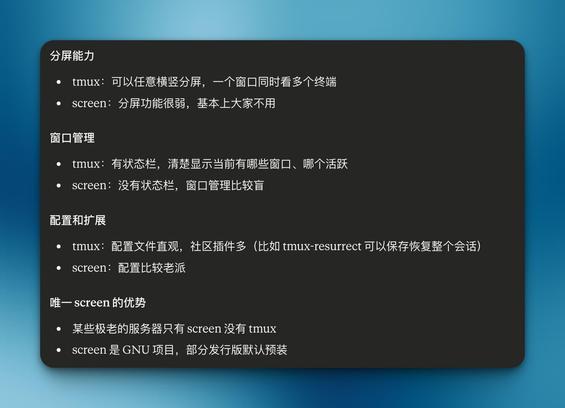
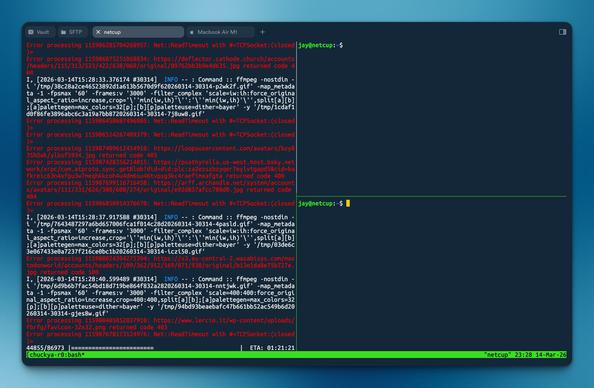
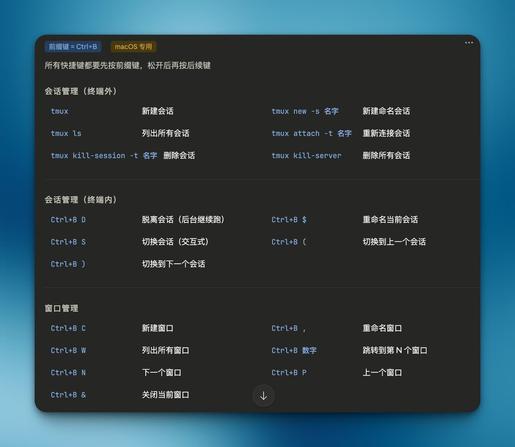
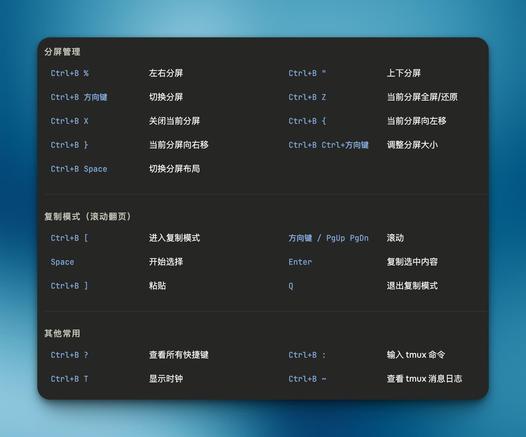
我将从Screen切换到Tmux ()
相见恨晚,其实是之前懒得了解,果然有需求才有动力(

https://github.com/tmux/tmux
https://github.com/gpakosz/.tmux

#tmux #screen #ssh #termius #linux #devops

Hmm, that's kind of annoying... The android app Termius seems to be really bad at maintaining background connections, so I've just discovered I have dozens of old dangling mosh sessions on my VPS.

It's actually just easier to do Termux->emacs->vterm->mosh... 🙄

#emacs
#termius

Maintenance du cluster Proxmox : check ✅
Connexions en série via Termius, quelques commandes bien placées, et tout rentre dans l’ordre.

Rien de spectaculaire… juste de l’infra qui tourne proprement 😄

#Proxmox #Homelab #Sysadmin #Linux #AutoHebergement #Termius

找了个时间优化了服务器便利性和“安全性”

1. Termius访问
Termius生成三个密钥分配给三台服务器
export到~/.ssh/authorized_keys
检查authorized_keys内容正确
测试密钥&无密码登录

2. 配置ufw
sudo ufw default deny incoming
sudo ufw default allow outgoing
sudo ufw allow http
sudo ufw allow https
sudo ufw allow 特殊端口/tcp
sudo ufw enable
sudo ufw status verbose

3. 配置fail2ban
sudo nano /etc/fail2ban/jail.local
[DEFAULT]
bantime = 1h
findtime = 10m
maxretry = 5
banaction = ufw
ignoreip = 127.0.0.1/8 ::1 X Y Z
[sshd]
enabled = true
port = 特殊端口
backend = systemd

sudo apt update && sudo apt install python3-systemd -y
sudo systemctl enable --now fail2ban
sudo systemctl restart fail2ban
sudo fail2ban-client status sshd

3. 配置sshd_config
sudo nano /etc/ssh/sshd_config
Port 特殊端口
PermitRootLogin no
PubkeyAuthentication yes
PasswordAuthentication no

sudo sshd -t
sudo systemctl restart ssh

4. 更改hostname
sudo hostnamectl set-hostname xxx
sudo nano /etc/hosts
修改127.0.1.1 后主机名为xxx
hostnamectl status

5. 配置互通
ssh-keygen -t ed25519 -C "from_$(hostname)" -N "" -f ~/.ssh/id_ed25519
cat id_ed25519.pub
nano ~/.ssh/authorized_keys
一共三行,Termius pub、其他两台服务器的pub

6. 配置Alias
nano ~/.bashrc
alias nc='ssh -p 特殊端口 jay@ipX'
alias cc='ssh -p 特殊端口 jay@ipY'
alias hd='ssh -p 特殊端口 jay@ipZ'
source ~/.bashrc
nc (netcup)
cc (clawcloud)
hd (hostdzire)
或者
nano ~/.ssh/config
Host nc
HostName X
Port 特殊端口
User jay
Host cc
HostName Y
Port 特殊端口
User jay
Host hd
HostName Z
Port 特殊端口
User jay
ssh nc
ssh cc
ssh hd
还可以加上“ProxyJump cc”连 xxx 之前先跳到 cc

#ssh #sshd #pub #alias #ProxyJump #authorized_keys #termius #ufw #fail2ban

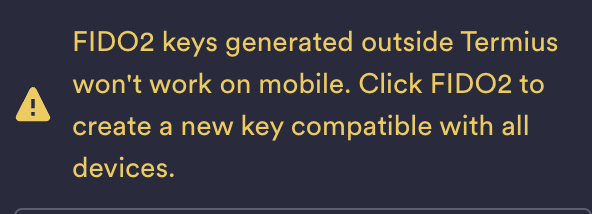
Do I really want to ask #Termius support what they're doing differently when they create FIDO2 keys than the rest of the world?

You can import ed25519-sk and ecdsa-sk keys generated elsewhere just fine on both mobile and desktop (albeit the documentation on desktop hallucinates menu entries that don't exist..) however these keys don't work ANYWHERE - not mobile AND not desktop.

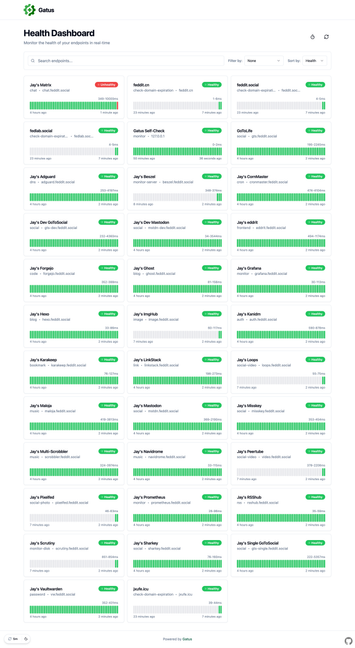
更改- name 和 - group 都会导致对应的持久化记录清空,所以谨慎修改名称和分组,否则需要到数据库内修改

不优雅的做法:
在vscode修改config.yaml
rm config/config.yaml
复制vscode内config.yaml内容
nano config/config.yaml
docker restart gatus

优雅的做法:
在SFTP文件管理页面/home/jay/docker/monitor/gatus/config/,(第一次选择打开方式vscode)双击文件,完成编辑,Ctrl S保存,回到termius的SFTP页面,点击Upload,回到终端,docker restart gatus

优雅在哪?()

#gatus #vscode #docker #yaml #termius

Tận dụng máy tính văn phòng cũ, mình đã xây dựng một hệ thống HomeLab hoàn toàn quản lý từ điện thoại qua Termius và Portainer. Chi phí ~0đ, tối ưu năng lượng và tích hợp ứng dụng kiếm thu nhập thụ động để bù tiền điện. Chi tiết về cấu hình, docker stacks và hướng dẫn truy cập từ xa: [GitHub repository]. Cần gợi ý thêm dịch vụ nhẹ phù hợp phần cứng cũ. #HomeLab #SelfHosting #Termius #Portainer #Docker #DIY #IoT #LowPower #VietnameseTech #TựLàmMáyChủ

https://www.reddit.com/r/selfhosted/comments/

exploring this, might have to set it up

don't see how it's any different to a regular ssh session over termius or something with tailscale, but i'm curious anyway 👀

https://vibetunnel.sh/

#Termius #Tailscale #SSH

Vibetunnel: Your Mac Terminal in Any Browser

Turn any browser into your terminal & command your agents on the go.

Vibetunnel