Me acaba de llegar #GNOME 50 a #openSUSE #Tumbleweed. Ahora tengo tasa de refresco variable. A ver qué tal va cuando hay abarcado todos los contextos que hago.
Episode 25 of our technology podcast @RuntimeArguments (http://RuntimeArguments.fm) and yes, I’m insanely late with this post, though the episode was on time. This episode is called "The X Window System and Wayland".
Jim @jammcq digs into the connection between Linux programs and windows showing up on the screen in front of you. Wolf @YesJustWolf asks all the dumb questions you wouldn’t have uttered even if you were in the room (mostly because Wolf doesn’t care about looking dumb).
As always, we want to know what you think:
https://www.buzzsprout.com/2469780/episodes/18959961-25-the-x-window-system-and-wayland
#XWindows #X11 #Wayland #Linux #LTSP #DisplayServer #OpenSource #LinuxDesktop #Podcast #TechPodcast
I have a #linuxdesktop question: my wife has bought a new laptop and has agreed to give #Linux a go, but with the condition that "I don't want to have to keep typing things in like you do", referring to me using i3wm and extensively using the command line.
I don't think she's particularly bothered about having a UI which is similar to Windows, MacOS, etc., so I'd like to set it up with something clean and minimalist, but it needs a graphical launcher and point-and-click file management etc. - basically the ability to do standard things without opening a terminal.
Any recommendations? I feel like I'm out of touch with what the modern options are.

Been using my Steam Deck as a regular computer for a bit and every time I do it makes me seriously consider moving to KDE Plasma as my desktop environment. I just need to find out how to mod it to be a bit more like my usual GNOME 49 DE?
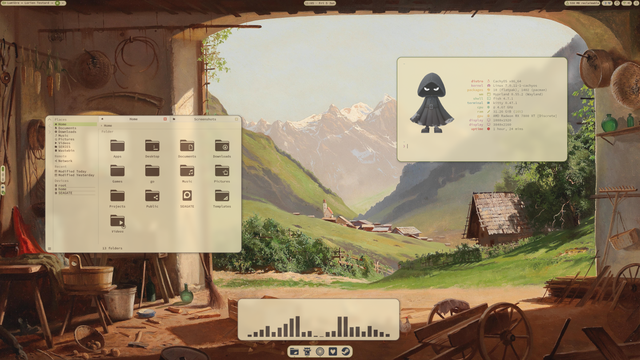
Tarde al #viernesdeescritorio pero aquí estamos.
#CachyOS #niri #DMS #DankMaterialShell #ShowYourDesktop #DailyDesktop #unixporn #LinuxDesktop
Maybe this is the year of the #linuxdesktop
France Launches Government Linux Desktop Plan as Windows Exit Begins
https://linuxiac.com/france-launches-government-linux-desktop-plan-as-windows-exit-begins/
#Infosec #Security #Cybersecurity #CeptBiro #France #Government #LinuxDesktop #Windows
deepin 25.1 update brings Linux kernel 6.18 and deeper AI integration
https://fed.brid.gy/r/https://nerds.xyz/2026/04/deepin-25-1-linux-release/
Toot, toot! 🎉 Morgen, 10. April 2026, um 13:00 geht es los:
@jkirk (+ ursprünglich @leyrer) starten die Linux-Desktop Installation Party II auf den Grazer @linuxtage
https://pretalx.linuxtage.at/glt26/talk/LCPU3E/
Installieren wir gemeinsam #Linux und werde digital unabhängig(er).
Mach ein Backup deiner Daten, pack am besten einen (USB 3) USB-Stick ein und komm vorbei.
Wir freuen uns schon!
**Linux-Desktop Installation Party** Lerne in unserer **Linux-Desktop Installation Party**, wie du Schritt für Schritt ein Linux-Betriebssystem auf deinem Computer installierst! Egal, ob du neugierig auf Linux bist oder eine Alternative zu Windows oder macOS suchst – wir helfen dir dabei. Bring deinen Laptop oder PC mit, und lass uns gemeinsam in die Welt von Linux eintauchen! Keine Vorkenntnisse nötig. 🚀🐧 **Workshop** Du möchtest Linux auf deinem Computer installieren, möchtest das aber nicht alleine machen? Dann ist unsere **Linux-Desktop Installation Party** genau das Richtige für dich! Wir werden zusammen ein Linux-Betriebssystem auf unserem Laptop oder PC installieren. Egal, ob du neugierig auf Linux bist, deine Privatsphäre stärken möchtest oder einfach eine Alternative zu Windows oder macOS suchst – machen wir es zusammen. **Ablauf** ... **Was erwartet dich?** - Demos verschiedener Linux-Distributionen (Debian, Linux Mint (Debian Edition), ZorinOS, CachyOS, Bazzite, Fedora, Ubuntu, ...) - Vorbereitung deines Computers für die Installation (Backups, Partitionierung) - Gemeinsame Installation einer Linux-Distribution deiner Wahl - Grundlegende Konfiguration und erste Schritte nach der Installation - Tipps und Tricks zur Nutzung und Anpassung deines neuen Linux-Desktops **Was solltest du mitbringen?** - Deinen Laptop oder PC, auf dem du Linux installieren möchtest - leeren USB-Stick - Freude am Ausprobieren und Neugier auf Neues! **Wichtig** - Sichere unbedingt vorher alle deine Daten auf ein externes Speichermedium **Vorkenntnisse:** Es sind keine speziellen Vorkenntnisse nötig. Egal, ob du Anfänger:in bist oder bereits erste Linux-Erfahrungen gesammelt hast – alle sind willkommen! **Wo?** Bei den [Grazer Linuxtagen 2026](https://www.linuxtage.at), [Campus Inffeldgasse, 8010 Graz](https://www.openstreetmap.org/directions?from=&to=47.05807%2C15.46088#map=19/47.05817/15.46097) im [Raum / Hörsaal HSi13](https://www.linuxtage.at/img/lageplan.png) Werde Teil der Linux-Community! 🚀🐧 `#LDIP #GLT #GLT26 #linuxdesktop #endof10 #did #didit`