
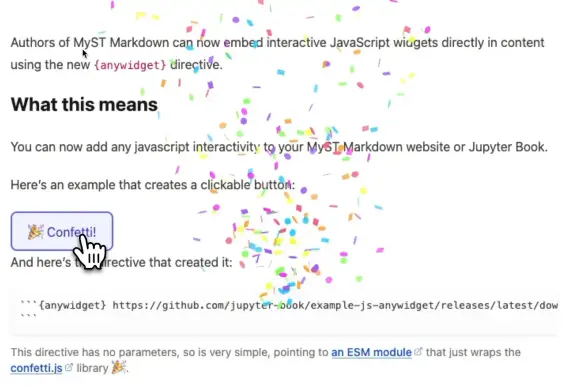
MyST Markdown now supports interactive JavaScript widgets with the new {𝗮𝗻𝘆𝘄𝗶𝗱𝗴𝗲𝘁} directive.

The directive uses the same 𝗿𝗲𝗻𝗱𝗲𝗿({ 𝗺𝗼𝗱𝗲𝗹, 𝗲𝗹 }) interface as anywidget in Jupyter notebooks, so existing widget authors can reuse their work directly in books and articles. mystmd bundles your ESM and CSS modules at build time, and the feature works without any Jupyter kernel.

The implementation started at SciPy 2024 and has been upstreamed into mystmd and Jupyter Book 2.

Read more: https:
#Jupyter #MyST #JupyterBook #OpenSource #InteractiveComputing #DataScience

https://blog.jupyter.org/the-myst-anywidget-directive-daa55c348ab2
Ein Geschenk zu Ostern: MyST Markdown 1.8.2 ist draußen

Ich kann ja nicht immer nur von meinen (zukünftigen) virtuellen Reisen ins Wunderland träumen, sondern gelegentlich sollte ich auch mal wieder über meine Publikationsstrategie nachdenken. Und da stehen zur Zeit MkDocs (Material) und MyST Markdown ganz oben auf der Liste der dafür nutzbaren Werkzeuge. https://kantel.github.io/posts/2026040302_myst_markdown_1_8_2/ #MystMarkdown #Markdown #Jupyter #JupyterLabDesktop #JupyterBook

Das #Datenkompetenzzentrum #QUADRIGA hat ein Template für Open Educational Resources (OERs) als #JupyterBook auf #Zenodo veröffentlicht. Schaut gern rein ✨

https://doi.org/10.5281/zenodo.18682707

#OpenScience #OER #GitHub

Die Wiederentdeckung von MyST Markdown: Mein neues Publikationstool?

Als mir jüngst zwei Videos zu MyST Markdown von unser allwissenden Datenkrake in meinen Feedreader gespült wurden, fiel mir ein, daß mir das Tool vor etwa zwei Jahren schon einmal untergekommen war und ich es so interessant fand, daß ich eigentlich ein paar Tests damit durchführen wollte. https://kantel.github.io/posts/2025111302_myst_markdown/ #MySTMarkdown #JupyterLab #JupyterLabDesktop #Markdown #JupyterLite #JupyterBook #VisualStudioCode #Sphinx #Quarto

A new look! We have created a new version of The Fuzzing Book, based on #JupyterBook, bringing

* easier navigation
* dark mode
* search
* mobile layout

and lots of other features. Check it out at https://www.fuzzingbook.org/beta/html/index.html
Should we continue with this new look? Comments are welcome!

Yes, go with the new look
88.9%
No, stick to the classic look
11.1%
Poll ended at .
The Fuzzing Book — The Fuzzing Book

My open source library for creating interactive questions in Jupyter notebooks and Jupyter Book is now used in over 200 other projects!

https://github.com/jmshea/jupyterquiz/network/dependents

#JupyterQuiz #Jupyter #JupyterBook

Network Dependents · jmshea/jupyterquiz · jupyterquiz repositories

An interactive Quiz generator for Jupyter notebooks and Jupyter Book - Network Dependents · jmshea/jupyterquiz · jupyterquiz repositories

GitHub
I'm creating a PDF file for multiple #Jupyter notebooks. I ended up using a small build script instead of sophisticated tools like #JupyterBook (jupyterlab-myst has bug) or #Quarto (focus on websites instead of PDF). Here is how I did this:
Simple PDF Book from Multiple Jupyter Notebooks
Scrolling over notebook got unexpected jump backs · Issue #243 · jupyter-book/jupyterlab-myst

Description With jupyterlab-myst installed, scrolling over the notebook is not smooth. Specifically, when I try to scroll up, it can sometimes jump back, and I have to scroll multiple times to get ...

GitHub
@AdiSlavcheva @openaccessnetwork Vielen Dank für's Teilen! Habt ihr auch Erfahrungen mit dem #JupyterBook Format? Das verwenden hier in den Niederlanden bereits einige technische Unis für die #OER Erstellung und meine Uni möchte auch gerne eine Instanz aufsetzen. Ich würde gerne probieren, meine Lehrmaterialien für den Textanalyse Kurs in dieser Form zu veröffentlichen, und ich bin noch auf der Suche nach "best practices", besonders für Inhalte aus den (digitalen) #Geisteswissenschaften.

The fastest "solution" is to use mermaid.live to save a .png of the diagram, and include the .png itself in the #JupyterBook.

Works for HTML and exports nicely to PDF, but it slightly defeats the point of using #mermaid for programmable diagrams...

Unfortunately I already ran into my first "bummer" with Mermaid.

The diagrams render nicely in the HTML version of the @ProjectJupyter #JupyterBook, but we did not get the export to PDF (via HTML and pyppeteer) to work 😩 .