 Home Is Where The Smart Is
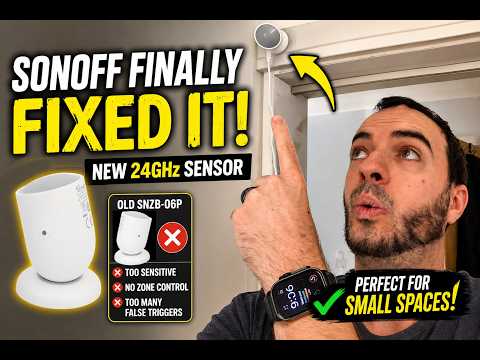
The BEST mmWave Presence Sensor for Small Rooms?
#Tech #SmartHome #Automation #Zigbee #HomeAssistant
The BEST mmWave Presence Sensor for Small Rooms?
#Tech #SmartHome #Automation #Zigbee #HomeAssistant
**Die Zeit für FHEM ist abgelaufen. Wir wechseln auf Home Assistant. **
FHEM stürzt regelmäßig über Nacht ab. Das macht mir das Logging kaputt, das macht unnötigen Aufwand, weckt Zweifel an der Stabilität. Oberflächen kontruieren in FHEM ist defakto unmöglich, externe Tools sind erforderlich, bei uns z.B.FUIP und Nodered und Standard-HTML. Klar, Nodered ist nicht der Weisheit letzter Schluss, aber in letzter Zeit sind viele Dinge bereits nach Nodered ausgewandert (unsere Solarsteuerung zum Beispiel).
Eine Installation, die weit über 15 Jahre alt ist, wechselt man natürlich zum einen nicht über Nacht aus und zum anderen nicht ohne einen konkreten Plan.
Unser System umfasst WLAN-Komponenten, ZigBee, Homematic, HomematicIP, HomeConnect, Echos und ALexa, Fritzbox u.a. Mindestens fünf andere Rechner liefern Zuarbeiten (NodeRed-Dashboards, Solarsteuerungen, Datenbank-Logging u.a.).
Ein Migarationsplan muss her:
**Phase 0: Inventur**
- Geräte-Inventur
- Logik-Inventur
Beispiel:
{ WriteFile('fhem_inventur_doif.txt', fhem('list TYPE=DOIF')) }
**Phase 1: Die Basis-Infrastruktur**
- Logging einrichten (MariaDB 10, machte bisher auch das Logging in FHEM
- Steuersysteme (zigbee2mqtt, Fritzbox, HomeConnect, ggf. Homematic und IP)
**Phase 2: Geräte-Migration (Hardware & APIs)**
- WLAN-Geräte
- zigBee-Geräte
- Homematic und HomematicIP
- Fritzbox, Fritzbox-Geräte
- HomeConnect
- Victron-Anlage mit allem was dazu gehört (MPPT, Batterie, CerboGX etc.)
**Phase 3: Die Logik**
- ATs
- notifys
- DOIFs
- sonstige Perl-Programme
- die Logik direkt über Nodered, HA dort einbinden
**Phase 4: Frontend & Visualisierung**
- Mein großes Infoterminal (NodeRed-Oberfläche)
- der kleine Bruder fürs Handy
- eine Mini-Version für den Desktop
- allgemeines FUI-Frontend
**Phase 5: Sprache & Benachrichtigungen**
- alexa einbinden
- E-Mail-System
- Status per Alexa verkünden
**Phase 6: Aufräumen und Abschalten.**
- Abschalten in FHEM, der Funktionen, die in HA umgesetzt wurden.
- Prüfen was übrig blieb
- Aufräumen (Dateien löschen, Datenbanken löschen etc.)
Ich denke, es wird mindestens ein Jahr dauern.
#fhem #homeassistant #nodered #migration #perl #MQTT #wlan #shelly #zigbee #homematic #HomematicIP #homeconnect
ESP32-S31 development boards unveiled for IoT, Smart Audio, and HMI applications
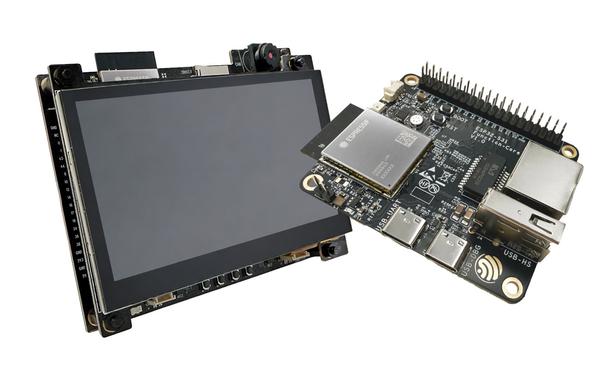
Two ESP32-S31 development boards are currently in the works, and the documentation is already available. The ESP32-S31 was unveiled last March, and it's the most feature-rich ESP32 wireless microcontroller so far with two RISC-V cores, Gigabit Ethernet, 2.4 GHz WiFi 6, Bluetooth, and 802.15.4 connectivity, LCD and camera interfaces, and more. The ESP32-S31-Function-CoreBoard-1 development board is based on the ESP32-S31-WROOM-3 wireless module, and offers Gigabit Ethernet, USB 2.0 OTG, and onboard audio peripherals for connected IoT applications. The ESP32-S31-Korvo-1 is a multimedia-focused development board based on the same ESP32-S31-WROOM-3 module, but featuring a dual-microphone array for speech recognition and near/far-field wake-up, two speaker connectors, a 4.3-inch LCD, a 3MP camera module, and a microSD card slot. It targets low-cost, low-power, connected audio/video and HMI applications. ESP32-S31-Function-CoreBoard-1 development board Specifications: Wireless module - ESP32-S31-WROOM-3 SoC - ESP32-S31NRV16 CPU RISC-V HP (High-performance) RV32IMAFCP CPU @ 320 MHz with FPU, SIMD, etc. RISC-V
Der #ZBT2 ist jetzt da. Ich sollte ihn diese Woche nicht auspacken, ich habe echt keine Zeit dazu, aber so viel Selbstkontrolle habe ich auch nicht.
Schritt 1: Das Gerät unterstützt sowohl #Zigbee als auch #ThreadMatter, aber nicht gleichzeitig. Also erstmal die Firmware für Thread installieren. Das ging sehr problemlos direkt vom Mac per USB im Webbrowser. https://toolbox.openhomefoundation.org/home-assistant-connect-zbt-2/
Right… So, the #Proxmox is running nice. I have found a spare 2T hard drive (2,5”, 5400rpm, unfortunately), but it will have to do for now.
Now I need to plan on how to migrate #HomeAssistant to a #HAOS VM. I have tested backup import and most of my things were surprisingly there. I’m reluctantly thinking about moving the #Zigbee dongle, but… Not sure how it’s gonna go with #HomeKit integration. I have easy over 80 devices…🤡
I still need some kind of redundand storage…
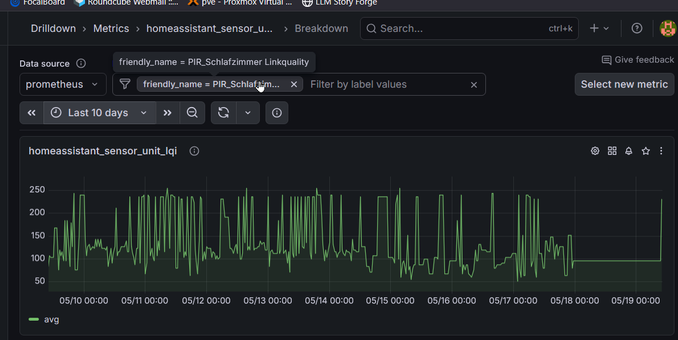
Wieder was gelernt: Die Batterieanzeige der billigen Knopfzellen-Bewegungssensoren (Sonoff SNZB-03) kannste komplett vergessen, ABER man kann die LinkQuality nutzen um zu erkennen ob das Ding quasi nicht mehr von Zigbee2Mqtt erreicht wird, weil sich dann der Wert nicht mehr ändert.
(Am rechten Ende war die Batterie leer, Zigbee2Mqtt hat aber einfach den letzten bekannten wert (100%) behalten)

$13 Qualcomm QCC74xM EVK offers Wi-Fi 6, Bluetooth 5.4, and 802.15.4 connectivity (Bouffalo Lab BL618 inside)
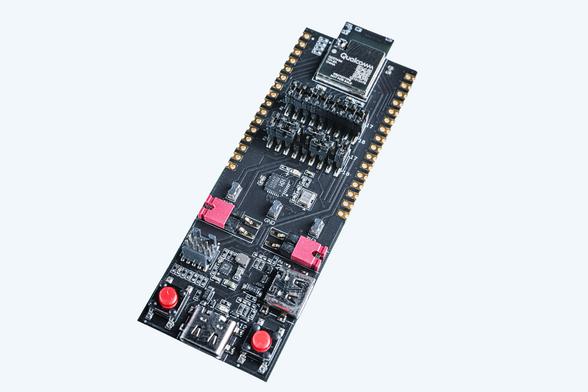
Back in November 2024, we wrote about Qualcomm's QCC730M and QCC74xM modules for low-power IoT devices, but at the time, there was no evaluation board EVK for those SoCs. Fast forward to today, and the official development boards for the QCC74x series have finally been released, complete with a surprisingly affordable price tag. The Qualcomm QCC74xM EVK is a tri-radio evaluation board with Wi-Fi 6, Bluetooth 5.4, and IEEE 802.15.4 (Thread/Zigbee) with a price tag of just over $13. But what is interesting is that, while it carries the Qualcomm brand, documentation from the Zephyr Project clearly shows that the QCC74x series is actually based on and mostly equivalent to the Bouffalo Lab BL61x series, specifically the BL618. Qualcomm QCC74xM EVK specifications: Wireless Module – Qualcomm QCC74xM LGA Module (QCC743M, QCC744M, or QCC748M depending on the board variant) CPU - 32-bit RISC-V processor (RV32IMAFCP) @ up to 325 MHz with FPU
 Ron
Ron Hobbyblogging.de
 cnx-software.com [Unofficial]
 Richard "RichiH" Hartmann
 Thilo
Thilo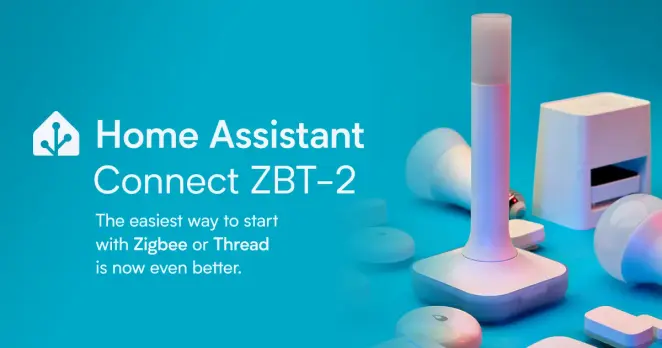
 Sebastian
 GuacamOlé 🥑
 Mat (notenoughtech)