 Guido Lehwalder
#WebMSX v6.0.6 booting CP/M Plus v3.0
for #MSX2 ;)
#CPM
https://webmsx.org/
https://github.com/ppeccin/WebMSX
for #MSX2 ;)
#CPM
https://webmsx.org/
https://github.com/ppeccin/WebMSX

@syx and if you just want to quickly try out some games, then you can also use #WebMSX emulator on #TheFileHunter's pages.
For instance, all #MSXdev game jam compo games are listed on: https://www.file-hunter.com/MSXdev/index.php?id=MSX
And a bunch of the more popular games such as #Aleste 2 are listed on: https://www.file-hunter.com/MSX/index.php?id=aleste2
There's also various #homebrew available: https://homebrew.file-hunter.com/
More about MSXdev: https://www.msxdev.org/
@bitsofbas
Result of last night's #coding on the #ZettDarkstone #isometric #tileEditor for the #MSX2:
Zett Darkstone Editor version 25 (Project Page with controls | Run online with WebMSX)
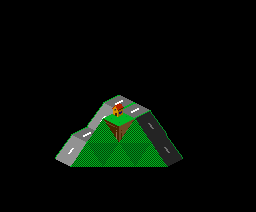
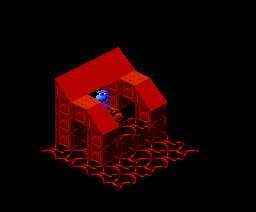
Today I learnt a bit more about #VRAM pages and palettes on the #MSX2, especially addressed from within the #MSX #BASIC language.
As a result I made some more progress on my fork of Zett Darkstone's tile-drawing editor programme and released build 24, which can now properly save your drawing (and progress) to disk.
(Actually importing it again is future exercise.)
If you want to play around with it, you can load the dsk via WebMSX
#ZettDarkstone #Darkstone #FiXatoCodes #coding #retrocomputers #emulation #WebMSX
@[email protected] @kelbot agreed, #ProjectMelancholia is the more 'professional' translation out there. :)
It can be played online through #WebMSX via https://file-hunter.com/MSX/index.php?id=sdsnatcher
The English translation of the original #Snatcher graphic adventure can be played here: https://file-hunter.com/MSX/index.php?id=snatcher
(This uses a HDD image, which can be found if you know where to look in the HTML source; not sure if fMSX supports hard disk images though.)

 FiXato


 FiXato (fallback)