Question for allegro experts:

If I have

1. an Orcad Capture schematic, which at some point, _presumably_ was translated to

2. a schematic in a different format, which I would have assumed would have had to have been edited into

3. an updated schematic, which was used to create

4. a layout in format X (which I do have access to, but only through a viewer, not as an editor), which was subsequently algorithmically translated into

5. an Allegro layout,

and I now want to get Capture to talk to the converted layout from (5), _what tools are there that would be able to clean up_ the absolute fustercluck of disagreeing netnames and footprint names and whatnots, between (1) and (5)?

So far, I've extracted footprints and footprint names from (5), and manually inserted them into (1).

I have then after some cussing got the original schematic (1) to acknowledge the existence of the layout (5), and the syncing process now only yeets (i.e. unplaces) about 15% of the components.

The result I get is

6. an Allegro layout with the right board outline, about 85% of the components placed, and about 95% of the connectivity correctly implemented (I suspect (3) to be the cause of many of the discrepancies; yeeted components could conceivably be a cause of traces no longer being associated with any net, perhaps?), of which about 3% has the same netnames as (5): the two layout tools uses different methods of naming unnamed nets (the original designer apparently didn't believe in naming things). Combine this with (3), and it turns out that (6) has a lot of traces with multiple netnames, and netnames associated with multiple traces.

#allegro #orcad #Capture

La scelta di un tool di moderno per la progettazione di #PCB layout comporta una serie di valutazioni complesse, per questo alcune caratteristiche sono essenziali.

@Artedas channel partner di @cadence con l’obbiettivo di fare chiarezza, ha creato un elenco dedicato alle caratteristiche salienti del nuovo tool #OrCAD X Presto.

Leggi la notizia completa👉🏻 https://www.elettronica-tech.it/perche-scegliere-orcad-x-presto/?utm_source=mastodon&utm_medium=Zoho+Social e registrati su #ElettronicaTECH per non perdere tutti gli aggiornamenti!

#Cadence ha rilasciato da poco #OrCAD X, distribuito in Italia da #Artedas una piattaforma di progettazione innovativa abilitata per il cloud che soddisfa tutte le esigenze delle piccole e medie imprese.

Leggi la notizia completa👉🏻 https://www.elettronica-tech.it/orcad-x-cosa-ce-di-nuovo/?utm_source=mastodon&utm_medium=Zoho+Social e registrati su #ElettronicaTECH per non perdere tutti gli aggiornamenti!

#Cadence ha rilasciato da poco #OrCAD X, distribuito in Italia da #Artedas una piattaforma di progettazione innovativa abilitata per il cloud che soddisfa tutte le esigenze delle piccole e medie imprese.

Leggi la notizia completa👉🏻 https://www.elettronica-tech.it/orcad-x-cosa-ce-di-nuovo/?utm_source=mastodon&utm_medium=Zoho+Social e registrati su #ElettronicaTECH per non perdere tutti gli aggiornamenti!

#Cadence ha rilasciato da poco #OrCAD X, distribuito in Italia da #Artedas una piattaforma di progettazione innovativa abilitata per il cloud che soddisfa tutte le esigenze delle piccole e medie imprese.

Leggi la notizia completa👉🏻 https://www.elettronica-tech.it/orcad-x-cosa-ce-di-nuovo/?utm_source=mastodon&utm_medium=Zoho+Social e registrati su #ElettronicaTECH per non perdere tutti gli aggiornamenti!

#Cadence ha rilasciato da poco #OrCAD X, distribuito in Italia da #Artedas una piattaforma di progettazione innovativa abilitata per il cloud che soddisfa tutte le esigenze delle piccole e medie imprese.

Leggi la notizia completa👉🏻 https://www.elettronica-tech.it/orcad-x-cosa-ce-di-nuovo/?utm_source=mastodon&utm_medium=Zoho+Social e registrati su #ElettronicaTECH per non perdere tutti gli aggiornamenti!

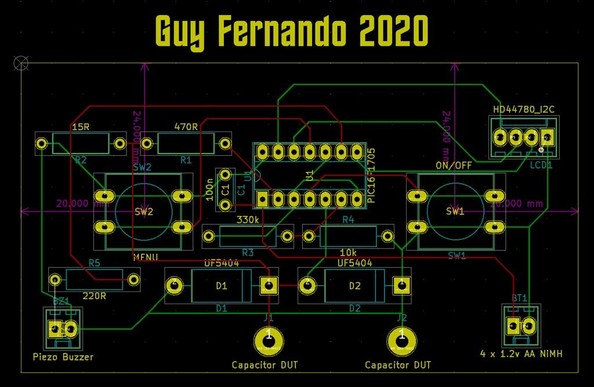
I've knocked together a quick PCB in KiCad. KiCad is a free software suite for electronic design automation. It facilitates the design of schematics for electronic circuits and their conversion to PCB designs.

#KiCad #Protel #OrCad #PCBdesign #Electronics
[05/05/2020]

Did anyone here use #DOSBox (and @DOSBox_Staging) for things other than gaming?

For example, I use it for:

- compiling apps with the #Psion SIBO C SDK
- opening old schematics in #OrCAD

#RetroComputing #DOS #MSDOS #16bit

Some slight tweaks to my @DOSBox_Staging config, and I think I've settled on a winning combination.

I think the only two things I'd like are a keybinding to switch between windowresolution settings, and a keybinding to switch between cycles=auto and cycles=max. But I could try to implement that myself.

Screenshots are of the #Psion SIBO Debugger, #OrCAD Draft 4.1,
#TopSpeed C, and the original DOS Psion Series 3c emulator (not the MAME one).

#DOSBox #16bit #RetroComputing #RetroDev

Question to the #electronics, #maker and #cad communities about #OrCAD.

Does anyone have an old OrCAD 4 SDT.CFG file set up for metric page sizes (A4, A3, etc)? I've hunted everywhere on the internet and I can only find English/Imperial sizes (A, B, C, etc).

I'm trying to import some old SCH files into newer versions of OrCAD. Either the page sizes are slightly too small, or the scale goes insane, or both.