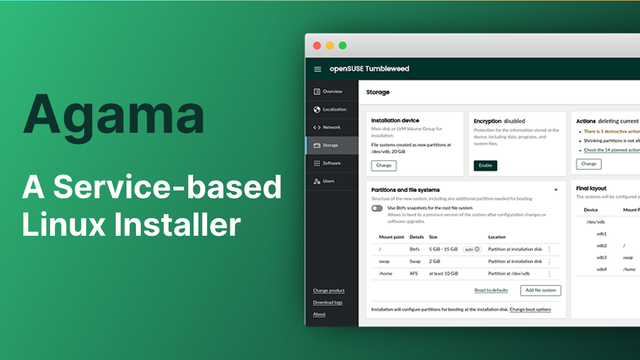
Further experiment update: Put on Fedora Server for the home lab - was able to setup #podman and running #cockpit to manage the containers. used @techhut 's guide that he made a couple days ago. Thanks for being so thorough. Launched #Minecraft for the house today and will be getting #plex and #pihole next. Tearing down and setting up so many times over 3 distros have taught me quite a bit tho. Learning is the journey. #opensource #linux #fedora #opensuse
Hach! Alles läuft unter #cockpit #kvm #qemu . 5 VMs und der schwachbrüstige N95 Klotz-PC für seinerzeit 160€ langweilt sich. Und ich habe in den letzten Tagen einiges gelernt. Sicherlich geht #proxmox schneller und hübscher. Aber zum einen kann das ein paar Sachen nicht, welche mir wichtig sind. Zum anderen fühlt es sich doch besser an, wenn man den Kram selbst zusammenbaut. Eine Jacke, welche man selbst näht, ist doch auch was schöneres als etwas gekauftes. Kann über die Weboberfläche alle VMs administrieren, neue erstellen, auf jede VM mit Terminal oder Desktop schalten. Und nebenbei noch den Status des Hosts checken. Alles auch über VPN von unterwegs.

@dzwiedziu I consider #OpenStack to be the harder of the two, and thus naturally more valuable to self-train on if that is a goal. There are lots of OpenStack deployments out in the wild and people who want to build new private clouds now, so OpenStack skills are quite a bit more valuable than other alternatives. OpenStack on #AlmaLinux FTW.

If the goal of your homelab isn't about training, I'd go straight simple with #Fedora Server or AlmaLinux with #Cockpit and #Ansible and call it a day.

Had a recent hiccup with our Fedora release process for the past 2 releases, but the lastest release is now published!

Features unclean shutdown notice, disabled SPICE enabled by default for VMs, and network IP config now autofills network prefix length and gateway!

These are the last releases for this year and we'll continue to release more starting 2026! 💙

https://cockpit-project.org/blog/cockpit-353.html
https://cockpit-project.org/blog/cockpit-352.html

#cockpit #release

Cockpit 353

smarter IP configuration

Cockpit Project
I'm so ready for holiday, but I'm also stressing out about wanting my Cockpit passkey stuff to work before FOSDEM

#cockpit
Cockpit Competition Heats Up as Next-Gen Widebodies Drive an Avionics Power Shift

Global Avionics Round-Up from Aircraft Value News (AVN) The widebody recovery has arrived with force, but the clearest transformation is happening not in the cabin or the cargo hold. It […]

Avionics International
Milan-bound 737 MAX engine shuts down in flight after cockpit sun visor detaches - AeroTime

A Milan-bound Boeing 737-8 MAX operating as a Ryanair flight shut down an engine shortly after departure from Krakow after a cockpit sun visor detached.

AeroTime

记录下cockpit安装debian13 GNOME desktop全过程(未完)...

1. ISO选择:https://ftp.fau.de/debian-cd/13.2.0/amd64/iso-dvd/debian-13.2.0-amd64-DVD-1.iso
2. 存储、内存、CPU:由于主力desktop机器,200GB存储、32GB内存、12vCPU
3. 组件:GNOME+SSH+标准工具
4. 修改IP为静态、修改分辨率为1080P
5. 配置NAT:https://mstdn.feddit.social/@admin/115716827718592318
6. 添加jay到sudoers组内:jay ALL=(ALL) NOPASSWD: ALL
7. 编辑源:sudo nano /etc/apt/sources.list,注释deb cdrom
8. 更新软件源、软件:sudo apt update && sudo apt upgrade -y
9. 安装必要软件环境:
sudo apt install -y curl wget git unzip tar zip build-essential vim neovim nano sudo man-db htop tmux fzf rclone awscli aria2 httpie net-tools iproute2 nmap traceroute lsof dnsutils ufw python3 python3-pip python3-venv nodejs npm golang rustc cargo ncdu rsync tree lynx w3m links task-gnome-desktop gnome-tweaks gnome-shell-extensions
sudo apt autoremove -y && sudo apt clean
10. 安装docker,添加jay到docker组内
https://docs.docker.com/engine/install/debian/
https://docs.docker.com/engine/install/linux-postinstall/
sudo systemctl enable docker --now
11. 安装beszel-agent监控资源
12. 安装终端录制asciinema、agg:https://linux.do/t/topic/1306649
13. 安装chrome:sudo apt install ./google-chrome-stable_current_amd64.deb

#gnome #debian13 #debian #cockpit #VM #KVM #QEMU #linux

RE: https://mstdn.feddit.social/@admin/115716445396750150

本来写了很多,但是太麻烦了,就用这个最简单的方法吧:编译完Linux内核就不用了

NAT端口转发尝试:

VM1:
ifconfig
得到内外IP为192.168.122.2

Hetzner0:
sudo virsh list --all
列出虚拟机
sudo virsh net-dhcp-leases default
确认VM IP 是 192.168.122.2
sudo iptables -t nat -A PREROUTING -p tcp --dport 2222 -j DNAT --to-destination 192.168.122.2:22
设置端口转发
sudo iptables -I FORWARD -d 192.168.122.2/24 -p tcp --dport 22 -j ACCEPT
sudo iptables -I FORWARD -s 192.168.122.2/24 -p tcp --sport 22 -j ACCEPT
允许转发流量
sudo apt install iptables-persistent -y
sudo netfilter-persistent save
保存配置

其他命令:
sudo iptables -t nat -L PREROUTING -n --line-numbers
查看NAT转发规则
sudo iptables -t nat -D PREROUTING NUMBER
删除规则

#NAT #iptables #ubuntu #linux #cockpit