 Y20K
Y20K Marco Arment
I have been a Macintosh user for quite some time now and I have never, not once, not a single time, correctly distinguished "brew update" from "brew upgrade" on the first try
 peter sibley
@marcoarment i got into the habit of just running both .
 Steve Barnes
I suppose one could identify the command they typically intend to run, and map "brew updo" to it.
 Young Thos
@marcoarment I think it's a Linux convention, and even they get confused sometimes https://itsfoss.com/apt-update-vs-upgrade/
 Schamschula
@NeueWelle @marcoarment Under FreeBSD pkg update downloads the currently available package list, while pkg upgrade downloads and installs the outdated packages. In the MacPorts world that corresponds to port sync and port upgrade outdated.
 Aaron
Aaron@marcoarment My mnemonic (which may or may not work for you) is that “update” comes before “upgrade” alphabetically, so that’s the one you should run first.
 Jim Mitchell
@marcoarment Ditto. I’ve just learned to do the opposite of what my gut tells me to do and nail it every time.
 Chris Hasenpflug
@marcoarment IIRC upgrade used to not update, now I feel like you can just upgrade and be good. Historicaly it matched Linux package managers
 joschi
@marcoarment You've made a typo in "topgrade".
 Matt Wilcox
@marcoarment you gotta update the "available software" feed before upgrading to the application versions listed in it.
Might help you remember ... but prob not.
 Mark Levison
@marcoarment …corked.app pulls a hold my beer on you. I’ve been using Corked unsuccessfully for most of a year. Every time it updates the casks a few of them require I finish from the command line. So really it just exists to yell run a command.
 Pedro Fernandes
@marcoarment one is a refill the other is another kind of beer?… As long as I don’t have an empty mug I will have them both
 Jason Snell
 Chris Wu 🪐
@jsnell @marcoarment I always appreciate it when well established developers reveal things like this because I really would think that it’s something I should have mastered by now and definitely have not.
 Pirijan
@marcoarment truly the usb-a of terminal commands
 Curtis Bridges
@marcoarment I just make a single alias that updates everything and then i never have to remember anything but my naming convention.
 Josh Justice
@curtisbridges @marcoarment yup mine is `brewup`
 Daniel Luz
@marcoarment The answer these days is simple! Just run `brew upgrade`, as it auto-updates. Erase `update` from your shell history and never wonder again.
 Michael Swanson
@marcoarment This is embarrassingly true! However, about two weeks ago, I had to manually type these many times, and for now (at least), I have it!
 Leon Mika
@marcoarment Yep, me neither.
 Matt Garber
@marcoarment Thankfully, I suppose, it at least matches the much longer history of Apt syntax behavior on Debian/Ubuntu servers, where you have to *update* the repo lists before being able to *upgrade* any outdated packages.
(And then I also make it easier by aliasing `brew update ; brew upgrade ; brew cleanup` as one run every few days.)
 radarskiy
@matt_garber @marcoarment And then there's dist-upgrade which means "render the disk permanently unbootable".
 Ölbaum
@matt_garber Not “any outdated packages,” “ALL outdated packages.”
You can `apt upgrade rsync` and it will happily ignore the argument and upgrade all packages.
@marcoarment
@oscherler @marcoarment Correct, should’ve written that clearer. I’ve always found that slightly counterintuitive vs. the yum/dnf upgrade syntax on RHEL-based systems… with apt you have to do `apt install [package]`, which will then *upgrade* only the specified package and its dependencies if it’s already installed. 🤷♂️
 Dr. Drang
@marcoarment It’s very simple. You use “brew update” when you want to update and “brew upgrade” when you want to upgrade.
 Matthew Janssen
@drdrang @marcoarment Oh, we got a computer expert over here!
 𝚎𝚒𝚗 𝚖𝚊𝚕𝚒𝚔
@marcoarment I‘m not alone
 Tom Head
@marcoarment yep, yep, yep
Like `ln -s <source> <target>` or `ln -s <target> <source>`. Which is it? Hope I never end up in a situation where lives depend on getting it right...
 gibwar
@tomhead @marcoarment The way I've learned to remember it is it has the same argument logic that
cp and mv do, in that you can provide multiple sources to one destination, which puts the destination at the end. So I read it as ln -s <what> <where at> bbech
bbech@marcoarment I never understand why I need to update then upgrade.
 WTL
WTL VioletBackpack
@marcoarment I let my shell remember for me, searching for ‘brew up’ shows me the ‘brew update && brew upgrade’ that I usually run
 Jim Jones
Update = ask the servers about the latest news
Upgrade = have work done on my computer
It's how I keep this straight in my head on Linux using apt in Ubuntu.
 Chris "Crunchy Leaf" Salzman
@GreatBigTable that’s genuinely helpful, thanks!
 Andrew Herron
@marcoarment modern brew will auto-update by default. You only ever need to run “brew upgrade” now.
 Brad Koehn
@marcoarment if you use Oh My, Zsh! (and you should), `bup` will do both.
 Ayo^
Ayo^@marcoarment `brew update` will upgrade your Homebrew and `brew upgrade` will update your packages. Couldn’t be clearer.
 Machiel
@marcoarment just make an alias that does them in the right order🙂
 Mark Otway
@marcoarment
It's the software equivalent of inserting a USB plug prior to USB-C.
It's the software equivalent of inserting a USB plug prior to USB-C.
 Steven Op de beeck
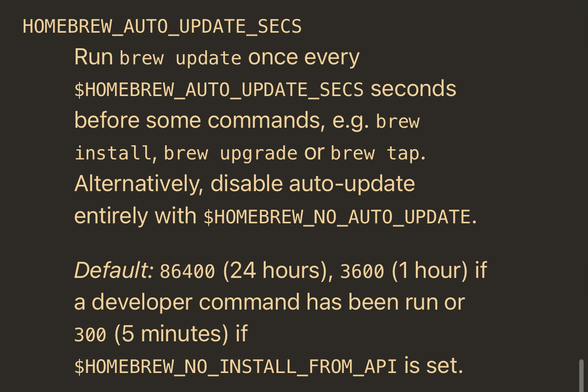
@marcoarment You don’t have to brew update, it’s automatic. It makes sure brew itself is up to date and downloads the latest formulae. Auto-update is on by default and will run once every 24h before commands: install, upgrade and tap.
Brew upgrade bumps all packages to their latest working versions given the dependencies between them.
 nSonic
@marcoarment Out of the blue … „update“ could mean „look for updates of Brew itself“ (so update the command / directory cache)
„Upgrade“ then probably installs new versions of everything you have installed with brew before.
But I’m probably wrong … and if it’s this or vice versa it should be decent commands or parameter like „brew update -self“ and „brew update -all“ or something 🤷♂️
 John Mark Schofield
@marcoarment You almost never have to run “brew update.” “brew upgrade” will do an update if it is needed.
 Korrespondent zur See
@marcoarment alias bupdate="brew update && brew upgrade"
… made this years ago and never bothered again. But I am more concerened about the amount of what is all that for and why did I install it in my machine over the years when I do that.
 Frank Endrullat 🌻
@marcoarment As a long time Debian user the difference between update and upgrade is in my DNS now I guess, so it was never an issue with bee for me. 🤷♂️
 Owen 🇦🇺
@marcoarment Same, I got sick of trying to remember, so I wrote a shell script to do all the things in one command. 😅
 maikm
maikm@marcoarment I've been using this and only this for years now.
% cat ~/bin/brewupdate.sh
#!/bin/bash
brew update && echo && brew outdated && echo && read -p "Proceed with upgrade? (Ctrl-C if not) " a && brew upgrade && brew cleanup
 Jan Eden
@marcoarment Eselsbrücke: "(pkg|apt|brew) update" means "Get your cache up to date.".
 Brent Traut
@marcoarment I’m convinced the app just rejects whichever one you try first. Worst than USB-A orientation.
 Nick Vance
@marcoarment Similar to what others said. I add this alias to my bash/zsh profile on all my Macs:
`alias upall='brew update && brew upgrade'`
And for consistency I do the same on my ubuntu/debian servers
`alias upall='sudo apt update && sudo apt upgrade'`
So now I just can `upall` on any cli I touch to pull the main package updates.
 traal
traal@marcoarment also a Unix and Homebrew user for many years now. After a few days of this silliness I made a shell script called ”brup” that does the right thing. This is Unix. I know this. 😁
@marcoarment make sure you’re on the latest Homebrew versions, because you don’t have to do this song and dance anymore. Nowadays it auto-updates its metadata after it’s a few hours old. So just brew upgrade.
 Jeff Watson
@marcoarment the USB-A plug of software.