 Hylke Bons 🥜
RE: https://mastodon.social/@hbons/115684542795059829
several people told me (unprompted) that they liked my "micro dev blogging" for Bobby on here.
so fave if you want to see my failures in real time for the next one. :)
RE: https://mastodon.social/@hbons/115684542795059829
several people told me (unprompted) that they liked my "micro dev blogging" for Bobby on here.
so fave if you want to see my failures in real time for the next one. :)
alright let's get started!
got a backend that mirrors+archives to SQLite (hence Bobby) space weather data from the NOAA. and you'll be able to self-host a mirror.
now to write a beautiful aurora dashboard in #gtk #libadwaita UI!

the NOAA space weather data does not have an API. it's a bunch of undocumented random .json files behind a CDN that sometimes partially cuts cached files.
so I wanted to have something reliable to work with first.
it's... interesting for an official government agency... 🤨
hitting the ground running because of all the code reuse. thanks Bobby. :)

been a while since I used a Grid (probably GTK2 days). and being able to set relative positions to other items is a lot more intuitive and less clunky than hardcoding edge numbers.
also <sub> and <sup> texts are working nicely for scientific notations! 📊

adding ✨.
almost done with the low hanging fruit. now need to add graphs over time.
best way to do that?

boom. bar charts. 📊
just using a GtkFrame and styling with CSS.
the line graph will be trickier, but thinking about generating an SVG and displaying that.

TIL about GtkLevelBar.
GtkProgressBar's lost brother from an other mother.
just set the min/max and a value. convenient!

#libadwaita has a handy .accent CSS class for labels.
using that (+bold) to highlight when measurements are good or heading in the right direction.

adding a main summary card for those not yet familiar interpreting the numbers.
I wonder if I can turn this into a widget that goes next to the weather in the shell?

adding a small inline ⚠️ icon and suddenly your eyes have a kind of anchor from which to explore the rest of the text.
sometimes decorations are good.

got some line graphs going using SVG and with the system accent colour.
still blurry and need to iterate on the style, but it's a start. 📉

using the .warning CSS class to highlight upcoming high Kp values. 🚨
the threshold will be configurable in Preferences and/or based on your location.

settling on the layout. I think this will be it for the first release.
funky colours that match the wallpaper totally by accident... 😉
also added a #fediverse hashtag graph. arguably the best indicator!
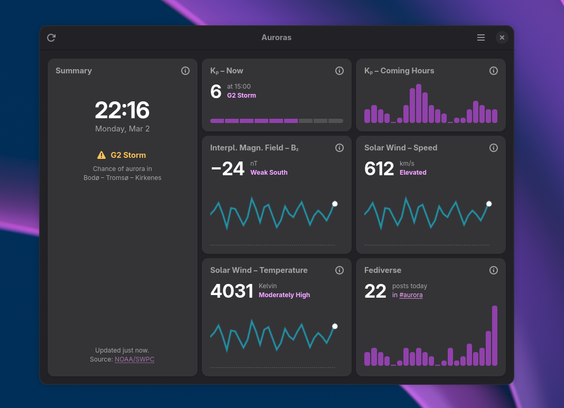
ok, light theme! ☀️
cards use the same colour as windows. so I'm slightly changing the base window colour to the one used in sidebars (like in Files).
GTK doesn't seem to have a .dark or .light CSS selector. so had to manually toggle a class and listen for the dark mode signal. no big deal.
had this idea of just showing country flags instead of city names.
it's less precise, but I think a lot more engaging. :)

want to appreciate for a minute that #gtk can now baseline align labels regardless of size or style.
won't need to change the margins when playing with the font sizes later.
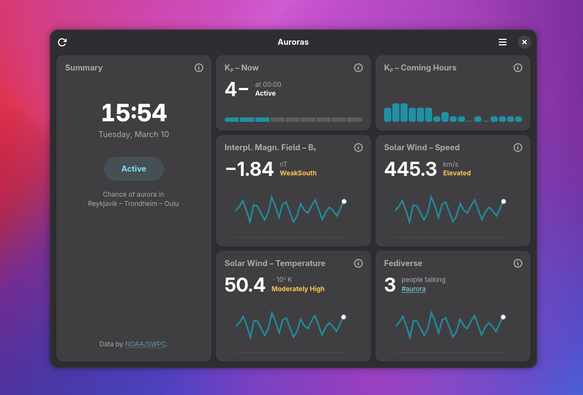
all data is now hooked up!
just need to finish the SVG line graph drawing, and this will be ready for a preview release. 🧪
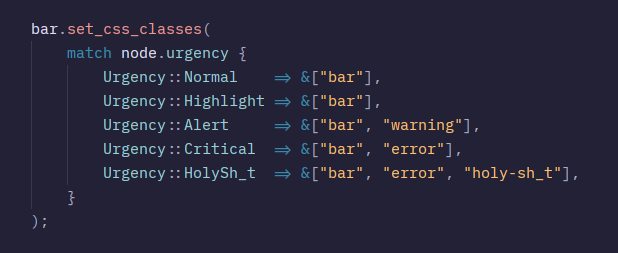
adding CSS styling to the bar graph according the the official scientific urgency scale. 📊
bars 📊 are now more accurate (float instead of rounding to int), and the line 📈 is starting to look like something with real data.
layouting this is tricky. I think I will hardcode the dimensions for now...
next some sense of scale with axis.
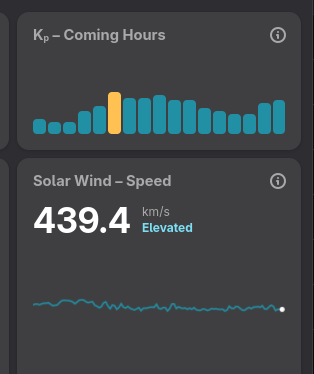
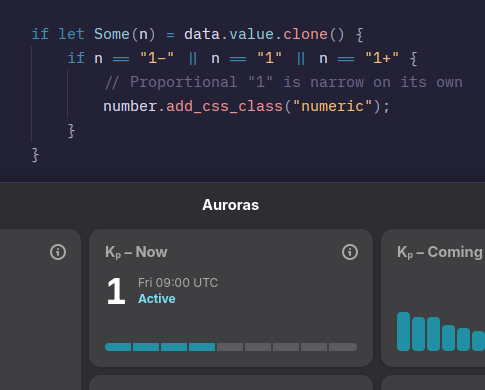
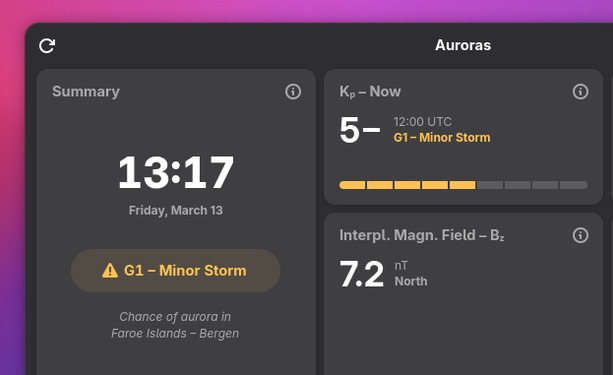
graphs are accurate now and I can change the y-range based on what's needed for the data.
added the ".card" class for a quick framing but now I'm thinking about keeping it. 🤔
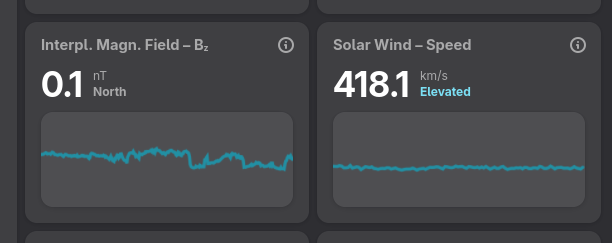
woopsie! Bz literally went off the chart yesterday!
yes, I added a gradient too. 🌈
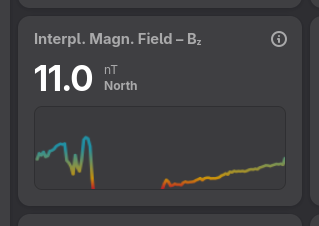
no fancy screenshot today... made automatic background data fetching and updating the dashboard work.
done, but it was a pain. 😅
now I've got some kind of Megazord composed of std::thread, glib::idle_add_local and tokio:mpsc... 🤖
ok! finally #Flatpak preview builds 🧪 for those who want to try out Auroras: https://github.com/hbons/Auroras/actions/runs/23414227266#artifacts
feedback welcome! feel free to report any issues on #GitHub.
still a bunch of stuff to fix like #a11y, but if all goes well I'll publish to #Flathub soon. :)
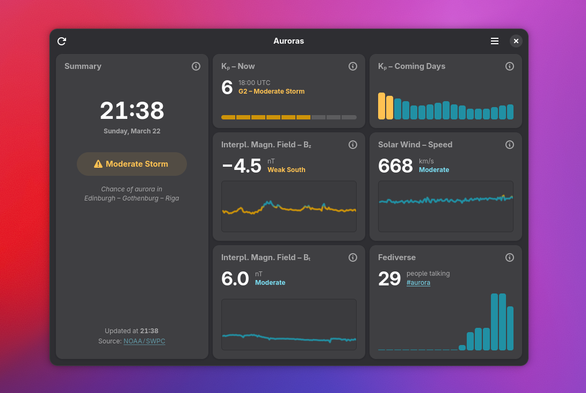
if you like Auroras and Bobby and want to help bring my design work to other #FOSS projects, I’m looking for sponsors. :)
@hbons Looking good! If you want some ideas (or just to use/copy some code) about how to lay out bar chart elements for accessibility, correctness and adaptivity, see the bar chart in the wellbeing panel in gnome-control-center (also used in malcontent for parental controls): https://gitlab.gnome.org/GNOME/gnome-control-center/-/blob/main/panels/wellbeing/cc-bar-chart.c?ref_type=heads
There’s a long term plan to split it out into something shared, which you might be interested in (https://gitlab.gnome.org/GNOME/gnome-control-center/-/issues/3513)
@hbons of course, but i haven't published it anywhere. Everything is collected from public sites. Local cameras from me and a fellow hunter, mine in Ytterboda the other in Tavelsjö.
Maybe I should open up a repo...
@hbons Heh, will this cover North America?
If so, for Canada you might want to include provincial flags (e.g. 🏴 for Alberta, or qualified flags like 🏴/🇨🇦 for Alberta/Canada), otherwise the land area is too vast. Hell, our provinces can be rather large.
@virtuous_sloth at some point yes. :)
but as I understand it's not really possible to predict West-East occurrences... just very broadly North-South. I guess it could be based on whether the sun has set.

@ebassi @hbons @media `light-dark()` is also a good method (dunno if GTK supports it)
--bg-color: light-dark(#efedea, #223a2c);
https://developer.mozilla.org/en-US/docs/Web/CSS/color_value/light-dark

The light-dark() CSS <color> function enables setting two colors for a property - returning one of the two colors options by detecting if the developer has set a light or dark color scheme or the user has requested light or dark color theme - without needing to encase the theme colors within a prefers-color-scheme media feature query. Users are able to indicate their color-scheme preference through their operating system settings (e.g., light or dark mode) or their user agent settings. The light-dark() function enables providing two color values where any <color> value is accepted. The light-dark() CSS color function returns the first value if the user's preference is set to light or if no preference is set and the second value if the user's preference is set to dark.
 Adrien Plazas
 Patrys
 Ross Burton
 Tobias Bernard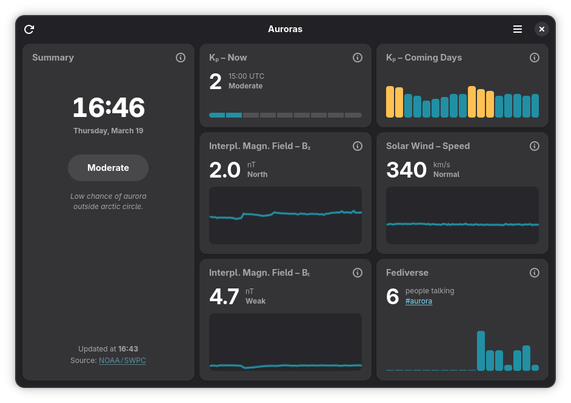
 Philip Withnall
 Jaye 🍊
 Robin Stolpe
 Bruce Elrick
 Michał Fita
 pino
pino Benedek Dévényi
 Emmanuele Bassi
 taye
taye José Albornoz
 Rodney