I fail using this UI at least once a week.

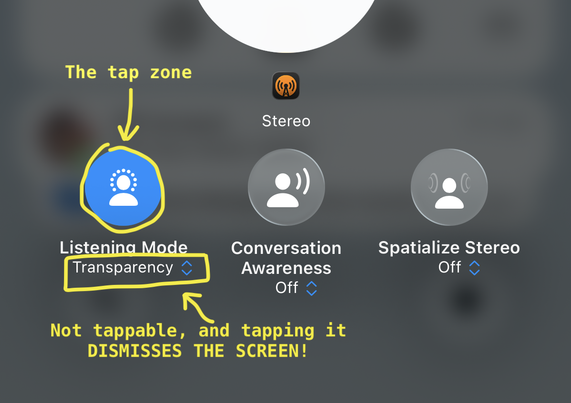
It's the AirPods Control Center volume pane, where I go to put my AirPods Pro into Adaptive mode (which I have configured a hundred times to be part of the long-press selection, but that always gets inexplicably forgotten).

What you're SUPPOSED to do is tap the circle to bring up the modes.

But right below it is the OBVIOUS LOOK OF A DROPDOWN CONTROL, complete with the double-arrow and tint color, but it is NOT ACTUALLY A TAPPABLE CONTROL AARRGGHHH 😔

@marcoarment
But the Dow is over 50,000!
@marcoarment That is very annoying but why don’t you just hold down on the stem? You can even disable one of the modes in settings so if you only use noise canceling or transparency mode holding the stem will go back and forth between those
@joshdm did you read my second paragraph
@marcoarment My apologies, I got interrupted while reading that and my brain processed it as long pressing in control center. Just wanted to offer a helpful suggestion

@joshdm, @marcoarment mentioned this, saying that the setting reverts / forgets his selection(s) on a regular basis:

> which I have configured a hundred times to be part of the long-press selection, but that always gets inexplicably forgot.

@marcoarment If you think this is bad, start a workout on your Apple Watch.
@caseyliss It would be so cool if someone on the Fitness app team worked out at least once
@caseyliss You're really scaring me... am still resisting the upgrade, despite iOS 26.4 dropping support because of it... Any video somewhere of the bad changes?
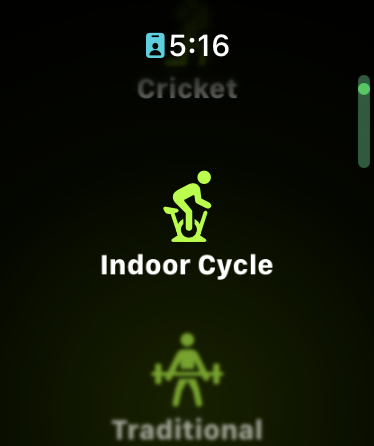
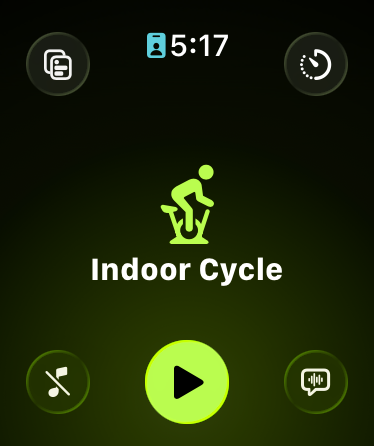
@fabienmarry @caseyliss best I can describe: guess what happens if you tap on the weightlifting icon in the screenshot below? You start a weightlifting session, right? Wrong! It starts indoor cycle. Why? Because there is a play button there! No there isn’t? Oh yes there is. It just hasn’t rendered yet (see second pic a sec later). šŸ’€
This gets me at least once a week. Maddening.
@andrewwade @fabienmarry Perfect summary
@caseyliss @andrewwade Thanks !
Oh dear. Here's to hoping Watch OS 27 reverts that…
@andrewwade don’t get me started with the workout detection bug where if you choose change workout you have to put the watch to sleep then wake it up to actually show the workout options šŸ˜®ā€šŸ’Ø

@andrewwade @caseyliss This is such a good example of interaction design done by a visual designer: all tasks at the same level and a nicely visually balanced screen.

While the previous design understood that 99% of the time you want to start the activity, not configure it, so that action should be treated differently, and faster. Gigantic touch target, everything else in hidden in (…)

Design is, huh, how it works...

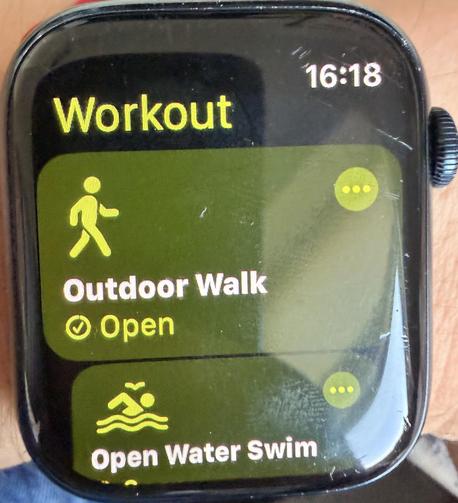
PS. Adding watch screenshots to the list of what iOS 26.4 broke

@andrewwade @fabienmarry @caseyliss is it just me but pressing the action button for fitness app now automatically starts a commonly used workout? Before it brought up the menu. And it’s dumb because it can’t even start the correct workout based on the time and location I’m in (I’m on a very predictable schedule)
@ebbi @andrewwade @fabienmarry @caseyliss I think that’s configurable somewhere. Mine is set to always / only start a run, which I recall explicitly setting up.
Now, where one configures that (workouts.app? watch settings? Watch.app on iPhone maybe…?), your guess is as good as mine.
@coachmike66 @andrewwade @fabienmarry @caseyliss didn’t know that - just changed it in settings! Thanks mate
@ebbi @andrewwade @fabienmarry @caseyliss And if you were unaware, this is another game-changer: simultaneously pressing the Action button and Side button during a workout will toggle pause/resume of the workout.
HUGE help in heavy rain, or with winter gloves, when swiping is problematic (no more swiping and tapping with nose 😃).
@coachmike66 @ebbi @fabienmarry @caseyliss oh maybe but I do about 5 different workout types so a default wouldn’t help. Good to know though!
@caseyliss @marcoarment This is the fiddliest bit of fiddlieness that has ever fiddled
@caseyliss @marcoarment This is so true. Every release they make the icon for starting the actual workout just a little bit smaller.
@caseyliss @marcoarment Yup have to restart watch quite often to clear the previous workout that gets stuck beneath. Not to mention selecting a workout with the Digital Crown which is like wheel of fortune, or waiting for a spinner to stop before you can actually press the start button
@caseyliss DUDE. why do workouts fail to start so often?!
@dk @caseyliss my problem is not them failing to start but wondering if I don’t know how to hit the specific hit target that’s like trying to shoot the port on the Death Star.
@caseyliss My biggest complaint with workouts on Apple Watch is stopping them. When my watch display is sweaty from, say, working out, it doesn’t register touches. Chemistry and physics and electrolytes and capacitance and all. Theres no way to stop the session without frantically, fruitlessly, wiping my watch and hands on my sweaty shirt to dry them off so my ā€œexercise watchā€ can register touch inputs. It’s crazy that the crown can’t be used as an alternate input.
@cphansen @caseyliss try pressing both buttons, that's how you can pause the workout at least without using the screen
@caseyliss @marcoarment May I recommend: ā€œSiri, start an outdoor walking workoutā€? My watch is usually inaccessible, so this is my best option for starting a workout and it is… fairly reliable. Bonus: you can stop workouts this way, too, but whether or not you have a workout running it will always reply ā€œEnding your workoutā€œ. :)
@DavidAnson @caseyliss @marcoarment Did this for years until it stopped working completely with bike workouts (the German phrase ā€žRad Outdoorā€œ always toggles ā€žOther Workoutā€œ now) 😢
@caseyliss I use workouts several days a week and it seems straightforward to me šŸ¤·ā€ā™‚ļø ope the app, swipe to the desired workout (listed in order of most recently used, I believe) and tap the play button to start the workoit. What am I missing?

@caseyliss very interesting; I guess I never thought to tap on an icon below the one that is front-and-center. Or maybe I don't mind waiting the second (based on a test I just did) for the play/start button to appear.

Thanks for sharing the issue that others are experiencing!

@tim @caseyliss Barely half a second. I guess I’m not bothered like the much of the internet over a start button taking ~0:005 to show up.

It really seems like much of the iOS 26 complaining has devolved from discussing legitimate issues at first into whining about petty issues just to keep the narrative artificially going.

The ā€œnormalsā€ in my life who don’t follow Apple analysis from day-to-day had no comments about iOS 26 once they passed the initial ā€œthis looks differentā€ phase.

@_MrJasonW @tim @caseyliss I am happy for the normals in your life, but the very normal grannies in my life, and my friends who don’t see very well, and my friend with shaky hands because of Parkinson, all would love a word
@caseyliss @tim The ā€œcardā€ interface was the best Watch interface, and everything they’ve done to get away from cards has been a regression.
@caseyliss @marcoarment Maybe 20% of the time my phone doesn’t show a keyboard when activating a text field. iPhoneOS 1.0-level stuff 🄲
@twostraws @caseyliss @marcoarment occasionally some of the keys on the keyboard all kind pile on top of each other. Only ever seems to be the lower left ones like z,x,c, & d. Technically I can still hit them if I’m super precise. Eventually the keyboard crashes and then it’s ok again for a while 😢
@caseyliss @marcoarment the only way to start a workout reliably on apple watch without losing your fucking mind is — ironically enough — to use siri
@lexfri @caseyliss @marcoarment This is exactly what I started doing.

@lexfri @caseyliss @marcoarment I use a shortcut bound to the action button on the Ultra that shows me a menu of my most often used workout types. Works great. If I have to use the normal workout selector…

(╯°▔°)╯︵ ┻━┻

@lexfri @caseyliss @marcoarment But don't try to start a workout on your watch while using Siri on your AirPods connected to your phone, because every time it asks me which app I want to use. And you can't say Workout because it doesn't exist on the phone. :|
@dmoren but ā€œfitnessā€ does work! I’m so šŸ¦† ing happy to can finally start watch workouts from my phone via AirPods again. It was my biggest pet peeve fo years.
@lexfri @caseyliss @marcoarment Well... Whenever I cycle I say ā€œstart a cycling workoutā€ as I roll out of the garage. That used to work every time, but recently it will randomly show a picker between indoor cycling and outdoor cycling. Now I have to check what it’s actually doing which isn’t entirely safe. I never do indoor cycling, so this makes it extra frustrating.
@lexfri @caseyliss @marcoarment Nope, dammit.
"Start Indoor Skating Workout" reliably starts an "Other" workout despite Indoor Skating being something I've been doing twice a week, recently.
@caseyliss i have to tap the button at least 3 times before it actually registers. It’s quite annoying.
@caseyliss @marcoarment tapability isn’t a problem but it’s rage inducing how slow the start button can take to show on an Ultra 2 so it’s not even at the edge of OS support. I also hate the ordering of workouts always changing to the last one you did so if you do various workouts you always need to scroll down, hope the animation isn’t glitchy and wait on the stat button.
@caseyliss @marcoarment …while wearing gloves in the winter and holding your excited-to-start-the-walk-already dog on a leash, because you forgot to start it inside.
@marcoarment oh man I’m not the only one. Thank god I’m not the issue here. It’s clearly poor UI design.
@marcoarment 10000% same. It's so bad.
@marcoarment Where do we send thank you flowers?
@marcoarment Same 😤 despite knowing it, I fall for it very regularly. I can't believe it hasn't been fixed for years.
@marcoarment I have the cheap AirPods so I don't even know what I'm looking at, but it certainly sounds frustrating.

@marcoarment Apple desperately need some people who's first thing they do looking at anything internal is "how can I fuck up using your design / implementation".

The whole place seems to be Confirmation Bias: The Company.

"We designed it like this, so we know how it works, so ship it"

@marcoarment I looked at the image before I completed reading your post. My immediate read on the UI was that clicking the blue "listening mode" button turns it to "off" (you know, like how clicking the blue Bluetooth or WiFi button in THE SAME UI turns Bluetooth or WiFi off). I was wondering what's so difficult about it.

This is remarkably bad.

@marcoarment somewhat related; open the Airpods case next to like 3 devices, and you'll see the big pop-up screen with battery stats and such which then *never closes automatically* and stays open forever on every nearby device, until you manually dismiss it šŸ¤¦šŸ¼ā€ā™‚ļø sigh, so many bugs...