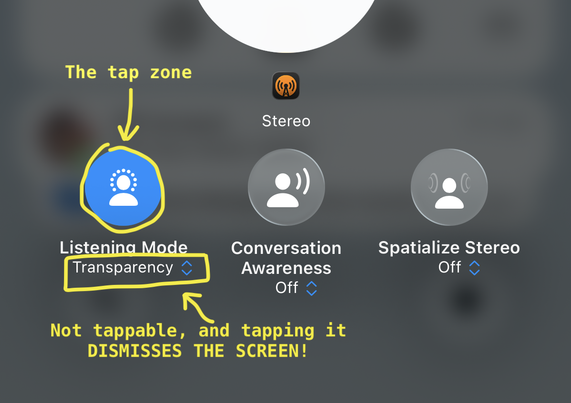
I fail using this UI at least once a week.

It's the AirPods Control Center volume pane, where I go to put my AirPods Pro into Adaptive mode (which I have configured a hundred times to be part of the long-press selection, but that always gets inexplicably forgotten).

What you're SUPPOSED to do is tap the circle to bring up the modes.

But right below it is the OBVIOUS LOOK OF A DROPDOWN CONTROL, complete with the double-arrow and tint color, but it is NOT ACTUALLY A TAPPABLE CONTROL AARRGGHHH 😔

@marcoarment If you think this is bad, start a workout on your Apple Watch.
@caseyliss I use workouts several days a week and it seems straightforward to me šŸ¤·ā€ā™‚ļø ope the app, swipe to the desired workout (listed in order of most recently used, I believe) and tap the play button to start the workoit. What am I missing?

@caseyliss very interesting; I guess I never thought to tap on an icon below the one that is front-and-center. Or maybe I don't mind waiting the second (based on a test I just did) for the play/start button to appear.

Thanks for sharing the issue that others are experiencing!

@tim @caseyliss Barely half a second. I guess I’m not bothered like the much of the internet over a start button taking ~0:005 to show up.

It really seems like much of the iOS 26 complaining has devolved from discussing legitimate issues at first into whining about petty issues just to keep the narrative artificially going.

The ā€œnormalsā€ in my life who don’t follow Apple analysis from day-to-day had no comments about iOS 26 once they passed the initial ā€œthis looks differentā€ phase.

@_MrJasonW @tim @caseyliss I am happy for the normals in your life, but the very normal grannies in my life, and my friends who don’t see very well, and my friend with shaky hands because of Parkinson, all would love a word