
🚨 WARNING: Google is trying to force you into using #Gemini AI on Android in #Gmail, #WhatsApp & other apps - hijacking your data for "AI training"

This is opted in by default – so check your Settings to opt out.

Here’s how: 👉 https://tuta.com/blog/how-to-disable-gemini-on-android
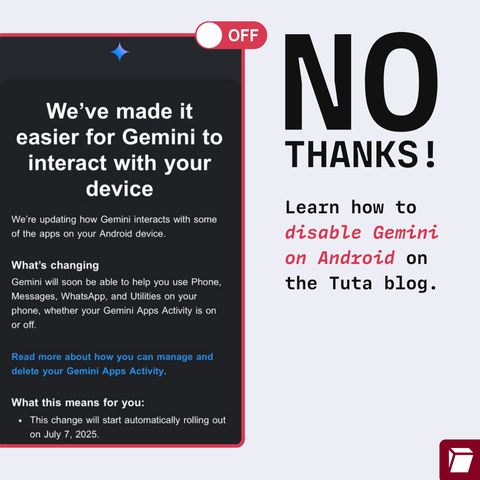
@Tutanota Is this country-specific? I'm in the UK and there is no Gemini app on my phone, and I just updated the OS.

@cassolotl @Tutanota

Without gemini app you can do this:

-Go to the google app.

-Click on your profile picture.

-Go to settings.

-Go to google assistant.

-Go to google digital assistants (choose between google assistant and gemini).

-Choose google assistant instead of gemini.

-Go back to the google assistant section.

-Go to the "Your Apps" section.

-Go to the Whatsapp section.

-Disable: "Allow assistant to learn from this app" and "Allow assistant to choose this app".

@simonjpaladinus @Tutanota Thank you, this is really helpful! :)
@simonjpaladinus Nightmare to do for each and every app. I'm livid, I know I shouldn't be expecting anything else from Google and Co, but this is probably what is gonna push me away from android OS and start looking for libre alternative. Even if the experience is subpar.
Thank you for the detailed explanation and sorry for the rant. Take care
@simonjpaladinus @cassolotl @Tutanota may I add do this for more apps in the list like brave web browser and maybe Wikipedia?

@FilesUnknown @cassolotl @Tutanota

Yes, you should definitely do the same with the other apps. I only put whatsapp as an example.

I also forgot to mention that if you want to disable google assistant completely, you should do the following:

-Go to the google app.

-Click on your profile picture.

-Go to settings.

-Go to google assistant.

-Go to general.

-Deactivate the google assistant.

@Tutanota We really, really, really, need to have regulations that force AI to self-disclose in the content it generates. But also, have devices explicitly say your content is being tracked to train a model.
@Tutanota Thank you! Sent to a friend on Pixel
@Tutanota on a Linux phone you do not have to worry about things like this.
@Tutanota
How to disable ai anywhere ?
@J_Peregrine @Tutanota Temporary: by fiddling with settings, installing Linux or GrapheneOs. But at the end: with torches and guillotines.
@Tutanota On all android devices?, did a quick check and don't have that thing installed, maybe my phone doesn't have it preinstalled?
you should look up Gemini on your phone settings, I don't have Gemini installed but I went to check and it still was activated to look at YouTube and maps :/
@lovelikeasunset @Tutanota A real snake that integration into everything :/

@mikeTesteLinuxQlub @Tutanota

In the article they say "... ID is: com.google.android.apps.bard"

So I guess you have to search for an app named Bard (not for one called Gemini).

#Gemini #Bard

@mikeTesteLinuxQlub @Tutanota

Without gemini app you can do this:

-Go to the google app.

-Click on your profile picture.

-Go to settings.

-Go to google assistant.

-Go to google digital assistants (choose between google assistant and gemini).

-Choose google assistant instead of gemini.

-Go back to the google assistant section.

-Go to the "Your Apps" section.

-Go to the Whatsapp section.

-Disable: "Allow assistant to learn from this app" and "Allow assistant to choose this app".

@Tutanota gotta love the wording - We've mad it easier for Gemini to interact 😂 Lol...

@ivantodorov The wording is accurate: If you trigger Gemini and you tell it to do that thing then it will do that thing. If you don't tell it to do that thing? It won't.

"Hey Gemini, send a message to Steve on WhatsApp"

"I'm sorry Dave, I can't do that."

It's @Tutanota that is being disingenuous by spreading FUD.

@Tutanota is this only for the latest versions of android or are they rolling this garbage out back to amdroid 8 and before
@Tutanota I use an iPhone, so I guess I don't have to do anything 😉
@scottytrees Don't hold your breath! They could do something similar too. 😉
@Tutanota Thank you Tuta. That is why you're the best.
@Tutanota I guess this is country dependent? I can't find any Gemini app on my Pixel 8, but I am in Europe.
@Tutanota @NotTheLBCGuy seems it’s worse than enabled by default, it’s actively overriding your decision to switch it off.
@Tutanota You can bypass it by using a 3rd party app to access your email.
@Tutanota This will just add to my list of reasons to stop attempting to use smartphones completely. My medical issues make them problematic at best to use & the devices just keep getting worse, as do my medical conditions albeit at a far slower rate than the devices, OSs & software.
@Tutanota
I have a OnePlus Nord N30. I do not see a Gemini app on this phone. Are you certain they won't install it through a so-called upgrade? I am getting ads for Gemini, and I thought i had ad-proofed it... But you can't hide from Google

@Tutanota
Disabled it, but no luck uninstalling. Can't afford a pixel so graphineOS isn't an option.

Really fed up of privacy being limited to people with money and tech skills. There needs to be a way for everybody to have privacy.

@Tutanota Sin la app de gemini puedes hacer esto:

-Ir a la app de google.
-Dar click en tu foto de perfil.
-Ir a configuración.
-Ir a asistente de google.
-Ir a asistentes digitales de google (elegir entre asistente de google y gemini).
-Elegir el asistente de google en vez de gemini.

-Ir de nuevo a la seccion de asistente de google.
-Ir a la parte de "Tus Apps".
-Ir a la parte de Whatsapp.
-Desactivar: "Permitir que asistente aprenda de esta app" y "Permitir que asistente elija esta app".

@joeress Heads up, based on your last podcast.