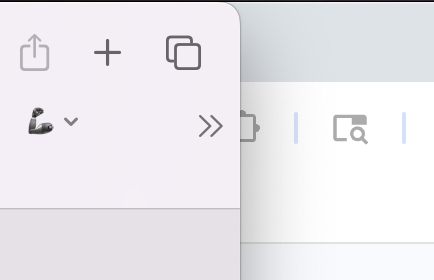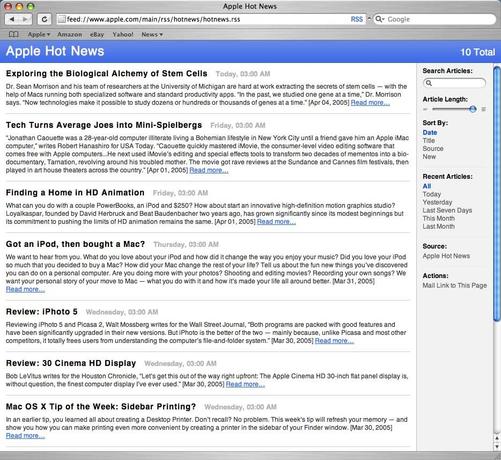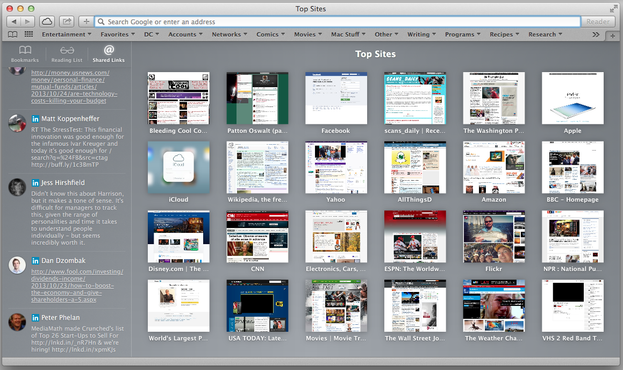
Apple love to preach "the UI gets out of the way of your content" with each new redesign, but how true is that in practice? Let's compare the total height of the Safari UI with a toolbar, favourites bar and tab bar visible, across the three latest Mac OS design languages – Yosemite, Big Sur and now Tahoe. I've added a red line for emphasis.

It sure looks to me like the UI is eating more into my content with each redesign.

After booting into Tahoe for the first time and spending a bit of time opening up apps, I had a feeling that my 16" MacBook Pro just got smaller, because things are bigger and less of my stuff can fit on the screen. What good is a larger screen if the UI keeps eating up all that space?

On the Mac we have the mouse pointer. It's a precision pointing device. Things don't need to be sized to work with touch. We can deal with higher UI and information density – we got by for decades.

@tuomas_h maybe they’re setting thing up for touch enabled macs…
@tuomas_h
Not the same issue, but my monitor keeps getting smaller, too, and I'm not thrilled with it.
In my case, it's because I keep having to change the scaling for my worsening vision.
@tuomas_h between this and the performance it really feels like 10.0 again

@tuomas_h @jeffwatkins they have a new 18” MacBook Pro coming that they expect you to upgrade to.

It also has a transparent glass keyboard with the letters moulded into each cap in crystal quartz, to ensure that the letter printing doesn’t get in the way of the laptop’s design.

@tuomas_h

THANK YOU! You are 100% correct.

@tuomas_h Great comparison, Tuomas!

(/cc @siracusa )

@tuomas_h This is on par with SF Symbols looking so blurry on non-retina displays. They don't think about the hardware (displays) at all.
@tuomas_h Turns out toolbars had a purpose - who knew ;)
@tuomas_h at least with 11-15 you could merge the tabs with the url bar; it was smaller than 10 that way!
@chrisw_b Yeah, you could certainly do that. I found it too messy to my taste, I prefer things separated.
@tuomas_h I liked it but I'm a relentless tab closer haha
@tuomas_h @stroughtonsmith I suspect one of the reasons _everything_ seems to have gotten bigger with Tahoe is potential touchscreen Macs, and minimum touch targets.
@rhysmorgan @stroughtonsmith People were making this exact argument also when the last redesign was fresh. I'll believe it when I see it.

@tuomas_h @rhysmorgan @stroughtonsmith also: why would this be a good thing anyway? I don’t get the fascination with touchscreen laptops. We have a mouse pointer and trackpad which means I don’t have to move my arms to select things and interact. Reaching out is inaccurate and tiring and smudges the screen.

There are ways to do direct + indirect control well (we did that with Solu). Apple just never figured it out (Touch Bar as example).

@Setok @tuomas_h @stroughtonsmith I’m not saying it would especially be a good thing, but I think Apple would be fairly likely to do it as a convertible device anyway. I can’t pretend that I don’t occasionally reach out to touch my iPad screen when in the Magic Keyboard 😅
@rhysmorgan @tuomas_h @stroughtonsmith I admit to never having. Used an iPad in that exact setup. I did for a while use an old iPad with just a plain keyboard stand (but no mouse / pointer back then). Constantly reaching out was a bloody nuisance! Was so happy to finally get my MacBook back :)

@tuomas_h

And at the same time they manage to show less information and actions while taking up more space

@tuomas_h this is happening to all desktop UIs over the last 15 years. Even some Linux DEs, like Gnome. I call it "the touchscreen scourge".
@tuomas_h I keep saying this: the more padding Apple adds to macOS components the more convinced I am that they are planning for touch input. Maybe it be macOS on iPad or adding touch screens to MacBooks
@tuomas_h At the same time they’ve removed the option to collapse the tab bar and address bar in to a single row. So for people who used that option the account of chrome has increased significantly.
@tuomas_h Ah, but you see, you have to count the content you can't read that you can sort of see under all those controls and the title bar.
@dnanian @tuomas_h Also, if I may offer my expert opinion in nuanced technical terms, Safari has really got ugly as fuck.
@dnanian Of course you’re right, my mistake 😅
@tuomas_h @stroughtonsmith they took away the compact tab bar layout. That was the best thing they ever did to Safari. The compact layout was smaller than Yosemite and got completely out of the way

@tuomas_h there are several false beliefs at work:

- blurred content under the UI chrome counts as “content”

This is somewhat true for photos (the only use case being designed for apparently) and totally false for text.

- a Mac is essentially an iPad with a keyboard

The macOS 26 UI is now derived from the iPad. The biggest problem for the iPad with its full screen paradigm and “big iPhone” UI has always been “what do we do with all the leftover space”? Answer: add a sidebar and whitespace.

@tuomas_h I don’t know what you’re doing wrong but my tabs are in the title bar (where the traffic light buttons live) and take up no additional space
@check123 I’m not doing anything wrong, I’m just not using the “compact” tab bar layout (which isn’t the default anyway), it just doesn’t fit my mental model.
@tuomas_h @check123 But the compact mode use minimal space, you can't ignore that in this topic.
@nanozuki @check123 I’m comparing like for like, and the compact mode did not exist before the Big Sur design. Plus, it’s not the default anyway, so this will be the experience for most people.
@tuomas_h pro tip: most people expect the progression of oldest to newest to go left to right. At a quick glance I thought Tahoe was the right-most image.
@tuomas_h @marcoarment Not that I agree with the choice, but when they say “gets out of the way of your content” I think they really mean the UI is clean and “less busy” and not attracting the eye away from the content. The end result may oddly be leaving less space for content as blank dead space of the app UI grows.
@tuomas_h @marcoarment Put your site nav across the bottom of the site instead of across the top, and then see how Tahoe Safari fares. Content is visible, but unnavigable.

@tuomas_h @marcoarment I think people with brains like mine must be in charge of UI lately, because I while I can absolutely see what you mean about less content fitting on the screen at the same time, the extra space and lower density actually let me take in more of the content. In high-density UIs I feel like my eyes can't rest on any one thing and it takes a lot more effort to read. It's like a light that's too bright, except it's information? Extra whitespace feels calming and comfortable to me.

I wonder how complicated it would be to implement a setting for density choice, like we have in some UIs (email comes to mind), where we can choose like “cozy” for high-density or “relaxed" for lower-density.

@LauraLangdon @marcoarment I think that’s a great point and there probably isn’t one universally right. I come from the camp that thinks UIs should be compact and not try to blend in with the content, kind of acting as a “frame” for what I’m trying to focus on.

And I totally agree there should be something like the “sidebar icon size” setting that we have now but for the whole UI. We probably wouldn’t be having this discussion if that existed.

@tuomas_h After all these years I'm still mad about the loss of color in the finder's side bar. The icons there _were_ the content. Now it's all blueish shapes.

@tuomas_h Still ahead of Chrome. (below)

Fun fact: in designing Edge for Windows 10 I took screenshots of every single browser and made sure that the UI exactly met or beat the tightest of them.
I was so stubborn about it I refused to use the proposed system button size because it made the ui too tall and horsey. The controls team gave me shit about it, but then ultimately changed the sizing of all controls to match and that's how I saved hundreds of millions of Windows users an extra 4 pixels.

@drewpickard @tuomas_h not all heroes wear capes 🫡
@tuomas_h most valid critique I’ve seen so far.

@tuomas_h

Mmh, yummy, delicious soft padding.

@fi

@tuomas_h
What is why I was so excited about tree style tabs for Firefox being implemented. And not very excited that windows 11 loses the ability to have the task bar on the left side. But dock o the left and tree tabs, amazing!
@tuomas_h It's interesting, I feel like it's an unintentional throwback to the older Safari designs. The version here from Tiger, with its larger three-row UI, looks a lot like the Tahoe Beta 1 version. Not sure that's a good thing or not, but interesting to see it come back around. https://arstechnica.com/gadgets/2005/04/macosx-10-4/
@tuomas_h Conspiracy theory take: MS kept IE such a crap browser for so long to damage the web and thus keep a better grip on Windows apps as a platform. Apple are now doing the same.

@tuomas_h @chartier I bet they’re prepping touchability on the Mac and want it to be less of a touchability nightmare than on windows. Lay the groundwork in the UI first, then roll out the hardware.

Everyone I know has been trying to scroll on their MacBooks by touching the screen for at least a decade. Apple knows the demand is there.

@gregatron5 @tuomas_h Not sure how I’ll get used to fingerprints on a Mac screen. Fine on my iPad, illegal on my Mac. 😆
@tuomas_h yep , but when you scroll down the main bar overlays showing the content.
@arquitetomovel What I’m calling for is more “usable” area for the content. If you place a book behind a piece of frosted glass, you can maybe see that it’s there, but you can’t read any of the text through the material. It’s the exact same thing here.
@tuomas_h Perhaps counter-intuitively, it would appear that border-lines, color changes, shadow, and texture-shifts between sections *preserve* space because without them, you have to use extra margins to disambiguate the visual hierarchy.
@tuomas_h curious how a version before the merged title bar would compare to the Tahoe one. Would be funny if they threw away the usability of the title bar to make more room for content only have have the UI eat it back up again.
@wezm I should take some screenshots of my Mavericks Mac to do this comparison.
@tuomas_h That's what we can call an Apple to Apple comparison ^^

@tuomas_h

That's because the lead designer is getting older and hasn't accepted yet they needed glasses.

@tuomas_h I'll keep saying this is the preparation for a future touch friendly macOS
@lasombra_br People made this exact argument when the previous redesign (Big Sur) was unveiled and it turned out to be a nothingburger. I’ll believe it when I see it. Until then this is nothing more than reduction of information density for no obvious benefit.

@tuomas_h I'm not saying it's going to happen today or tomorrow, but there's no other obvious explanation, to me, to justify this amount of padding.

As you said, we'll have to see it to believe it.

@tuomas_h my kingdom to go back to just 19 pixels.