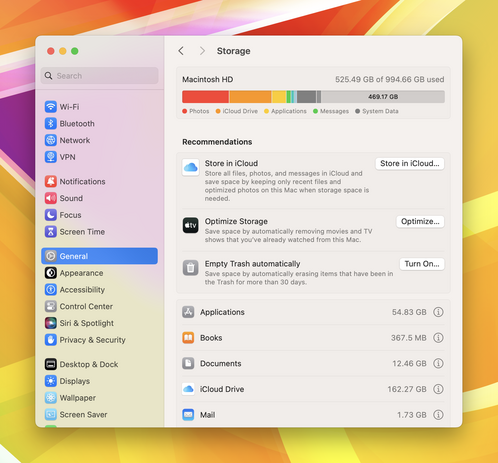
How much storage are people using on their Mac? 💻

I’ve outgrown 256 & 512 GB & feel I need at least 1 TB with my current usage. I don’t carry external SSD’s and prefer to keep all my files/photos on my device.
@BasicAppleGuy I went 2 TB on my MBP/14/M1Pro. Turns out that I guessed right. It's about 70 percent full because I'm a digital packrat, but I'd have felt cramped on 1 TB.
@BasicAppleGuy I have a 1TB M2 MBA *and* a 1TB iPhone 15 Pro Max both a little over half used, I don’t want/need any storage anxiety!
@BasicAppleGuy I've had 1 TB as a standard on my Macs for a long time. I've got about 42% of it in use, but it's been as high as 50%. I get a tad anxious when it crosses that halfway point and do some pruning.
@dsilverman @BasicAppleGuy I’ve had 8TB on all my Macs (since became available) when I started converting my film photos & home video tapes to digital 10 years ago, using a huge amount of space. Now using over 5TB, nervous about only 3TB left. So I guess everything is relative 🙁
@BasicAppleGuy I’m right in the edge of my 512GB in my MacBook Pro. Next time I upgrade (which won’t be for a while, my M1 Pro’s holding up really well) I’m almost definitely going for at least 1TB
@BasicAppleGuy Current M1 MBP is 512, but I would probably do 1TB next time as well.
@BasicAppleGuy Same can’t work with 512 anymore. Even with 2TB iCloud.
@BasicAppleGuy happy with my 512. I keep most things on the cloud.
@BasicAppleGuy bought 512, always struggling to keep enough free space. I think I’ll do 2TB next time.

@BasicAppleGuy Ha ha no, I have 4.5 TiB in the Mac, and 256 GiB free, plus an external 4 TiB which is 81% full. I could move maybe 2 TiB to a new larger external with a little effort.

40+ years of digital packratting.

@BasicAppleGuy On my main machine, ~750GB of a 1TB drive, though that’s with the full photo library on an external SSD.
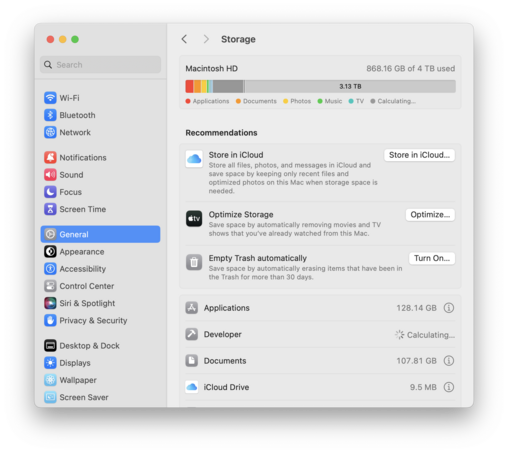
@BasicAppleGuy evidently a lot, even with all the recommended optimizations enabled
@BasicAppleGuy My 1TB drive is nearly full
@BasicAppleGuy Mac Mini with 512gb + external drive. But it‘s annoying…

@BasicAppleGuy I definitely need to trim down Xcode - I have a bunch of simulators I don't need now.
My Photos Library is on a thunderbolt SSD so don't have to worry about that.

Out of interest, what does your System Data show as? I'd LOVE to know what's included in mine…

@BasicAppleGuy I have a 4 TB drive here, but that’s less because I use that much storage and more because I didn’t feel like waiting 1-2 months for a BTO model when the local Apple Store had the high end model in stock for same day pickup.
@BasicAppleGuy I went for 4TB when I upgraded in November. Using 1.8 at the moment but wanted legroom for future expansion. Photo Library of 150K photos takes up 700GB on its own. Don’t want to put stuff on external drives, they just get lost.
@BasicAppleGuy I’ve outgrown my 1tb M2 MacBook Air in less than a year….
@BasicAppleGuy I just bought M3 Air and went from 1 TB on my M1 Air to 2 TB on the M3

@BasicAppleGuy have? 8TB. Using? 3TB.

Was it expensive? You bet.
Was it worth it? Absolutely.

@BasicAppleGuy I have a 4 TB MBP (full) and a 4 TB external SSD for Final Cut
@BasicAppleGuy My 1TB MacBook Pro didn’t have enough space to install the last OS update, but a large chunk of that was music cache and I’m also dual booting Asahi
@BasicAppleGuy 512. Apple storage is too expensive! Way cheaper to throw together a multi TB M.2 based SSD for on the go, and have the big server (42TB!) at home for everything else.
@BasicAppleGuy Using about 200 GB on my 1 TB laptop. I guess I over-buy.
@BasicAppleGuy I always max out RAM and SSD, e.g., the iMac I bought in January came with 24 GB RAM and 2 TB SSD #OverprovisioningIsNotACrime
@BasicAppleGuy HD space is the main reason I have a MacBook Pro and not an Air. 2.9 TB is what all my stuff on a single disk.
@BasicAppleGuy I opted for 2TB, currently using 800GB… probably won’t be upgrading my Mac for another year or two.
@BasicAppleGuy I’m almost out of 2TB on mine. shooting prores is not great for storage, so I’m actually going to be going back to HEVC for a bit until I can afford larger internal storage. I have a nas for archiving, so that won't be an issue, but it's really difficult using the same device for YT (hobby) as well as work documents.
@BasicAppleGuy My iMac has a 256GB drive but even with my pictures in iCloud, Photos thumbnails etc. was eating up all the space. So I added a 1TB external drive dedicated to the Photos library. Conveniently this lets me store all my pictures locally now. So if I go for a laptop I’ll get at least a 1TB drive.
@BasicAppleGuy I am definitely in the minority here as I only use 160 out of 256 GB on my MacBook Air. Most of that is taken up by a local copy of Photos. I use an external HDD/SSD just for backups and media.
@BasicAppleGuy With photos, historical mail, work datasets (I’m a scientist) and a handful of games, I’m always pushing the limits of 1T on my MBA. Need to regularly offload to NAS, which makes the “portable workstation” vision less viable. I’ve had 1T internal drives in my laptops for 8 years now thanks to the gouging price of storage upgrades - it’s becoming a problem! 😅
@BasicAppleGuy You do have a lot of photos / graphic designs you work on so makes sense. I'm on 512gb and have half of it available.
@BasicAppleGuy 2TB, few month ago I managed to remove 1TB of stuff
@BasicAppleGuy On my Mac Mini, I have 1TB internally and 2, 4, and 8 TB external disks to hold my data, photo library (I shoot a *lot*), and local backup. On my MacBook Pro laptop, I have a half terabyte disk and use OneDrive, Dropbox, and iCloud Drive to hold most of my work, because I know I have local access to that on my desktop. I also back up critical files to Carbonite, because I'm in IT, and I'm compulsive.
@BasicAppleGuy I feel especially strongly about keeping my photos local, because that is my own copyrighted creative work, and I'm not about to give some faceless corporation with a really poor track record on IP control over it. Even though I keep the bulk of my photo library online in Adobe Lightroom, I keep local copies and an additional local backup of everything (I don't back those up to Carbonite, because that's too redundant even for me).
@BasicAppleGuy 2TB has been my standard on my personal Mac’s for several years. I, too, keep all photos and current files on my M2 Pro mini and M3 Pro 14” MBP. As files become less current, they are moved to my 12TB Synology NAS, which is accessible from anywhere. The NAS also has Time Machine backups for our 3 Macs as well as original, native size, Photo Library backups. And yes, @siracusa, the NAS is backed up both locally and remotely.

@BasicAppleGuy 2 tb and having to constantly offload files.

External drives on mac have been a painful experience as finder stops seeing the drive if the laptop sleeps when docked. (ie drive not ejected) Having to plug the drives into windows to run a disk check/repair. Any tips?