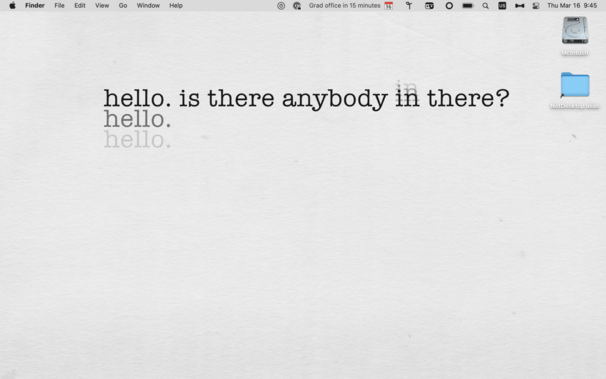
My "organizational" system for my podcasts is to keep these folders on my Desktop, periodically archiving them — usually motivated by running out of desktop screen width.

It has gotten increasingly ridiculous as my monitors have gotten bigger over time…

The visibility and misalignments are the point!

If they look nicer or aren’t visible in my face all the time, I’ll NEVER remember to archive them.

How many of you have some version of a junk-drawer/"to go through” folder on your Desktop?

And how often do you go through it?

Yeah, that’s what I thought!

Hidden junk is just junk you'll never deal with.

I have so many “[x] to go through" folders in so many places. When have I gone through them? Never.

Eventually, one such folder (Stuff To Go Through) got big enough that I shifted it to my NAS, where of course I'll get to it really quickly, right?

Let's see what gems are in it:

- A 2011 invoice for Build & Analyze
- Instapaper 4.0 beta notes
- A photo from Tumblr's 2009 SXSW party
- An RSS icon that briefly looks like a guy sitting on a toilet
- My iPhone 4S receipt

…and so much more.

@marcoarment One could make a podcast from Marco's "Stuff To Go Through" folder.
@marcoarment the RSS icon is cute, though!
@marcoarment Everyone has that one photo you saved for a very particular reason but cannot recall what that was.
@marcoarment Thank you for brining this up, because it led to me finding this absolute gem in my own "NEED TO SORT" folder
@marcoarment wow, blast from the past with that Planet koozie!
@mikerastiello Nice catch! Were you there back then? They were our host for most of the time I was there, even as they became Softlayer.
@marcoarment my wife was in marketing for The Planet back then, she worked on the SXSW stuff that year and we had a bunch of these laying around.
@marcoarment bring back Marco Marco 🕶️
@marcoarment Are you wearing your aviators indoors?
@stuart Those were someone else’s ridiculous sunglasses (I forget exactly who — I think maybe Meaghano), I tried them on as a joke and did my best cool-guy impression, and someone (probably Tiff) took a picture.
@marcoarment I'm currently about six months into another run at proper Getting Things Done and making sure my weekly review includes tasks to go through all those dumping grounds has helped me a ton. (I think the current list is starred email, insurance receipts in dropbox, projects in my todo app, and my Apple Notes.)
@marcoarment first name tumblr club represent!
@marcoarment that picture of you is fucking rad
@marcoarment It's just “To Sort”s all the way down.
@marcoarment are we sure that RSS icon isn't actually an artist's rendering of @caseyliss at his 5g picnic table/park bench?
@marcoarment Oh my gosh, baby Marco is adorable!
@marcoarment That guy has peed on his shoes
@marcoarment My solution is to use Hookmark to link to folders that actually matter to go through in the places they belong, and then make OmniFocus actions to go through them. That way they’re ‘in place’ when I never go through them.
@marcoarment this photo makes it look like your name is Marco “Tumblr” Marco
@marcoarment love the old iOS interface, such nicely designed buttons 👌
@marcoarment that‘s definetly Raymond Reddington from The Blacklist 🖖

@marcoarment > Hidden junk is just junk you'll never deal with

HEY MAN MY "INCOMING FOLDERS”

…prove this is 100% true. 😖

@caseyliss @marcoarment this reminds me of how the 2 minute rule significantly improved my life.

The rule is this. If we have an incoming task (grinding through emails, filing a document, or whatever), if we can do the task in < 2 minutes, then always just do the task right now and get it out of your “in tray”. It’s freeing because if we know the task will take more than 2 minutes it’s usually easier to file, discard, or process accordingly: https://gettingthingsdone.com/what-is-gtd/

What is GTD

Getting Things Done (GTD) is a personal productivity methodology that redefines how you approach your life and work.

Getting Things Done®
@marcoarment I have a “Desktop Files” box that I occasionally dump stuff into, with plans to review at some point, but essentially it’s now just full of a dozen “Dump <Date>” folders…
@TimMorris @marcoarment Amateur. Mine are simply called „Desk“ and are nested inside each other.
@TimMorris man this is better than me. I have nested “to sort and file” folders with no dates, each accompanied by half a monitor of files.
@TimMorris I’m on “Desktop Files IV,” myself. No idea what’s in them. 🙄
@bubbajet I tend to purge after 6-12 months.
@marcoarment I sadly report that I have multiple junk drawer folders on my Desktop. Sigh. I’ve learned to love myself anyway.
@marcoarment For me, Downloads has become the horror that I swore Desktop never shall be again.

@jerrod @marcoarment Hahah, I wanted to post the same thing: Desktop for me is a clean slate, but all the stuff Marco is saying is now "Downloads”.

Partially because it's not synced to iCloud (which I don't want as I sometimes downloads files that are tens of gigabytes in size, like Xcode)

Beside that though… I have indeed everything sorted out in proper folders like a proper sort-and-order freak that I am 🤓

@jerrod @marcoarment Consider Hazel, helps keep things tidy, love it —> https://www.noodlesoft.com/
Noodlesoft – Noodlesoft – Simply Useful Software

@jerrod Same for me. Though because the stack is always visible in my dock, for a few weeks I feel like my Mac is „dirty“ until at some point I clear out the folder and it feels clean again. Rinse and repeat.
@jerrod @marcoarment Here to suggest Hazel as well. Solved that particular problem for me
@jerrod @marcoarment Hazel solved my download folder issues. It automatically cleans up old downloads and organizes the new ones.
@jerrod @marcoarment I see staff with well over 1000 files in downloads folder.

@jerrod @marcoarment man, do I have a solution for you!

ls -lah ~/Downloads
lrwxr-xr-x 1 argon staff 7B 10 Mar 2022 /Users/argon/Downloads -> Desktop

@jerrod @marcoarment Have you tried a folder within your Downloads folder?

@jerrod @marcoarment I deal with this by creating a directory called Transient. No ambiguity, it is what it is called. All downloads go there. Then I have cron jobs that delete anything older than 2 weeks. If you need it longer you have 2 weeks to move it. If not, it will disappear. It solved the problem of "I have a new machine, what is actually important in this unholy mess of a directory?"

I now do this on every work and personal computer I ever touch.

https://devportaldocs.service-now.com/blog.do?p=/post/ot-transient-mac-directory/

Off-Topic: Transient Mac Directory

This is not directly ServiceNow related, but a tip I stumbled across that has made my digital and work life much easier. It’s highly common that people have a “Downloads” directory that they choose not to back up. Why would you? It has big files that churn a lot, so that is just extra cruft in your Time Machine or other backup. However, unless you are very disciplined over time you get unruly chaos.

@geniodiabolico @jerrod @marcoarment Works like a charm, and if I may say, brilliant.
@jerrod @marcoarment I treat my downloads folder as a temp folder. If I want something from there to persist, I gotta move it. Every so often I just delete everything in there without looking at it.
@jerrod @marcoarment Same here. It’s the digital equivalent of that one junk drawer in the kitchen, where everything lands that doesn’t really have a place.
@jerrod @marcoarment
I solve the Desktop clutter problem by having a folder named "__SORT_THESE" on the Desktop. Occasionally, I just toss all the random stuff in there, keeping only specific folders on the Desktop beside it. Problem solved, right?
@jerrod @marcoarment Same. Occasionally I clean it up and try to keep it that way, but it always ends up messy again... 🙈
@jerrod @marcoarment The same for me, and I excluded the Downloads folder from Time Machine backups, to force me to move things to their proper space.
@jerrod @marcoarment ahaha I occasionally "clean up" the Desktop folder by moving everything into Downloads. 😎
@jerrod @marcoarment this. so much this. But also…Desktop is still a shitshow, mostly full of screenshots though. 😢

@jerrod @marcoarment it’s fine, really, after a while you can just move everything into an ‘archive’ subfolder of Downloads. Then, when you feel like it you can have archive2, archive3, etc.

Once you get to archive10 I recommend renaming Downloads to something like Downloads_old, and start anew. That’s how I do it at least.

@jerrod @marcoarment that’s funny, I keep my Downloads clean at all times (just a staging area) and no thanks to Stacks my desktop is a disaster.
@jerrod @marcoarment I have a Hazel rule that sorts files after one week into an subfolder named with the date the file was added 🙈
@jerrod @marcoarment I wrote a very mid program to automatically add Finder colors to old things in my Downloads directory and optionally delete very old things. I find it helps me keep a small working set in there
https://github.com/arennow/tide
GitHub - arennow/Tide

Contribute to arennow/Tide development by creating an account on GitHub.

GitHub
@marcoarment I have this. The NotDesktop is a folder in Dropbox (so it syncs between my office and home computers), and this is an alias to it, in case I am ever tempted to save anything to the desktop.
@marcoarment guilty! My junk folder is 2GB and I have no idea what is in there. :)