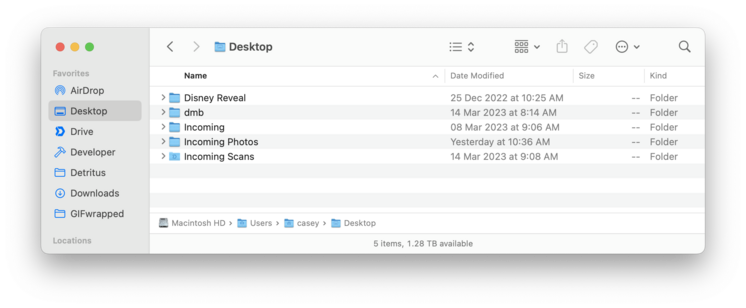
My "organizational" system for my podcasts is to keep these folders on my Desktop, periodically archiving them — usually motivated by running out of desktop screen width.

It has gotten increasingly ridiculous as my monitors have gotten bigger over time…

The visibility and misalignments are the point!

If they look nicer or aren’t visible in my face all the time, I’ll NEVER remember to archive them.

How many of you have some version of a junk-drawer/"to go through” folder on your Desktop?

And how often do you go through it?

Yeah, that’s what I thought!

Hidden junk is just junk you'll never deal with.

I have so many “[x] to go through" folders in so many places. When have I gone through them? Never.

Eventually, one such folder (Stuff To Go Through) got big enough that I shifted it to my NAS, where of course I'll get to it really quickly, right?

Let's see what gems are in it:

- A 2011 invoice for Build & Analyze
- Instapaper 4.0 beta notes
- A photo from Tumblr's 2009 SXSW party
- An RSS icon that briefly looks like a guy sitting on a toilet
- My iPhone 4S receipt

…and so much more.

@marcoarment One could make a podcast from Marco's "Stuff To Go Through" folder.
@marcoarment the RSS icon is cute, though!
@marcoarment Everyone has that one photo you saved for a very particular reason but cannot recall what that was.
@marcoarment Thank you for brining this up, because it led to me finding this absolute gem in my own "NEED TO SORT" folder
@marcoarment wow, blast from the past with that Planet koozie!
@mikerastiello Nice catch! Were you there back then? They were our host for most of the time I was there, even as they became Softlayer.
@marcoarment my wife was in marketing for The Planet back then, she worked on the SXSW stuff that year and we had a bunch of these laying around.
@marcoarment bring back Marco Marco 🕶️
@marcoarment Are you wearing your aviators indoors?
@stuart Those were someone else’s ridiculous sunglasses (I forget exactly who — I think maybe Meaghano), I tried them on as a joke and did my best cool-guy impression, and someone (probably Tiff) took a picture.
@marcoarment I'm currently about six months into another run at proper Getting Things Done and making sure my weekly review includes tasks to go through all those dumping grounds has helped me a ton. (I think the current list is starred email, insurance receipts in dropbox, projects in my todo app, and my Apple Notes.)
@marcoarment first name tumblr club represent!
@marcoarment that picture of you is fucking rad
@marcoarment It's just “To Sort”s all the way down.

@marcoarment > Hidden junk is just junk you'll never deal with

HEY MAN MY "INCOMING FOLDERS”

…prove this is 100% true. 😖

@caseyliss @marcoarment this reminds me of how the 2 minute rule significantly improved my life.

The rule is this. If we have an incoming task (grinding through emails, filing a document, or whatever), if we can do the task in < 2 minutes, then always just do the task right now and get it out of your “in tray”. It’s freeing because if we know the task will take more than 2 minutes it’s usually easier to file, discard, or process accordingly: https://gettingthingsdone.com/what-is-gtd/

What is GTD

Getting Things Done (GTD) is a personal productivity methodology that redefines how you approach your life and work.

Getting Things Done®
@marcoarment I have a “Desktop Files” box that I occasionally dump stuff into, with plans to review at some point, but essentially it’s now just full of a dozen “Dump <Date>” folders…
@TimMorris @marcoarment Amateur. Mine are simply called „Desk“ and are nested inside each other.
@TimMorris man this is better than me. I have nested “to sort and file” folders with no dates, each accompanied by half a monitor of files.
@TimMorris I’m on “Desktop Files IV,” myself. No idea what’s in them. 🙄
@bubbajet I tend to purge after 6-12 months.
@marcoarment I sadly report that I have multiple junk drawer folders on my Desktop. Sigh. I’ve learned to love myself anyway.
@marcoarment If Jobs or Ive saw this they wouldn't be mad... Just very disappointed.
@marcoarment I feel like @siracusa could go on about this screenshot for a good 90 minutes
@cdevroe @marcoarment @siracusa Yes! I came here for this. It’s almost too on the nose tho, seems fishy.
@marcoarment Is it possible to move the files to categorized sub-folders?
MacBook How to Cleanly Align Folders and Icons on Desktop

YouTube
@marcoarment If you're gonna post that kind of stuff, at least enable “Snap to Grid” in the View Options 😅

@marcoarment oh god my eyes 😱

My Desktop has gotten completely out of control, and I'm embarrassed to share it:

@caseyliss @marcoarment Is it really us Linux people who have to inject some desktop sanity into this thread?

...really? 😂

@acejacek No, Linux Mint. I use Mint for gaming, Fedora for workstation and laptop.
@caseyliss Disney reveal?? 👀👀👀
@connorcrosby Telling the kids we were going to Disney. Need to make a multicam clip out of it :)

@caseyliss
What are you doing with those incoming folders?

@marcoarment

@caseyliss @marcoarment how do you even see the wallpaper behind all that? 🤣
@marcoarment I think your monitor is tilted.
@marcoarment this is giving me a mild aneurysm. Having a messy desktop is one thing but them not being vertically or horizontally aligned using the grid is the final twist of blade! Each to their own but this makes my skin crawl!
@marcoarment The Folders of Siracusa County
49" Odyssey G9 LC49G95TSSRXEN | Samsung Polska

49" Odyssey G9 (LC49G95TSSRXEN) - Poznaj zalety i specyfikację produktu. Dowiedz się więcej i wybierz Monitory dla siebie w sklepie Samsung Polska.

Samsung pl
@marcoarment it’s really the vertical alignment that does it for me. You’ve never tried stacks?
@SamTheGeek @marcoarment my personal recommendation would be at least enabling snap-to-grid 😅 (plus some custom Hazel rules to archive old episodes for you)
@marcoarment
I’m firmly in the Nothing Gang camp.
@marcoarment get one of those 32:9 as a side monitor for keeping track of your folders 👌
@marcoarment Nothing wrong with that until you see "New Folder (3)"
@marcoarment I use Hazel app to periodically sort both my downloads and desktop. You can set up a ton of rules, set labels etc