One thing that Mastodon newcomers may not realize is how easy it is to turn Mastodon for web into essentially a Tweetdeck clone, with columns for search/compose, home, notifications, and any lists you've set up. It takes literally seconds.

Here's what mine looks like right now:
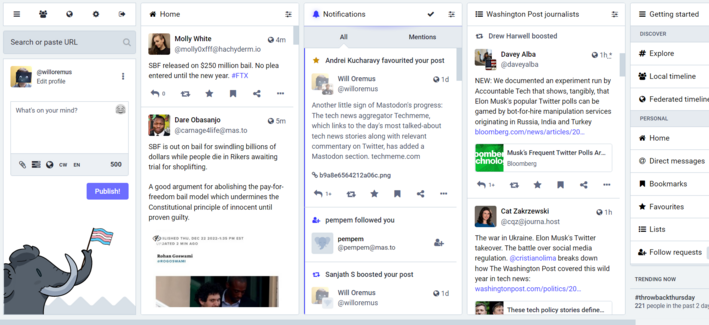
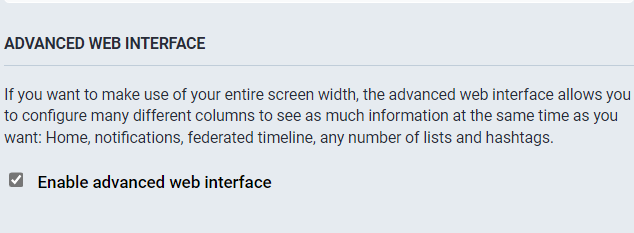
To get the Tweetdeck-style view on Mastodon for web, just go to Settings > Preferences > Appearance and check "Enable advanced web interface." Then "save changes."
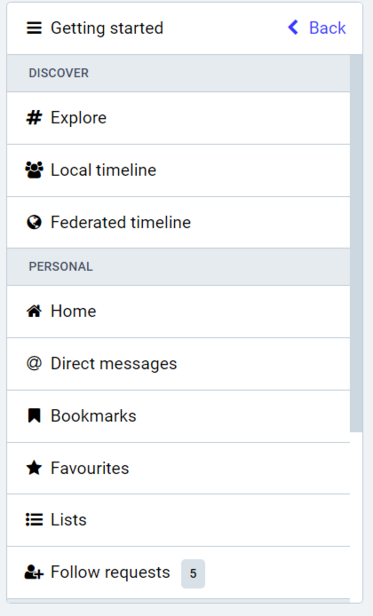
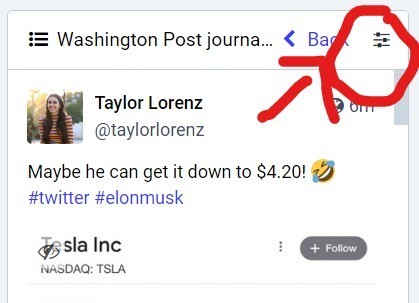
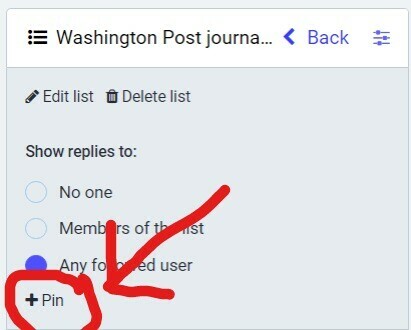
To add columns to your default home screen on Mastodon for web, once you've enabled advanced web interface, select the tab you'd like to add from the "Getting Started" column. (E.g. "Local timeline," "Federated timeline," or any "Lists" you've set up.) Then click the "show settings" icon for that column, and click "pin." That's it.
Thanks to @drewharwell for pointing me to this very helpful @spencerdailey thread, which goes into more detail on using Lists in mastodon for those interested: https://journa.host/@spencerdailey/109550540019073158
Spencer Dailey (@[email protected])

A month after incorporating Mastodon lists into my workflow ( https://journa.host/@spencerdailey/109388873948779246 ), here are some thoughts about the end user experience: As you know, lots of friction exists in many aspects of using Mastodon, and yet, people really want to be here (because they fought through it). πŸ˜„ Mastodon's "Lists" feature *is* great, but it really makes you put in the work. Some thoughts on using Mastodon as a media-gazing tool:

Mastodon

@willoremus @drewharwell @spencerdailey
You can also combine multiple hashtags into their own column.

First, search for an interesting hashtag. Open the Show Settings menu on the result and pin the column.

Open the Show Settings menu again and you can tell it to include additional tags in that column.

If your first search was #cats, then you can add #catsofmastodon and #catstodon as well and any related post will show in that column.

@willoremus are lists public or private? not seeing any info/options
@willoremus how do I get mastodon for web is my first question πŸ€¦πŸ½β€β™€οΈ
@helacool literally just enter your server address as the URL in a browser window. in your case, mastodon.world. then log in.
@willoremus Thank you. And I just enabled the advanced thing in settings. It def gives the Tweetdeck feel. Gah I wish I could just port over my lists from Tweetdeck...and would pay to do so. But guess it's still early in Mastodon's feature set.
@willoremus I wish there was a way to curate and share lists. I for one would LOVE a list of quality journalists from a variety of major news networks, as well as a list for breaking news.
@willoremus Any way to add columns for notifications other accounts, allow posting from secondaries, etc?
@willoremus I LOVE YOU!!! Thank you so much!
@willoremus Shame it was not called TootDeck. Missed opportunity that could have helped people migrate to a familiar but better tweeting experience in the Mastodon world.
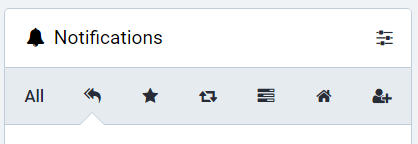
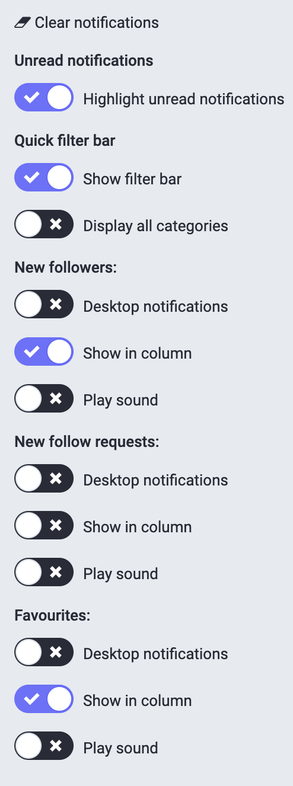
@willoremus Noticed you haven’t yet enabled the notifications category bar to filter them by type. (Display All Categories under Show Filter Bar). That’s another hidden deluxe power user setting.
@profcarroll like this? good tip thx
@willoremus Worth it alone for keeping track of all the polls you’ve ever voted in. (I have no idea what the Home icon category is for BTW.)
@willoremus It's really cool that this is built into the UI instead of being an entirely separate interface.
@willoremus Thank you. This is most helpful to me.
@willoremus
I think I love you - I used tweet deck and really missed that layout
Thankyou
@willoremus awaiting the how-to in this thread
@kashhill @willoremus Turn on the advanced interface in the settings.
@yacc143 @willoremus ty! I only just now realized mastodon did not have to be a big depressing grey screen so thank you for that as well.

@kashhill
Nope it does not. It also has all kinds of import/export features for your data, an API so you can basically use a couple of alternative clients, browser extensions to deal with the biggest irritations, and yes I guess you can probably access your data from an jupiter notebook via the API too to do stupid hackish things.

@willoremus

@kashhill
Compared to the daily birdsite jail (in normal operation I mean) mastodon is comperatively freedom.
@willoremus
@kashhill @yacc143 @willoremus Also this: using Yuito is a Twitter like experience but way better... complete with scheduling posts, onscreen hashtag, etc., Also that private note space in your follows profile page is kind of useful.
@willoremus Is this setup going beyond the flipping of the Advanced multicolumn option? It looks fancier than mine...
@Philgross it's just that, except i've pinned a list to mine which maybe you haven't tried yet?
@willoremus I haven't even tried making a list. Let me give that a shot.
Spencer Dailey (@[email protected])

A month after incorporating Mastodon lists into my workflow ( https://journa.host/@spencerdailey/109388873948779246 ), here are some thoughts about the end user experience: As you know, lots of friction exists in many aspects of using Mastodon, and yet, people really want to be here (because they fought through it). πŸ˜„ Mastodon's "Lists" feature *is* great, but it really makes you put in the work. Some thoughts on using Mastodon as a media-gazing tool:

Mastodon
@willoremus Once I put a user in the list, I was hoping they would stop showing up in my Home list (I was trying to isolate some chatty accounts). Is there a way to exclude them from Home? Can I un-follow them while keeping them in the List?
@Philgross not that i know of, but i'm not an expert -- just learning alongside a lot of others.

@willoremus I figured it out. To turn the Mastodon web app into a Tweetdeck clone.

1. Go into preferences
2. Under Appearance, enable "advanced web interface"
3. Enjoy

@willoremus I actually like Mastodon better than tweetdeck. Sadly I never used tweetdeck consistently until I used Mastodon now use both. πŸ‘
@willoremus And adding columns is so easy. *pin*
@willoremus I dont know what Tweetdeck is and I tried this and I really hate it.
@willoremus I had to turn off boost and fav alerts because my notifications was getting way too busy
@alex definitely. nice problem to have but agree notifs can be unusable if you don't filter. i set up my mastodon on mobile to only notify me when someone i follow engages. but i still like to be able to see all the engagements when i view them on the web, for now.
@alex @willoremus yep, the UX is not great when things get busy. I still haven't figured out how to turn off the sounds on notifications for replies.
@jdp23 @alex ha, that was one of the very first things i had to figure out bc they were driving me bonkers
@jdp23 @willoremus sound settings should be in the hamburger menu at the top of the column
@alex @willoremus they are for New followers, new follow requests, and favorites. Not for replies.
@jdp23 @willoremus Hrmm, is that covered under "mentions"?

@alex indeed it is, thanks much!

And, how embarassing! There's no indication that it's scrollable so i never thought of scrollingn down to find it under mentions! πŸ˜‚

@willoremus

@jdp23 @willoremus haha, it happens to the best of us

@alex well please don't tell any tech reporters about this, I wouldn't want to lose credibility!

@willoremus

@jdp23 I'll make it a point to tag everyone in the WaPo tech desk πŸ˜‚
@willoremus
I think this could be really helpful for people who are having trouble adapting to Mastodon from Twitter. Pardon the incoming keyword spam. Trying to reach as many new people as possible.
#TwitterNewbies #Twitter #TwitterTips #TwitterExodus #Twexit #TwitterDed #MastodonTips #MastodonTipsAndTricks #MastodonNoob #MastodonNoobie #MastodonNewb #MastodonNewbieTips
@willoremus
I wish that "advanced" mode was a Tweetdeck clone. It's not. Tweetdeck is not about having columns; it's about filtering what you see in those columns. The advanced mode does not let you do that (or add additional columns). Having columns in no way makes it a clone.
@allenholub fair. "clone" was the wrong word. it has some similar functionality and a familiar feel to tweetdeck. not all the same features.
@allenholub @willoremus True. Currently you have two options for filtering or discovering something new: hashtags and local timeline from your instance. Lists from accounts you don't follow would be great, also a selective mute-feature.

@willoremus Yes! This is great. I have columns set up for favorite hashtags, local news, hobby, etc.

It feels very much like it solves my need for a clone.

@willoremus it's such a massive improvement over the default style, but it's not for everyone!
@willoremus This is amazing. Thank you so much for this tip!
@willoremus @kirbstr My suggestion would be to use https://github.com/NicolasConstant/sengi/ @sengi_app multiaccount as well as column layout.
GitHub - NicolasConstant/sengi: Mastodon & Pleroma Multi-account Desktop Client

Mastodon & Pleroma Multi-account Desktop Client. Contribute to NicolasConstant/sengi development by creating an account on GitHub.

GitHub
@willoremus Wow - thank you!! Only 3 days old on mastodon and loving the kind helpful people here.
@willoremus Can you please give a few steps on how to set this up?
@scribbl yes, check the self-replies to my post. good luck!