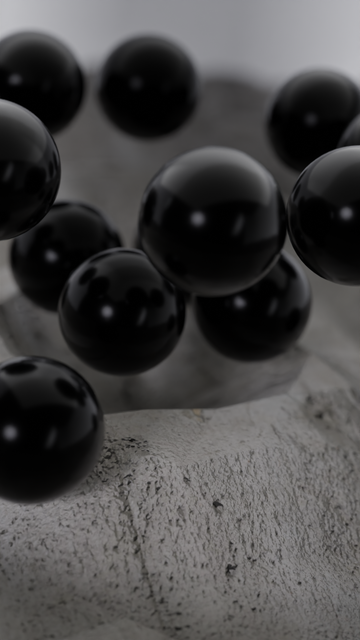
First render in a while. It's a simulation nodes gravity simulation. I went through many phases of overcomplicating it to varying degrees of success before going the absolutely simplest approach of Newtonian gravity with a force filter that drops very close particles to 0 influence (otherwise particles get flung into the Twilight Zone). I cheated a bit and optimized calculation time by using a Merge by Distance in my simulation zone and only calculating the influence from those. It does cause closely-clustered points to have only as much influence as a single point. In another study, I had found a way to make the merged points have the mass of all the points in the merge, but the way that I did it had worse performance than the raw N^2 N-Body calculation.

The color of each particle is simply the absolute value of the velocity, mapping XYZ to RGB.

I should work with Geometry nodes more. They are very stimulating. My real addiction is programming, and I often neglect my art, and geo nodes give me the opportunity to scratch both itches at once.

I wish I could get this one done in Cycles, but it's just too damn slow. Low frame time and denoising alone would make a 30 second render take over 5 hours, and it doesn't really look that much better than Eevee.

#Blender #BlenderEevee #EeveeRenderer #EeveeRender #Video #MotionGraphics #MoGraph #Gravity #GeometryNodes #SimulationNodes #Suzanne #NBody #NBodySimulation
Okay, time for integration.

1) Make initial lines
2) Simulate spiders (and bake)
3) Simulate physics

It's all coming together :)

#b3d #geometrynodes #simulationnodes #blender

I wasn’t doing my velocity calculations right, turns out we can have a little more fun still:

#b3d #geometrynodes #simulationnodes #blender

Warning: audio is loud.

Follow-up music visualizer video.

This time I used Simulation Nodes, and it looks a lot better. For each frequency band, I'm generating an icosphere 60 times per second and shooting them up the Y axis. This one was actually far easier than the way I was doing it before. Simulation nodes are very powerful.

I wish I could render this thing up with cycles. Even with my GPU, a single frame takes 42 seconds, so this whole 5237-frame video would take two and a half days to render. It would be less if I dropped the framerate, but this does not look nearly as good at a lower framerate.

Track is PRINCESS♛THEME from the album ♞ by Emma Essex

#Blender #Blender3D #Blender3DArt #3DArt #Music #Video #Mograph #MotionGraphics #AudioVisual #MusicVisualization #GeometryNodes #SimulationNodes

Some more bouncing particles, this time inside an icosahedron

#blender #blender3d #b3d #blendercommunity #geometrynodes #simulationnodes #simulation

Slash effect!

Nodes in the previous tweets.

oh man, in the original gif there's some very small red glitches - maybe not everything goes very smoothly - should make some investigations...

#b3d #geometrynodes #simulationnodes

Halp, halb, Simulation Nodes Curve Drawing in Edit mode thing, can't do

https://blender.stackexchange.com/q/301787/8282

#b3d #geometrynodes #simulationnodes

Simulation Nodes: How to draw curve and have it update to screen immediately while playing timeline?

Simon Thommes made this freely downloadable smoke cloud curve drawing asset: https://studio.blender.org/films/wing-it/?asset=6834 It uses the Simulation Zone in Geometry Nodes. How can I make even...

Blender Stack Exchange
video proof they live in a simulation #SimulationNodes #b3d
first time playing with #SimulationNodes. starting to feel like programming - assigning and mutating variables as "attributes" #b3d