EXCLUSIVE: One UI 8.5 Beta forums for the Galaxy S24 FE + S25 FE spotted!

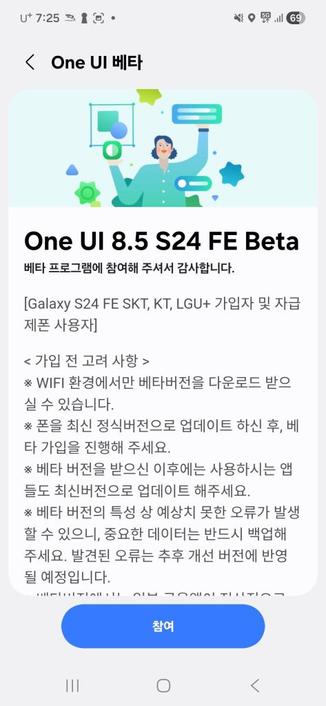
In an unexpected move, while Samsung is testing One UI 8.5 beta builds for the S24 and for the Galaxy Z Fold/Flip6 series, they have also considered testing the beta builds for the S24 FE and the S25 FE.

The below builds have been spotted according to Tarun Vats as mentioned in the above linked article:

  • S25 FE: S731NKSU5ZZCB
  • S24 FE: S721NKSUAZZCB

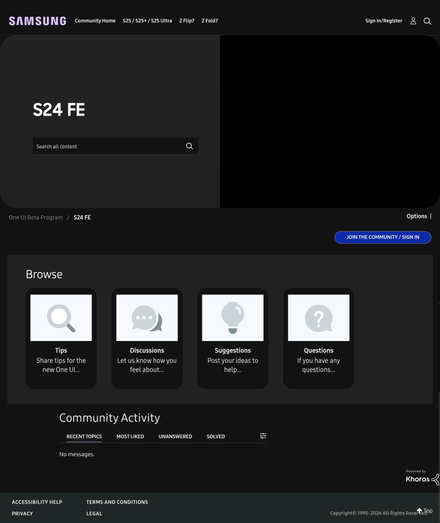
While those builds have been spotted, we have conducted further investigation, and we have spotted the One UI 8.5 beta forums for both the Galaxy S24 FE and the Galaxy S25 FE devices, at least in the USA forums!

This means that we are one step closer to Samsung opening the beta program for the Galaxy S25 FE and for the S24 FE devices.

Once the beta program actually opens, we’ll let you know.

#Android #GalaxyS24FE #GalaxyS25FE #news #oneUi #S24FE #S25FE #Samsung #SamsungGalaxyS24FE #SamsungGalaxyS25FE #smartphone #Tech #Technology #update

Samsung releases the January 2026 security patch for the Galaxy S24 FE series

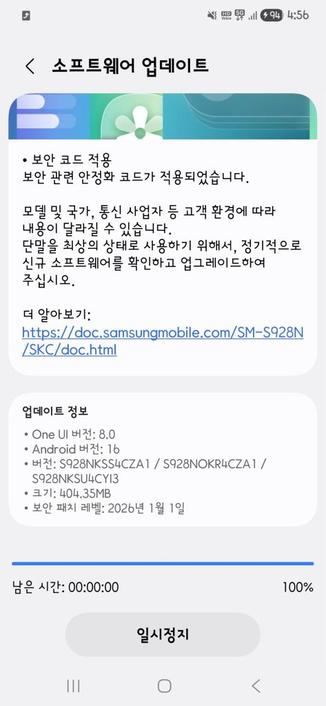
January 2026 is here, and Samsung have focused on releasing the January 2026 security patch for the majority of Galaxy users worldwide. As per their rollout schedule for security updates, Samsung have released the January 2026 security patch to the Galaxy S24 FE users, starting from the Korean version.

The following firmware information is found:

To update your Galaxy to this security update, follow these steps:

  • Open Settings, and navigate to System Update
  • Tap on Check for Updates
  • Press Download Now
  • Wait until the download is complete, then press Install Now
  • Wait until the phone installs the update successfully
  • Make sure that you’re connected to a stable and fast Wi-Fi network to avoid high mobile data fees. Never interrupt the update in any way, or problems could occur later. Make sure that you apply all available updates once you update your phone for maximum stability. An update might take 5 to 10 minutes to apply, depending on the device and the type of the update being applied.

    If you’re seeing “Your software is up to date,” this means that the update hasn’t reached your device yet. Keep checking for updates, as Samsung rolls it out gradually to all devices from country to country, usually starting from Korea.

    #Android #Android16 #AndroidB #AndroidBaklava #GalaxyS24FE #news #oneUi #S24FE #Samsung #SamsungGalaxyS24FE #smartphone #Tech #Technology #update

    Samsung releases the January 2026 security patch for the Galaxy S24 series

    January 2026 is here, and Samsung have focused on releasing the January 2026 security patch for the majority of Galaxy users worldwide. As per their rollout schedule for security updates, Samsung have released the January 2026 security patch to the Galaxy S24 users, starting from the Korean version.

    The following firmware information is found:

    To update your Galaxy to this security update, follow these steps:

  • Open Settings, and navigate to System Update
  • Tap on Check for Updates
  • Press Download Now
  • Wait until the download is complete, then press Install Now
  • Wait until the phone installs the update successfully
  • Make sure that you’re connected to a stable and fast Wi-Fi network to avoid high mobile data fees. Never interrupt the update in any way, or problems could occur later. Make sure that you apply all available updates once you update your phone for maximum stability. An update might take 5 to 10 minutes to apply, depending on the device and the type of the update being applied.

    If you’re seeing “Your software is up to date,” this means that the update hasn’t reached your device yet. Keep checking for updates, as Samsung rolls it out gradually to all devices from country to country, usually starting from Korea.

    #Android #Android16 #AndroidB #AndroidBaklava #GalaxyS24 #GalaxyS24Series #GalaxyS24Ultra #news #oneUi #S24FE #S24Series #S24Ultra #S24U #Samsung #SamsungGalaxyS24 #SamsungGalaxyS24Series #SamsungGalaxyS24Ultra #smartphone #Tech #Technology #update

    Apple, Android, Windows, Linux - und ich mittendrin

    Warum ich alle Systeme nutze, was ich daran schätze und warum Technikverstehen mehr braucht als nur eine Marke.

    techUpdate.io

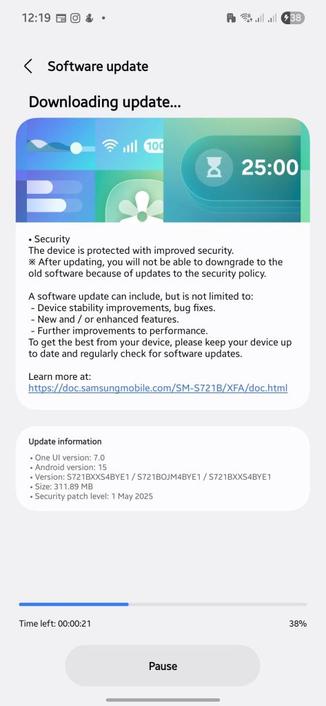
    Galaxy S24 FE May 2025 Security Patch released!

    The May 2025 security patch has been released for the Galaxy S24 FE device roughly two weeks ago. Such update improves your device security to make sure that you can use your device without worrying about thieves using loopholes to get unauthorized access to your device. The firmware can be identified using the following builds:

    • Galaxy S24 FE: BYE[1/3] or BYDF (Korean)

    In order to update your device to the latest security patch, you can check for all available updates using the following steps:

  • Go to Settings
  • Navigate to Software update
  • Tap on Download and Install
  • When installing the update, make sure that you keep your device on, and that you never interrupt the update process in any way. Interruption of the update process can cause problems later. Make sure that your phone has enough battery before you attempt to install the update. Also, make sure that you maintain a reliable Wi-Fi connection to avoid mobile data fees.

    #Android #GalaxyS24FE #news #oneUi #S24FE #Samsung #SamsungGalaxyS24FE #smartphone #Tech #Technology #update

    Samsung EP-N5200: Kompatibel mit Galaxy S24 FE?

    Du hast noch die Samsung EP-N5200 Wireless Charging Ladestation und bist dir nicht sicher, ob du sie für dein neues Galaxy S24 FE verwenden […]

    https://grellmann.net/samsung-ep-n5200-kompatibel-mit-galaxy-s24-fe/?mtm_campaign=mastodon

    #EFZS721 #EPN5200 #Galaxy #QI #S24FE #Wireless

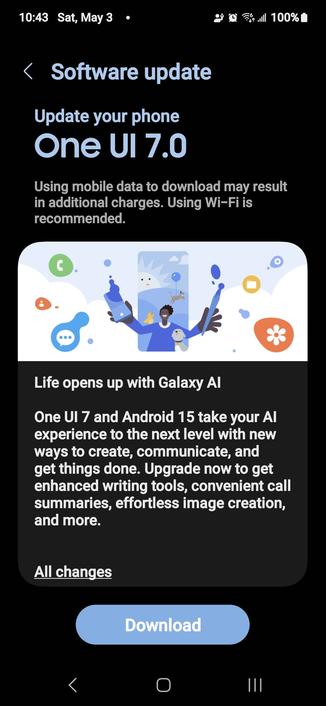
    Time to bite the bullet. The funny thing is that I haven't had much time with One UI 6.0. I've only just got a Galaxy S24 FE after using a Galaxy S9+ for about 6 years #samsung #oneui7 #android #s24fe

    One UI 7 Eligible Flagships List

    Samsung has recently published a blog post on the official newsroom website saying that they’ve chosen Monday, April 7th, 2025 (date may be different in other markets, such as April 10th for USA and April 14th for Malaysia), as the final One UI 7 release date starting point. This aligns with an earlier blog post from the company that was talking about the Beta program expansion for S23 series, Z Fold/Flip6, and Tab S10 where it stated that the official rollout will start within April, with the New Zealand version of the newsroom stating that the April rollout will be for all markets.

    According to Samsung, One UI 7 brings “AI-driven enhancements that make everyday interactions more meaningful and intuitive.” They state that they’re going to start the rollout of the update with the Galaxy S24 series and the Z Fold/Flip6 foldables, and will expand the update gradually to other eligible Galaxy phones and tablets within the coming days and weeks. Samsung Singapore, which suggested April 14th to be the release date, listed more flagship devices to receive the One UI 7 update:

    • Galaxy S Series
      • Galaxy S24 Series
      • Galaxy S24 FE
      • Galaxy S23 Series
      • Galaxy S23 FE
      • Galaxy S22 Series
      • Galaxy S21 Series
      • Galaxy S21 FE
    • Galaxy Z Series
      • Galaxy Z Fold6 and Galaxy Z Flip6
      • Galaxy Z Fold5 and Galaxy Z Flip5
      • Galaxy Z Fold4 and Galaxy Z Flip4
      • Galaxy Z Fold3 and Galaxy Z Flip3
    • Galaxy Tab
      • Galaxy Tab S10 Series
      • Galaxy Tab S9 Series
      • Galaxy Tab S9 FE Series
      • Galaxy Tab S8 Series
      • Galaxy Tab S6 Lite

    Availability of the update and its timing will vary depending on the market, so be patient until the update appears. Then, you can enjoy the One UI 7 features.

    #Android #Android15 #AndroidV #GalaxyS24 #GalaxyS24FE #GalaxyS24Series #GalaxyS24Ultra #news #oneUi #OneUI7 #OneUI7Beta #OneUI70 #OneUI70Beta #S24 #S24FE #S24Series #S24Ultra #S24U #Samsung #SamsungGalaxyS24 #SamsungGalaxyS24FE #SamsungGalaxyS24Series #SamsungGalaxyS24Ultra #smartphone #Tech #Technology #update

    April 7th – One UI 7 release date

    Samsung has recently published a blog post on the official newsroom website saying that they’ve chosen Monday, April 7th, 2025 (date may be different in other markets, such as April 10th for USA and April 14th for Malaysia), as the final One UI 7 release date starting point. This aligns with an earlier blog post from the company that was talking about the Beta program expansion for S23 series, Z Fold/Flip6, and Tab S10 where it stated that the official rollout will start within April, with the New Zealand version of the newsroom stating that the April rollout will be for all markets.

    According to Samsung, One UI 7 brings “AI-driven enhancements that make everyday interactions more meaningful and intuitive.” They state that they’re going to start the rollout of the update with the Galaxy S24 series and the Z Fold/Flip6 foldables, and will expand the update gradually to other eligible Galaxy phones and tablets within the coming days and weeks, including, but not limited to:

    • Galaxy S24 FE
    • Galaxy S23 FE
    • Galaxy Z Fold/Flip 6
    • Galaxy Z Fold/Flip 5
    • Galaxy Tab S10
    • Galaxy Tab S9

    Availability of the update and its timing will vary depending on the market, so be patient until the update appears. Then, you can enjoy the below One UI 7 features.

    One UI 7 introduces a brand new interface built for AI, helping users interact with their devices more naturally than before while following the simple, impactful, and emotive design that leads to cohesive design. It includes Now Bar, which gives you real-time updates that matter the most on the lock screen, such as the stopwatch, voice recording, or even music playing and workout status.

    Galaxy AI has been expanded in One UI 7 to introduce more features, such as:

    • AI Select: intuitively understands context and makes selection suggestions based on it. For example, while watching a video, AI Select suggests saving the video as GIF.
    • Writing Assist: easily summarizes or automatically formats content in which text can be selected to help you write meaningful sentences. Available in 2024 and 2023 flagships.
    • Drawing Assist: brings ideas to life with more than a single input, including combinations of text prompts and images or sketches. Available in 2024 and 2023 flagships.
    • Audio Eraser: isolates categories of sounds and removes unwanted sounds, such as wind noise and music. Available in 2024 flagships.
    • Deeper Gemini Integration: allows you to long-press your phone’s side button to let you give it voice prompts so that Gemini can pull information tailored to your needs.
    • Natural Search in Settings: lets you use natural language to search for a specific settings for your device. For example, say “My eyes are feeling tired,” and it pulls recommendations about enabling eye shield and adjusting brightness. Available in 2024 and 2023 flagships.

    Of course, there are far more features introduced in One UI 7, which will begin its rollout of the stable update in April 7th.

    #Android #Android15 #AndroidV #GalaxyS24 #GalaxyS24FE #GalaxyS24Series #GalaxyS24Ultra #news #oneUi #OneUI7 #OneUI7Beta #OneUI70 #OneUI70Beta #S24 #S24FE #S24Series #S24Ultra #S24U #Samsung #SamsungGalaxyS24 #SamsungGalaxyS24FE #SamsungGalaxyS24Series #SamsungGalaxyS24Ultra #smartphone #Tech #Technology #update