 اسماعیل محمّدنژاد 🇵🇸🇮🇷
 Linux Easy
openSUSE Leap 16 è qui! Kernel Linux 6.12 LTS, installer Agama, SELinux e desktop GNOME 48 e KDE Plasma 6.4. #openSUSE #Leap16 #LinuxKernel #Agama #Plasma64

 mamptecnocrata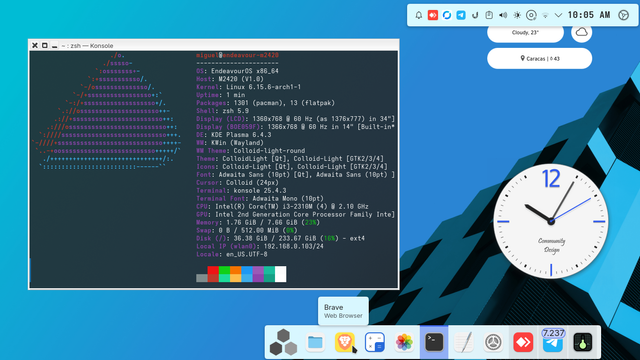
 LiquidParasyte
Hmmmmm why did Fedora 42 roll back Plasma 6.4 this week?
#fedora #KDEPlasma #Linux #fedora42 #Plasma6.4
 Aptivi
Plasma 6.4 and X11 on Arch Linux needs manual intervention
Since KDE Plasma 6.4 was released, it has been ported over to Arch Linux users under the Testing branch with version 6.4.0-1 on the release date. Systems that have this branch configured can now experience KDE Plasma 6.4.
Normally, this version of KDE Plasma 6.4 runs on Wayland. During testing, the Arch Linux team have made an announcement on their official web page regarding support for X11 and KDE Plasma 6.4. They have stated that they had done a recent migration of KWin to two packages:
- kwin-wayland: KDE Window Manager using the modern Wayland protocol
- kwin-x11: KDE Window Manager using the legacy X11 protocol
Unfortunately, this means that those who are running the legacy X11 protocol need to install an additional support package for X11 for the Plasma session, plasma-x11-session, or they won’t be able to log in the next time the system is restarted.
They have additionally pointed out that Arch’s package manager, Pacman, is currently unable to figure out the personal setup of a user, and stating that “it wouldn’t be ok to install plasma-x11-session and kwin-x11 for every one using Plasma.”
If you are using the X11 version of KDE Plasma, you can use sudo pacman -Syu and sudo pacman -Sy plasma-x11-session. We recommend migrating to Wayland as soon as possible.
#KDEPlasma #KDEPlasma64 #news #Plasma #Plasma64 #Tech #Technology #update #X11

 Michael Biel (Mick)
KDE Plasma 6.4 released
A new version of KDE Plasma, 6.4, is now live to the public after many weeks of new features, performance improvements, and bug fixes. The official announcement has been made to let users know about Plasma 6.4 and how it improves your desktop experience.
The Plasma developers declare this version as feeling more like /home, because it became smoother, friendlier, and more helpful. The improvements come to nearly every front from the main desktop to the applications, such as accessibility, color rendering, tablet support, windows management, and more.
- Windows management: The window management has been improved to allow you to select the tiles on each virtual desktop, which improves your productivity. Other layout combination means that you can create any kind of layout order in a way that best suits you and your workflow.
- Accessibility features: More accessibility features have been added to Plasma to make users in need of such features have better experience. For example, mouse movement can be made using your keyboard’s number pad, or you can zoom in and out using your three fingers on your touchpad.
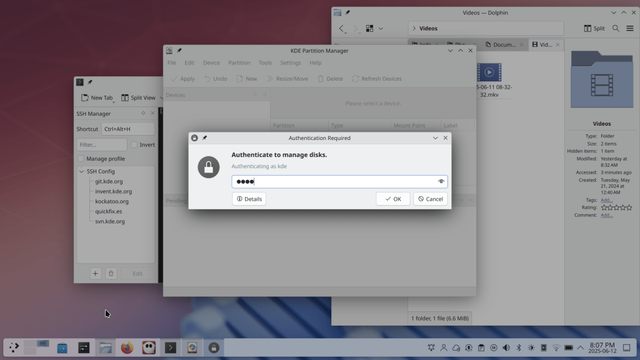
- Visual Design and User Interface: The foreground and the background element contrast has been increased to make the UI more balanced. Breeze Dark has become darker than before to make UI elements and text pop more. In addition to more improvements being made, the authentication dialog is now more focused by simulating the “lights out” effect, helping users focus on the login dialog.
- Notification system: Performing the file transfer operation now shows you a more detailed notification that shows you the transfer speed. You can install software updates directly from the notification. Also, full-screen applications will enable Do Not Disturb, making urgent notifications show up, and the less important ones will show up as a summary when you exit a full-screen app.
- Improved screenshots: The screenshot application, Spectacle, has been improved by improving its look for the better, which is a significant change from KDE Plasma 6.3. Also, WebM screen recordings have been improved to record in high quality, in addition to the same improvement landing on recordings with fractional scaling.
Linux distributions will begin distributing this version of KDE Plasma soon. You can also download the source code of KDE Plasma 6.4
Announcement Release notes Live image#KDE #KDEPlasma #KDEPlasma6 #KDEPlasma64 #news #Plasma #Plasma6 #Plasma64 #PlasmaDesktop #Tech #Technology #update

KDE Plasma 6.4 Gets UI Overhauls
KDE Plasma 6.4 has recently entered a soft freeze stage in preparation for the release, so this means that there will be no more new features being added. Furthermore, more bug fixes and UI refinements will be made during the rest of the development cycle until the final release. However, there may be new features that have been in development in months and are almost ready.
KDE Plasma 6.4 now gives you a beautified new folder dialog that provides you options to customize the folder’s appearance, alongside the folder name, such as the folder icon. You can make your folder visually expressing to make them easier to distinguish from other folders.
For the new file dialog, it has become more gorgeous by adding an icon for visual representation of what you’re going to create. This makes tasks easier for you.
You can now identify the media being played in some applications that provide this metadata to the KDE Plasna desktop. Any application that does this will be given a name and a media currently playing in the audio volume panel widget. This will streamline the identification of which application is playing which media, especially when it comes to web browsers.
Additionally, when you’re transferring files, sleep is now inhibited to prevent transfer interruptions during the long session. This ensures that you save time from having to retry the transfer, should any problems occur.
For those who are using Ubuntu, the upcoming Ubuntu version, which is 25.10 Questing Quokka, will provide this version of KDE, which will be released on June 17th, 2025.
You can see more changes here.
#KDE #KDEPlasma #KDEPlasma6 #KDEPlasma64 #news #Plasma #Plasma64 #Tech #Technology #update


