So, mal Klartext: Der Echo Show 15 bei uns im Flur ging mir schon ewig dermaßen auf den Keks!
Das Ding mutiert zur reinen Dauerwerbesendung, die man nicht mal abstellen kann. Und der Nutzen? War eh schon immer mau. Als Bilderrahmen ein Witz (viel zu klein!) und die Zwangswerbung war echt der Showstopper.
Es war Zeit, den Anfang vom Ende der Amazon-Ära bei uns einzuläuten!
Rauswurf! Der Echo Show 15 war das erste von 12 (!) Geräten (Echos, FireTV, etc.), das hochkant rausflog. Ganz ehrlich, das Teil war (direkt nach der lahmen FireTV Box ohne GBit-LAN) der absolute Fehlkauf des Jahrhunderts. Also: Weg mit dem Schrott!
Okay, ABER: So ein Info-Screen im Flur... Kalender, Wetter, schnelle Notizen... das war schon praktisch. Das wollten wir irgendwie behalten.
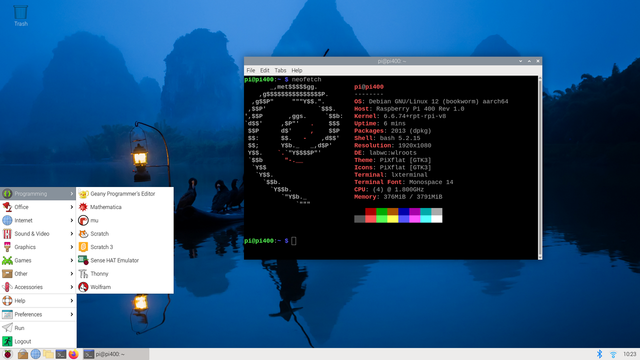
Und wie es der Zufall so will: Nach 'nem Hardware-Shuffle bei uns stand plötzlich ein fetter 43-Zoll 4K-Monitor arbeitslos rum. Gleichzeitig langweilte sich mein Raspi 400 ("Sagiri") zu Tode.
Moment mal... Monitor? Check. Computer? Check. Hmmmm... Da geht doch was!
Blöd nur: Im Flur mit 'ner Maus rumfummeln? Nee, danke. Der Echo Show hatte ja wenigstens Touch. 'ne Touchfolie für den 43-Zöller? Kurz gegoogelt und... HOLY MOLY! Schweineteuer. Da bist du sofort im vierstelligen Bereich. Vergiss es.
Irgendwann bin ich dann über Infrarot-Rahmen gestolpert (GreenTouch, für die Nerds). Das Ding packst du quasi *vor* den Monitor. Innen sind LEDs, die ein unsichtbares Gitter spannen. Finger durch? BÄM – Touch-Eingabe! Ob das klappen kann?
Und WIE das klappt! Das rockt richtig!
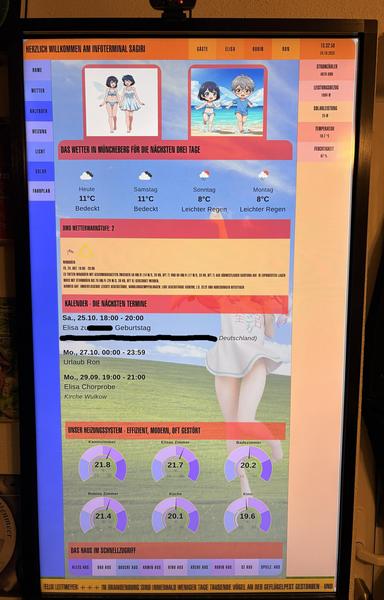
Unser Monitor hat kaum Rand, aber egal. Den IR-Rahmen pappt man mit Doppeltape drauf. Ein bisschen Nervenkitzel war's schon – bei dem Tape hast du nur *einen* Versuch, keine Korrektur. Also, zu zweit, paar Mal "trocken" geübt, angehalten, Luft angehalten... und... passt! Monitor hochkant gedreht – zack, 43-Zoll-Touch-Tablet!
Hardware steht. Jetzt die Software. Was soll drauf? Wie soll's aussehen?
Der Plan: Wir drei (meine Familie) kriegen eigene, persönliche Dashboards. Weil ich eh mittelfristig von FHEM weg will (Richtung HomeAssistant) und die Standard-Dashboards alle lahm fand, hab ich alles in NodeRed gebaut. Damit hatte ich ja schon bei FHEM und meinen Victron-Sachen rumgespielt.
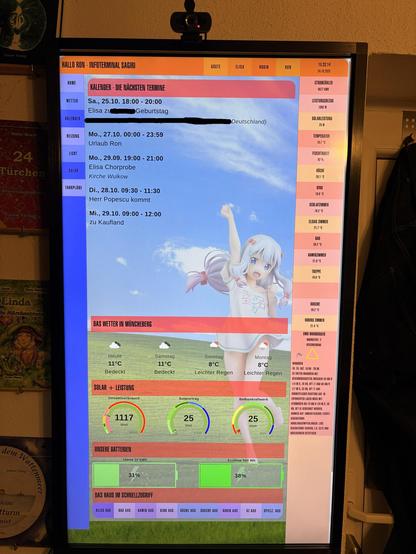
Bei der Optik hab ich mich fett bei Star Trek bedient: LCARS! Oben 'ne Leiste für unsere persönlichen Ansichten, links ein Menü für spezielle Seiten, rechts schnelle Status-Infos. Und ganz unten ballert ein RBB24-Newsticker durch.
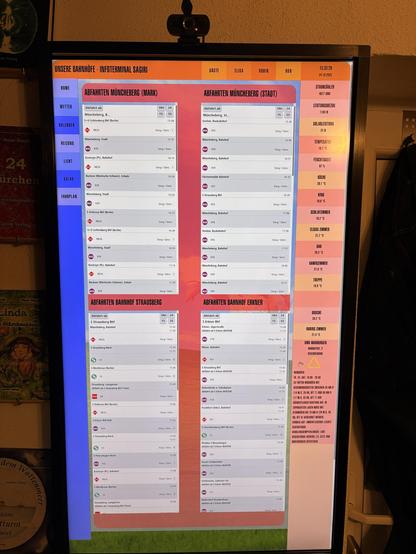
Was muss rein? Klar: Unser Kalender, Wetter, Lichter ausknipsen, Haus-Status. Absolutes Must-have: Robins Stundenplan (heute/morgen), der natürlich Ferien und Feiertage checkt. Und weil's geht: Abfahrtszeiten vom Bus um die Ecke.
Das Teil soll natürlich nicht 24/7 leuchten. Plan A (der coole Plan): Kamera drüber! Wenn einer davorsteht -> Display an. Und (jetzt kommt's!): Gesichtserkennung! Das Display sollte *wissen*, wer ich bin und *meine* Seite zeigen. Für Gäste gab's 'ne Touri-Seite.
... Tja. Das war dann wohl *etwas* zu ambitioniert.
Problem 1: "Sagiri" (der Raspi) kriegt den Monitor nicht aus. HDMI abschalten? Fehlanzeige. Lösung? Der gute alte Holzhammer: 'ne Funksteckdose, die in FHEM hängt. Sagiri funkt jetzt an FHEM: "Mach Saft an!" oder "Mach Saft aus!". Klappt.
Problem 2: Die Gesichtserkennung. Lief... naja... instabil. Lag vielleicht weniger am Raspi als an meiner Faulheit, tausend Trainings-Fotos von uns zu machen. Egal. Plan B: Die Kamera checkt jetzt nur *ob* einer da ist. Display geht an. Und die eigene Seite? Ist ja nur einen Fingertipp entfernt. Passt auch.
Aber fast wär's GANZ gescheitert! Der Standard-USB-Kamera-Node in NodeRed ist andauernd abgeschmiert. Nach 'ner Stunde war Schicht im Schacht. Panik! Zum Glück hab ich irgendwo einen 8 (!) Jahre alten, völlig verstaubten Node ausgegraben, den ich eigentlich nie nutzen wollte... und siehe da: Das Ding läuft stabil wie ein Panzer! (Und wenn der auch zickt, kommt 'n oller Bewegungsmelder drüber. Das geht *immer*.)
So! Hardware: Check. Software-Hürden: Genommen. Der Rest war pure Fleißarbeit am Code.
Und jetzt? FERTIG! Unser "LCARS-Echo-Killer" hängt und läuft. Hat mich alles in allem (Material besorgen + Programmieren) gut zwei Wochen gekostet.
Und jetzt grübel ich... Hmmmm... Was, wenn ich den 65-Zöller in der Küche auch... *touchy* mache? Die FireTV Box nervt mich eh. Der TV könnte doch GoogleTV... Nur mal so'n Gedanke...
#pi400 #nodered #fhem #echoshow #lcars #fhem #smarthome #dashboard #greentouch
 CryptGoat
 Cliff
Cliff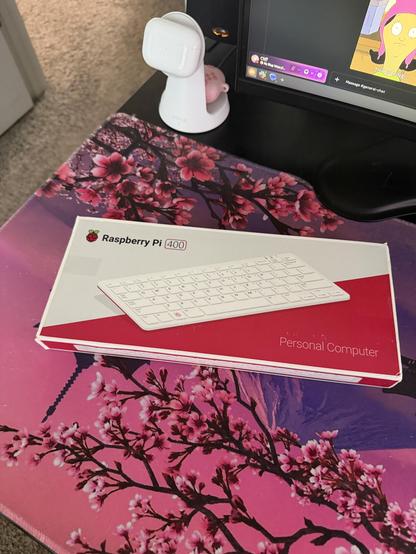
 Leo Bistmans
 Ron
Ron
 Paolo Amoroso's Journal
 @mshallop has moved
 Andrew 🏳️🌈 🖥 🧦
 linkslice