Memory Integrity Enforcement: A complete vision for memory safety in Apple devices - Apple Security Research

Memory Integrity Enforcement (MIE) is the culmination of an unprecedented design and engineering effort spanning half a decade that combines the unique strengths of Apple silicon hardware with our advanced operating system security to provide industry-first, always-on memory safety protection across our devices — without compromising our best-in-class device performance. We believe Memory Integrity Enforcement represents the most significant upgrade to memory safety in the history of consumer operating systems.
Memory Integrity Enforcement: A complete vision for memory safety in Apple devices - Apple Security Research

1/2
Challenges with #windoz10 #windoz11 on a #thinkpad #T430s

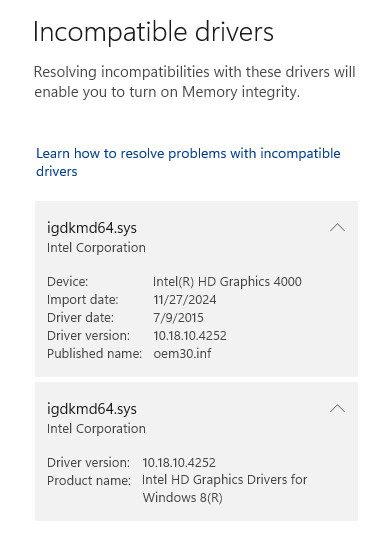
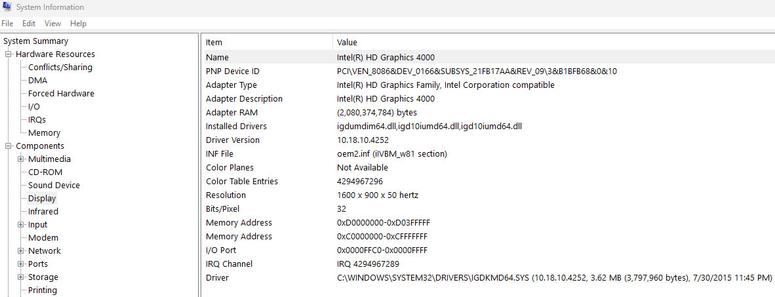
Good old #intel #intel_corp never bothered to update & release #drivers for the HD #graphics #4000 #graphics4000
The driver is for #windows8 only

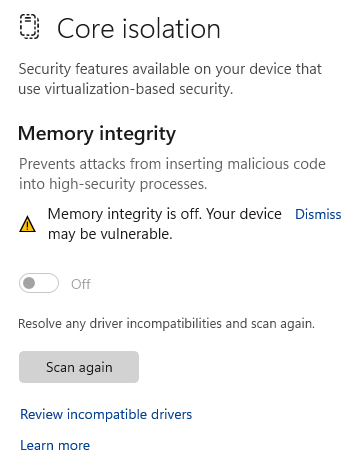
I figured this out by having the #windowsSecurity alerting that #coreIsolation - specifically #memoryIntegrity could not be enabled. With #idgkmd64.sys being released of July 2015.

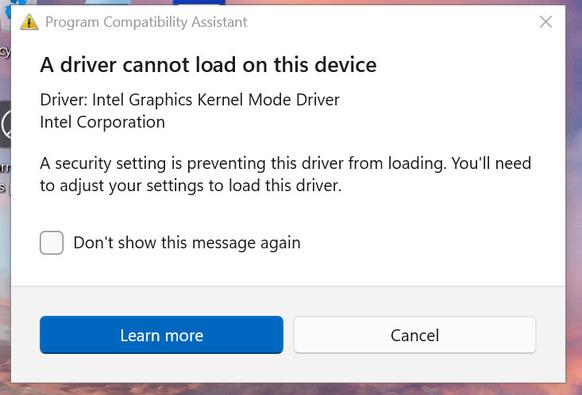
If you remove the driver, the laptop defaults to the base Microsoft video driver with the horrid resolution, but you can enable memory integrity at this point. Reboot, and windows will alert that the driver cannot load because a security setting is blocking the loading of the driver.

I have dug around at length, there is no updated driver for Windows 10 or 11 (abandoned by Intel). I have tried windows update, Intel's own driver update tool, and the usual ThinkPad forums with no success. Ive found multiple posts of less experienced folks trying to decipher this issue and situation, all threads become dead ends.

So either you use the default Windows #VGA driver with memory integrity enabled and horrible resolution, or the #windows8 driver release with memory integrity disabled. Looks as I need to have a hardened configuration with #AV #EDR on this #T430s to manage the risks - more on that approach later.

#siliconValley #SillyValley
#vintagecomputing
#vintagecomputing #vintagecomputint #vintagecomputer #vintagecomputers #vintagecomputalk
#vintagehardware
#computerHistory
#retro
#retrocomputing #retroComputers
#WallOfRetro
#retroTech #retroTechnology
#nerdsOfVintage #happyNerding
#computer #tech
#nerds #nerd

Just found out that #hybridSleep is no longer available on my #Windows11 system. Turned out that it was due to #coreIsolation #memoryIntegrity that I had switched on a while ago.

This is a hard one.

#physicalSecurity competing against #infoSec, if you will.

I guess I'll keep memory integrity enabled, then. ;-)

Microsoft: Turn off Memory Integrity if it’s causing problems - Microsoft has finally clarified how users can fix a Windows security measure that has been causing... more: https://nakedsecurity.sophos.com/2020/03/09/microsoft-turn-off-memory-integrity-if-its-causing-problems/ #memoryintegration #securitythreats #memoryintegrity #microsoft #windows10 #windows #flaws
Microsoft: Turn off Memory Integrity if it’s causing problems

Naked Security