@jorjorbinks I just fixed an old #Thinkpad #T430s from 2012 with a spare screen that I got my hands on for free. Generation 7 Core i5, 8 GB of RAM and I also installed #Ubuntu 26.04. I am honestly astonished how smooth it runs regular tasks. Sadly the screens of the T430s were really horrible. But it’s a neat addition for my father’s workshop and I could save something from the trash.

That 99 Euro T430s I grabbed off of Kleinanzeigen is REALLY pretty actually. Very well maintained. In fact it looks barely used at all. 🤷

I am sure the battery is pretty shitty (didn't try yet) but hey. Immediately flattened that Windoze with Debian 12 of course. Went for KDE this time, never played with that before. Looks neat! 😎

All it needs now is a BIOS update since it's still cranking on the 2013 version. 😬

#thinkpad #t430s #ItsFastEnough

3/2

The one issue I was able to figure out with this #lenovo #T430s was printing on #windoz11

With my #HP #laserjet using #jetdirect cards with an local #IP address have worked fine over the years (and the cheap toner cartridges make it all the better)

But when installing 11, adding and using printers over the #network is nothing but frustration. The #printer would not add/configured, or if it did get added then test prints would sit in the print queue and fail. I could ping the printer, but there was no visible communication with it.

Searching at length, I fumbled across this post

Windows 11 22H2: network printing switched to RPC over TCP
https://www.ghacks.net/2022/11/02/windows-11-22h2-network-printing-switched-to-rcp-over-tcp/

So Microsoft changed the default print related communications for endpoints in #Windows 11 version #22H2 Endpoints now use #RPC over #TCP instead of over Named Pipes.

If you are in this situation, there are some registry edits that can be made manually via #powershell or via #grouppolicy that are documented in that linked article.

I made the edits on the #T430s and am now able to print to my #4050TN Now, for some reason my #ThinkPadP1 is still having issues with printing after the #registry tweaks, with test jobs still sticking in the queue. More #troubleshooting is needed, or I may just #wipe & #reinstall

#vintagecomputing
#vintagecomputing #vintagecomputint #vintagecomputer #vintagecomputers #vintagecomputalk
#vintagehardware
#computerHistory
#retro
#retrocomputing #retroComputers
#WallOfRetro
#retroTech #retroTechnology
#nerdsOfVintage #happyNerding
#computer #tech
#nerds #nerd
#Lenovo #thinkpad #laptop #laptop_computer

Windows 11 22H2: network printing switched to RPC over TCP - gHacks Tech News

Microsoft changed the default print related communication for client server communications in Windows 11 version 22H2 to improve security.

gHacks Technology News

1/2
Challenges with #windoz10 #windoz11 on a #thinkpad #T430s

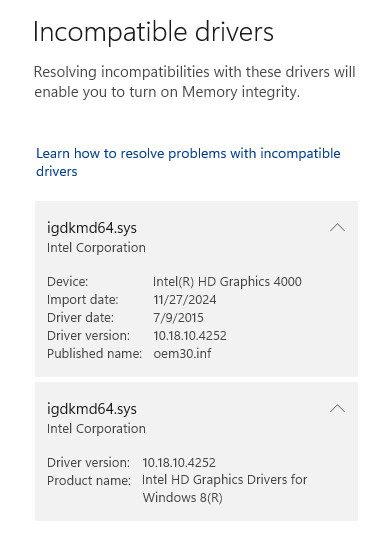
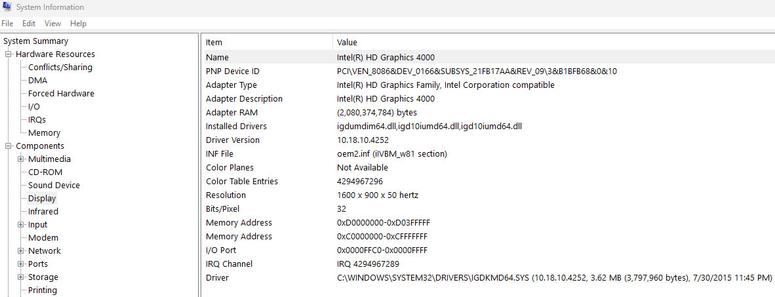
Good old #intel #intel_corp never bothered to update & release #drivers for the HD #graphics #4000 #graphics4000
The driver is for #windows8 only

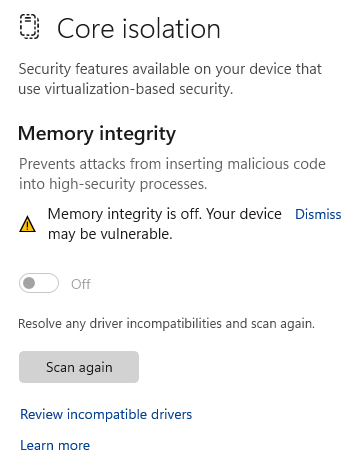
I figured this out by having the #windowsSecurity alerting that #coreIsolation - specifically #memoryIntegrity could not be enabled. With #idgkmd64.sys being released of July 2015.

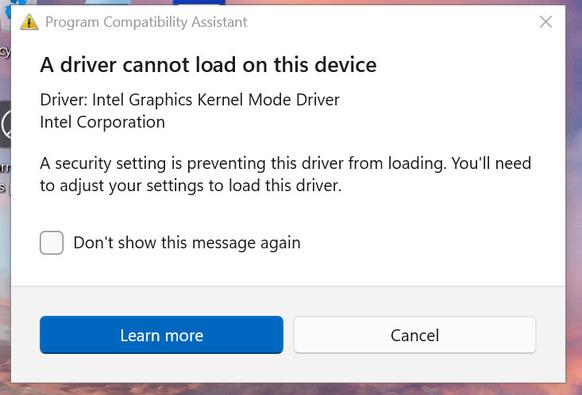
If you remove the driver, the laptop defaults to the base Microsoft video driver with the horrid resolution, but you can enable memory integrity at this point. Reboot, and windows will alert that the driver cannot load because a security setting is blocking the loading of the driver.

I have dug around at length, there is no updated driver for Windows 10 or 11 (abandoned by Intel). I have tried windows update, Intel's own driver update tool, and the usual ThinkPad forums with no success. Ive found multiple posts of less experienced folks trying to decipher this issue and situation, all threads become dead ends.

So either you use the default Windows #VGA driver with memory integrity enabled and horrible resolution, or the #windows8 driver release with memory integrity disabled. Looks as I need to have a hardened configuration with #AV #EDR on this #T430s to manage the risks - more on that approach later.

#siliconValley #SillyValley
#vintagecomputing
#vintagecomputing #vintagecomputint #vintagecomputer #vintagecomputers #vintagecomputalk
#vintagehardware
#computerHistory
#retro
#retrocomputing #retroComputers
#WallOfRetro
#retroTech #retroTechnology
#nerdsOfVintage #happyNerding
#computer #tech
#nerds #nerd

@RL_Dane @e33io I'll leave the soldering to braver peeps than me.  My #T430s is running #1vyrain though (a straight flash): https://1vyra.in
Anyone here with a #t430s swapped out the optical drive with a hdd/ssd? The caddies look pretty inexpensive and I don't think the optical drive even works. Is there one you like? Any duds to avoid?