
#howTo
#linux #debian #ubuntu #ubuntu​Studio #KDE #Keybind #shortcuts #keyMapping #Umlaute

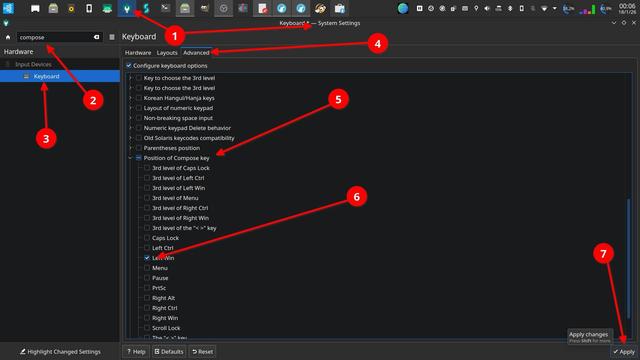
To be able to use the option to compose letters for example the german Umlaute "ä, ö, ü" or the spanisch "ñ" you have to activate the compose key option in the system settings menu. Once you have defined and activated a key on the keyboard for that specific purpose, you can compose the letters by combining respective or similar symbols with it while pressing the compose key.

Example:
["]+[composeKey] and than [u] => ü
[~]+[composeKey] and than [n] => ñ
[']+ [composeKey] and than [e] => é

#howTo
#linux #debian #ubuntu #ubuntu​Studio #KDE #Keybind #shortcuts #keyMapping

How to (re)map keys.
In the case of a #keyboard at hand there are two keys (down arrow and right arrow) that don't work anymore.
Solved this with (re)assigning the arrow up and arrow left keys in combination with the ALT key:
[ArrowUp]+[ALT] = arrow down
[ArrowLeft]+[ALT] = arrow right
The commands in the [Action] box are respectively Down and Right.

superuser.com wrote:

System settings:
  • => "Custom Shortcuts"
  • => "Edit" menu button at the bottom
  • => "New"
  • => "Global Shortcut"
  • => "Send Keyboard Input"

https:// superuser.com/questions/1826459/how-to-remap-key-combination-on-linux-wayland-kde-meta-arrow

I have a couple of old macs running Ubuntu and I would really like to map ⌘-x ⌘-c and ⌘-v to the cut, copy and paste in all my Gnome apps, including terminal (and ⌘-t to open a new tab in firefox).

This is not in Gnome tweaks.

Otherwise, switching between my work mac and a linux mac will actually break my brain.

#Ubuntu #Gnome #Mac #KeyMapping

@lps @tonton @friction I love the idea of more application having similar shortcuts but I suspect that this could only work for applications that have similar functionality.

#Blender #Friction #shortcut #key #keymapping

For those curious about my mapping and layers, here you go

#mechanicalkeyboard #keymapping

Here is the before and after from tonight’s new keyboard layout

#mechanicalkeyboard #keymapping

Muscle memory won out… I can no longer continue with the sudo split layout with my keyboard anymore. Here is the new layout (did a few tweaks)

#mechanicalkeyboard #keymapping

@gnulinux
Wenn das eine Innovation für Europa sein soll, sehe ich mehr Nachteile als Vorteile:

- Basis ist amerikanisches Layout (Tipp: dann nehmt doch einfach das amerikanische )
- dementsprechend sind alle Sonderzeichen amerikanisch gelayoutet (Innovation: null)
- der super key hat ein proprietäres windows branding
- das überflüssige Capslock wird fortgeschrieben

#keyboardlayout #keymapping

Classic PC gaming on Linux is a treat in so many ways.

Here's a collection of sc-controller (user-mode driver and GTK3 based graphical user interface for Steam Controller) keymap profiles to play old DOS games using, yes, that modern Steam Controller!

--->

https://github.com/neuromancer/DOS-sccprofiles #Linux #classic #gaming #DOS #Steam #controller #profiles #keymapping #PC

neuromancer/DOS-sccprofiles

DOS-sccprofiles - A collection of sc-controller profiles to play old DOS games