@studi0 @tutorial #ubuntuStudio2022.04lts
#linux #debian #bookworm

Ubuntu 22.04.5 LTS (Jammy Jellyfish)
cdimage.ubuntu.com/ubuntustudi…

Installation notes and customization hints.

Ubuntu studio by default uses #KDE and comes with a lot of preinstalled software for creating audiovisual content like KDEnlive, GIMP, audacity, OBS and brings a low latency kernel.

After having used it for a while we create a new installation on a recently acquired used #thinkpad 460s installing the newer long time support version 2024.04. Apparently there have been a lot of changes from 2022.04 to 2024.04 and somehow till this very day the 2024.04 version doesn't work as expected and we don't find it fully reliable. For that reason we stepped back to the 2022.04lts version, installing it alongside the 2024.04lts version on the same hard disk.

Apparently the torrent live .ISO is corrupted, at least we weren't able to make it work.
The web site download did work fine for installation:
cdimage.ubuntu.com/ubuntustudi…

Ubuntu Studio 22.04.5 LTS (Jammy Jellyfish)

CD images for Ubuntu Studio 22.04.5 LTS (Jammy Jellyfish)

#Keybind #shortcuts
#linux #debian #ubuntu #KDE

#howTo set a keyboard key to turn the screen off.

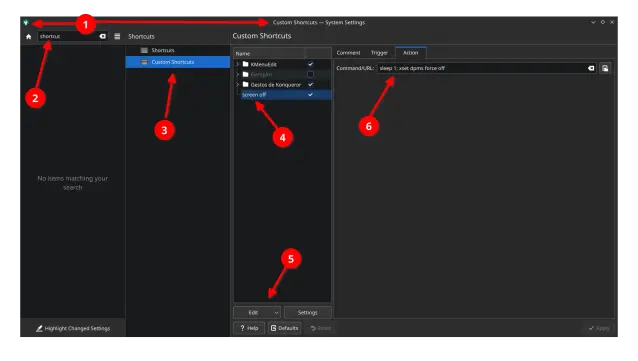
Creating a shortcut in settings -> shortcuts -> power management -> turn off screen doesn't work correctly.

To solve this create a customized shortcut:
Settings -> custom shortcuts -> EDIT - new -local shortcut - command

Enter as command line:
sleep 1; xset dpms force off

[sleep 1] delays command. This apparently solves the problem.
tested 2022.04 y 2024.04

@utopiarte @tutorial @studi0

#howTo
#linux #debian #ubuntu #ubuntu​Studio #KDE #Keybind #shortcuts #keyMapping

How to (re)map keys.
In the case of a #keyboard at hand there are two keys (down arrow and right arrow) that don't work anymore.
Solved this with (re)assigning the arrow up and arrow left keys in combination with the ALT key:
[ArrowUp]+[ALT] = arrow down
[ArrowLeft]+[ALT] = arrow right
The commands in the [Action] box are respectively Down and Right.

superuser.com wrote:

System settings:
  • => "Custom Shortcuts"
  • => "Edit" menu button at the bottom
  • => "New"
  • => "Global Shortcut"
  • => "Send Keyboard Input"

https:// superuser.com/questions/1826459/how-to-remap-key-combination-on-linux-wayland-kde-meta-arrow

#howTo
#linux #debian #ubuntu #ubuntu​Studio #KDE #Keybind #shortcuts #keyMapping #Umlaute

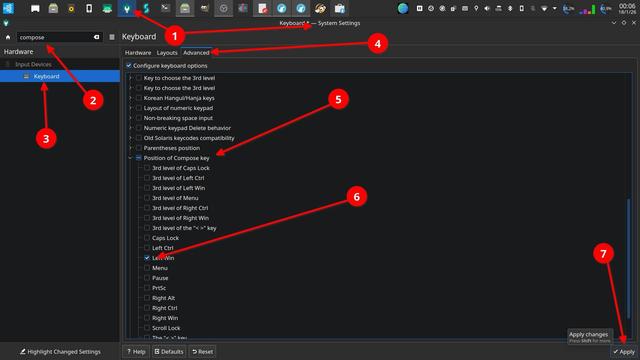
To be able to use the option to compose letters for example the german Umlaute "ä, ö, ü" or the spanisch "ñ" you have to activate the compose key option in the system settings menu. Once you have defined and activated a key on the keyboard for that specific purpose, you can compose the letters by combining respective or similar symbols with it while pressing the compose key.

Example:
["]+[composeKey] and than [u] => ü
[~]+[composeKey] and than [n] => ñ
[']+ [composeKey] and than [e] => é

@utopiarte I can also recommend the eurKey layout for an english layout with umlauts