WE AND THE COLOR
Top 10 Design Gadgets for Creative Professionals That Will Change How You Work in 2026
It’s not a single product launch or a sudden software update. No, it’s the quiet but unmistakable feeling that the hardware surrounding creative work is finally catching up with how designers, illustrators, and visual thinkers actually work. The best design gadgets for creative professionals in 2026 are not just faster or thinner versions of what came before. They represent a fundamentally different relationship between tool and process.
Consider this: the lines between sketchpad, workstation, and smart controller have completely dissolved. Today’s creative professional moves fluidly between analog thinking and digital execution. As a result, the right gadgets no longer just run software — they reshape the rhythm of creative work itself.
This is not a list of every shiny release from the past year. These are the ten design tools in 2026 that carry genuine creative weight. Each one changes something about how work gets made, reviewed, or delivered. Some have been refined over the years. Others arrived this cycle as true step changes. All of them belong on a serious creative desk.
What Makes a Gadget Actually Useful for Creative Professionals in 2026?
Most lists answer this question by listing specs. Processor speed, resolution, and refresh rate. Those numbers matter, but they don’t tell the whole story. The more useful question is: Does this tool reduce friction between the idea and the output?
That framing — which I call the Friction Reduction Index — is the editorial standard used here. A gadget earns its place on this list when it shortens the distance between creative intent and finished result. Furthermore, the best tools in 2026 share a secondary quality: they reward skill. They get better as you understand them. Consequently, they scale with a professional’s ambitions rather than capping them.
With that framework in place, here are the ten design gadgets that pass the test.
1. Apple iPad Pro M5 — The Portable Studio Standard for Design Professionals
The iPad Pro line has always attracted two types of users: those who treat it as a companion device and those who treat it as a primary creative surface. Apple’s M5 generation iPad Pro delivers up to 3.5 times faster AI performance compared to the M4 and up to six times faster than M1 systems. That number stops being abstract when you run Procreate at maximum canvas size, Photoshop on a high-resolution composite, or Affinity Designer on a detailed brand system simultaneously.
What defines this device in 2026 is not raw power alone. It’s the ecosystem. The M5 iPad Pro features iPadOS 26, which introduces Background Tasks that unlock new capabilities for creative professionals, including more control over audio input and the ability to capture high-quality recordings with local capture. These are workflow gaps that professional users identified years ago. Their arrival signals maturity.
Why the iPad Pro M5 Belongs in a Professional Design Kit
The Tandem OLED display still sets the benchmark for mobile color work. Brightness, contrast, and color accuracy are all exceptional. Apple Pencil Pro adds hover detection, haptic feedback, and barrel roll — giving the experience a tactile dimension that pure touchscreen devices lack.
On iPad Pro M5, Octane X delivers up to 6.7 times faster 3D rendering with ray tracing compared to M1 and up to 1.5 times faster than M4. For motion designers and 3D artists, that means real interactive previews during the creative process itself, not just at final render time.
The iPad Pro M5 is, simply put, the most capable portable design surface currently available. It doesn’t replace a workstation for every task. But it handles more professional workflows than ever before — and it does so with a 5.1mm profile you can carry anywhere.
2. Wacom Cintiq 24 (2025) — The Refined Creative Pen Display for Studio Work
Wacom’s Cintiq line went five years without a meaningful update. The 2025 release was worth waiting for. The new Cintiq 24 is the first update to Wacom’s mid-range professional pen displays since 2019. It features a higher-resolution 2.5K display, a slimmer design, and the upgraded Pro Pen 3.
The Pro Pen 3 is the headliner. Multiple professional reviewers called it one of the best pens on the market today, praising its smooth and responsive feel. That opinion carries weight from illustrators and concept artists who work with this hardware daily.
The Case for a Dedicated Pen Display in 2026
An iPad Pro and a Wacom Cintiq are not competing products. They answer different questions. The iPad is for mobility, flexibility, and direct touch interaction. The Cintiq is for sustained, precision-critical studio work where your dominant hand never leaves the pen.
The 2025 Cintiq uses a fanless advanced thermal design, keeping the screen cool and quiet — a critical feature for anyone who records voiceovers or works in silent studio environments. Additionally, the 24 Touch model adds 10-finger multitouch, a feature previously limited to the Cintiq Pro line.
At $1,299.95 for the Cintiq 24, this is the most accessible large-format professional pen display Wacom has produced. For illustrators, character designers, and photo retouchers, it represents a clear upgrade path that doesn’t require a Cintiq Pro budget.
3. Apple MacBook Pro M5 — The Design Workstation That Fits in a Bag
The MacBook Pro remains the reference machine for most creative studios. With M5, that position strengthens. Apple’s announcement positioned M5 across the MacBook Pro, iPad Pro, and Vision Pro simultaneously — a coordinated ecosystem release designed specifically for professionals who work across multiple contexts throughout the day.
For designers, the GPU performance gains are the real story. On MacBook Pro, Blender renders up to 1.7 times faster than M4 systems and up to 6.8 times faster than M1 models. That improvement hits differently when you’re iterating on a motion identity or preparing a 3D brand world for a client presentation.
Why MacBook Pro M5 Still Defines the Creative Laptop Category
Battery life remains exceptional. The display calibration is among the best in any laptop form factor. The unified memory architecture means that 16GB performs like far more on competing platforms. Furthermore, the build quality sets a standard that remains unmatched.
Yes, the MacBook Pro is expensive. But for a professional billing creative work, the long-term cost-per-hour calculation consistently favors the Apple Silicon machines. The MacBook Pro with M4 Max packs a desktop-class chip into a 14-inch body with 24-hour battery life without performance throttling — and M5 extends that further.
If you’re on pre-M-chip hardware, the M5 upgrade is the most significant performance jump available in the laptop design tool category right now.
4. reMarkable Paper Pro — The Focused Thinking Tool for Design Ideation
Not every design problem starts at a screen. The best ones often start on paper — with loose thinking, rough sketches, and undirected exploration. The reMarkable Paper Pro exists precisely for that phase.
The reMarkable Paper Pro features an 11.8-inch e-ink display with a color Canvas display, designed to replicate the tactile feel of writing on paper while providing digital organization and connectivity. The result is something genuinely different from any other device in this list.
How the Paper Pro Fits a Professional Creative Workflow
With a pen-to-ink delay of just 12 milliseconds, strokes appear almost instantly — comparable to writing on real paper. The screen’s textured resistance gives a satisfying, tactile feel whether sketching or taking notes. That distinction matters enormously for ideation. An iPad, however good, always feels like a digital surface. The Paper Pro feels like a sketchbook.
The newer Paper Pro Move variant, launched in 2026, brings that experience to a 7.3-inch portable form factor. The Paper Pro Move fits in a jacket pocket and features a 15-day battery life, making it purpose-built for thinkers who move between locations and need a distraction-free capture tool.
The no-apps philosophy is a genuine strength, not a limitation. There are no notifications. No context switching. No temptation to check messages mid-session. For a design professional who struggles to protect deep work time, the Paper Pro operates as something I call a Cognitive Cleanroom — a device deliberately stripped of everything that competes for attention.
5. Elgato Stream Deck + — The Physical Workflow Controller for Creative Desks
Ask any designer who uses a Stream Deck when they got one, and watch their face. Almost universally, the answer comes with visible regret that they waited so long. The Elgato Stream Deck + is the model that makes the most sense for creative professionals specifically.
The Stream Deck + introduces a new form factor built specifically for creative professionals, featuring eight LCD keys, a dynamic touch panel, and four push-to-click dials. Video editors particularly value the tactile precision of the dials for scrubbing timelines and making fine adjustments that are difficult with a mouse.
Stream Deck + as a Creative Command Layer
The concept is simple: physical shortcuts for every application action you perform repeatedly. In Photoshop, that might mean a single button to toggle layer visibility, run a batch export, or switch tools. Or in Adobe Premiere, the dials control timeline scrubbing and audio levels. And in Figma, you trigger component swaps or export specs with one press.
I think of this device as installing a Physical Command Layer on top of software workflows. Mouse and keyboard handle input. The Stream Deck handles commands. The split significantly reduces cognitive load — you stop navigating menus and start executing decisions.
The deep plugin ecosystem supports hundreds of integrations. The Stream Deck software is intuitive, easy to use, and designed with thoughtfulness that reflects intelligent design — setup for complex tools like OBS, Lightroom, and Photoshop is straightforward through drag-and-drop configuration. Given the $199 price point, the return on invested time is exceptional.
6. Logitech MX Master 3S — The Precision Input Device for Daily Design Work
Every creative professional needs a mouse. Most settle for whatever came in the box. The MX Master 3S is the answer for those who’ve stopped settling.
The Logitech MX Master 3S is specifically designed for productivity and creative workflows. The tactile feedback and distinct actuation point can lead to faster, more accurate input with less fatigue. After daily use, that difference compounds into real ergonomic and output benefits.
What Makes the MX Master 3S a Professional Design Tool
The electromagnetic scroll wheel switches between ratcheted and free-spin modes. For designers scrolling through long artboards, component libraries, or high-resolution reference images, the free-spin mode removes friction from the most common navigation action. The horizontal scroll wheel maps natively to timeline scrubbing in video tools and canvas panning in illustration software.
Furthermore, the multi-device pairing and seamless computer switching make it ideal for studios running multiple machines — a MacBook Pro for daily production and a desktop for rendering, for example. The MX Master 3S carries both without requiring a second device.
This is the mouse that rewards the professional who considers every touch point in their workspace. Its design intelligence is restrained, functional, and precise — qualities that describe the best creative tools.
7. Sony WH-1000XM6 — The Acoustic Environment Tool for Focused Creative Work
Sound shapes creative output more than most designers acknowledge. A noisy workspace raises cognitive load. An actively managed acoustic environment lowers it. Sony’s WH-1000XM6, released in late 2025, represents the clearest expression of that principle in headphone form.
The sixth generation of Sony’s flagship noise-canceling headphones refines the already-dominant XM5 platform with improved multipoint connectivity, wider soundstage calibration, and faster wear detection. The ANC performance remains best-in-class for open-plan office and travel use. For a designer moving between studio, client meetings, and transit, a single device that handles all three acoustic environments is essential infrastructure.
Sound as a Design Tool
There’s a framework I apply here: the Acoustic Design Environment principle. What you hear while you work shapes the tone, pace, and emotional register of what you create. A designer scoring motion work through open-back monitors in a treated room produces differently from one working in a noisy café. The WH-1000XM6 gives mobile creatives environmental control that was previously only available in dedicated studios.
The 30-hour battery life and USB-C fast charging make them practical for long sessions. The sound profile, while slightly V-shaped out of the box, responds well to EQ tuning through the Sony Connect app. For reference listening, additional transparency is available via the ambient mode, which is precise enough for critical review work.
8. DJI Osmo Pocket 4 — The Compact Camera System for Visual Content Creators
Designers who produce content — for clients, for their own platforms, or for editorial use — need camera hardware that matches the visual standards they hold for their work. The DJI Osmo Pocket 4 answers those needs with remarkable efficiency.
The Osmo Pocket 4 records in 4K at 240fps, offers an optional light accessory for recording in dark interiors, and delivers better image stabilization and subject tracking compared to the previous generation. The gimbal stabilization built into the compact body removes one of the primary technical barriers to professional-quality handheld video.
Why Visual Creators Need Dedicated Camera Hardware
Smartphone cameras continue to improve. But they struggle with sustained 4K capture, optical stabilization under movement, and ergonomic control during extended takes. The Osmo Pocket 4 solves all three without requiring a full cinema rig.
For a brand designer shooting client case study footage, a graphic designer documenting process work, or a creative director capturing content for their studio’s social presence, this device strikes the right balance between portability and professional quality. It fits in a jacket pocket, shoots footage that matches modern distribution standards, and it requires no dedicated operator — the tracking system handles subjects automatically.
9. XPPen Artist Ultra 16 — The Color-Critical Pen Display for Budget-Conscious Professionals
Wacom doesn’t own the pen display category anymore. XPPen’s Artist Ultra 16 makes that point with considerable force.
The XPPen Artist Ultra 16 features a 15.6-inch 4K OLED display with a 100,000:1 contrast ratio, 99% Adobe RGB, 99% sRGB, and 98% DCI-P3 color space coverage. The Dual X3 Pro Series delivers 16,384 pressure levels with sub-1ms response time.
When XPPen Artist Ultra 16 Makes More Sense Than a Cintiq
The honest answer is: often. For a freelance designer or illustrator who needs color-accurate pen display work without the Wacom premium, the Artist Ultra 16 is one of the strongest value propositions in professional creative hardware right now.
The OLED panel is the decisive advantage over competing non-OLED displays in this price range. True blacks, exceptional contrast, and color fidelity that holds up against print-calibration requirements. The ACK05 Shortcut Remote adds physical control shortcuts that improve workflow efficiency during sustained drawing sessions.
The Hardware Value Threshold — the point at which additional investment stops improving creative output — sits considerably lower than most professionals assume. The XPPen Artist Ultra 16 demonstrates that professional color work no longer requires a professional-tier budget.
10. Elgato Key Light MK.2 — The Lighting System for the Modern Creative Environment
Lighting belongs on a list of design gadgets. That statement would have seemed eccentric five years ago. In 2026, with video meetings, creator content, and remote client presentations as standard professional activities, lighting quality is a direct representation of professional credibility.
The Elgato Key Light MK.2 provides 2,800-lumen panel output with adjustable color temperature (2,900–7,000K) and software-controlled brightness via the Elgato Connect app. The updated MK.2 addresses mounting flexibility shortcomings from the original with a redesigned arm and desk clamp system.
Why Lighting Is a Design Professional’s Tool in 2026
A designer presenting work via video call shapes how that work is received before a single pixel loads. Flat overhead lighting creates a visual context that subtly undermines the quality of the work being presented. Properly balanced key lighting creates visual authority. It communicates that the person on screen takes presentation seriously — which in client-facing creative work, carries real commercial weight.
Furthermore, for designers who produce video content, tutorials, or social documentation of their process, the Key Light MK.2 removes the single biggest quality gap in most home studio setups. Pairing it with the Stream Deck + creates an integrated output environment where lighting, audio, and software control all respond to a single physical interface.
The 2026 Creative Stack: How These Gadgets Work Together
The most effective creative setups in 2026 don’t rely on any one device. They assemble what I call a Layered Toolkit Architecture — where each gadget addresses a distinct phase of the creative workflow without unnecessarily overlapping.
A practical example of that architecture: the reMarkable Paper Pro handles ideation and concept capture. The iPad Pro M5 with Apple Pencil handles mobile sketching, client presentations, and tablet-first workflows. The MacBook Pro M5 handles production software, rendering, and asset management. The Wacom Cintiq 24 handles precision illustration and photo work. The Stream Deck + automates repetitive commands across all software. The MX Master 3S handles precision input. The Key Light MK.2 manages the visual output environment. The WH-1000XM6 manages the acoustic environment.
Together, these tools form a complete system. Each one is replaceable in isolation. Together, they create a creative environment that removes friction at every point in the process.
Additional Considerations: Design Gadgets for Specific Creative Specializations
Not every professional needs all ten devices. The best graphic design tools for freelancers may look different from a motion design studio setup or the ideal kit for a UX designer working remotely. Here’s a quick breakdown by role.
Brand and print designers should prioritize the Wacom Cintiq 24 or XPPen Artist Ultra 16 alongside color-calibrated display hardware. The color accuracy tools matter more here than raw processing power. UX and product designers benefit most from the iPad Pro M5 — Figma’s iOS implementation, paired with Apple Pencil and Stage Manager, which handles most UX workflow stages with exceptional mobility. Motion designers and video-focused creatives should treat the MacBook Pro M5 and DJI Osmo Pocket 4 as core investments. Additionally, the Stream Deck +, with its timeline scrubbing dials, is especially relevant for editors working in Premiere Pro or DaVinci Resolve.
What to Expect from Creative Hardware in the Next 18 Months
Several trends in the current hardware landscape suggest where design gadgets for creative professionals are heading next. AI hardware acceleration is now standard across Apple Silicon, NVidia, and AMD platforms — and software will increasingly leverage that capability for real-time generative assistance within professional tools. Expect Photoshop’s AI features, Figma’s AI layout tools, and Procreate’s generative brushes to get dramatically faster.
Spatial computing is a slower burn. Apple Vision Pro with M5 hardware is powerful, but design software hasn’t yet adapted fully to the spatial interface paradigm. The next 18 months will likely see Figma, Adobe, and Sketch release spatial-native workflows that make Vision Pro genuinely compelling for design review and presentation. That’s not here yet. But it’s close.
E-ink color display technology is improving faster than expected. The reMarkable Paper Pro demonstrates what’s possible at 20,000 colors. Within two product generations, that category will deliver full professional color for annotation and sketchwork. When that happens, the lines between the Paper Pro and an iPad will blur significantly.
Frequently Asked Questions: Design Gadgets for Creative Professionals in 2026
What are the must-have design gadgets for graphic designers in 2026?
The essential hardware for a graphic designer in 2026 includes a high-performance laptop or desktop, a color-accurate pen display (Wacom Cintiq 24 or XPPen Artist Ultra 16), a precision mouse (Logitech MX Master 3S), and a workflow controller (Elgato Stream Deck +). For mobile work, the iPad Pro M5 with Apple Pencil Pro is the strongest portable option available.
Is the iPad Pro M5 good enough to replace a laptop for design work?
For many creative workflows, yes. The iPad Pro M5 handles Procreate, Adobe Photoshop, Illustrator, Affinity Designer, and Fresco at professional quality. iPadOS 26 also adds new multitasking and background processing capabilities. However, for print production, complex motion design, or software requiring macOS or Windows, a laptop or desktop remains necessary.
What is the best pen display for professional illustrators in 2026?
The Wacom Cintiq 24 (2025) is the best dedicated pen display for professional illustrators who prioritize pen feel and workflow integration. For illustrators who want 4K OLED color accuracy at a lower price point, the XPPen Artist Ultra 16 is an exceptional alternative.
Do creative professionals really need a Stream Deck?
Yes — for anyone using professional creative software daily, a Stream Deck delivers measurable productivity gains. It converts multi-step software actions into single button presses, reduces context switching, and eliminates menu navigation for common commands. The Elgato Stream Deck +, with its combination of keys and dials, is the most versatile option for design and editing workflows.
What is the best laptop for design professionals in 2026?
The Apple MacBook Pro with M5 chip is the top recommendation for most creative professionals in 2026. It delivers exceptional GPU and CPU performance, industry-leading display calibration, all-day battery life, and deep compatibility with professional creative software. For Windows users, the Dell XPS 15 with NVIDIA RTX hardware remains a strong alternative.
Is the reMarkable Paper Pro useful for professional designers?
Yes, particularly for ideation, client meeting notes, concept sketching, and annotation workflows. The Paper Pro’s paper-like display and 12ms pen latency create a writing and sketching experience that feels genuinely different from glass-surface tablets. It functions best as a dedicated thinking and capture tool rather than a production device.
What design gadgets are best for remote or freelance designers?
For remote and freelance designers, portability and multi-functionality matter most. The iPad Pro M5, MacBook Pro M5, reMarkable Paper Pro Move, Logitech MX Master 3S, and Elgato Key Light MK.2 form a highly effective remote studio. Together, they cover ideation, production, precision input, and professional video presence for client-facing work.
How much should a creative professional budget for hardware in 2026?
A professional-grade creative setup in 2026 requires realistic investment. A core laptop, display, tablet, and controller setup typically ranges from $3,000 to $8,000, depending on specifications. Prioritizing the laptop and pen display first, then adding workflow controllers and environment tools as budget allows, is the most effective approach. The XPPen Artist Ultra 16 and Elgato Stream Deck + offer the strongest value at their respective price points.
Hungry for more? If so, feel free to visit WE AND THE COLOR’s Design and Technology categories.
#apple #design #designGadgets #devices #technology #tools #wacom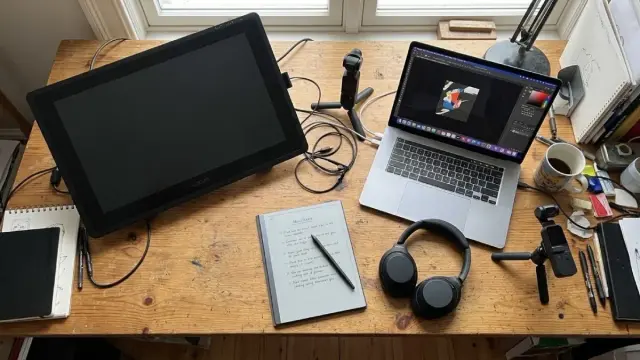
 Curious Goblin