Dear #Obsidian users,

I have a problem with a #DataviewJS query within the Simple Note Reviews plugin.

I'm trying to use one tag and exclude one folder, but however I try to write it it comes out wrong.

This is the gist of what I am trying to have:
```
#Active AND !('./logseq/bak')
```

#Obsidian #Dataview question: I remember faintly some trick to get a value from an inline field combined with an HTML dropdown menu, so to customize a #DataviewJS query.
Can anyone say if this still works and how it was achieved? For sure there's an extra plugin, but would it work without one?
#AskFedi

My journey with #obsidian is just about to cross the two-year mark: I started my “Evaluate Obsidian” project on Nov 10, 2023 after I encountered a “block limit” with my previously preferred note-taking app, Craft.

It’s been a long #pkm exploration to decide how I wanted to use this app—tracking everything from meetings to exercise to books I’m reading—and have vibe-coded a lot of #dataviewjs code.

I’m just about to embark on a new “quantified self” chapter by building some data visualizations like burn-down charts for projects and scatterplots for weigh-ins and I’m seriously considering blogging about my experience.

I might do this for no other reason tha simply sharing the joy of that discovery with others. But I’m curious: is that anything that anybody would be interested in reading?

Sometimes, figuring stuff out for myself in #ObsidianMD when using #dataview and #dataviewJS is super rewarding. Other times I just want to bonk my head against the desk repeatedly whilst chanting "I'm a numpty. I'm a numpty. I'm a numpty"

Today the numpty chant was brought on by simply trying tp sort a list of sections (each section heading is the name of one of the NPCs in my #dnd campaign planning vault) into alphabetic order.

Took me way too long to figure out and was litterally fixed by adding one word to my query.

Oh well, at least my NPC overview file is useable now.

I need a drink.

https://gitea.com/medic/obsidian

A loose collection (growing) of @obsidian related #python scripts and some #dataviewjs for my vault. Might be of interest to you, too.

obsidian

obsidian

Gitea: Git with a cup of tea

Making Clickable Navigation Maps with dataviewJS - Share & showcase - Obsidian Forum

Key Points:
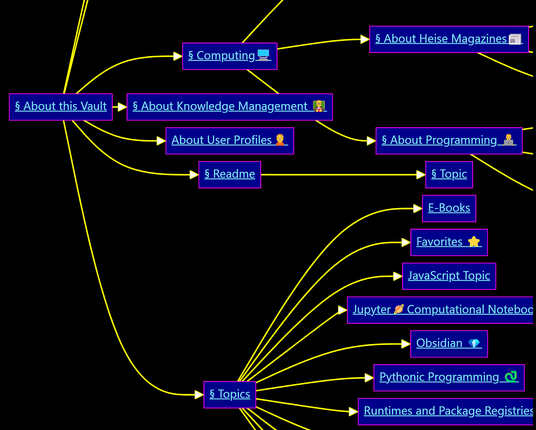
➡️ Use dataviewJS to create clickable Mermaid navigation maps in Obsidian.
➡️ Organize notes using folder structures and frontmatter types like 'readme' and 'about'.
➡️ Plugins like Excalibrain and Smart Connections can also enhance note organization.

#Obsidian #DataviewJS #MermaidMaps #NoteOrganization #Ontology #PKM

https://forum.obsidian.md/t/making-clickable-navigation-maps-with-dataviewjs/90546

Making Clickable Navigation Maps with dataviewJS

This post describes a method to use a dataviewJS query to scan notes in your vault to generate a clickable Mermaid navigation map. You might find this useful if: you have the dataview plugin installed and enabled. you use the folder structure in Obsidian to organize notes with a is a sub-topic of relationship. You use files like README to provide instructions and background information for the content of certain important folders. you use frontmatter to establish a simple type classificatio...

Obsidian Forum

A brute force dataviewJS query to create a multi-column picture table - Share & showcase - Obsidian Forum

The post presents a dataviewJS query for creating a multi-column picture table in Obsidian. It explains the need for organizing similar pictures in a vault and provides a detailed code snippet for the query.

#DataviewJS #DataView #PictureGallery #Obsidian #PKM #KnowledgeManagementTools #KnowledgeManagement

https://forum.obsidian.md/t/a-brute-force-dataviewjs-query-to-create-a-multi-column-picture-table/89745

A brute force dataviewJS query to create a multi-column picture table

Recently I needed discovered that I had a lot of similar pictures in my vault because it seemed easier to paste new ones on the spot. Unfortunately using different pictures for the same concepts creates a messy knowledge graph which is difficult to remember. Hence, I needed a solution with following features: Works out-of-the-box, no configuration necessary Scans down a directory tree and collect all images Presents images in a multi-column table format along with their filenames Allow drag an...

Obsidian Forum

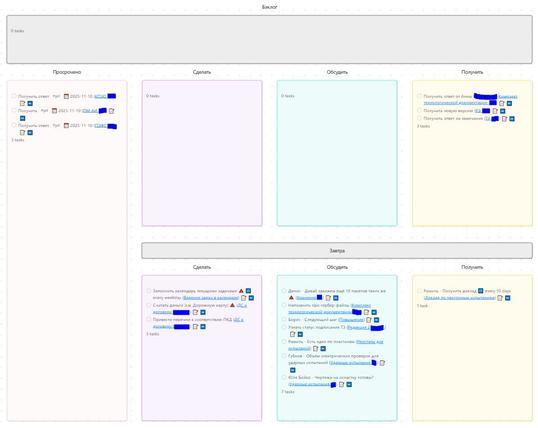
Управление личными делами в Obsidian (прототип)

В статье будет показан прототип системы дел, который реализован в Obsidian . Система в основном будет базироваться на идеях GTD . Задачи будут создаваться в дневнике/журнале и агрегироваться в отдельных заметках с использованием плагина Tasks . Система будет адаптирована для телефонов. Статья написана для продвинутых юзеров Obsidian. Новичкам, конечно, с ней будет тяжеловато разобраться. Задачи и Obsidian? Звучит интересно!

https://habr.com/ru/articles/833654/

#obsidian #tasks #dataview #dataviewjs #обсидиан #задачи #система_дел #база_знаний #task_managment #journal

Управление личными делами в Obsidian (прототип)

В статье будет показан прототип системы дел, который реализован в Obsidian . Система в основном будет базироваться на идеях GTD . Задачи будут создаваться в дневнике/журнале и агрегироваться в...

Хабр

Summarizing Information with DataviewJS | biscotty's Workshop

How to create summary statistics for data in an interactive table with the dataview Obsidian plugin.

#CustomFunctions #Obsidian #ObsidianPlugin #dataview #DataviewJS #KnowledgeManagement #PKM

https://biscotty.online/blogs/dataviewjs-interactive-dynamic-tables

DataviewJS: A Gentle Introduction Part 2 | biscotty's Workshop

How to use DataviewJS to display lists and tables of files in your vault, including sorting and filtering by date. It covers dot notation, the pages() function, and how to use sort() and where() functions.

#KnowledgeManagement #Obsidian #DataviewJS #ObsidianPlugin #PKM

https://biscotty.online/blogs/dataviewjs-files-dates