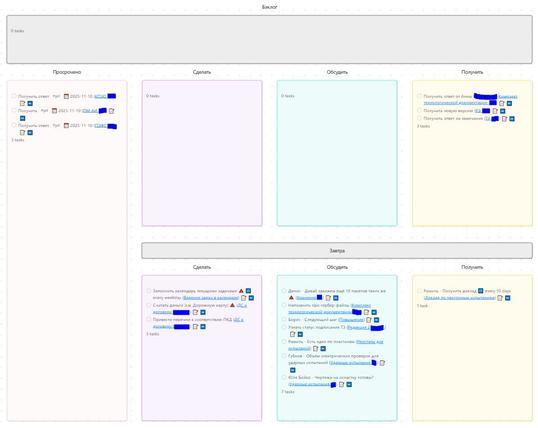
Как я заменил таск-трекер на Obsidian + Claude Code и перестал вести доски руками

Трекеры задач превращаются в кладбище карточек, потому что это отдельное окно и отдельное усилие. Я заменил их на Obsidian + Claude Code: задачи — это markdown-файлы на диске, дашборды рендерит Obsidian, а Claude управляет всем из терминала через слэш-команды. Универсальный шаблон выложил в открытый доступ - теперь можно общаться со своим крафтовым таск-трекером, будто это Linear с MCP (только у нас дома).

https://habr.com/ru/articles/1008564/

#obsidian #claude_code #тасктрекер #управление_задачами #продуктивность #markdown #git #автоматизация #open_source #dataview

Как я заменил таск-трекер на Obsidian + Claude Code и перестал вести доски руками

Я веду несколько проектов параллельно. Как и многие, прошёл путь от Trello через Notion к Linear. Каждый раз одна и та же история: первую неделю всё красиво, потом доска превращается в кладбище...

Хабр

Either #elk or my server is b0rked, the home page of YT is b0rked, and I am in a foul mood. All good reasons to stay offline and work on my paper - #obsidian integration process.

I also need to figure out how to convert my existing Obsidian journal entry process (currently using inline properties) to a setup that uses Bases as I start to migrate at least some stuff away from being dependent on the #dataview plugin.

The combination of #Obsidian (which I've been using for years, now), the Obsidian #Dataview plugin, the YAML frontmatter in my notes that #ClaudeCode helped me put together: give me super useful queries. Using Dataview, YAML, and doing queries within Obsidian is new to me; but that's an implementation detail. Obsidian and Claude are already in my toolbox.

These queries allow me to assemble a "dashboard" for my practice sessions (Each practice session is a dated file. I care about the ones I recently did. I care about the ones I'm planning in the future), weaknesses, and exercises to address those weaknesses.

I can bookmark the dashboard; but it's annoying to bookmark "the next session" (because that's a different file every day).

Adding the #MetaBind plugin lets me put buttons on my dashboard to actually **create** a file for an upcoming session ... that new file can hold my thoughts and plans!

And because practice sessions are now queryable, I can find, e.g., every time I practiced for more than 30 minutes; every time I used the such-and-such practice tool; etc.

Is your Obsidian Daily Note just a 'write-only' memory hole? You write it once and never see it again? 🗑️

It’s time to stop treating it like a diary and start treating it like a Dashboard.

Most online tutorials offer broken code that lags your vault or breaks during sync. Here is how to build an Enterprise-Grade template that actually works:

https://myangle.net/5-essential-obsidian-dataview-queries-for-your-daily-notes-template/

#ObsidianMD #Dataview #PKM #SecondBrain

5 Essential Obsidian Dataview Queries for Your Daily Notes Template » MyAngle

Transform your static Daily Note into a dynamic dashboard. Copy these 5 essential Obsidian Dataview queries for tasks and history. Get the template.

MyAngle

I was gently positive on #Obsidian Bases as a replacement for #DataView, but I'm esp finding the action of "produce dynamic list of related notes to current note" is much smoother with Bases.

In DV:
- write .js file containing DV 'SQL' (in eg vim)
- create a new specific-to-that-query 3-4 line template/snippet
- use eg Templater hotkey to embed snippet

Bases:
- write new Base (in obsidian!)
- type ![<base name>] to embed

Cuts out the template middleman, & no editing 'external' files.

(1/2)

Ah, y no lo publiqué, creo, solo lo hice pero hice un post con los snippets que uso de #dataview en #obsidian https://hackmd.io/@dprieto/snippets-dataview
Pequeños trozos de código que uso en mi obsidian utilizando dataview - HackMD

Esta nota es una referencia para otras personas que también usen Obsidian y el complemento dataview incluyendo unos pocos snippets que utilizo y me son prácticos.

HackMD
#Obsidian #Dataview question: I remember faintly some trick to get a value from an inline field combined with an HTML dropdown menu, so to customize a #DataviewJS query.
Can anyone say if this still works and how it was achieved? For sure there's an extra plugin, but would it work without one?
#AskFedi

Falls man alten Code aus Abfragen für #Dataview auch in #Bases von #Obsidian weiterhin nutzen möchte, sollte man mal einen Blick auf diesen Converter werfen:

https://bases-toolbox.vercel.app/#dataview-converter

#obsidian no sé si utilizar un excel o una tabla de toda la vida de Dios. Pongo el enlace y añado la información correspondiente.
Otra opción es usar bases o #dataview y entonces en las notas pondría la información de cada "fila" y luego hago una vista que lo muestra. También quiero en un punto deteminado sacar esta información para enseñarla.
¿Opiniones?

Experimenting with #Obsidian's new Bases feature vs my existing #DataView setup.

Haven't dug yet to see how much I can torture Bases into being as capable as DataView, but so far it meets my expectations: yea it gets about 80-90% of the way there (VERY EXCITING!) but I'll have to think real hard about how to tackle that missing 10-20% when it pops up.

(eg, lack of dynamic sort function will be a bit of a problem, tho TBF that's also a problem in Airtable…)