One UI 8.5 Beta 3 is out [Galaxy S25]!

One UI 8.5 has made a significant appearance, with new features and other improvements. We are very thrilled to announce that Samsung has released the third beta version of One UI 8.5 (build ZZA3) that has the following changes:

  • Bugs that have been fixed
    • Fixed the clock display error on the lock screen
    • Resolved the issue related to favorites in the phone app
    • Fixed the issue where Now Briefing does not display Live Effect in the gallery
    • Improved the screen lagging issue when using gallery
    • Improved the issue of high power consumption when a specific app is running
    • Enhanced the visibility of the search button on the widget addition screen
  • Many other improvements

To join the Beta Program, you must have the latest version of Samsung Members installed. You can get the latest version through either the Galaxy Store or the Play Store. Once done, you should be able to join the program if you have an eligible device. You can see the status of your joining process here.

#Android #Android16 #AndroidB #AndroidBaklava #GalaxyS25 #GalaxyS25Ultra #news #oneUi #OneUI8 #OneUI80 #OneUI85 #S25 #S25Ultra #Samsung #SamsungGalaxyS25 #SamsungGalaxyS25Ultra #smartphone #Tech #Technology #update

One UI 8.5 Storage Share Requirements

Storage Share is one of the One UI 8.5‘s new features that will make it to the upcoming Galaxy S26 smartphone series on March. It allows you to take a look at your other Galaxy device’s storage to access its downloads, photos, videos, and so on. Storage Share can be used with Nearby Devices by connecting your other device to your phone.

This is a great feature, intended to give access to your other device’s files more quickly than before, without having to rely on third-party file sharing solutions.

However, this feature relies on Nearby Devices, which means that your device needs to run One UI 7 or higher. Additionally, there’s a very small detail that you may want to pay attention to.

Storage Share works on all supported Galaxy devices running One UI 7 or higher with the Linux kernel version being at least 5.15. Linux 5.15 was released on October 31st, 2021, with the following key features added:

  • New experimental NTFS file system implementation
  • ksmbd, an in-kernel SMB 3 server
  • Migrate memory pages to persistent memory in lieu of discard
  • DAMON, a data access monitor
  • Introduce process_mrelease(2) system call

If you want to use Storage Share with a Galaxy Book, you’ll need to have at least:

  • Galaxy Book2 or later (Intel)
  • Galaxy Book4 or later (ARM64)

As for televisions, you’ll need to have at least U8000 and above released after 2025. This means that you’ll need to have a TV that was released this year in order to use Storage Share.

To check the kernel version on your Android device, head to Settings > About > Software information. Then, look for a section called “Kernel version.”

Storage Share is one of the features that will be exclusive to newer Galaxy devices running One UI 7.0 and Linux 5.15 or later. Even though the oldest supported Galaxy devices are eligible for One UI 8.5, such as the Galaxy S22, the Z Fold/Flip 4, and the Tab S8 series, they will have features stripped out, such as Storage Share.

#Android #Android16 #AndroidB #AndroidBaklava #news #oneUi #OneUI85 #Samsung #smartphone #Tech #Technology #update

One UI 8 Beta Program History

One UI 8 brought in minor changes to make your user experience enhanced. It was first released with the Galaxy Z Fold/Flip 7 + Flip FE two months before the final release, which happened on September 15th, 2025, for the One UI 8 version on the Galaxy S25 series, including the thin phone, the S25 Edge.

One UI 8 Beta Program was a long beta program for phones that Samsung has launched. So, here we present you with the version history of the One UI 8 Beta Program (this list is based on Korean releases):

  • Samsung Galaxy S25 / S25+ / S25 Ultra [Beta shutdown September 15th, 2025]
    • One UI 8 Beta 1 (build ZYER): May 28th, 2025 (articlerecruitment)
    • One UI 8 Beta 2 (build ZYF3): June 12th, 2025
    • One UI 8 Beta 3 (build ZYFA): June 30th, 2025
    • One UI 8 Beta 4 (build ZYGB): July 30th, 2025 (announcement)
    • One UI 8 Beta 5 (build ZYH6): August 19th, 2025
    • One UI 8 Beta 6 (build ZYHB): August 28th, 2025
    • One UI 8 Beta 7 (build ZYI3): September 8th, 2025
  • Samsung Galaxy S24 / S24+ / S24 Ultra [Beta shutdown September 22nd, 2025]
    • One UI 8 Beta 1 (build ZYH3): August 13th, 2025 (announcement)
    • One UI 8 Beta 2 (build ZYHB): August 29th, 2025
    • One UI 8 Beta 3 (build ZYI3): September 10th, 2025
  • Samsung Galaxy S23 / S23+ / S23 Ultra [Beta shutdown September 29th, 2025]
    • One UI 8 Beta 1 (build ZYHB): September 1st, 2025 (announcement)
    • One UI 8 Beta 2 (build ZYI5): September 11th, 2025
  • Samsung Galaxy Z Fold6 [Beta shutdown September 22nd, 2025]
    • One UI 8 Beta 1 (build ZYH1): August 13th, 2025 (announcement)
    • One UI 8 Beta 2 (build ZYHB): August 29th, 2025
  • Samsung Galaxy Z Flip6 [Beta shutdown September 22nd, 2025]
    • One UI 8 Beta 1 (build ZYH4): August 13th, 2025 (announcement)
    • One UI 8 Beta 2 (build ZYHB): August 29th, 2025
  • Samsung Galaxy Z Fold5 [Beta shutdown September 29th, 2025]
    • One UI 8 Beta 1 (build ZYHC): September 2nd, 2025 (announcement)
    • One UI 8 Beta 2 (build ZYI6): September 12th, 2025
  • Samsung Galaxy Z Flip5 [Beta shutdown September 29th, 2025]
    • One UI 8 Beta 1 (build ZYHC): September 2nd, 2025 (announcement)
    • One UI 8 Beta 2 (build ZYI6): September 12th, 2025
  • Samsung Galaxy A36 [Beta shutdown September 22nd, 2025]
    • One UI 8 Beta 1 (build ZYHD): September 1st, 2025 (announcement)
    • One UI 8 Beta 2 (build ZYI7): September 9th, 2025
  • Samsung Galaxy A35 [Beta shutdown September 29th, 2025]
    • One UI 8 Beta 1 (build ZYH6): September 1st, 2025 (announcement)
    • One UI 8 Beta 2 (build ZYI6): September 16th, 2025
  • Samsung Galaxy A55 [Beta shutdown September 29th, 2025]
    • One UI 8 Beta 1 (build ZYH6): September 1st, 2025 (announcement)
    • One UI 8 Beta 2 (build ZYI7): September 15th, 2025
  • Samsung Galaxy A54 [Beta shutdown October 1st, 2025]
    • One UI 8 Beta 1 (build ZYH6): September 1st, 2025 (announcement)
    • One UI 8 Beta 2 (build ZYI3): September 15th, 2025

Similarly, the One UI 8 Watch Beta Program was launched initially for the Galaxy Watch Ultra and the Galaxy Watch7 smartwatches before the release of the Watch8, which resulted in the Ultra getting the final release much earlier than October 13th. Here’s the version history of the One UI 8 Watch Beta Program:

  • Galaxy Watch Ultra [Beta shutdown July 22nd, 2025]
    • One UI 8 Watch Beta 1 (build ZYFE): June 30th, 2025 (article)
  • Galaxy Watch7 [Beta shutdown October 13th, 2025]
    • One UI 8 Watch Beta 1 (build ZYFE): June 30th, 2025 (article)
    • One UI 8 Watch Beta 2 (build ZYH2): August 12th, 2025
    • One UI 8 Watch Beta 3 (build ZYHA): August 26th, 2025
    • One UI 8 Watch Beta 4 (build ZYI2): September 5th, 2025
    • One UI 8 Watch Beta 5 (build ZYI4): September 12th, 2025
  • Galaxy Watch6 (Normal and Classic) [Beta shutdown November 19th, 2025]
    • One UI 8 Watch Beta 1 (build ZYI4): September 24th, 2025 (articlearticle 2)
    • One UI 8 Watch Beta 2 (build ZYI5): September 30th, 2025
    • One UI 8 Watch Beta 3 (build ZYJ5): October 28th, 2025
    • One UI 8 Watch Beta 4 (build ZYJ6): October 31st, 2025
    • One UI 8 Watch Beta 5 (build ZYK2): November 7th, 2025
  • Galaxy Watch5 (Normal and Pro) [Beta shutdown December 1st, 2025]
    • One UI 8 Watch Beta 1 (build ZYK1): November 10th, 2025 (articlearticle 2)
    • One UI 8 Watch Beta 2 (build ZYK4): November 17th, 2025

Meanwhile, One UI 8.5 Beta Program is ongoing, with the following versions released

  • Samsung Galaxy S25 / S25+ / S25 Ultra
    • One UI 8.5 Beta 1 (build ZYL8): December 8th, 2025 (article)
    • One UI 8.5 Beta 2 (build ZYLH): December 22nd, 2025

#Android #AndroidB #AndroidBaklava #news #oneUi #OneUI8 #OneUI80 #Samsung #smartphone #Tech #Technology #update

Eligible Flagships for One UI 8.5

Recently, there has been a lot of talk about One UI 8.5 as leaks started to surface, such as the refined UI across the whole operating system, alongside more improvements to the Samsung applications. One UI 8.5 is said to come with the Galaxy S26 series as the first devices that will get it.

Although this list is based on Samsung’s refreshed update policy, the following flagships will be able to experience the One UI 8.5 update once the Galaxy S26 series gets released:

  • Galaxy S
    • Galaxy S22 / S22+ / S22 Ultra
    • Galaxy S23 / S23+ / S23 Ultra / S23 FE
    • Galaxy S24 / S24+ / S24 Ultra / S23 FE
    • Galaxy S25 / S25+ / S25 Edge / S25 Ultra / S25 FE
  • Galaxy Z
    • Galaxy Z Fold/Flip 4
    • Galaxy Z Fold/Flip 5
    • Galaxy Z Fold/Flip 6
    • Galaxy Z Fold Special Edition (Korea only)
    • Galaxy Z Fold/Flip 7
    • Galaxy Z Flip FE
    • Galaxy Z TriFold
  • Galaxy Tab S
    • Galaxy Tab S8 / S8+ / S8 Ultra
    • Galaxy Tab S9 / S9+ / S9 Ultra
    • Galaxy Tab S10+ / S10 Ultra
    • Galaxy Tab S11 / S11 Ultra
    • Galaxy Tab S9 FE / S9 FE+
    • Galaxy Tab S10 FE / S10 FE+
    • Galaxy Tab S6 Lite (2024)

Devices like the Galaxy S22, the Galaxy Z Fold/Flip4, and the Galaxy Tab S8 will no longer receive any major OS update after the release of One UI 8.5.

Please note that the list above is not official, and can change as soon as the official rollout of One UI 8.5 starts.

#Android #Android16 #AndroidB #AndroidBaklava #news #oneUi #OneUI8 #OneUI85 #Samsung #smartphone #Tech #Technology #update

Official changelogs for One UI 8.5 Beta

One UI 8.5 has made a significant appearance, with new features, design improvements, and other improvements. Samsung has recently opened the One UI 8.5 Beta Program in Korea, the USA, the UK, and Germany, with the program extending to India and Poland when the second beta gets released.

You can see the official changelogs below:

Galaxy Al

Continuous image generation

  • Keep creating without stopping. Photo Assist now lets you generate Al images using different Photo assist features without saving each iteration. When you’re done, you can review all your creations in your history and pick your favorites.

Connectivity

Storage share

  • Access your files anywhere. Files from your other Samsung phones, tablets, and PCs are available in the My Files app on your phone. You can also access your phone’s files on other Samsung devices, even your TV.

Quickly connect to Smart View devices

  • Connect to your favorite display faster. You can now add a shortcut on your Home screen to instantly mirror your phone’s screen to a TV or other display device.

Enhanced Auracast features

  • It’s easier than ever to listen to and broadcast sound with Auracast. Options for both broadcasting and listening are now located in the Audio broadcast menu in Settings.

Voice broadcasts

  • Broadcast your voice to people around you with Auracast. In addition to media sound, you can now broadcast your voice using your phone’s built-in microphone.

Quick Share

Avoid unwanted sharing requests

  • You can now set Quick Share to only receive files from other devices signed in to your Samsung account or Google account.

Photo sharing suggestions

  • Share photos with the right people faster. When you share pictures that include friends or family, Quick Share can recognize who’s in them and suggest sharing directly with those people.

Home and Lock screens

Automatic Lock screen layout

  • Wallpapers with pictures of people or pets now fit perfectly every time. When you choose a photo for your Lock screen, the layout adjusts automatically so the clock and widgets don’t cover important parts of the picture.

More customizable clock fonts

  • Personalize your Lock screen clock. You can now adjust the thickness of more font styles to match your preferred look.

Weather

Enhanced weather widget

  • Quickly check upcoming precipitation in the Weather widget on your Home screen. The widget now shows a graph if precipitation is expected in the next few hours.

Pollen index

  • Check how much pollen is in the air to help manage your allergies. You can check pollen levels for trees, grass, and ragweed.

Clock

Weather alarm backgrounds

  • Wake up to an alarm that gets you ready for the day’s weather. Your alarm screen can now show the current weather conditions as a background when it rings.

Time zone converter

  • Compare time zones at a glance. The new slider in the Clock app makes it easy to check the time difference between places around the world.

Samsung Health

Enhanced weekly reports

  • See a fuller picture of your health each week. Weekly reports now include data from your medication tracker and mindfulness sessions.

Upgraded Sharing Experience

  • Share your workouts your way. Mix and match your exercise stats with photos from your workout to create the perfect social media post.

Start meditations from your watch

  • Find calm right from your wrist. You can now start favorite or recommended meditations directly on your Galaxy Watch without picking up your phone.

Antioxidant measurements from your watch

  • Check your antioxidant levels anytime. Measure directly from your Galaxy Watch, even if it’s not connected to your phone. Works with Galaxy Watch8 and Galaxy Watch Ultra.

Security and privacy

Theft protection

  • Keep your phone and data safe in case it is lost or stolen. Turn on Failed authentication lock to automatically lock the screen in case there are too many failed attempts to verify your identity using your fingerprints, PIN, pattern, or password. Identity check also protects even more settings than before.

Turn off Auto blocker temporarily

  • If you need to temporarily disable Auto blocker’s security protection, a new option lets you turn it on automatically 30 minutes later so you don’t forget.

Battery and power

Revamped battery info

  • See your battery use more clearly. The redesigned Battery settings screen makes it easier to check remaining time, charging status, and daily usage over the past week.

Improved Power saving

  • Use Power saving to make your battery last longer without charging. Choose Standard for moderate savings and customizable limits, or choose Maximum to turn off all non-essential features and make your battery last as long as possible.

Accessibility

Easily control Bluetooth hearing aids

  • Access settings for your Bluetooth hearing aids directly from the Accessibility shortcut. A pop-up will appear that lets you change your hearing program, turn Ambient sound on or off, and more.

Control magnification with mouse or keyboard

  • Keep what you need magnified in view with these new options. You can make the magnified area follow the cursor as you type or move when you change focus using the keyboard. When using a mouse, you can make the magnified area shift as you move the pointer to the edge of the screen.

Dwell action and Corner actions

  • The Auto action after pointer stops feature has been divided into 2 features. Dwell action lets you set custom actions when your mouse stops moving for a certain amount of time. Corner actions let you set a different action for each corner of the screen.

Even more improvements

More customizable quick panel

  • Arrange your quick settings just the way you like them. You can now add, remove, reorder, and reorganize controls in the quick panel.

Early alerts for reminders

  • Get alerts before reminders are due to make sure you don’t forget important tasks. You can choose how far in advance to get an alert for each reminder.

Partial screen recording

  • Include only what you need in your screen recordings. You can now select only the part of the screen that you want to record.

Calculator nudges

  • Save time on calculations. Numbers and formulas copied to your clipboard will be suggested when you open Calculator so you can enter them with a quick tap.

Keep window sizes in DeX

  • DeX now remembers your app window sizes and positions. When you open an app again, it appears just as you left it.

To join the Beta Program, you must have the latest version of Samsung Members installed. You can get the latest version through either the Galaxy Store or the Play Store. Once done, you should be able to join the program if you have an eligible device.

#android #android16 #androidB #androidBaklava #galaxyS25 #galaxyS25Ultra #news #oneUi #oneUi8 #oneUi80 #oneUi85 #s25 #s25Ultra #samsung #samsungGalaxyS25 #samsungGalaxyS25Ultra #smartphone #tech #technology #update

One UI 8.5 Beta Program is now open!

One UI 8.5 has made a significant appearance, with new features, design improvements, and other improvements. We are very thrilled to announce that Samsung has recently opened the One UI 8.5 Beta Program in the following countries:

This gives us a hint that the Beta Program is now open. Users should be able to try out One UI 8.5 in its earliest shape and form on their Galaxy S25 devices, including the base model, the Plus model, and the Ultra model.

Please note that Samsung might not have opened the Beta program in your country yet, even if your country is eligible for beta testing. In this case, you’ll have to wait for the beta banner.

To join the Beta Program, you must have the latest version of Samsung Members installed. You can get the latest version through either the Galaxy Store or the Play Store. Once done, you should be able to join the program if you have an eligible device.

#android #android16 #androidB #androidBaklava #galaxyS25 #galaxyS25Ultra #news #oneUi #oneUi8 #oneUi80 #oneUi85 #s25 #s25Ultra #samsung #samsungGalaxyS25 #samsungGalaxyS25Ultra #smartphone #tech #technology #update

One UI 8.5 Beta Program might open this week!

One UI 8.5 has made a significant appearance, with new features, design improvements, and other improvements. Samsung is rumored to release the One UI 8.5 Beta Program, further confirmed by an update made to PENUP today, in the following countries:

  • Korea
  • United States of America
  • United Kingdom
  • Germany
  • India (when Beta 2 releases)
  • Poland (when Beta 2 releases)

Users should be able to try out One UI 8.5 in its earliest shape and form on their Galaxy S25 devices, including the base model, the Plus model, and the Ultra model, once the beta program fully opens, which is expected to be this week.

Please note that Samsung might not have opened the Beta program in your country yet, even if your country is eligible for beta testing. In this case, you’ll have to wait for the beta banner.

To join the Beta Program, you must have the latest version of Samsung Members installed. You can get the latest version through either the Galaxy Store or the Play Store. Once done, you should be able to join the program if you have an eligible device.

#android #android16 #androidB #androidBaklava #galaxyS25 #galaxyS25Ultra #news #oneUi #oneUi8 #oneUi80 #oneUi85 #s25 #s25Ultra #samsung #samsungGalaxyS25 #samsungGalaxyS25Ultra #smartphone #tech #technology #update

One UI 8.5 Beta Program for the Galaxy S25 is getting ready!

One UI 8.5 brings major aesthetic changes and new features, including the flexible quick panel configuration and redesigned user interface. This version of One UI is slated to appear on the Galaxy S26 series, which will be unveiled early next year. Getting ready for One UI 8.5 Beta Program is a major milestone for the Galaxy users, as the One UI 8.0 rollout to all the devices is about to finish.

Today, the first beta build for the One UI 8.5 software has been spotted, starting from the Korean Galaxy S25 models. According to Tarun Vats, the build version is ZYKP, and it’s based on the first report from a Korean user on the local Samsung Members community forums.

This marks the start of the era of One UI 8.5 beta program that will be available for the Galaxy S25, according to the information that is currently available to us. There is no definite release date for the Beta program, but it should arrive in the coming weeks.

Once the first beta comes out for the Galaxy S25, we’ll inform you. We’d like to remind you that this beta program will be available (based on the history of the beta program) in Korea, USA, UK, India, Germany, and Poland, unless otherwise noted.

To be able to update to the beta version of One UI 8.5, you’ll need to use Samsung Members on an eligible phone. Additionally, you’ll need to be in one of the six countries we’ve mentioned to be able to participate.

Please note that certain Good Lock modules are not optimized for One UI 8.5 and may stop working after you update your phone to the beta version.

To update to One UI 8.5 Beta once it gets released, follow these steps:

  • Open Samsung Members on an eligible phone
  • Scroll down to Beta Program, or open the banner
  • Press “One UI 8.5 Beta Galaxy S25” or something similar
  • Read the instructions and press “Join”
  • Wait for a few moments, then check for updates on your phone
  • The update may take a few minutes to install. As the update is going to be large, you’ll have to download it over the Wi-Fi to avoid mobile data expenses. Never interrupt the update in any way, or you may experience problems later.

    As always, report bugs that you find to either the Samsung Members community under the Beta section or the error reports section. Several beta versions are expected to appear to ensure stability of the software, before the official stable release expected in the first half of 2026.

    #android #android16 #androidB #androidBaklava #news #oneUi #oneUi85 #oneUi85Beta #samsung #smartphone #tech #technology #update

    Our projects welcome One UI 8!

    Starting from today, we have finally set the support date for our official support of One UI 8 that was released for the Galaxy S25 series on September 15th. One UI 8 is an operating system that brings minor improvements in different areas, while introducing exciting new features, such as the adaptive lock screen clock.

    We will begin supporting users who are using One UI 8 to support our projects, such as Nitrocid KS and BassBoom, until December 2nd, 2032. Our projects can now run on One UI 8, which is a big achievement for us, as we keep supporting our projects on Android.

    Furthermore, we’d like to remind users who are still using One UI 6.x, which was released in 2023, that our support of this operating system version will cut off starting December 30th, 2027. This is to ensure that we keep going forward. You can still run our projects after this date, but all official support will end.

    To update to One UI 8, make sure that you’re using an eligible device, such as Samsung Galaxy S25; Galaxy Z Fold6; and Galaxy Tab S10, before you check for updates. The rollout may vary, depending on the model and the country.

    #Android #Android16 #AndroidB #AndroidBaklava #bassboom #news #nitrocid #NitrocidKernel #NitrocidKernelSimulator #NitrocidKS #NitrocidKS #oneUi #OneUI8 #OneUI80 #Samsung #smartphone #Tech #Technology #terminaux #update

    One UI 8 allows you to see “Other files” in Storage Manager

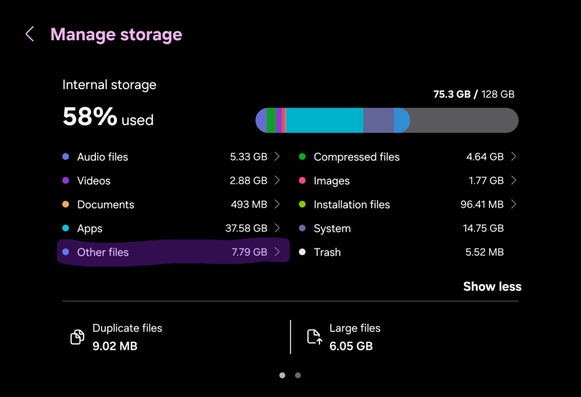
    One UI 8.0 introduces a new feature that allows you to see the “Other Files” that occupy your device’s storage in the Storage Manager, alongside photos, videos, and other categorized files. This allows you to free up some space to allow more data inside your device. You can access this menu through Settings > Device Care > Storage.

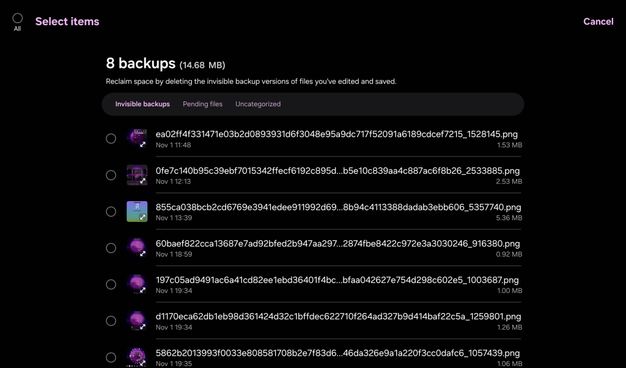
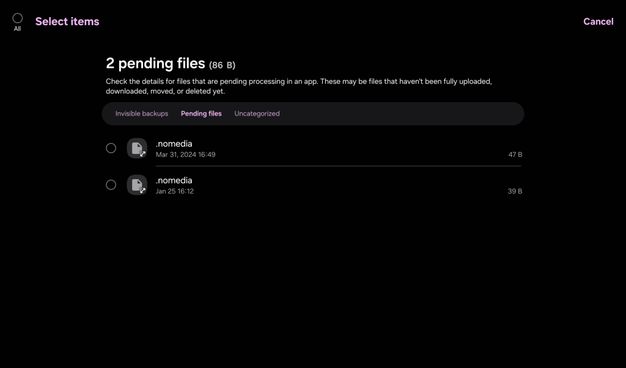
    Once inside, you’ll be met with three categories: invisible backups, pending files, and uncategorized files.

    Select any invisible backup, and you’ll be presented with an option to delete those backups. When editing a picture in your gallery app, you’ll notice that there are invisible backups being created for you to be able to revert to the original image, should you not like the edits being made after editing.

    Pending files are the files that are pending processing. However, you’ll only be presented with an option to see the details of the selected file. If you select only one file, you’ll be given a path, just like below:

    As for the uncategorized files, the files that are recognized by My Files but not yet categorized into anything will show up as “Other files”, therefore, those files are shown in the list.

    However, a big disappointment is that when you select files, you’ll only be presented with an option to show the file details. Honestly, an option to delete files should have been included to save time, but it’s not implemented in this version. Therefore, you’ll have to spend time getting the paths to a file you want to delete using the only option that you have, called file info. Then, going to those paths to find the file before deleting it.

    So, while this long-awaited feature has been finally implemented for general use, there are things that are missing, such as deletion of uncategorized files from this screen. We expect to see improvements in this area in One UI 8.5 or 9.0.

    As for One UI 9.0 based on Android 17, the Galaxy Tab S8 won’t get the update as the upgrade cycle has been finally complete, with One UI 8.5 being the last update to get.

    #Android #Android16 #AndroidB #AndroidBaklava #news #oneUi #OneUI8 #OneUI80 #Samsung #smartphone #Tech #Technology #update