Want to have JAWS describe an image in context with Picture Smart AI? Use this keystroke to describe an image based on your current application or context. For example, describe the screen of a PowerPoint presentation, the image or control in focus on a web page, or a currently selected file in File Explorer.

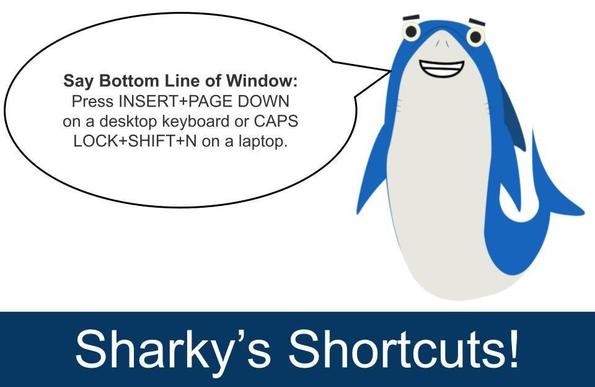
Use these steps: Press INSERT+SPACEBAR, P, ENTER on a desktop keyboard or CAPS LOCK+SPACEBAR, P, ENTER on a laptop.

#JAWS #ScreenReader

🀣🀣🀣

They create an account on a #server for every single #hashtag in the #fediverse just so they can #boost every single hashtag that is tooted. 🀣🀣🀣

I don't manage an #instance (I ran a #BBS back in the day and that was enough for me) but I have to think this takes up server or processing resources.

Also, apologies to folks reading these toots with a #screenreader. I understand that it pronounces the word "hashtag" every single time a hashtag is used. I will eventually behave.

@NVAccess a history check,
I thought the first NVDA release is 0.5 somewhere around April 2006,
but according to top tech titbits archive,
here' the first mention from Top Tech Tidbits for Thursday, July 13, 2006
3) Michael Curran is writing a free, open-source screen reader for windows. The current version is primitive in the extreme, but Michael wants input and programming assistance, It is being written in the Python language.
http://www.kulgan.net/nvda/
#nvda #screenReader
Domain Parked With VentraIP Australia

Coming back to #nvda add-on development, consider making all the input help description clear, direct and understanbable.
Put a lot of thoughts in making help accessible even if your add-on only perform simple functions as it will make many days better for many people that want to use your add-ons.

To summarise on add-ons best practice

  • design context-sensitive help
  • allow users to ease in into your add-on by making the front-end easy to use
  • design a command palate if add-on is too complex
  • create menus or tabs of functions rather than keyboard shortcuts
  • implement multiple ways of performing a function to give people choice.
  • ensure input help is descriptive
  • #screenReader #blind #nvda

    I guess I underplayed the interview that @NVAccess gave to @AccessOn
    It could be a co-incident, but, the development list are more active this week, people are more enthusiastic to contribute code and many of the masto citizens are giving the screen raeder another look.
    Again, there are other factors that plays into this, so take my understanding as a very naive look at this whole thing.
    #nvda #screenReader
    This project is a perfect one to be adapted into an NVDA add-on. Window Eyes previously have a lot of nifty tools like this when the screen reader starts.
    #nvda #screenReader https://allovertheplace.ca/@RareBird15/116233507817189708
    Lanie (@[email protected])

    I just shipped a real release of my `bible-reader` project. It’s a terminal-first Python tool for daily Bible reading. It can import compatible WorldBiblePlans EPUBs, split them into day-by-day files, extract scripture-only readings, and track progress through the plan. I also just added a changelog, automated GitHub releases, a license, contribution guidelines, and issue/PR templates, so it’s starting to feel like a real open-source project instead of just β€œscript in a repo.” πŸ˜„ Repo: https://github.com/RareBird15/bible-reader #Python #CLI #OpenSource #BibleStudy

    All Over the Place

    @moeria Außerdem hab ich gerade gestern gelesen, dass es hilfreich ist, Hashtags nicht innerhalb des Textes zu verwenden, sondern durch eine Leerzeile getrennt unter den Text zu schreiben, da sonst der Text mit einem Screenreader nicht richtig bzw. verstÀndlich vorgelesen wird.

    #Inklusion #blind #Screenreader #Fediverse #Mastodon #Hashtags

    I #do #not #understand the #urge to #put a #hashtag in #front of #random #words in #toots.

    #Besides the #fact that it is a #pain in the #ass for #screenreader #users, #most of those #hashtags are just #useless and do #not even #help to #reach a #bigger #audience.
    On the #contrary, even for #sighted #folks it's #hard to #read, so they #probably #ignore the #post and just #continue #scrolling.

    #JustSaying.

    Announced at the CSUN Assistive Technology Conference: AI Page Explorer is coming to JAWS and Fusion Home Annual Subscriptions in our May 13 release. This addition expands how people can explore web content using AI-powered insights.

    #JAWS #ScreenReader #PageExplorer

    Interesting nvda add-on from Tony Gebhard, Interactive NVDA screen reader training add-on β€” guided, hands-on lessons built into NVDA
    Submitted for addon store review, you can check out the Github repo here,
    https://github.com/tonygeb23/nvdaCoach-
    Thrilled to share something I've been building: NVDA Coach is now available β€”

    a free, interactive training add-on for the NVDA screen reader. πŸŽ‰

    As an assistive technology instructor, I've worked with a lot of people who are

    just starting out with screen readers. The hardest part isn't finding the right

    resource β€” it's the gap between reading about a command and actually using it.

    NVDA Coach closes that gap.

    Instead of reading a manual, students practice real NVDA commands step by step,

    inside NVDA itself, with spoken instructions and instant feedback.

    πŸ“š Version 1.0.0 includes 24 lessons across three chapters:

    β†’ Getting Started β€” the 10 essential commands every beginner needs

    β†’ Reading and Moving Through Text β€” character, word, line, and selection navigation

    β†’ Browse Mode and Web Navigation β€” heading, link, form, and landmark navigation

    What makes it different:

    βœ… Everything happens inside NVDA β€” no PDFs, no videos, no switching context

    βœ… Live practice forms for hands-on Tab and control navigation

    βœ… Practice text embedded directly in the lesson window for reading drills

    βœ… A practice web page auto-opens for browse mode lessons

    βœ… Completely free. No account. No internet required after install.

    βœ… Built for beginners, usable independently or with an instructor

    If you work with people who are learning NVDA, or if you're learning yourself,

    I'd love for you to try it and share it with anyone who might benefit.

    This is a beta release with plenty of room for feedback, comments, and suggestions. Please feel free to flood my email inbox. :)

    πŸ”— Learn more: tonygebhard.me/NVDACoach

    πŸ“§ Questions or feedback: [email protected]

    #NVDA #ScreenReader #AssistiveTechnology #Accessibility #AT #BlindTech

    #DigitalInclusion #AccessibilityTools #A11y #AssistiveTech