Sebastian Ingrosso, Tommy Trash, John Martin - Reload

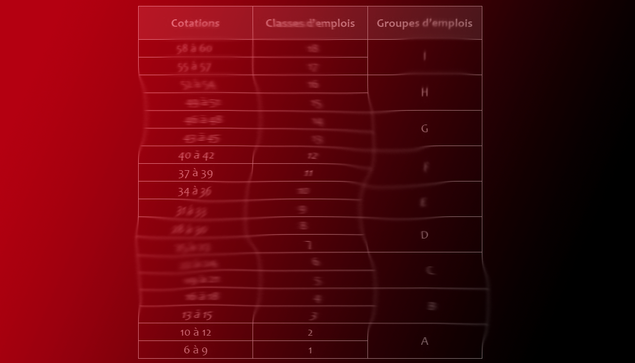
Il y a deux ans, l’accord RELOAD était déployé chez Airbus, (...) un piège pour les salariés d’Airbus : nos carrières stagnent, nos salaires aussi !
#cgt #airbus #reload #classification #métallurgie #convention #toulouse #commercial #aircraft @cgtcadrestechs @La_CGT
Ich hatte Booze & Glory vor ein paar Jahren auf dem #reload in #sulingen gesehen. Eine britische Oi Punk Band. Die haben ordentlich Dampf gemacht :)
🇺🇦 #NowPlaying on #KEXP's #SonicReducer
Reload:
🎵 I Like Everything You Think Sucks
https://open.spotify.com/track/5BXLFug764Iv4lokAeQKLw
🎶 show playlist 👇
https://open.spotify.com/playlist/4DZfWKuJvxbIrgtLMHmoi3
🎶 KEXP playlist 👇
https://open.spotify.com/playlist/6VNALrOa3gWbk794YuIrwg
roehling/postsrsd: Postfix Sender Rewriting Scheme daemon
This finally made me perform the (long overdue) migration from Sendmail to Postfix:
The Sender Rewriting Scheme (SRS) is a technique to forward mails from domains which deploy the Sender Policy Framework (SPF) to prohibit other Mail Transfer Agents (MTAs) from sending mails on their behalf. With SRS, an MTA can circumvent SPF restrictions by replacing the envelope sender with a temporary email address from one of their own domains. This temporary address is bound to the original sender and only valid for a certain amount of time, which prevents abuse by spammers.
[Wayback/Archive] roehling/postsrsd: Postfix Sender Rewriting Scheme daemon
Via a long queste to figure out why Gmail every now and then bounces forwarded messages because of Sender Policy Framework (SPF). Below are a few of the links that brought me here in mostly reverse order, but first some links that should help me further on the topic of Postfix virtual aliases.
The sendmail setup had some features not covered below (like a catch-all forward for email to addresses virtual domains not covered by a virtual alias) which I hopefully can cover later.
One thing learned both over the past decades and related postfix material: use separate servers or containers for each of your functions. So do not mix web-hosting, outgoing mail, incoming mail, fail2ban and others on the same server.
Links:
Postfix and virtual aliases
Q
I have already re-read the docs on this as well as other posts here and this is still very unclear to me. I have been testing various things to understand the difference betweenalias_maps and virtual_alias_maps and I don’t see the use of these 2 separate settings in postfix. This is what I found so far (Note – I am using postfix in the same server as my web server as null client to send emails only): 1) /etc/aliases file: root: [email protected] When I add the above to the alias_maps, I noticed that some services like fail2ban are able to pick this and it sends root emails to the alias email addresses mentioned. However, I also noticed that some other services (like mail command) does not respect this and tries to send the email directly to [email protected] which does not exist (I think its the postfix myorigin setting that is adding the @mydomain.com). To fix this I then added the virtual_alias_maps 2) /etc/postfix/virtual root [email protected] When the above is added, all services uses this virtual aliases email. I also noticed that once I add the above, even fail2ban begins to ignore my initial settings in /etc/aliases/ file and starts to follow the email address given in virtual file. Now this has confused me even more – /etc/aliases/ when having the email inside virtual aliases map seems to override it? root@localhost) first follow email address given in alias_maps (/etc/aliases/) and later decides to ignore that once virtual_alias_maps was added? …
A
Some background
Postfix inherited some features from older sendmail like milter and aliases. The file /etc/aliases is part of aliases inheritance and implemented by alias_maps. On the other side, postfix has virtual_maps/virtual_alias_maps for handle email aliasing. So what’s the difference between them?
Parameter alias_maps
mydestinationParameter virtual_alias_maps
mydestination, virtual_mailbox_domains or other places. It will override the address/alias defined in other places.$myorigin, when site is listed in $mydestination, or when it is listed in $inet_interfaces or $proxy_interfaces. This functionality overlaps with functionality of the local aliases(5) database.domain regardless of local parts$myorigin if append_at_myorigin set yesWhy do we need /etc/aliases when having the email inside virtual aliases map seems to override it?
As you can see above, alias_maps(/etc/aliases) has some additional features (beside forwarding) like piping to command. In contrast with virtual_alias_maps that just forwards emails.
What is the purpose of having these 2 separate aliases mapping and when do we decide when to use what?
The alias_maps drawback is that you cannot differentiate if the original recipient has [email protected] or [email protected]. Both will be mapped to root entry in alias_maps. In other words, you can define different forwarding address with virtual_alias_maps.
Why did fail2ban (which is configured to email to root@localhost) first follow email address given in alias_maps (/etc/aliases/) and later decides to ignore that once virtual_alias_maps was added?
Before virtual_alias_maps added: root@localhost was aliased by alias_maps because localhost was listed in mydestination.
After virtual_alias_maps defined: The entry root (in virtual_alias_maps) doesn’t have domain parts and localhost was listed in mydestination, so it will match root [email protected].
Why doesn’t all services read email aliases mentioned in /etc/aliases and they only work when the email aliases are added in virtual alias map?
Command mail root will send email to root. Because lacks of domain parts, postfix trivial-rewrite will append myorigin to domain parts. So, mail will be send to root@myorigin.
Before virtual_alias_maps added: Unfortunately, myorigin isn’t listed in mydestination, so it won’t be processed by alias_maps.
After virtual_alias_maps added: The entry root (in virtual_alias_maps) doesn’t have domain parts and myorigin (obviously) same as myorigin, so it will match root [email protected].
A
…
You need to be more specific, which services, how and where do they submit mail?
C
hi @NickW yes I did rebuilt aliases using newaliases after change. The only thing I can think for why its not using aliases is maybe due to the postfix setting that adds @$domain_name after the user and hence virtual_alias_maps is needed to redirect those emails. I read this in postfix docs and maybe thats why mail command to root is not working with aliases: postfix.org/STANDARD_CONFIGURATION_README.html#some_local Anyhow, thank you so much for helping me understand this better Nick. I really appreciate it.. :)
alias_maps (default: see “postconf -d” output)
The alias databases that are used for local(8) delivery. See aliases(5) for syntax details. Specify zero or more “type:name” lookup tables, separated by whitespace or comma. Tables will be searched in the specified order until a match is found. Note: these lookups are recursive.
The default list is system dependent. On systems with NIS, the default is to search the local alias database, then the NIS alias database.
If you change the alias database, run “postalias /etc/aliases” (or wherever your system stores the mail alias file), or simply run “newaliases” to build the necessary DBM or DB file.
The local(8) delivery agent disallows regular expression substitution of $1 etc. in alias_maps, because that would open a security hole.
The local(8) delivery agent will silently ignore requests to use the proxymap(8) server within alias_maps. Instead it will open the table directly. Before Postfix version 2.2, the local(8) delivery agent will terminate with a fatal error.
Examples:
alias_maps = hash:/etc/aliases, nis:mail.aliasesalias_maps = hash:/etc/aliases…
This is how Postfix decides what mail to accept, and how to deliver it. In other words, address classes are very important for the operation of Postfix.
An address class is defined by three items.
What address classes does Postfix implement?
…
aliases – Postfix local alias database format
virtual – Postfix virtual alias table format
virtual_alias_maps (default: $virtual_maps)
Optional lookup tables that alias specific mail addresses or domains to other local or remote addresses. The table format and lookups are documented in virtual(5). For an overview of Postfix address manipulations see the ADDRESS_REWRITING_README document.
This feature is available in Postfix 2.0 and later. The default value is backwards compatible with Postfix version 1.1.
Specify zero or more “type:name” lookup tables, separated by whitespace or comma. Tables will be searched in the specified order until a match is found. Note: these lookups are recursive.
If you use this feature with indexed files, run “postmap /etc/postfix/virtual” after changing the file.
Examples:
virtual_alias_maps = dbm:/etc/postfix/virtualvirtual_alias_maps = hash:/etc/postfix/virtual…
Rewrite addresses to standard form
Before the cleanup(8) daemon runs an address through any address mapping lookup table, it first rewrites the address to the standard “[email protected]” form, by sending the address to the trivial-rewrite(8) daemon. The purpose of rewriting to standard form is to reduce the number of entries needed in lookup tables.…
Delivering some but not all accounts locally
A drawback of sending mail as “[email protected]” (instead of “[email protected]”) is that mail for “root” and other system accounts is also sent to the central mailhost. In order to deliver such accounts locally, you can set up virtual aliases as follows:
1 /etc/postfix/main.cf:2 virtual_alias_maps = hash:/etc/postfix/virtual3 4 /etc/postfix/virtual:5 root root@localhost6 . . .Translation:
Execute the command “postmap /etc/postfix/virtual” after editing the file.
Postfix lookup table types
To find out what database types your Postfix system supports, use the “postconf -m” command. Here is a list of database types that are often supported:
btree A sorted, balanced tree structure. This is available only on systems with support for Berkeley DB databases. Database files are created with the postmap(1) or postalias(1) command. The lookup table name as used in “btree:table” is the database file name without the “.db” suffix. cdb A read-optimized structure with no support for incremental updates. Database files are created with the postmap(1) or postalias(1) command. The lookup table name as used in “cdb:table” is the database file name without the “.cdb” suffix. This feature is available with Postfix 2.2 and later. cidr A table that associates values with Classless Inter-Domain Routing (CIDR) patterns. The table format is described in cidr_table(5). dbm An indexed file type based on hashing. This is available only on systems with support for DBM databases. Public database files are created with the postmap(1) or postalias(1) command, and private databases are maintained by Postfix daemons. The lookup table name as used in “dbm:table” is the database file name without the “.dir” or “.pag” suffix. environ The UNIX process environment array. The lookup key is the variable name. The lookup table name in “environ:table” is ignored. fail A table that reliably fails all requests. The lookup table name is used for logging only. This table exists to simplify Postfix error tests. hash An indexed file type based on hashing. This is available only on systems with support for Berkeley DB databases. Public database files are created with the postmap(1) or postalias(1) command, and private databases are maintained by Postfix daemons. The database name as used in “hash:table” is the database file name without the “.db” suffix. inline (read-only) A non-shared, in-memory lookup table. Example: “inline:{ key=value, { key = text with whitespace or comma }}”. Key-value pairs are separated by whitespace or comma; with a key-value pair inside “{}”, whitespace is ignored after the opening “{“, around the “=” between key and value, and before the closing “}”. Inline tables eliminate the need to create a database file for just a few fixed elements. See also the static: map type. internal A non-shared, in-memory hash table. Its contents are lost when a process terminates. lmdb OpenLDAP LMDB database. This is available only on systems with support for LMDB databases. Public database files are created with the postmap(1) or postalias(1) command, and private databases are maintained by Postfix daemons. The database name as used in “lmdb:table” is the database file name without the “.lmdb” suffix. See lmdb_table(5) for details. ldap (read-only) LDAP database client. Configuration details are given in the ldap_table(5). memcache Memcache database client. Configuration details are given in memcache_table(5). mysql (read-only) MySQL database client. Configuration details are given in mysql_table(5). netinfo (read-only) Netinfo database client. nis (read-only) NIS database client. nisplus (read-only) NIS+ database client. Configuration details are given in nisplus_table(5). pcre (read-only) A lookup table based on Perl Compatible Regular Expressions. The file format is described in pcre_table(5). The lookup table name as used in “pcre:table” is the name of the regular expression file. pipemap (read-only) A pipeline of lookup tables. Example: “pipemap:{type1:name1, …, typen:namen}”. Each “pipemap:” query is given to the first table. Each lookup result becomes the query for the next table in the pipeline, and the last table produces the final result. When any table lookup produces no result, the pipeline produces no result. The first and last characters of the “pipemap:” table name must be “{” and “}”. Within these, individual maps are separated with comma or whitespace. pgsql (read-only) PostgreSQL database client. Configuration details are given in pgsql_table(5). proxy Postfix proxymap(8) client for shared access to Postfix databases. The lookup table name syntax is “proxy:type:table“. randmap (read-only) An in-memory table that performs random selection. Example: “randmap:{result1. …, resultn}”. Each table query returns a random choice from the specified results. The first and last characters of the “randmap:” table name must be “{” and “}”. Within these, individual maps are separated with comma or whitespace. To give a specific result more weight, specify it multiple times. regexp (read-only) A lookup table based on regular expressions. The file format is described in regexp_table(5). The lookup table name as used in “regexp:table” is the name of the regular expression file. sdbm An indexed file type based on hashing. This is available only on systems with support for SDBM databases. Public database files are created with the postmap(1) or postalias(1) command, and private databases are maintained by Postfix daemons. The lookup table name as used in “sdbm:table” is the database file name without the “.dir” or “.pag” suffix. socketmap (read-only) Sendmail-style socketmap client. The name of the table is either inet:host:port:name for a TCP/IP server, or unix:pathname:name for a UNIX-domain server. See socketmap_table(5) for details. sqlite (read-only) SQLite database. Configuration details are given in sqlite_table(5). static (read-only) A table that always returns its name as the lookup result. For example, “static:foobar” always returns the string “foobar” as lookup result. Specify “static:{ text with whitespace }” when the result contains whitespace; this form ignores whitespace after the opening “{” and before the closing “}”. See also the inline: map type. tcp TCP/IP client. The protocol is described in tcp_table(5). The lookup table name is “tcp:host:port” where “host” specifies a symbolic hostname or a numeric IP address, and “port” specifies a symbolic service name or a numeric port number. texthash (read-only) A table that produces similar results as hash: files, except that you don’t have to run the postmap(1) command before you can use the file, and that texthash: does not detect changes after the file is read. The lookup table name is “texthash:filename”, where the file name is taken literally; no suffix is appended. unionmap (read-only) A table that sends each query to multiple lookup tables and that concatenates all found results, separated by comma. The table name syntax is the same as for pipemap tables. unix (read-only) A limited view of the UNIX authentication database. The following tables are implemented: unix:passwd.byname The table is the UNIX password database. The key is a login name. The result is a password file entry in passwd(5) format. unix:group.byname The table is the UNIX group database. The key is a group name. The result is a group file entry in group(5) format.Other lookup table types may be available depending on how Postfix was built. With some Postfix distributions the list is dynamically extensible as support for lookup tables is dynamically linked into Postfix.
virtual_mailbox_maps (default: empty)
Optional lookup tables with all valid addresses in the domains that match $virtual_mailbox_domains.
Specify zero or more “type:name” lookup tables, separated by whitespace or comma. Tables will be searched in the specified order until a match is found.
In a lookup table, specify a left-hand side of “@domain.tld” to match any user in the specified domain that does not have a specific “[email protected]” entry.
With the default “virtual_mailbox_domains = $virtual_mailbox_maps“, lookup tables also need entries with a left-hand side of “domain.tld” to satisfy virtual_mailbox_domain lookups (the right-hand side is required but will not be used).
The remainder of this text is specific to the virtual(8) delivery agent. It does not apply when mail is delivered with a different mail delivery program.
The virtual(8) delivery agent uses this table to look up the per-recipient mailbox or maildir pathname. If the lookup result ends in a slash (“/”), maildir-style delivery is carried out, otherwise the path is assumed to specify a UNIX-style mailbox file. Note that $virtual_mailbox_base is unconditionally prepended to this path.
When a recipient address has an optional address extension ([email protected]), the virtual(8) delivery agent looks up the full address first, and when the lookup fails, it looks up the unextended address ([email protected]).
Note 1: for security reasons, the virtual(8) delivery agent disallows regular expression substitution of $1 etc. in regular expression lookup tables, because that would open a security hole.
Note 2: for security reasons, the virtual(8) delivery agent will silently ignore requests to use the proxymap(8) server. Instead it will open the table directly. Before Postfix version 2.2, the virtual(8) delivery agent will terminate with a fatal error.
Mail forwarding domains
Some providers host domains that have no (or only a few) local mailboxes. The main purpose of these domains is to forward mail elsewhere. The following example shows how to set up example.com as a mail forwarding domain:
1 /etc/postfix/main.cf: 2 virtual_alias_domains = example.com ...other hosted domains... 3 virtual_alias_maps = hash:/etc/postfix/virtual 4 5 /etc/postfix/virtual: 6 [email protected] postmaster 7 [email protected] joe@somewhere 8 [email protected] jane@somewhere-else 9 # Uncomment entry below to implement a catch-all address10 # @example.com jim@yet-another-site11 ...virtual aliases for more domains...Notes:
Execute the command “postmap /etc/postfix/virtual” after changing the virtual file, and execute the command “postfix reload” after changing the main.cf file.
More details about the virtual alias file are given in the virtual(5) manual page, including multiple addresses on the right-hand side.
Q
In Postfix 2.10.2, I have a setup with multiple domains and several virtual aliases to assign mail addresses to local users. It works fine as long as I do not add a catchall.
Before I used virtual aliases, I had a catchall defined with
local_recipient_maps =luser_relay = catchallbut as I need to sort out mail addresses from different domains, I had to use virtual aliases.
Now postfix.org says I should do it like this, which I did:
/etc/postfix/main.cf:
virtual_alias_domains = example.comvirtual_alias_maps = hash:/etc/postfix/virtual/etc/postfix/virtual:
[email protected] [email protected] [email protected] [email protected] catchallBut if I do so, the catchall address grabs all my mail instead of just the mail to not explicitly defined addresses. Why is that and how do I change it?
I did postmap virtual and also restarted Postfix. There are no errors in the log, it just logs the delivery to the catchall address. And there is a warning “do not list domain example.com in BOTH mydestination and virtual_alias_domains”, but I did not do that! I don’t even have a mydestination directive. (There is one in the config below, but I added that after NickW suggested so.)
…
A
The important part is that all real mailbox users are also put into the virtual alias lookup. This works around the fact that aliases have priority over real accounts. So it’s not about the order of the entries, or whatever your mydestination is set to, you just have to add your real mailboxes as aliases, too, and the catchall will work as intended and only collect the mail for the undefined addresses.
So in the end, your lookup must look like that
@example.org [email protected]@example.org [email protected]@example.org [email protected]@example.org [email protected]That way, mails for “actually-exists”, “concrete-alias1” and “concrete-alias2” will all go to “actually-exists”, a user that does actually exist on the system, while mail for all other possible receipients is shoved into “catchall”.
Shoutout to this article for the tip. Confirmed with postfix 3.4.13.
C
The official docs describe that use-case pretty much the same as well: @domain address, address, ... Redirect mail for other users in domain to address. This form has the lowest precedence. Note: @domain is a wild-card. With this form, the Postfix SMTP server accepts mail for any recipient in domain, regardless of whether that recipient exists. postfix.org/virtual.5.html
source: "@domain.com"
destination: "[email protected]"
query = SELECT destination FROM aliases WHERE source='%s' UNION SELECT CONCAT(username, '@', domain) AS destination FROM users WHERE CONCAT(username, '@', domain)='%s'
Das macht nichts anderes, als den Alias auf sich selbst virtuell einzufügen, wenn es den User gibt. Return-Path related links (which one needs to understand SRS)
Q
On our mailing application we are sending emails with the following header:
FROM: [email protected]: [email protected]: [email protected]The problem that we are facing is that some email servers will bounce back a message immediately and use the from or reverse path ([email protected]) instead to our bounce mgmt server. We want to know if we modify in the header the reply-to to be the same as the return-path if we will be able to catch all bounces.
Any other ideas are welcome?
We are using the following documents as references: VERP RFC Bounce Messages
SMTP Log Parsing to get Bounces
EDIT 1: A few more bits of information to see if we can get this resolve.
We want to know at what point the email server relaying the message will choose to use the reply-to versus the return-path. We have notice that when the first SMTP server relaying the message gets rejected it sends it to the reply-to, but when it happens after one hop it sends it to the return-path.
C
postmastery.com/blog/about-the-return-path-header
A
Let’s start with a simple example. Let’s say you have an email list, that is going to send out the following RFC2822 content.
From: <[email protected]>To: <[email protected]>Subject: Super simple emailReply-To: <[email protected]>This is a very simple body.Now, let’s say you are going to send it from a mailing list, that implements VERP (or some other bounce tracking mechanism that uses a different return-path). Lets say it will have a return-path of [email protected]. The SMTP session might look like:
{S}220 workstation1 Microsoft ESMTP MAIL Service{C}HELO workstation1{S}250 workstation1 Hello [127.0.0.1]{C}MAIL FROM:<[email protected]>{S}250 2.1.0 [email protected] OK{C}RCPT TO:<[email protected]>{S}250 2.1.5 [email protected]{C}DATA{S}354 Start mail input; end with <CRLF>.<CRLF>{C}From: <[email protected]>To: <[email protected]>Subject: Super simple emailReply-To: <[email protected]>This is a very simple body..{S}250 Queued mail for delivery{C}QUIT{S}221 Service closing transmission channelWhere {C} and {S} represent Client and Server commands, respectively.
The recipient’s mail would look like:
Return-Path: [email protected]: <[email protected]>To: <[email protected]>Subject: Super simple emailReply-To: <[email protected]>This is a very simple body.Now, let’s describe the different “FROM”s.
MAIL FROM command. As you can see, this does not need to be the same value that is found in the message headers. Only the recipient’s mail server is supposed to add a Return-Path header to the top of the email. This records the actual Return-Path sender during the SMTP session. If a Return-Path header already exists in the message, then that header is removed and replaced by the recipient’s mail server.All bounces that occur during the SMTP session should go back to the Return-Path address. Some servers may accept all email, and then queue it locally, until it has a free thread to deliver it to the recipient’s mailbox. If the recipient doesn’t exist, it should bounce it back to the recorded Return-Path value.
Note, not all mail servers obey this rule; Some mail servers will bounce it back to the FROM address.
However, as you can tell, not all mail servers obey the RFC standards or recommendations.
A
Another way to think about Return-Path vs Reply-To is to compare it to snail mail.
When you send an envelope in the mail, you specify a return address. If the recipient does not exist or refuses your mail, the postmaster returns the envelope back to the return address. For email, the return address is the Return-Path.
Inside of the envelope might be a letter and inside of the letter it may direct the recipient to “Send correspondence to example address“. For email, the example address is the Reply-To.
In essence, a Postage Return Address is comparable to SMTP’s Return-Path header and SMTP’s Reply-To header is similar to the replying instructions contained in a letter.
C
I would point out that the primary concept not captured in this analogy is that the Return-Path header is added by the receiving mail server and not by the sender. So it’s more like this: you can write whatever address you want inside of the envelope, but to deliver it you have to take it to the post office and show them your drivers license (or other ID) and they put that address on the envelope before sending it. In other words, the Return-Path header is as trustworthy as the checks performed by the receiving SMTP server, where the others can be easily spoofed
Return-Path is added to preserve the value of the SMTP MAIL FROM command. Thus it is the mailbox provider (for example Google, Hotmail, Yahoo) that adds the Return-Path header. A bounce message or just “bounce” is an automated message from an email system, informing the sender of a previous message that the message has not been delivered (or some other delivery problem occurred). The original message is said to have “bounced”.
This feedback may be immediate (some of the causes described here) or, if the sending system can retry, may arrive days later after these retries end.
More formal terms for bounce message include “Non-Delivery Report” or “Non-Delivery Receipt” (NDR), [Failed] “Delivery Status Notification” (DSN) message, or a “Non-Delivery Notification” (NDN)
…
…
SMTP is a connection-oriented, text-based protocol in which a mail sender communicates with a mail receiver by issuing command strings and supplying necessary data over a reliable ordered data stream channel, typically a Transmission Control Protocol (TCP) connection. An SMTP session consists of commands originated by an SMTP client (the initiating agent, sender, or transmitter) and corresponding responses from the SMTP server (the listening agent, or receiver) so that the session is opened, and session parameters are exchanged. A session may include zero or more SMTP transactions. An SMTP transaction consists of three command/reply sequences:
Besides the intermediate reply for DATA, each server’s reply can be either positive (2xx reply codes) or negative. Negative replies can be permanent (5xx codes) or transient (4xx codes). A reject is a permanent failure and the client should send a bounce message to the server it received it from. A drop is a positive response followed by message discard rather than delivery.
Variable envelope return path (VERP) is a technique used by some electronic mailing list software to enable automatic detection and removal of undeliverable e-mail addresses. It works by using a different return path (also called “envelope sender”) for each recipient of a message.
…
While bounce message formats in general vary wildly, there is one aspect of a bounce message that is highly predictable: the address to which it will be sent. VERP takes full advantage of this. In a mailing list that uses VERP, a different sender address is used for each recipient.
…
With VERP, the original message would be different:
[email protected][email protected]The bounce, then, will be more useful:
[email protected]From this bounce message the mailing list manager can deduce that a message to [email protected] must have failed.
This example shows the simplest possible method of matching a VERP to a list subscriber: the entire recipient address is included within the return path, with the at sign replaced by an equals sign because a return path with two at signs would be invalid. Other encoding schemes are possible.
…
The Sender Rewriting Scheme (SRS) is a scheme for bypassing the Sender Policy Framework‘s (SPF) methods of preventing forged sender addresses. Forging a sender address is also known as email spoofing.
…
SRS is a form of variable envelope return path (VERP) inasmuch as it encodes the original envelope sender in the local part of the rewritten address.[2] Consider example.com forwarding a message originally destined to [email protected] to his new address <[email protected]>:
ORIGINAL envelope sender: [email protected] envelope recipient: [email protected] REWRITTEN envelope sender: [email protected] envelope recipient: [email protected]…
The server keeps track of an envelope for the client.
The envelope contains any number of envelope recipient addresses and at most one return path. The envelope is empty when it contains no addresses. When the client connects to the server, the envelope is empty. For example, after the following responses and requests, the envelope contains the return path [email protected], the recipient address [email protected], and the recipient address [email protected]: 220 heaven.af.mil ESMTP MAIL FROM:<[email protected]> 250 ok RCPT TO:<[email protected]> 250 ok RCPT TO:<[email protected]> 550 wrong address, buddy RCPT TO:<[email protected]> 250 okThe MAIL verb
The point of a MAIL request is to set the envelope return path and clear the list of envelope recipient addresses.
A MAIL request has a parameter containingIf the server accepts the MAIL request, then the new envelope contains the return path specified in MAIL, and no recipient addresses. The server is required to use code 250 here.
…
…
The primary purpose of the Return-path is to designate the address to which messages indicating non-delivery or other mail system failures are to be sent. For this to be unambiguous, exactly one return path SHOULD be present when the message is delivered.SRS with Postfix
Back to the the links in reverse order that made me find roehling/postsrsd: Postfix Sender Rewriting Scheme daemon:
Q
I’m trying to configure postfix as forwarder to Gmail. I’ve successfully configured the virtual aliases for the domains I’m hosting and that I want to redirect, but the Gmail Sender Policy Framework (SPF) verification is failing due to this:
Delivered-To: [email protected]: by 10.25.28.147 with SMTP id c141csp88155lfc; Sat, 11 Oct 2014 09:08:40 -0700 (PDT)X-Received: by 10.224.70.83 with SMTP id c19mr21300511qaj.66.1413043720159; Sat, 11 Oct 2014 09:08:40 -0700 (PDT)Return-Path: <[email protected]>Received: from mail1.mycompany.com (mail1.mycompany.com. [2604:xxxxxxx:b5c8]) by mx.google.com with ESMTP id d63si16549011qgd.80.2014.10.11.09.08.39 for <[email protected]>; Sat, 11 Oct 2014 09:08:40 -0700 (PDT)Received-SPF: softfail (google.com: domain of transitioning [email protected] does not designate 2604:xxxxxxx:b5c8 as permitted sender) client-ip=2604:180:2:2cf::b5cI think the problem lies in the return path. When doing email forwarding with another hoster (e.g. namecheap) that gets rewritten to this automatically:
Return-Path: <SRS0+BJjl=7C=gmail.com=realsender@eforward3e.registrar-servers.com>Is there any way to perform such a rewrite in postfix? Thanks
A
I fixed this with postsrsd by following this guide: https://www.mind-it.info/forward-postfix-spf-srs/
In short:
Download and compile the software
cd ~wget https://github.com/roehling/postsrsd/archive/master.zipunzip mastercd postsrsd-master/makesudo make installAdd postfix configuration parameters for postsrsd
sudo postconf -e "sender_canonical_maps = tcp:127.0.0.1:10001"sudo postconf -e "sender_canonical_classes = envelope_sender"sudo postconf -e "recipient_canonical_maps = tcp:127.0.0.1:10002"sudo postconf -e "recipient_canonical_classes = envelope_recipient"Add SRS daemon to startup
sudo chkconfig postsrsd on# Start SRS daemonsudo service postsrsd restart#Reload postfixsudo service postfix reloadhttps://github.com/roehling/postsrsd was still maintained in 2023 which mentions in the README.rst
If your Linux distribution has a sufficiently recent PostSRSd package, install it! Unless you need a specific new feature or bugfix from a newer version, it will be much less of a maintenance burden.
Q
When using Postfix virtual alias maps to forward email to another domain, is it possible to have Postfix re-write the sender address exclusively for forwards to avoid SPF rejection at the final destination.
i.e. If [email protected] has a forward configured to [email protected], we want Postfix (running at ourdomain.com) to rewrite the sender address to [email protected].
Currently email sent from [email protected] to [email protected] will be forwarded to [email protected] with the sender address staying as [email protected], which causes an SPF rejection.
I’ve found in other answers such as this one that this is possible with postsrsd, however installing new software on these hosts is likely not possible.
I was initially looking into sender canonical maps, however the Postfix documentation suggests that canonical maps are not used with virtual alias maps:
Postfix address rewriting documentation:
Addresses found in virtual alias maps … are not subjected to canonical mapping, in order to avoid loops.
Is there another way to re-write the sender address which will work with virtual alias maps without installing something like postsrsd?
A
postsrsd is not difficult to set-up and it is the correct way to handle the issue because it makes clear to the receiving system that the message is a forward. By plainly rewriting the envelope sender you are taking on yourself the reputation burden of the email you are forwarding. Should you forward spam, the receiving system will blame your domain for it and lower your reputation.
This may happen anyway, even with SRS, because it depends on the receiving domain to be capable of discriminating a forwarded message from a direct message. Gmail, for example, prefers a plain forward that fails spf to an SRS forward. Go figure.
The perfect solution would be not to forward at all.
This article is for email administrators who forward email to Gmail from other servers or services. Follow these best practices to help ensure Gmail’s spam filter correctly classifies forwarded messages.
Forwarding and spam
Avoid changing the envelope sender when forwarding email to Gmail.
Some email software or services change the envelope sender to your domain when forwarding messages. If the envelope sender is changed to your domain for forwarded spam, Gmail might learn that your domain sends spam. Gmail might treat future messages from your domain as spam.
You can use third-party software to identify spam message and prevent them from being forwarded. If you never forward spam to Gmail, you can change the envelope sender to your domain.
Procmail forwarding
Procmail typically changes the envelope sender for forwarded messages. To fix this issue, add the following to your Procmail configuration file:
SENDER=`formail -c -x Return-Path`
SENDMAILFLAGS="-oi -f $SENDER"
Forwarding and authentication
We recommend email administrators always set up email authentication for their domain. However, authentication can affect message forwarding.
Don’t modify message headers or message body for forwarded messages. If the body of the message is changed, messages won’t pass DKIM authentication and might be sent to spam.
Other reasons that forwarded messages fail DKIM include: Modifying the mime boundaries, third-party software modifying the body of the message, expanding the message recipient using LDAP, and re-encoding the message.
Gmail has strict authentication for frequently spoofed domains, such as eBay, PayPal, and Google. If your mail server modifies forwarded messages from these domains, Gmail might mark them as phishing. Forwarded messages from these domains have an Authentication-Results header that shows DKIM failed. Messages sent directly to Gmail from these domains pass DKIM.
Forwarding with a mail provider
To prevent spam from being forwarded to Gmail, update your mail provider’s forwarding settings. If you can’t modify the forwarding settings, contact the mail provider for help.
Your users can update their Gmail Accounts settings to prevent Gmail from displaying a phishing warning for forwarded messages. In the Accounts tab, enter the email address being forwarded to the Send mail as setting. For detailed instructions, go to Send emails from a different address or alias.
Set up SPF, DKIM & DMARC for your organization
…
Important: Starting November 2022, new senders who send email to personal Gmail accounts must set up either SPF or DKIM. Google performs random checks on new sender messages to personal Gmail accounts to verify they’re authenticated. Messages without at least one of these authentication methods will be rejected or marked as spam. This requirement doesn’t apply to you if you’re an existing sender. However, we recommend you always set up SPF and DKIM to protect your organization’s email and to support future authentication requirements.
…
dashboard.endpointdev.com and was then forwarded to maildrop.endpointdev.com which then delivered it to Gmail, Gmail looked at the earliest sender server it could find in the Received headers of the email message, found dashboard.endpointdev.com, and flagged it as an SPF failure because our SPF policy didn’t include dashboard.endpointdev.com [206.191.128.233]. This can be seen in this excerpt of relevant email headers. (Some specific details here were changed to protect the innocent.) Note that email headers appear in reverse chronological order, so the most recent events are at the top: Received: from maildrop14.epinfra.net (maildrop14.epinfra.net. [69.25.178.35]) by mx.google.com with ESMTPS id l20si5561179oos.78.2022.01.25.10.52.05 for <[email protected]> (version=TLS1_3 cipher=TLS_AES_256_GCM_SHA384 bits=256/256); Tue, 25 Jan 2022 10:52:05 -0800 (PST)Received-SPF: fail (google.com: domain of [email protected] does not designate 206.191.128.233 as permitted sender) client-ip=206.191.128.233;Authentication-Results: mx.google.com; dkim=pass [email protected] header.s=maildrop header.b=hR445V77; spf=fail (google.com: domain of [email protected] does not designate 206.191.128.233 as permitted sender) [email protected]: from dashboard.endpointdev.com (dashboard.endpointdev.com [206.191.128.233]) by maildrop14.epinfra.net (Postfix) with ESMTP id A2AA03E8A7 for <[email protected]>; Tue, 25 Jan 2022 18:52:05 +0000 (UTC)To: <[email protected]> That is wrong! The SPF check should have been done against maildrop14.epinfra.net [69.25.178.35] because that is the IP address that actually connected to Gmail to send the email. That server is one of our infrastructure hostnames allowed to send email as part of the maildrop.endpointdev.com DNS record, so checking it would have led Gmail to give a passing SPF result. Why did Gmail do this? I don’t know, and at the time didn’t find any public discussion that would explain it. I suspect it has something to do with Gmail’s internal systems being comprised of many, many servers, and the SPF check being done long after the email was passed on from the initial receiving point through various other servers. Then Gmail parses the headers to find out who the sender was, and gets confused. SPF stands for Sender Policy Framework. It is an authentication check on the envelope sender. That is: it asks, “Is this computer allowed to send mail from this address/domain?” It is not a reputation check; it is just supposed to prevent or reduce the likelihood that a message is forged.
What does this mean for email forwarding? Well, a lot, actually! When Pobox forwards mail to your forwarding address, your ISP may do an SPF lookup. If the domain that the message came from published an SPF record, our servers definitely wouldn’t be in it! So, if we forwarded the message using the original envelope sender, the mail we are forwarding to you could get rejected.
Instead, we SRS rewrite the envelope sender, so that it will come from @pobox.com. Basically, that means that we take the original sender address, and (with some modifications) make that the username portion of an email address @pobox.com. That way, the SPF lookup your ISP will do is on @pobox.com, instead of the domain of the sender. But, if your ISP rejects the message for another reason, like your account being over quota, we can still reverse the address, and send the bounce message back to the original message sender.
You can maintain either a cache or a temporal list of SRS return addresses in order not to store an ever increasing mapping of rewritten and original return addresses, or encode the original return address in the rewritten return-path.
Q
I have a vanity domain (mydomain.com) hosted by Gandi and configured with mail aliases for my family that point to our respective Gmail addresses:
AliasReal [email protected]@[email protected]@gmail.comand so on.
Gmail is configured to send email as the vanity address and I also have a SPF record set up:
v=spf1 include:_spf.google.com include:_spf.gpaas.net include:_mailcust.gandi.net ?allAlthough mail-tester.com reports that the SPF is set up correctly, it’s possible to get a SOFTFAIL when sending an email from [anyone]@mydomain.com to [anyone else]@mydomain.com:
Sent fromSent toSPF result of [email protected]@[email protected]@[email protected]@gmail.comPASS[email protected][email protected]SOFTFAIL…
Is there any way I can stop emails sent from mydomain.com to another address at mydomain.com failing SPF?
A
You can see that the mail was received from a Gandi server:
Received: from relay10.mail.gandi.net (relay10.mail.gandi.net. [2001:4b98:dc4:8::230])You can see that the Gandi servers are not authorized in the SPF record:
Received-SPF: softfail (google.com: domain of transitioning [email protected] does not designate 2001:4b98:dc4:8::230 as permitted sender)SPF checks against the return-path header. Not the mailfrom header. The return-path is [email protected]. Therefore, gmail.com SPF records do not permit Gandi servers to send email using a return-path with gmail.com email addresses.
SPF is functioning normally. What you are seeing is an inherent weakness in the SPF protocol regarding mail forwarding. When mail is forwarded at the MTA (mail server) level, the mailfrom and return-path headers are not rewritten (nor should they be), but when the forwarded mail reaches the recipient’s email server it is coming from the forwarding server, and not from the sender’s original e-mail server. Therefore, the recipient’s email server checks SPF and sees that the return-path domain does not authorize the forwarding email server to send mail.
Forwarding breaks SPF. Because you do not control the SPF records for the gmail.com domain, you can not authorize Gandi servers to forward mail on gmail’s behalf. This is why SPF cannot be used, alone, to determine if mail is authorized or not.
…
C
An update: Due to other issues, I recently moved my mail forwarding away from Gandi to forwardemail.net. The emails that were previously getting a SPF SOFTFAIL now all get PASS, suggesting that Gandi wasn’t doing something right.
Note that the last comment is wrong: header Return-Path rewriting fixes the SPF problem. But I didn’t known that back then. Now I know it is called Sender Rewriting Scheme, but note:
Please note : Using SRS protocol fails the SPF Alignment check for your DMARC record, and it’s by design. Your DMARC record can still pass with a DKIM check.
Q
I have a domain with webmail on Gandi. I use that address for work. I set up mail forwarding to a personal Gmail address. Sometimes emails sent to my work address get bounced.
…
A
…
I solved it by lowering security in Gmail, following instructions (IIRC) I found at Google. which I am having trouble finding now. There is an active case https://support.google.com/accounts/thread/16039385?hl=en you could follow, or step through their eleven-item list at https://support.google.com/accounts/thread/6071257?hl=en then post a support request of your own, titled something like email forwarded from my domain hosted elsewhere bounces when it reaches gMail.
Queries
--jeroen
Growing up, the three R's were reading, 'riting, and 'rithmetic. Not any more.
While #reading and #writing are incredibly useful, #arithmetic isn't quite as essential when I have a calculator in my pocket. #Mathematics, on the other hand, is necessary for lots of things, as #TomLehrer demonstrates: https://youtu.be/2VZbWJIndlQ?si=PiSJBwgv7mUCGU7m
In this millennium, the three R's are #reload, #restart, and #reinstall. And, when you contact #support, they will walk you through them first.
#combotober Day 19 | Combo That Uses the Same Move
Guilty Gear X2 #RELOAD
This combo right here is maybe the only reason I boot up reload and it's worth every penny