Balrog Soft presenta Amidesk: ejecuta AmigaOS 1.3 desde tu navegador.

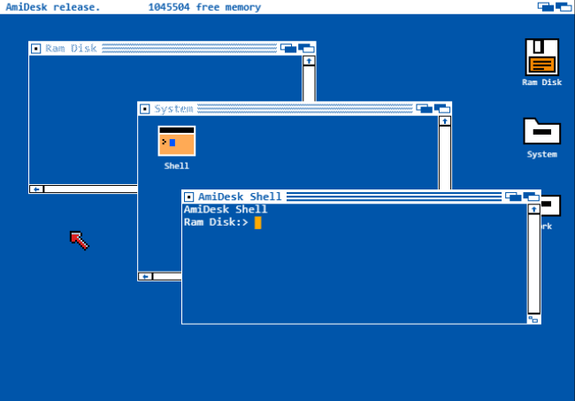
AmiDesk es un ambicioso proyecto de Pedro «Balrog», conocido desarrollador y demoscener amiguero, además de responsable de Balrog Soft, que busca recrear AmigaOS 1.3 mediante tecnologías web manteniendo compatibilidad a nivel de API con el sistema original.

Desarrollado principalmente en HTML y JavaScript, AmiDesk va mucho más allá de una simple recreación visual de Workbench. Uno de sus aspectos más llamativos es la implementación de una multitarea preventiva simulada sobre JavaScript, un lenguaje tradicionalmente monohilo. Para lograrlo, el sistema utiliza funciones generadoras y llamadas yield que son inyectadas automáticamente en las aplicaciones escritas en JavaScript, permitiendo que el mecanismo resulte transparente para los desarrolladores.

Según explica su autor, la implementación de Exec se encuentra aproximadamente al 95%, mientras que otras librerías del sistema rondan actualmente el 50% de desarrollo. El entorno ya dispone de un Shell funcional, varios comandos en C: y una RAM Disk completamente operativa.

Uno de los avances más destacados es la integración de un emulador Motorola 68000 en desarrollo. Gracias a este trabajo, AmiDesk ya es capaz de ejecutar determinados componentes procedentes de discos originales de Workbench, incluyendo programas BCPL y algunos binarios nativos. Comandos como Echo y Avail funcionan actualmente de forma completa dentro del entorno emulado. Además, es posible montar imágenes ADF de Workbench y ejecutar determinados comandos directamente desde ellas utilizando el Shell de AmiDesk.

La versión web incorpora también una unidad Work respaldada por Google Drive. El sistema crea automáticamente una carpeta específica para almacenar datos y permite importar archivos mediante las herramientas integradas, una solución necesaria debido a las limitaciones de acceso impuestas por la API de Google Drive. La página incluye además varios ejemplos de aplicaciones que pueden importarse y ejecutarse dentro del entorno, junto con soporte para scripts y distintas utilidades que muestran las capacidades actuales del sistema.

AmiDesk se encuentra disponible para pruebas desde cualquier navegador moderno a través de su página oficial. La documentación del proyecto también menciona planes para una futura versión bare metal destinada a Raspberry Pi, aunque esta rama del desarrollo se encuentra todavía en una fase temprana.

Balrog es ampliamente conocido dentro de la escena amiguera por una trayectoria que abarca desde desarrollos clásicos como Amigochi, una mascota virtual para AmigaOS inspirada en el fenómeno Tamagotchi de finales de los noventa, hasta producciones demoscene de gran calidad realizadas junto a Samplemind dentro del grupo Amiga Skool. Por destacar una de las más recientes, The Colour Out Of Space, presentada en la competición Amiga de la Revision Satellite Party 2024 celebrada en Puçol, donde obtuvo la segunda posición.

Más información y acceso al proyecto: https://www.amidesk.net
#68000Emulation #68k #adf #ADFDiskImage #AmiDesk #amiga #AmigaDevelopment #AmigaEmulator #AmigaOperatingSystem #AmigaScene #amigaShell #AmigaSkool #amigaos #AmigaOS13 #AmigaOSCompatibleAPI #Amigochi #AmigochiAmiDesk #APICompatibleAmigaOS #BalrogSoft #browserBasedAmigaOS #classicComputing #CommodoreAmiga #demoscene #emulación68000 #emuladorAmiga #escenaAmiguera #GoogleDrive #html5 #informáticaRetro #JavaScript #Motorola68000 #multitareaPreventiva #navegadorWeb #PedroBalrog #preemptiveMultitasking #RAMDisk #retroComputing #retroComputingCommunity #retrocomputación #samplemind #ShellAmiga #sistemaOperativoAmiga #TheColourOutOfSpace #webBrowser #webOperatingSystem #workbench #Workbench13
2026 Green Powered Challenge: Solar Powered Pi Hosts Websites In RAM

If you started with computers early enough, you’ll remember the importance of the RAMdisk concept: without a hard drive and with floppies slow and swapping constantly, everything had to live …

Hackaday
2026 Green Powered Challenge: Solar Powered Pi Hosts Websites In RAM

If you started with computers early enough, you’ll remember the importance of the RAMdisk concept: without a hard drive and with floppies slow and swapping constantly, everything had to live …

Hackaday

Obsolete hardware

Whenever I need to run an operating system on obsolete computing hardware, I find the smallest distribution Puppy Linux comes into mind.
The last number of years Slitaz has been doing an enormously great job keeping my old hardware to chug along.

Slitaz is so small it can run on RAM:

That's Amiga speak for ramdisk

#hardware #obsolete #distro #small #environment #Puppy #Slitaz #Linux #keep #running #technology #programming #efficient #Amiga #RAM #ramdisk #FAST

bsd.rd breakdown

Les RAMdisk ne sont pas morts et permettent plus de 30 Go/s en 2025 http://dlvr.it/TM2PPF #RAMdisk #Mac
Les RAMdisk ne sont pas morts et permettent plus de 30 Go/s en 2025

Dans les années 90, les Mac permettaient directement de créer un RAMdisk, un espace de stockage de petite capacité stockée directement dans la mémoire vive. À l'époque, c'était une solution intéressante dans certains cas, comme sur les premiers Mac...

MacGeneration

Macのメモリ上に一時的な高速仮想ドライブを作成できる「TmpDisk」がAPFSとNoExecオプションをサポートし、CLIツールを追加。
https://applech2.com/archives/20250719-tmpdisk-for-mac-ram-disk-management.html

#applech2 #仕事効率化 #github #Mac #OSS #RamDisk #メモリ #レビュー

Macのメモリ上に一時的な高速仮想ドライブを作成できる「TmpDisk」がAPFSとNoExecオプションをサポートし、CLIツールを追加。

TmpDiskはMacに搭載されているメモリを一時的に揮発性の高速な仮想ドライブへ変換しマウントできるようにしてくれるアプリで、元TwitterのエンジニアのTimothy Marksさん(Imothee LLC.)がオープンソースで開発していますが、このTmpDiskが「TmpDisk v2.2.x」アップデートで、APFSやNoExecオプションなどをサポートしています。

AAPL Ch.

The Complete Guide to Installing, Configuring and Operating Plex Media Server on Ubuntu Server (11/14)

📺 Create a RAM disk for fast, temporary processing (Beginner-Friendly!)

Optimise PMS by configuring a RAM disk for handling temporary files and avoiding wear on the physical storage. Plex relies on the underlying Ubuntu.

https://youtu.be/963F5HOIVaE

#PlexMediaServer #UbuntuServer #HomeServer #SelfHosting #PlexSetup #PMS #TTMO #Streaming #Beginner #HowTo #RAMDisk

PMS on Ubuntu: Step 11 of 14: Setting up a RAM Disk in Ubuntu

YouTube
@paul_cS. I think I rebooted the computer between benchmarking and adding the #ramdisk to the /etc/fstab. In effect I made a ramdisk, benchmarked it, rebooted and then copied my files on the /mnt/ramdisk location of my M.2 NVME instead of RAM itself. At least this is what I think happened. And because it's a good one the I/O speed difference wasn't enough for me to notice.
Save your disk, write files directly into RAM with /dev/shm

Given my interest in extending the life of my SD cards and hard drives as much as possible, I’m surprised I haven’t come across /dev/shm before. In a word it’s a world-accessible RAM scratchpad, which seems baked right into POSIX, so that virtually every ~Unix~ EDIT: Linux system already has it mounted as a tmpfs by default: 1 2 ❯ mount | grep '/dev/shm' tmpfs on /dev/shm type tmpfs (rw,nosuid,nodev,inode64) Today’s lucky 10,000, indeed.