Kamratpostaren Söder
Om två timmar startar "Oliver under Ockupation" Presentation av ISM i Malmö!
#AmaltheaBokkafé #Presentation
https://dukop.dk/9897/
#AmaltheaBokkafé #Presentation
https://dukop.dk/9897/
Luxury Brand Guidelines InDesign Template for Screen-Ready Presentations
Brand guidelines used to live in PDFs nobody opened. That era is over. Today, brand identity documents are expected to function as presentations, reference tools, and communication assets — all at once. The luxury brand guidelines InDesign template by Tom Sarraipo answers that demand directly, with a presentation layout built for screens, not printers.
This is a 21-page, 1920 × 1080 px Adobe InDesign template. It covers every major touchpoint of a brand identity system — from logo architecture and color palettes to packaging, stationery, and digital mockups. And it does all of this inside a visual language that feels restrained, precise, and unmistakably premium.
But beyond the aesthetics, this template represents a specific philosophy about how brand documentation should work. Furthermore, it challenges designers to rethink what a brand guidelines document is actually for.
Download the template from Adobe StockPlease note that this template requires Adobe InDesign installed on your computer. Whether you use Mac or PC, the latest version is available on the Adobe Creative Cloud website—take a look here.
Adobe InDesign Brand Guidelines Presentation Layout by Tom Sarraipo Download the template from Adobe StockWhat Makes a Brand Guidelines Presentation Template Actually Useful?
Most brand guidelines templates fall into one of two failure modes. Either they are too generic — a grid of colors and fonts that tells nobody anything — or they are too rigid, demanding a visual style that overwrites the client’s actual brand. Tom Sarraipo’s template avoids both.
The layout operates on what I’d call the Neutral Scaffold Principle: the structure is opinionated, but the content slots are entirely neutral. Every image, logo, and typeface is a placeholder. Consequently, the designer’s job is to fill the scaffold with the client’s actual brand reality — not adapt their brand to fit a template’s personality.
This distinction matters enormously in practice. A scaffold that imposes its own aesthetic becomes a liability. Meanwhile, a scaffold that stays out of the way becomes a genuine tool. Sarraipo’s template is firmly in the second category.
The minimalist layout is built around high contrast, clean white space, and editorial typographic hierarchy. Therefore, it reads as premium without performing premium — a critical distinction for luxury branding work.
The Architecture of the Template: 21 Pages, Zero Waste
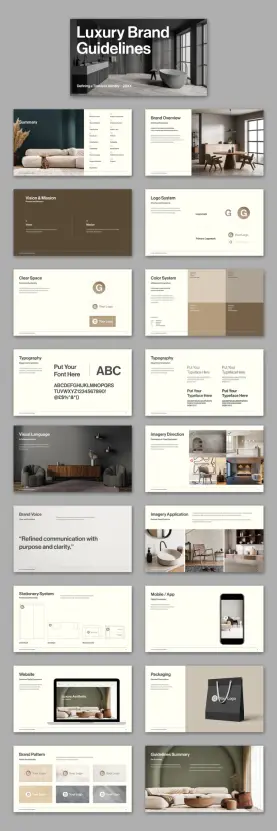
Twenty-one pages sounds like a lot. In practice, every spread in this template earns its place. Let me walk through the structure and explain what each section actually accomplishes.
Cover and Summary
The cover establishes visual tone immediately. It uses a bold sans-serif headline — “Luxury Brand Guidelines” — against a full-bleed lifestyle image. This is the First Impression Frame, the single slide that sets the entire emotional register of the document. Get it wrong, and nothing else recovers. Get it right, and every subsequent page benefits from the credibility established here.
The summary page follows with a structured content index. It lists every section — Brand Overview, Logo System, Color System, Typography, Visual Language, and more — in a scannable two-column layout. Additionally, it sits alongside a curated image block that reinforces the overall visual direction.
Brand Overview and Vision & Mission
The Brand Overview page introduces what Sarraipo’s layout calls “A Refined Foundation.” This section exists to establish context before introducing any visual assets. Moreover, it anchors the subsequent visual decisions in purpose, not just aesthetics.
The Vision & Mission spread is deliberately spacious. Two columns — Vision and Mission — sit against an earth-toned background. The breathing room here is intentional. These statements should feel considered, not compressed. Thus, the whitespace is functional, not decorative.
Logo System and Clear Space
The logo section is where many brand guidelines templates overcomplicate. Sarraipo’s version is admirably direct. It shows the logomark, the primary logomark, and the relationship between the two — clean, labeled, and unambiguous.
The Clear Space page follows with a dedicated spread for logo protection zones. This is often the most ignored section in brand documentation, yet it is among the most practically important. By giving it its own full page, the template signals that this is non-negotiable territory.
Color System
The color palette spread uses a grid of color blocks — warm neutrals, deep taupes, and muted earth tones in the placeholder version. Each block carries the color’s name, HEX, RGB, and CMYK values. This is the Color Specification Matrix approach, and it is the correct one for any brand document that will be used by both digital and print teams.
Furthermore, the grid layout allows for immediate visual comparison, which is exactly what a working designer needs when checking brand compliance on a real project.
Typography Spreads
There are two dedicated typography pages — a notable choice. The first establishes the typeface family, showing the full character set from A to Z and 0 to 9. The second demonstrates typographic hierarchy in use: primary, secondary, and supporting type roles shown side by side.
This dual-page approach reflects what I’d call the Type-in-Context Protocol: never show type in isolation. Always show it doing something. The second spread accomplishes exactly this, and it makes the typography section significantly more useful than a single specimen page.
Visual Language and Imagery Direction
The Visual Language spread is the most editorial section of the template. It uses a full-bleed lifestyle photograph alongside a curated color palette strip — establishing the mood and compositional approach that defines the brand’s image world.
The Imagery Direction page then goes further, showing both approved and rejected image treatments side by side. This is the Approval/Rejection Axis, a framework for communicating aesthetic standards without lengthy written descriptions. One correct image and one incorrect image teach more than three paragraphs of guidelines text.
Brand Voice
A single page carries a single quote: “Refined communication with purpose and clarity.” The entire slide is devoted to this one statement. This is not minimalism for its own sake — it is a demonstration of the principle itself. The brand voice page uses the brand voice to define the brand voice. That kind of self-referential precision is genuinely clever design thinking.
Applications: Stationery, Mobile, Website, Packaging
The applications section is where brand guidelines move from theory into practice. Sarraipo’s template covers four distinct touchpoints: stationery (letterhead, envelope, business card), mobile and app interface, website mockup, and packaging.
Each spread uses realistic mockup photography alongside annotated layout diagrams. This combination — what I’d call the Mockup-to-Blueprint Pairing — gives both the client and the production team exactly what they need. Clients see the vision; production teams see the specifications.
Brand Pattern and Guidelines Summary
The Brand Pattern page shows the logo used as a repeating graphic element — tiles of logomarks across varying backgrounds. This is practically useful for merchandise, packaging, and digital surface design. Additionally, it demonstrates the logo’s flexibility without compromising its integrity.
The final Guidelines Summary page closes the document with a lifestyle image and a structured list of key principles. It is the Closing Anchor Frame — the last impression, designed to leave the reader with clarity and confidence rather than information overload.
Why the 1920 × 1080 px Format Changes Everything
Brand guidelines have historically been delivered as PDFs at print dimensions — A4, US Letter, sometimes A3. That format made sense when the primary output was a printed binder. Today, almost nobody prints brand guidelines. They present them, share them, and review them on screens.
Sarraipo’s choice of 1920 × 1080 px — standard HD resolution and the native aspect ratio of virtually every contemporary monitor, laptop, and projector — is a direct response to this reality. The template fills the screen completely. There are no white bars, no awkward margins, no scroll required. It simply fits.
This format also has a practical advantage in client presentations. When you present brand guidelines at a 16:9 aspect ratio on a widescreen display, the experience is fundamentally different from sharing a PDF via email. The guidelines become a presentation. Consequently, they carry the weight and authority of a presentation.
Moreover, Adobe InDesign’s interactive features — hyperlinks, page transitions, video embeds — work within this format in ways that print-oriented documents cannot accommodate. The template is explicitly designed to support interactivity, transforming what would otherwise be a static reference document into an active communication tool.
The Minimalist Aesthetic as a Strategic Choice
Tom Sarraipo’s design aesthetic throughout this template is restrained to the point of discipline. Warm neutrals — off-whites, taupes, deep browns — dominate the palette. Typography is clean and geometric. Image placements are considered rather than decorative. Nothing competes for attention that isn’t earning it.
This is not merely a stylistic preference. It is a strategic design decision. A brand guidelines template that asserts its own visual identity too strongly will inevitably conflict with the client brand it is meant to document. Therefore, the template needs to be something closer to a neutral container than a designed artifact.
Sarraipo achieves this through what I’d describe as Aesthetic Recessive Design — the deliberate suppression of the template’s own visual personality in service of the content it will hold. The template looks premium because premium brands need premium documentation frameworks. But it does not look like any specific premium brand. That distinction is the entire point.
Who Actually Needs This Template?
The obvious answer is brand designers and creative directors. But the real answer is more specific than that.
This template is built for designers who work with clients for whom presentation quality is part of the value delivered. Luxury brand clients, high-end hospitality groups, fashion brands, architecture firms — these clients evaluate the quality of their designer’s documentation as part of how they assess the quality of their designer’s thinking. A polished, professional brand guidelines presentation communicates competence before anyone reads a single word.
It is also well suited to in-house brand teams at companies undergoing identity work — rebrands, sub-brand launches, brand consolidation projects. These teams need a documentation format that their internal stakeholders will take seriously. A 21-page structured presentation carries considerably more institutional weight than a shared Google Doc.
Additionally, design educators working on brand identity curriculum will find the template’s structural logic useful — not just as a tool, but as a teaching example of how brand documentation should be organized.
Customizing the Template in Adobe InDesign: What to Know
Adobe InDesign remains the professional standard for multi-page layout work, and this template uses it properly. Every text block is a placeholder. Every image frame is ready to accept your own photography or graphics. The color swatches in the Color System page are editable InDesign color objects — replace the HEX values and the blocks update automatically.
The typography placeholders use the message “Put Your Font Here” explicitly — an unusually direct instruction that makes the customization workflow immediately clear. Replace the typeface, update the character samples, and the entire typographic story of your client’s brand becomes visible in seconds.
For interactive use, InDesign’s Export to Interactive PDF or Publish Online features allow the completed template to function as a clickable presentation. Page transitions, hyperlinked table of contents entries, and embedded media all become possible within this document structure.
One practical note: because the template is built at 1920 × 1080 px, it exports cleanly to PowerPoint or Keynote via PDF intermediary — useful for clients who need to maintain the document internally without InDesign access.
The Broader Shift: Brand Guidelines as Brand Experiences
There is a longer argument embedded in a template like this one. Brand guidelines are not just reference documents. They are, in a very real sense, the first experience of the brand that internal teams and external partners have. If the guidelines are clumsy, disorganized, or visually incoherent, they undermine confidence in the brand itself — regardless of how strong the underlying identity work might be.
I’d frame this as the Documentation-as-Brand-Experience Thesis: the quality of your brand documentation is itself a brand signal. Luxury brands, in particular, cannot afford to separate the experience of using their brand from the experience of reading about their brand. They need to be the same experience.
Sarraipo’s template operationalizes this thesis. It is not just a convenient way to document brand decisions. It is a demonstration that brand thinking extends into every artifact the brand produces — including the document that governs the brand.
That is a more sophisticated position than most brand guidelines templates take. And it is why this particular template deserves attention beyond its surface-level functionality.
A Forward-Looking Prediction
Within the next three to five years, static PDF brand guidelines will become the exception rather than the rule. Interactive, screen-native brand documentation — delivered as web apps, interactive PDFs, or hosted brand portals — will become the standard expectation for professional brand identity work. Templates like this one, built at screen resolution with interactivity in mind, are the precursor to that shift.
Designers who build their documentation workflow around screen-native formats now will be significantly ahead of this curve when clients begin expecting it as standard practice. Furthermore, they will have developed the design fluency in this format that takes time to build.
Download the template from Adobe StockThe Sarraipo luxury brand guidelines template is, among other things, a bet on where professional brand documentation is heading. From where I stand, it is a well-placed bet.
Frequently Asked Questions
What software do I need to use this brand guidelines template?
You need Adobe InDesign to edit this template. Any current Creative Cloud subscription that includes InDesign will work. The template is delivered in standard InDesign format and does not require any additional plugins or extensions.
What is the page size of this brand guidelines template?
The template is designed at 1920 × 1080 px, which matches standard HD screen resolution. This makes it ideal for on-screen presentations, projector display, and interactive PDF export. It is not designed for print use at standard paper dimensions.
How many pages does the template include?
The template includes 21 pre-designed, fully customizable pages covering brand overview, logo system, clear space rules, color system, typography, visual language, imagery direction, brand voice, imagery applications, stationery system, mobile and app mockups, website mockup, packaging, brand pattern, and a guidelines summary.
Can I use this template for clients across different industries?
Yes. Because the template uses a neutral, minimalist aesthetic and placeholder content throughout, it adapts to virtually any brand identity project. It works particularly well for luxury, hospitality, fashion, architecture, and premium consumer brands, but the scaffold is flexible enough to support other sectors.
Can I make the brand guidelines interactive?
Yes. Adobe InDesign supports interactive PDF export and Publish Online, both of which enable hyperlinks, page transitions, and embedded media. The 1920 × 1080 px format is specifically suited to interactive presentation use.
Are the images and fonts in the template included?
All images and typography shown in the template are placeholders. You replace them with your own assets — client photography, brand typefaces, and logo files. The template provides the structural framework; the brand content is yours to supply.
Is this template suitable for a luxury brand identity project?
Yes, and it is specifically designed with that context in mind. The minimalist, screen-native layout communicates professionalism and restraint — exactly the qualities that luxury brand clients expect from their documentation. The template’s Neutral Scaffold Principle ensures it supports rather than overrides the client’s own brand personality.
Where can I get this Adobe InDesign brand guidelines template?
The luxury brand guidelines presentation template by Tom Sarraipo is available on Adobe Stock. You can browse and license it directly through Adobe Stock, where it is available as part of a standard or extended license depending on your intended use.
Check out other graphic design assets here at WE AND THE COLOR.
#AdobeInDesign #brandGuidelines #design #graphicDesign #InDesignTemplate #layout #luxuryBrand #presentation #presentationTemplate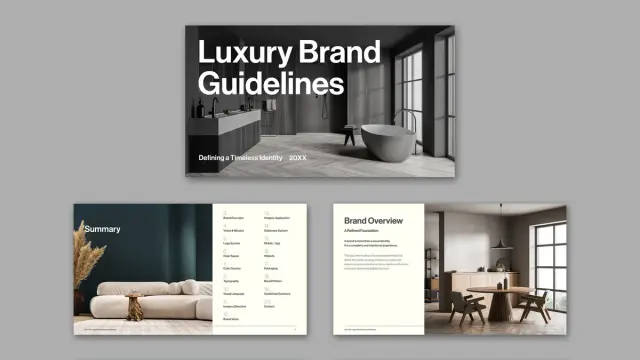
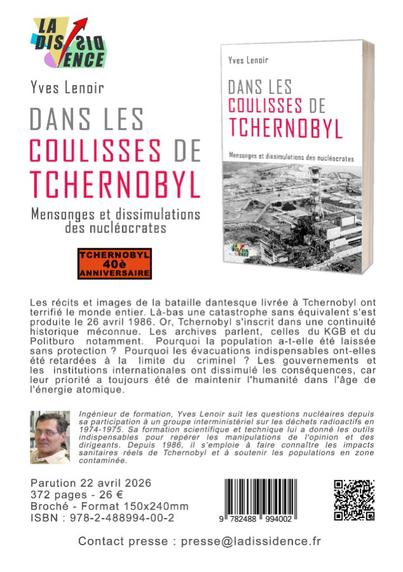
Le 2026-05-19 à partir de 17:30 Lieu : librairie Thuart - 24 rue de l'ETOILE à le Mans (72000) présentation du dernier livre de Yves Lenoir pour les 40 ans de la catastrophe de Tchernobyl Contact organisation : [email protected] 0645307466 sdn72.org
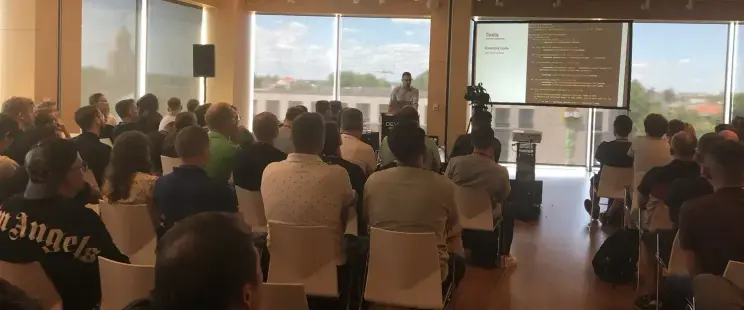
Learn how to build impactful conference presentations by focusing on storytelling, narrative throughlines, and audience experience rather than just slides.
#blog #indieweb #Presentation #PublicSpeaking #Conference #Storytelling #Career (https://gagor.pro/2026/05/how-to-prepare-presentation-for-a-conference/)
One of my nephews is doing pre-law (I think) and is doing a bit on copyright.
I showed him my VERY old "Understanding FOSS" slide deck:
https://www.deviantart.com/doctormo/art/Free-and-Open-Source-2-323411054
Amazing how some of these things haven't really changed.. including the public not knowing any of it still. Still 16 years ago! I really liked garish colors lol.
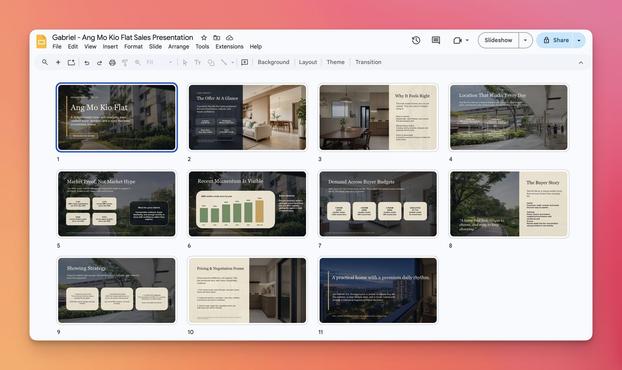
Gabriel Chua (@gabrielchua)
브라우저를 열지 않고도 Codex로 Google Slides 프레젠테이션을 만들 수 있다고 소개한다. 문서·슬라이드 제작을 AI로 대체하거나 보조하는 생산성 활용 사례다.

 Kamratpostaren
 WE AND THE COLOR
 GLOBAL Visibility aéPiot - by aePiot.ro
 Duk Op Event Bot
 DionyZack 🍉✊🏽♀️🌿
 vagabondageautourdesoi
 Tom
Tom Martin Owens
 sayzard