 ℵ₀ 🏳️⚧️🏴☠️
https://www.nature.com/nature/articles?type=futures
#naturemagazine #naturejournal can fuck off into the sun with this #paywall of even the #speculativefiction #Futures section
#
https://www.nature.com/nature/articles?type=futures
#naturemagazine #naturejournal can fuck off into the sun with this #paywall of even the #speculativefiction #Futures section
#
Struggling to Create a Stunning Nature Magazine Layout? This InDesign Template Might Be Your Answer
Ever flipped through a beautifully designed magazine, especially one showcasing the breathtaking beauty of nature, and wondered how it all comes together? Creating a professional publication from scratch is a significant undertaking. It demands a keen eye for design, a solid understanding of typography and layout principles, and proficiency in powerful software. Designing a compelling nature magazine layout requires balancing stunning visuals with clear, readable text, creating an immersive experience for the reader. It’s about capturing the essence of the wild, the tranquility of a forest, or the drama of a mountain range, all within the confines of a printed page or digital screen. Many aspiring designers or small publishers find this process daunting. But what if you could get a massive head start? What if a foundation was already laid, allowing you to focus on the content that truly matters?
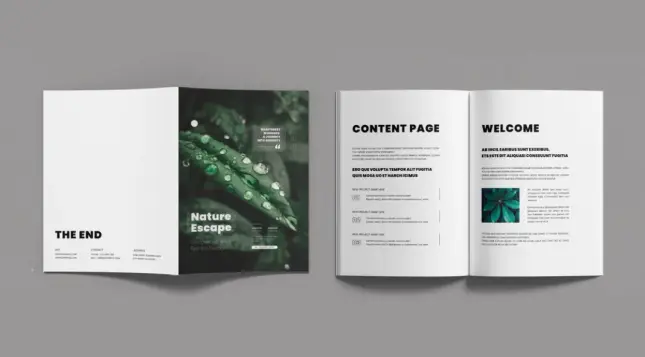
This is where high-quality design templates come into play. Think about it: a pre-designed structure, crafted by professionals, ready for your unique content. Today, we’re looking at a specific gem: a nature magazine layout template for Adobe InDesign, created by the talented folks at DesignCoach. This isn’t just any template; it’s a thoughtfully constructed A4 format design poised to make your publication look exceptional. Let’s explore why this particular template could be the perfect tool for your next nature-focused project.
Download the template from Adobe StockPlease note that this template requires Adobe InDesign installed on your computer. Whether Mac or PC, the latest version is available on the Adobe Creative Cloud website—take a look here.
Adobe InDesign magazine layout design template in A4 for Nature Content Download the template from Adobe StockWhy Adobe InDesign is the Choice for Magazine Design
Before diving into the template itself, it’s worth mentioning why Adobe InDesign is the industry standard for projects like this. While other software might handle images or simple text documents well, InDesign is built specifically for multi-page layouts.
Using a template within InDesign leverages all this power, providing a professional framework while still demanding the capabilities of the best tool for the job.
Introducing the DesignCoach Nature Magazine Layout Template
So, let’s talk about this specific template from DesignCoach. It’s designed in the standard A4 size, making it versatile for various printing needs worldwide. It comes packed with 16 pre-designed pages. This isn’t just a cover and a single content page; it’s a comprehensive set covering different layout possibilities you’d typically find in a magazine – think feature spreads, contents pages, introductory sections, and more. This variety gives you a fantastic starting point for structuring your entire publication.
Exploring the Clean and Modern Aesthetic
The first thing you notice about this nature magazine layout is its clean, contemporary style. It avoids clutter, allowing the imagery, presumably stunning nature photography, to take center stage.
This clean style makes the template incredibly adaptable. Whether your focus is wildlife photography, ecological issues, travel adventures, or botanical studies, the underlying design provides a sophisticated canvas.
Fully Customizable Content: Make It Your Own
A great template provides structure, not constraints. DesignCoach understands this perfectly. While the template includes 16 beautifully designed pages, all text and images are placeholders. This is crucial. You are not locked into someone else’s content.
Imagine dropping your own breathtaking landscape photos into the designated image frames. Picture pasting your carefully crafted articles into the text boxes. With Adobe InDesign, this process is straightforward. You can easily:
This flexibility ensures your final nature magazine layout is truly unique to your vision and content, even though it started from a template.
Print-Ready Design: CMYK Color Mode
One critical technical detail for any print project is the color mode. This template is set up in CMYK (Cyan, Magenta, Yellow, Key/Black). Why does this matter? CMYK is the standard color model used for professional printing presses. Designing in CMYK from the start helps ensure that the colors you see on your screen (bearing in mind screen calibration) are more accurately reproduced in the final printed product.
Using an RGB file (common for web images) for print can lead to unexpected color shifts. By providing the template in CMYK, DesignCoach saves you a crucial, potentially error-prone step in the print preparation process. It signals that this template is built with professional output in mind.
Who Can Benefit from This Nature Magazine Layout?
This template isn’t just for seasoned graphic designers (though they’ll appreciate the solid foundation). It’s a valuable resource for a wider audience:
Essentially, anyone needing to produce a high-quality nature magazine layout in InDesign, but perhaps lacking the time or advanced design skills to start from zero, will find this template incredibly useful.
Getting the Most Out of Your Template
While the template provides a fantastic structure, here are a few quick tips:
Your Shortcut to a Professional Publication
Creating a magazine is a journey. This DesignCoach nature magazine layout template for Adobe InDesign doesn’t complete the journey for you, but it gives you a reliable, well-designed vehicle to get started much faster. It provides a professional, clean, and adaptable framework specifically tailored for nature themes, complete with 16 customizable A4 pages and print-ready CMYK settings.
If you’ve been dreaming of launching your nature publication or simply need a more efficient way to produce stunning layouts, exploring a high-quality template like this is a smart move. It bridges the gap between vision and execution, empowering you to focus on what truly matters: sharing the wonder of the natural world through compelling content and beautiful design. Ready to bring your nature stories to life?
Download the template from Adobe StockFeel free to find other high-quality graphic design assets in the reviews on WE AND THE COLOR.
Subscribe to our newsletter!
[newsletter_form type=”minimal”]#AdobeInDesign #AdobeStock #graphicDesign #magazine #magazineLayout #natureMagazine

"In June a notice posted on the website of the journal Nature set a new scientific record. It withdrew what is now the most highly cited research paper ever to be retracted."
HT Retraction Watch
#PublicationEthics #NatureMagazine #SpringerNature #ScientificAmerican #ResearchIntegrity #Retractions #StemCells #StemCellScience #AdultStemCell #CatherineVerfaillie #UniversityOfMinnesota #BoneMarrow #HighImpact #PeterAldhous
This article was published in Nature magazine, and highlights breakthrough research that uses the fibers in the Digital 395 project (California Broadband Cooperative) to detect, measure and report in real time, earthquakes anywhere along its 600-mile length from Barstow, CA to Reno, NV. It’s a remarkable innovation that was spearheaded by scientists at Caltech, who asked the head of CBC, Michael Ort, if they could use dark fibers for their experiments after the Ridgecrest earthquake a few years back.
Here’s the link to the published article in Nature:
https://www.nature.com/articles/s41586-023-06227-w #owensvalley #bishopcalifornia #bishop #sierranevada #digital395 #nature #naturemagazine #caltech

Distributed acoustic sensing technology is utilized to image four high-frequency rupture subevents of the 2021 Antelope Valley, California, earthquake; the results indicate that the subevents are due to the breaking of fault asperities.
@obeto
Where is the scientific evidence demonstrating that Black bodies spontaneously dismember and disperse?
I'm pretty sure I'd have caught that headline in #NatureMagazine or #ScientificAmerican or something.
If nothing else, there'd be a cable show on #TLC or something about it....
I’m honoured to have my article and photos about the Vancouver Island marmot published in the Spring Edition of the prestigious magazine Nature Sauvage.
J’ai l’honneur d’avoir mon article et mes photos sur la marmotte de l’île de Vancouver publiés dans l’Édition printemps du prestigieux magazine Nature Sauvage.
https://www.naturesauvage.ca/publications/magazine/numero-59-printemps-2023/
#NatureMagazine #NaturePhotography #WildlifePhotography #nature #wildlife #Canada #VancouverIslandMarmot #marmot
 asavik
 WE AND THE COLOR
 Carl (He/Him)
 S Zhang
 Matt Hodgkinson
 Joe ✅
Joe ✅ BC Info Bot
 Mark W. Alexander
 Catherine Babault