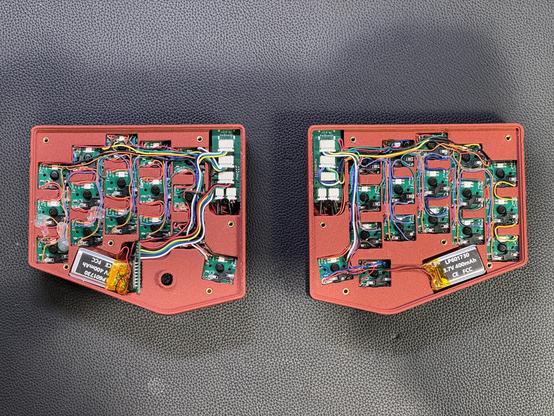
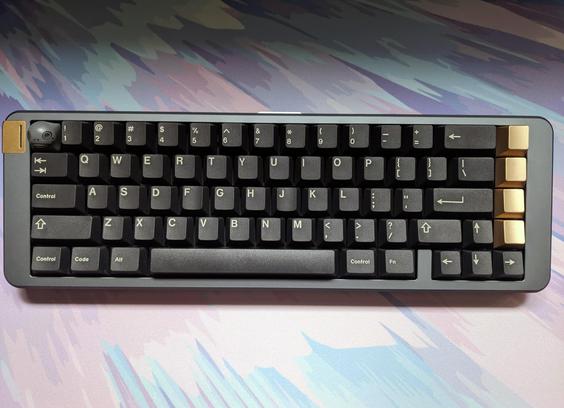
Both sides are wired now. I’ll cut and fit the gasket mount next, and it’s all about firmware after that

A keen observer might notice that there’s only one pair of keyboards and tl;td is that wiring this version was a miserable experience and I don’t want to release it like that. I’ll verify that the electronics work and then redesign the wiring to a FPC #keyboard #keyboards #electronics

Meine schönsten Proberaumerlebnisse, Eintrag vom 18.03.26:

Beim Einschalten meldet der Haupt-, weil einzige Klangerzeuger: "The internal memory has been corrupted, likely due to an interruption of power while the system was writing / saving data. This has been repaired and the affected Bank has been initialized."

Mit "the affected Bank" ist hierbei gemeint: Alle Bänke. Klanglich also in Sekunden from hero to zero, überall steht als Programmname nur noch "InitCombi". Da kann einem schon mal spontan etwas warm werden. 🙂

Wohl dem, der auf einem nach hektischer Sucherei in der Keyboardtasche tatsächlich gefundenen USB-Stick eine noch nicht zu alte Sicherung der Klangprogramme hat …

#Musikerleben #Musikelektronik #Backup #Keyboards

A mini review of the #HHKB after using it for a bit over a year https://batsov.com/articles/2026/03/18/one-year-with-the-hhkb/

#Keyboards

One Year with the HHKB: A Mini Review

The keyboard is the most important tool for a programmer. Choose wisely.

(think)

Ugh, so the Moonlander software (QMK) does have caps word built in. But… using a layer key breaks the word. So, only good if the characters you need are all on the main layout. Or if you want to custom compile the firmware to ignore layer keys.

Of all the things going on, custom compiling firmware for a keyboard is not a thing that I want to add to the pile.

So close, yet so far…

#keyboards #ErgonomicKeyboards
#keyboardfails

OK, time bare my soul. Here are the parameters with which I operate:

  • I'm running asahi with Debian Bananas using KDE Plasma

  • I have a dutch macbook pro, and so the keyboard looks as described here: https://support.apple.com/en-us/102743

  • I want the top button to the left of the 1 key to map to screenshot

  • when I hit shift+3, it should produce a hash

  • the button to the left of my z key, should be a backtic by default and a tilde when I hold shift and hit it

  • capslock should be ctrl

  • command key should be another control

All other keys should behave the way they normally would.

What keyboard model and layout do you choose for this if you're using Debian Bananas with KDE Plasma on a Dutch macbook pro?

If I select Apple ISO and Dutch Dutch Macintosh, everything works except #, which is instead a £. (also it won't let me map "win" aka command to ctrl)

If I select Generic 104-key PC and Dutch Dutch Macintosh, the # works, but then the tilde key becomes < >, which is weird.

I have no idea what to do. I want help.

#debianbananas #asahi #kde_plasma #kdePlasma #ashailinux #keyboard #keyboards

How to identify your Apple keyboard layout by country or region - Apple Support

Use the letters and symbols on your keyboard to determine your keyboard layout.

Apple Support

I have hyperhydrosis on my hands, feet, and under arms. I lost count of the amount of keyboards I've had to replace, both internal in my laptops and external usb ones. I know there are silicone options, but they are very mushy, often have strange layouts, and are full-sized. I am totally blind, so I need both tactility and the layout to be normal, or at least, close to it. I tried at least one a keyboard cover, but it made it very difficult to feel the keys, since it was thick and felt like a single sheet of silicone, even though it did have the spaces for each key.

This is my ideal keyboard in both layout and size, next to that on the Acer Aspire One D270, which is perfection. But I've gone through about seven of them already, because I keep shorting out keys. I try to remap them, but after awhile, it just becomes annoying.

CUQI Mini Keyboard, Small Wired 82 Scissor Keys, USB Interface

https://www.amazon.com/dp/B0C26RZBRJ

I bought this last month. It's okay, but I always have to use Auto Hotkey to add an Applications key and reverse the left Alt and Windows keys. Plus, not all programs recognise the changes. I have no idea how long it will last, either, since this is my first one. But at this price, I don't want to keep buying them. It's not portable enough to fit in my bag with my tablet, but it's thin, light, and not huge.

ALLIFE Universal Ultra Light Slim Portable Wireless Bluetooth 3.0 Keyboard

https://www.amazon.com/dp/B09GKFJM5D

This is good for phones, but it doesn't contain the F1 through F12 keys for Windows.

ProtoArc Foldable Compact Keyboard, XK04

https://www.amazon.com/dp/B0D9PT9884

I bought this a few days ago, precisely because it's supposed to be waterproof. They say it's for my Toughpad, which is a seven-inch tablet, but it's a giant, full-sized keyboard! Why they would make this for such a small machine is beyond me. That said, if this were compact, it would be perfect, since it's rigid with good key tactility. While they say it's mechanical, don't expect anything like a Model M.

BoxWave Keyboard Compatible with Panasonic Toughpad FZ-M1 MK3 (7 in)

https://www.amazon.com/dp/B0DJ3NT9G9

I've tried a few others, from folding to solid, but many were missing essential keys (most noteably the F1 through F12 keys) and some were simply ruined very quickly. Can anyone help me find a good, portable keyboard that can withstand my sweat?

#accessibility #blind #computers #hyperhydrosis #keyboards #portable #sweating #technology

Amazon.com: CUQI Mini Keyboard, Small Wired 82 Scissor Keys, USB Interface Compact for Android, Windows PC, Laptop, Raspberry Pi, Windows 10/8/7 : Electronics

Amazon.com: CUQI Mini Keyboard, Small Wired 82 Scissor Keys, USB Interface Compact for Android, Windows PC, Laptop, Raspberry Pi, Windows 10/8/7 : Electronics

Apple Updates MacBook Keycaps from Text to Glyphs on Several Keys

📰 Original title: Should Keycaps Use Text or Glyphs for Delete, Return, Tab, Caps Lock, and Shift?

🤖 IA: It's not clickbait ✅
👥 Usuarios: It's not clickbait ✅

View full AI summary: https://killbait.com/en/apple-updates-macbook-keycaps-from-text-to-glyphs-on-several-keys/?redirpost=974dede5-6ea9-4b38-af65-4f7d45e4b07e

#technology #apple #keyboards #macbook

Apple Updates MacBook Keycaps from Text to Glyphs on Several Keys

Apple has updated the keyboard design for its latest MacBook Air and MacBook Pro models, replacing text labels with glyphs on the Tab, Caps Lock, Shift, Return, and Delete keys for U.S.

KillBait Archive