
I've also returned the 2nd N150 mini PC.

The #Topton M5 2M is quite a competent little box - 2x Gen3x2 M.2 2280 & 2x i226 2.5 GbE NICs! 🤩👍

Imma not run this box in parallel to my existing NAS. I'd have to get a USB 2-bay for my spinning ZFS mirror, to replace it. We all know what a hassle it can be, to pull SMART reports out of those #Jmicron buggers!

+10 Watts, ain't worth the separation of server roles - not in my 1-user LAN, not in THIS economy! 🤣
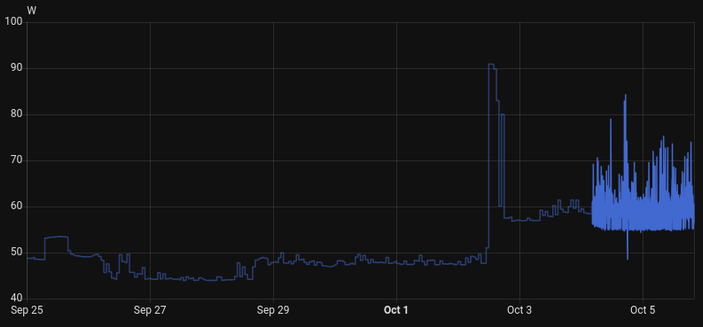

#Linux #NAS #HomeAssistant #HomeLab #ZFS

Been testing a bunch of external nvme cases lately...

Turned out none of 'em enables TRIM under Linux by itself but they are all perfectly capable to do so.
So here's the quick rules for what I got

# TRIM and start/stop support for external NVME to USB drives
sudo -s
cat <<EOF > /etc/udev/rules.d/42-jmicron-JMS583-storage.rules
#JMicron JMS583
ACTION=="add|change", SUBSYSTEM=="scsi_disk", ATTRS{idVendor}=="152d", ATTRS{idProduct}=="0583", ATTR{provisioning_mode}="unmap", ATTR{manage_start_stop}="1"
EOF
cat <<EOF > /etc/udev/rules.d/42-realtek-RTL9210B-CG-storage.rules
# Realtek RTL9210B-CG
ACTION=="add|change", SUBSYSTEM=="scsi_disk", ATTRS{idVendor}=="0bda", ATTRS{idProduct}=="9210", ATTR{provisioning_mode}:="unmap", ATTR{manage_start_stop}="1"
EOF
cat <<EOF > /etc/udev/rules.d/42-asmedia-ASM2362-storage.rules
# ASmedia ASM2362
ACTION=="add|change", SUBSYSTEM=="scsi_disk", ATTRS{idVendor}=="174c", ATTRS{idProduct}=="2362", ATTR{provisioning_mode}:="unmap", ATTR{manage_start_stop}="1"
EOF

oh wow... dk how sustainable this 'workaround' is, but from my sniffing around for the culprit, one of the suggested cause points out to something called uas that the drives are using (via the USB-SATA cables).

These
#JMicron tings are what's used by my drives on the Pi:

Bus 002 Device 002: ID 152d:0583 JMicron Technology Corp. / JMicron USA Technology Corp. JMS583Gen 2 to PCIe Gen3x2 Bridge Bus 001 Device 006: ID 152d:0583 JMicron Technology Corp. / JMicron USA Technology Corp. JMS583Gen 2 to PCIe Gen3x2 Bridge Bus 001 Device 005: ID 152d:0583 JMicron Technology Corp. / JMicron USA Technology Corp. JMS583Gen 2 to PCIe Gen3x2 Bridge
They're using
uas drivers:
$ sudo dmesg | grep -i uas [ 0.899109] usbcore: registered new interface driver uas [ 1.430272] scsi host0: uas [ 2.488903] scsi host2: uas [ 2.741227] scsi host3: uas
and the thing that seems to fix it (i.e. no longer crashes the entire USB stack on the Pi), is adding the following option to
/boot/firmware/cmdline.txt:
usb-storage.quirks=xxxx:yyyy:u
xxxx:yyyy being the actual ID reported for those USB bridge used by the drives (in my case, those JMicrons).

After a reboot, instead of using
uas, they're using usb-storage, and the USB crash no longer occurs when using #OMV (scanning disks).
mikahomelab@pi-0:~ $ sudo dmesg | grep -i uas [ 0.918739] usbcore: registered new interface driver uas [ 1.439226] usb 2-1: UAS is ignored for this device, using usb-storage instead [ 1.439267] usb 2-1: UAS is ignored for this device, using usb-storage instead [ 2.510028] usb 1-1.1.1: UAS is ignored for this device, using usb-storage instead [ 2.510066] usb 1-1.1.1: UAS is ignored for this device, using usb-storage instead [ 2.766095] usb 1-1.1.4: UAS is ignored for this device, using usb-storage instead [ 2.766132] usb 1-1.1.4: UAS is ignored for this device, using usb-storage instead
Not sure of the impact on this, but so far, I'm hoping it's usable.

🔗 (More Details on uas/usb-storage on the #RaspberryPi) https://forums.raspberrypi.com/viewtopic.php?t=245931

STICKY: If you have a Raspberry Pi 4 and are getting bad speeds transferring data to/from USB3.0 SSDs, read this - Raspberry Pi Forums

I've never been fond of #JMicron #USB bridges! #SATA or #NVMe! (#ASMedia ain't much better?)

It's just a pain in the rear to pull #SMART reports off the drive!

NO, i friggen DO NOT WANT TO fumble around with "-d", and quirks, and shiz!

Tools on friggen #Windows (#CrystalDiskInfo) CAN DO it, so SHOULD smartmontools on #Linux, automatically!

(back in the 480mbps USB 2.0 days - things were BETTER - current #Linux code hasn't caught up)

…or is it #Firmware?

#Linux #smartctl #smartmontools

🧵 2/2

This puppy, a "filthy" #JMicron bridge (wich doesn't support readily available SMART reports - afaik), is my new #Ventoy / #Medicat storage!

I just dd-cloned my 128G USB stick, moved and resized the boot&storage partition, with #Gparted.

It semi-failed! I had to plug it into a Windows 10(pro) machine, let Windows complain & "repair" the NTFS partition.

All fine, biz as usual, since! 😅 👍

New blog post, in which I am bewildered by the fact that two otherwise working Ethernet devices can refuse to communicate: https://blog.tty8.org/posts/2025-02-19-jmicron-jmc250-gigabit-ethernet-card-doesnt-work-with-mikrotik-hex-rb750gr3.html

#JMicron #MikroTik #Ethernet

JMicron JMC250 Gigabit Ethernet card doesn't work with MikroTik hEx (RB750Gr3) — Debiania

不信邪在安裝有 #JMicron JMB58x的 #Unraid 系統執行 powertop --auto-tune ,之後……是沒有出現嚴重問題,但是kernel一直噴錯誤訊息,只好停止執行及重新開機。反正這台有沒有做powertop最佳化,待機耗電量都沒有差異。

光是CPU不能進C6,還插著一張GTX1060就夠耗電了。

Like, https://www.orico.com.cn/uploads/download/2022/0328/NVME%E7%A1%AC%E7%9B%98%E7%9B%92%E6%94%B9%E4%BC%91%E7%9C%A0%E6%97%B6%E9%97%B4.zip is the manufacturer tooling for some of the popular USB -> NVMe / SATA controllers around, surely there's interesting stuff there. #ReverseEngineering #NVME #JMicron #ASMedia