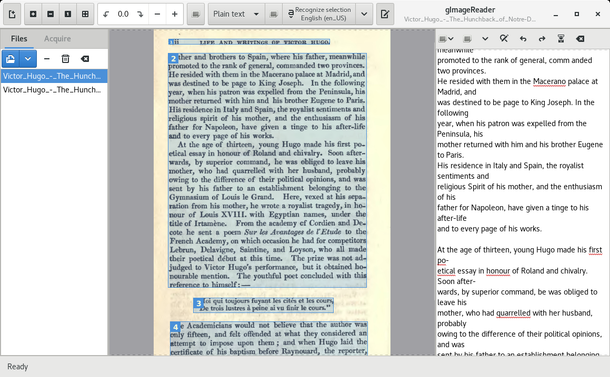
J'essaye de numériser des notes manuscrites vieilles de... 30 ans (mais le papier et l'écriture sont encore très propres - et lisible).

Alors j'sais pas si c'est moi qui écrit comme un sagouin (j'crois pas) ou bien si le scan #ocr a pas fait de progrès depuis 10-15 ans (dernière fois que j'ai fait ce genre de manip), mais j'arrive à rien récupérer de potable 😩

J'utilise #gImageReader (https://github.com/manisandro/gImageReader), frontend de #Tesseract (https://github.com/tesseract-ocr/tesseract)
#gnome #linux #scan

Toujours dans mon exploration de #Linux #LinuxMint je découvre la vraie puissance de #OCR #Text avec #gImageReader et #Paperwork (#Openpaper) :

https://www.openpaper.work/fr/ très facile à faire tourner sur Linux sans passer par #Docker. Les 2 sont aussi en .exe (relativement récent sur W* ; peu de patience sinon).

Je connaissais déjà #Tesseract mais avec 1 interface graphique et la #Research OCR dans 1 image c'est hyper puissant. Ça marche qu'avec des fonts non manuscrites mais qui sais un jour ...

Paperwork - La gestion de documents personnels rendue rapide et facile - OpenPaperwork

Paperwork, un gestionnaire de document personnels conçu pour rendre votre vie plus facile

Related to my epub DRM gripe, gImageReader (a front-end for Tesseract) does a great job of OCRing screen shots.

I'd still prefer a sane, reliable way to strip Adobe's DRM from epubs, or for publishers to stop using it.

#ocr #tesseract #gimagereader

@dhoe No, I don't really know any plugin for tesseract. At most I use #GImageReader as gui for tesseract (for setting preferences and doing the scans). Have no additional things running, language packages excluded from this:

tesseract-ocr-traineddata-script-fraktur
tesseract-ocr-traineddata-eng
tesseract-ocr-traineddata-deu
tesseract-ocr-traineddata-greek

This setting worked well for a long time, depending on how clearly legible the font was in the scanned text.

As I said earlier: This was the case on my Ubuntu system until recently. I'll probably find out how things work under the current OpenSuse Tumbleweed in the next few days. :wink:

Sigo diciendo que #GimageReader es un programa de puta madre.

Use gImageReader to Extract Text From Images and PDFs on Linux

gImageReader is a front-end for Tesseract Open Source OCR Engine. Tesseract was originally developed at HP and then was open-sourced in 2006.
Basically, the OCR (Optical Character Recognition) engine lets you scan texts from a picture or a file (PDF). It can detect several languages by default and also supports scanning through Unicode characters.
However, the Tesseract by itself is a command-line tool without any GUI. So, here, gImageReader comes to the rescue to let any user utilize it to extract text from images and files.
See Use gImageReader to Extract Text From Images and PDFs on Linux - It's FOSS

https://itsfoss.com/gimagereader-ocr/ https://squeet.me/objects/962c3e101799a8ce16cee928245fe9ae0f782cca

Use gImageReader to Extract Text From Images and PDFs on Linux - It's FOSS

gImageReader is a GUI tool to utilize tesseract OCR engine for extracting texts from images and PDF files in Linux. Here's how to install and use it.

@sirvoe
aggiungo: io ho provato di recente #tesseract con interfaccia grafica #gImageReader (su Mint 19). Sui formati il dibattito è aperto: se ti serve il pdf controlla la versione (quindi a quale standard corrisponde: #pdf/A [1-a, ma anche 1-b] è pensato per l'archiviazione a lungo termine, e la v. 1.4 corrisponde grosso modo a qulle specifiche).
Sulle immagini non so molto, ma anche lì hai i vari standard per il #jpeg (mentre per l'archiviazione il consenso è su #tiff, ma ti serve più spazio sul disco)

Para quienes busquen un programa de reconocimiento de caracteres, #gImageReader puede ser una buena herramienta, para tal propósito.

https://ubunlog.com/gimagereader-aplicacion-pdf-capacidad-ocr/

#OCR #Gnu #Linux #SoftwareLibre #opensource

gImageReader, una aplicación para PDF con capacidad de OCR

En el siguiente artículo vamos a echar un vistazo a gImageReader. Esta es una aplicación para PDF con capacidad de OCR que podemos utilizar en Ubuntu.

Ubunlog

#gImageReader is a graphical frontend for #Tesseract.

gImageReader is a GUI #OCR program which uses Tesseract to extract text. gImageReader provides many automatic and manually tunable image optimization options which enhance the accuracy of the OCR. gImageReader also allows for easy extraction of multiple images, multilingual texts, and spellcheck for the extracted text.

Website 🔗️: https://github.com/manisandro/gImageReader

apt 📦️: gimagereader

#free #opensource #foss #fossmendations

GitHub - manisandro/gImageReader: A Gtk/Qt front-end to tesseract-ocr.

A Gtk/Qt front-end to tesseract-ocr. Contribute to manisandro/gImageReader development by creating an account on GitHub.

GitHub
Let's see if placing a transcript in the #ImageDescription works. I'm messing around with #gocr and #gImageReader because I really want to maximize the #accessibility of these old #comics in #ScreenReader software.