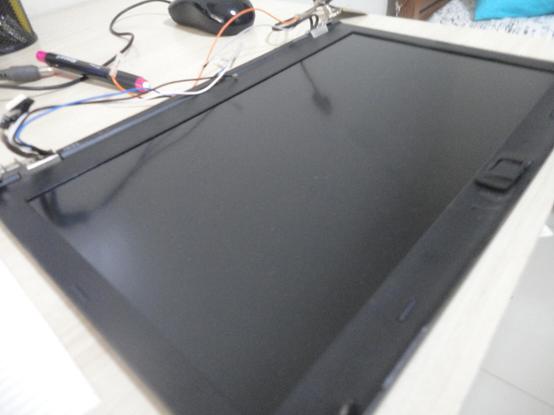
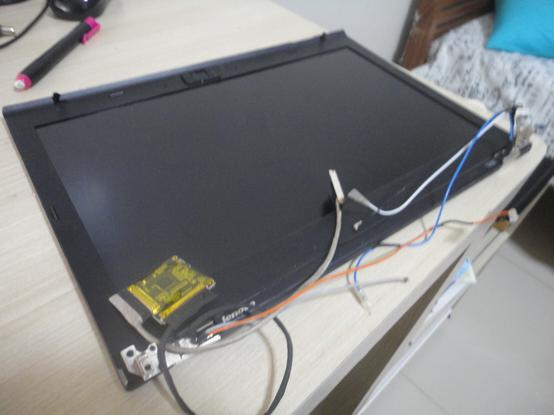
Well, it works. But not for me.

What i had in mind when i thought i could get used to a hidpi display while using #windowmaker #dockapps and a bitmap font?
It turned out to be easier to get back to a lower resolution display than to unrice my desktop and get used to a new one.

So i reinstalled the original 1600x900 display; and am selling the new one.

If anyone wants to buy a 2560x1440 matte display with the eDP to LVDS converter for #thinkpad #T430 (also works on T420, T430s and T420s), i am selling this one WITH* the adapted top lid cover (i had to sand down some nubs for the display to fit), so you do not need to diassemble it all and adapt; AND with the webcam and LED boards (because they are screwed into the lid).

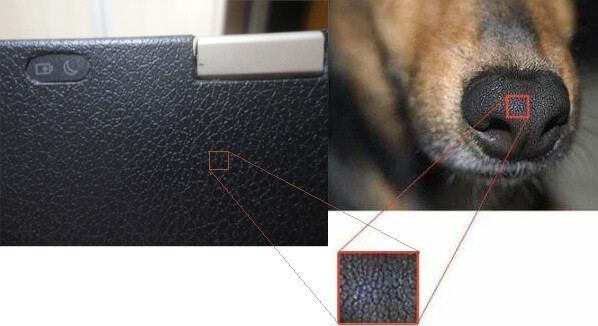
I'm selling the lid with all stickers i had in it: only one. A single faux-leather dog-nose-like vinyl adhesive covering it entirelly (for a bonus business laptop look).

*if you do not have a T430 or do not want the lid or do not want to pay more for the lid and webcam/led boards, i can sell only the display and the converter.

Preferably to brazil or mercusur for easy (for me) shipping.

#sell #vendo #hidpi #wqhd #qhd #thinkpad

Got a lot of work done with #ClaudeCode on #NeoFlux, my idea for a #Fluxbox-inspired grouping #WindowManager written in #Rust.

Supports 4 slits with per-slit #DockApps settings, window grouping, per-desktop backgrounds, gaps, etc. Also trying hidden desktops, which don't show up in window or desktop lists and are only accessible through keyboard shortcuts.

Testing it in #Xephyr so far, but will switch when I have a few days free to play around with it.

#Linux #Claude #LLMs

Updated my #Fluxbox #DockApps page. Several updates, plus new fluxBattery and fluxClipboard. Also created web versions for those who don't use one of the *boxes.

A few weeks of #k12 #education work left, then going to focus on my neoFlux #WindowManager.

https://www.chrisspackman.com/software/flux-dock-apps/index.html

Next up:

* update my websites. have lots of content that is waiting.

* maybe #VibeCode a #Fluxbox replacement? I love Fluxbox, have been on it for years, but like the #WindowMaker #Dockapps, it is pretty much finished, and I worry it will eventually be unmaintained. Unfortunately, I am not aware of any similar stacking window managers. Of course, vibecoding an x11 window manager --- what could possibly go wrong? (Everything. Everything could go wrong.) So, we'll see how that goes.

#Linux

continuing to work on #WindowMaker style #DockApps for #Fluxbox. Currently have:
* fluxCalClock
* fluxMatrix
* fluxMoon
* fluxData (for moon and weather data)
* fluxKeyboardLayout
* fluxPowerControl
* fluxMail
and
* fluxPlayer

fluxPlayer is not working well yet, but I don't have a lot of experience with controlling media players remotely. (usually just use #MPV). Working on fluxNetwork now; fluxWeather will be after that.

nice thing about an ultra-wide monitor - putting back all the #WindowMaker #DockApps that I couldn't justify using the space for on the previous, regular monitor.

I'll probably spend some time this summer tracking down and compiling (or attempting to get to compile) some of the ones that are no longer in #Gentoo repos.

I've got #wmCalClock #wmMatrix #wmMoon #wmSun and a couple of others beautifying and info-fying my desktop already.

1440 / 64 = 22(-ish), so room for more

#Linux #OldSchool

CPUAMD Ryzen 5 3600 (12) @ 3.600GHzRAM8GBGPUNVIDIA GeForce GTX 1050 TiOSUbuntu 24.04 LTSKERN6.8.0-40-genericWM/DEWindow Maker 0.96.0WallpaperPhoto by @ambivalena

For this period, I’ve settled on getting a nice Window Maker environment working. I like Window Maker because of its simplicity, low resource requirements and the use of dockapps. Dockapps are small apps that are designed to sit in the dock and show information or perform tasks. I’ve installed a couple that have similar look between them. From top to bottom:

  • Time – wmtime
    What can I say, it display an analog clock as well as day of week and the date
  • CPU/RAM – cputnik
    This displays how much all cores are working and also shows how much RAM has been used up. When clicking on the dockapp, gnome-system-monitor opens up
    Misc – wmmisc
    This dockapp shows exactly what it’s called, namely miscellaneous information about the system. Logged on users, uptime, ongoing processes, etc.
  • Network – wmifs
    This is a blinkenlights for the ongoing network traffic. You can see the amount of packets being sent as well as lights for receiving/transmitting data
  • Audio control – wmusic
    This is a general audio controller which is written for use with XMMS but can work with any audio player with support for multimedia controls. By double clicking the dockapp, it tries to launch xmms, but I’ve circumvented this by creating a bash script that launches Plexamp instead
  • Volume control – wmamixer
    Last but not least, a nifty volume controller. It can controll both left and right channels as well as master/capture. Worked out of the box for me.
  • Most of these dockapps are available in the normal Ubuntu repository, but some of them I had to compile myself like cputnik and wmamixer.

    The rest of the dock is occupied by quick launcher for Firefox, Thunderbird, Tilix (I will create a blog post about this lovely little gem later!) and Thunar. For those familiar with Window Maker may also notice that I’ve also disabled the workspace dock, a.k.a. the clip, as I’m not really fond of its functionality.

    https://thanius.chuggybumba.com/2024/08/18/bigbubbah-2024-08-18/

    #Dockapps #Firefox #Linux #Thunar #Thunderbird #Tilix #Windowmaker

    Xander / dockapps

    A few scalable dockapps.

    GitLab