 elvar.supply
Design tip:
Sketch the flow first
Or enjoy redesigning it 5 times later 👷♂️
 Wolfgang Bremer
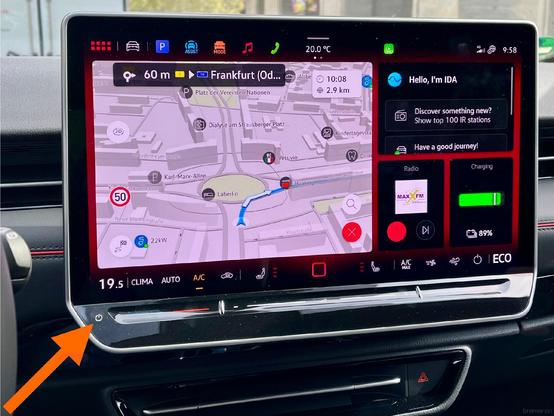
🚗🐣 Quick ID.7 GTX tip before the Easter trip:
To cancel GPS voice guidance instantly, just press the physical “off” button on the bottom left of the dashboard.
Sometimes it’s the little things - especially with kids on board. 👨👩👧👧
 Max Botmeier
Probiert es aus, ihr werdet es lieben! #DesignTip [2/2]
 Craig Saila
A big #Figma advantage : Showing stakeholders a concept like it'd be experienced by end users
Good prototypes move the conversation from visuals to flow by inviting feedback grounded in a human-centric perspective, not subjective taste (no more "make the logo bigger!")
The trick to creating a good #prototype, tho, is to think of it like you're designing a #presentation — and this piece offers some tips on doing just that
https://www.betterbydesign.cc/p/how-i-prototype-to-communicate-not

Good tips — including a handy sorting framework — on ensuring animations are done in a way ensuring the designed experience remains accessible for as many people as possible
One additional suggestion I'd offer: Consider an opt-in to animation function rather than the more typical opt-out. Doing this starts with a more accessible experience while still enabling rich motion for those who'd like it
https://www.smashingmagazine.com/2023/11/creating-accessible-ui-animations/

Creating Accessible UI Animations — Smashing Magazine
Animation and accessibility are often seen as two separate powers at odds with one another. How is it possible to strike a balance between elements that move and the possible negative effects they expose to users who are sensitive to motion? Oriana García explains how her team at Mercado Libre tackled the challenge by creating guiding principles for applying animation to user interfaces and incorporating them into the team’s design system.
 MartianCraft
#DesignTip. Design apps that are accessible to users with disabilities by following WCAG guidelines. Include alt text for images, use ARIA attributes for interactive elements, and ensure keyboard navigation support for all users #AppDevelopment
#DesignTip A responsive design adapts to different screen sizes and orientations, providing a seamless experience across devices. This benefits users with disabilities who may use various assistive technologies on different devices. #AppDevelopment #Accessibility
#DesignTip Navigation is the backbone of any digital experience. Design navigation menus that are clear, consistent, and easy to understand. Ensure your headings have proper structures, use descriptive labels, and organize content logically. #AppDevelopment #Accessibility
#DesignTip Design forms with accessibility in mind by providing clear labels, error messages, and instructions. Ensure that section headers have more weight than field labels to help the user understand the relationship between the two. #AppDevelopment #Accessibility
#DesignTip Choose fonts that enhance readability. Sans-serif fonts, like Arial or Helvetica, are generally easier to read on screens. Ensure there's enough contrast between text and background colors. Users with visual impairments or cognitive disabilities will benefit from it. #AppDevelopment #AppDesign #Accessibility