Josh Pasholk

@jpasholk
16 Followers
67 Following
193 Posts
Good friends, bad jokes, hot coffee, and cold beer.

⚙️ Wannabe designer & developer

👨‍💻 Chief Operating Officer @ Plantonix

📱Apple Enthusiast
Websitehttps://jpshlk.com
GitHubhttps://github.com/jpasholk
Discordjpasholk

Haven’t posted on here in a while so I figured I’d share a new project I’m working on.

It’s a soil volume calculator that helps you calculate how much of each ingredient is needed based on common ratios.

It’s been pretty fun to build and I’m leaving a lot!

#webdev #BuildInPublic

https://cococalcs.jpshlk.com

Garden Soil Calculator

Calculate how much soil you need

CocoCalcs

Federico has a big update to his Apple Frames shortcut out today that now works to frame the latest Apple devices. This one took a lot of sleuthing to get to work thanks to changes in how devices sometimes capture screenshots, but the final product works great.

https://www.macstories.net/ios/apple-frames-3-3-adds-support-for-iphone-16-and-16-pro-m4-ipad-pro-and-apple-watch-series-10-feat-an-unexpected-technical-detour/

Apple Frames 3.3 Adds Support for iPhone 16 and 16 Pro, M4 iPad Pro, and Apple Watch Series 10 (feat. An Unexpected Technical Detour)

Well, this certainly took longer than expected. Today, I’m happy to finally release version 3.3 of Apple Frames, my shortcut to put screenshots inside physical frames of Apple devices. In this new version, which is a free update for everyone, you’ll find support for all the new devices Apple released in 2024: 11” and 13”

🚀 New on the blog! This week’s #Obsidian plugin roundup features 10 fresh plugins to supercharge your workflow:
✨ Arweave Uploader
🔗 MOC Link Helper
👀 Peekaboo
🌌 Blue Star
🌳 TreeSearch
📄 Hexo Toolkit
🔍 Text Finder
🎨 SVG Styler
💪 Workout Tracker
🎲 Superstition
Dive in 👉 https://medium.com/technology-hits/obsidian-plugins-review-85-275268a717e1?sk=fb134e708149721b37fc1d4a02a3e1e3
#obsidian #ObsidianMD #secondbrain #pkm #note #NoteTaking @obsidian @[email protected] @[email protected]
Obsidian Plugins Review — 85 - Technology Hits - Medium

Welcome back to another exciting week in the Obsidian ecosystem! If you’re as obsessed with note-taking and productivity as I am, you know that plugins are the heart and soul of what makes Obsidian…

Technology Hits

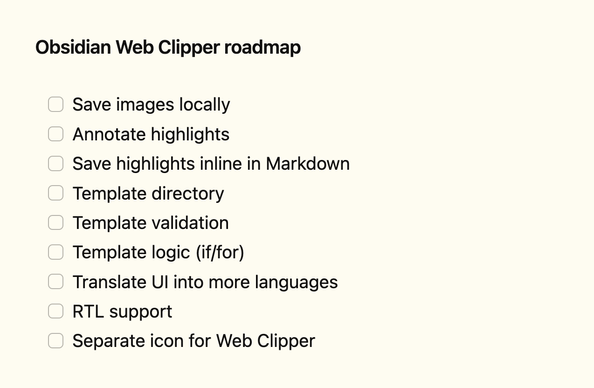
Here's what I'm working on next for #Obsidian Web Clipper.

Shameless ask — if you've been enjoying the extension, give it a review wherever you downloaded it. It really keeps me going 💜

Lot of new people asking how they can discover people to follow, and how they can make their own account more discoverable.

Here's a guide to discovering accounts to follow:

➡️ https://fedi.tips/how-do-i-find-accounts-to-follow-on-mastodon-and-the-fediverse-how-do-i-find-my-friends

...and here's a guide to how to make your own account and posts more visible:

➡️ https://fedi.tips/how-do-i-get-more-followers-on-mastodon-and-the-fediverse

If you see new people asking about these topics, you might want to share links to these guides.

(Also, all the text in my guides is CC-By-SA so feel free to build upon it.)

#FediTips

How do I discover accounts to follow on Mastodon and the Fediverse? | Fedi.Tips – An Unofficial Guide to Mastodon and the Fediverse

An unofficial guide to using Mastodon and the Fediverse

The best way to manage your Shortcuts Automations with so much more to come.

https://apps.apple.com/us/app/automation-control/id6737158540

#shortcuts #shortcutsapp

‎Automation Control

‎If you use the Shortcuts automations like I do, surely you can find it difficult to manage them. Automation Control works with the Shortcuts app to provide a better way to manage your Shortcuts automations. This app, in a nutshell, is a glorified IF statement that determines if your automations shou…

App Store

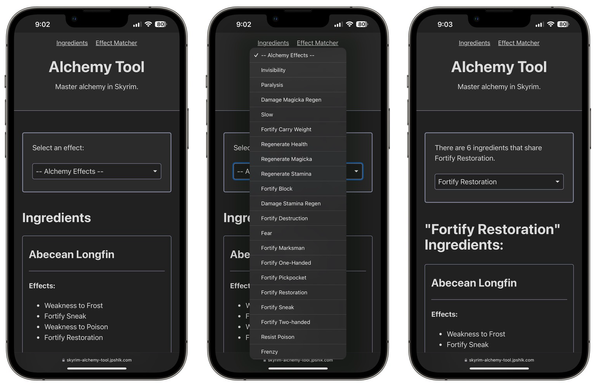
Happy 13th birthday #Skyrim!

To celebrate, I added more features to my Alchemy Tool, check it out!

https://skyrim-alchemy-tool.jpshlk.com

Skyrim Alchemy Tool

Master alchemy in Skyrim.

Welcome to new people joining from 𝕏!

Remember, posts are called toots here, likes are called florps, retweeting is technically a cross-account posting exploit that they can't fix because we're using it, and our version of Grok is called Garfiald.

There's no algorithm here! Literally none. There is no computer code behind Mastodon. Each http response is typed out by hand by your server admin in real time. Sometimes this means you won't see replies from other servers, but that's ok, other servers are full of losers anyway.

People here make a point of using alt text — if you can't find an image you want to post, just post a picture of your cat and describe the correct image in the alt text. Nobody will notice, or at least nobody will mind.

The first thing you should do is make a pinned toot with your pronouns, political affiliation, and favourite Linux distribution. Cisgender people are welcome on Mastodon but aren't officially supported, so some features may not work properly.

But most importantly, have fun! Users found to be not having fun will be given a written warning in the first instance and banned if the behaviour continues.

Image Positioning in Markdown: yes we can!

...handle the image positioning by appending a hashed value to the end of the image URL. For example, #left, #right, or #centre. We can at CSS level target the src attribute of the image and position the image along with any additional styling based on the hashed value. Very neat!

From https://www.surinderbhomra.com/Blog/2020/05/12/Aligning-Images-In-Markdown

Markdown:

![alt-text](path/to/image.jpg#right)

CSS:

img[src*='#left'] {
float: left;
margin: 10px 10px 10px 0;
}

img[src*='#center'] {
display: block;
margin: 0 auto;
}

img[src*='#right'] {
float: right;
margin: 10px 0 10px 10px;
}

#css #markdown #webdev

Aligning Images In Markdown | Surinder Bhomra

A nice clean way for positioning images left, right and centre within markdown.

netflix