
In prep for the Windows 12 rollout, now is a good time to get your town's Linux Install Parties planned and advertised.

Here's my town's https://fxbginstall.party/

Here's a quick how-to guide to spinning one up in your town:

Goals:
- Install Linux on your neighbors' laptops. This preserves older laptops ( #permacomputing #ewaste prevention). This removes people from one part of the surveillance economy. And it saves people money.
- The party should be geared towards NON-TECHIES. This is NOT a Linux Users Group. This is not for enthusiasts. This for folks who just want their computer to work and let them do the basics. Bend the tech to the people, not the people to the tech.

Date and Time:
- Shoot for monthly parties. Try for a specific day of the week. Say the "First Saturday" or "Second Sunday" of every month.
- Easy for folks to remember and if they miss one month, they'll be there the next month
- Try for between two hours to four hours for the event.
- Be consistent. Show up for the full time even if no one shows up. Some times it takes two or three meetings before people start to come regularly.

Location:
- Shoot for a public community area
- The best bet is your local library if they have rooms or conference areas.
- City community centers are good, too
- Also look for religious institutions, civic orgs, or fraternal orgs if need be. It needs to be open to
the public, though, with no requirements to push other agendas on to visitors.

Linux Distro:
- Shoot for a single distro that caters to folks who are new. I usually go for Linux Mint, but go with what you like. Focus on ease of use and familiarity for folks who arent used to Linux or various Desktop Environments.

Waivers & Backups:
- Everyone should sign a waiver. You keep the signed waiver. They can have a copy of the waiver
- Explain that while you and other volunteers will make your best attempt to install Linux, you make no guarantees. You may brick their machine accidentally. And no files that were on the harddrive will remain. Everything will be deleted.
- They should make backups of their files before you start the install process (either online/cloud, or local on a USB)
- Some folks want you to try for a dual-boot, but thats up to you if you want to offer it. Still let them know that you might brick the machine even (especially?) if you try for a dual boot install.
- Example Waiver: https://tldp.org/HOWTO/Installfest-HOWTO/legalprotection.html

Advertisements:
- Create a simple brochure website and fliers with info and time and date
- Use words like "Update to a modern, private, and fast operating system. No monthly subscription. No cost. Volunteers will install for you." Appeal to folks whose laptops cant upgrade. "Can't install Windows 11 or 12? Don't throw your laptop away, install Linux. It's free, up to date, and secure" Etc etc.
- Use your town's local social media (eg Town Subreddit, Online/Offline Classifieds, Library Announcements, Town Events Page)
- Post fliers in various coffee shops, libraries, bars, restrooms, and community centers
- Tell other similar groups (hacker spaces, maker spaces, linux groups, etc) both to spread the word and get volunteers
- Word of Mouth: Just tell everyone you run into. And tell them to tell everyone they know.

What to bring:
- Multiple install media/USBs with your Distro on it to install on the laptops
- A couple "Demo Laptops" with your distro of choice installed for people to try out (install games, office suites, common programs for folks to try it out - aim for what people use so various browsers including Firefox and Chrome, Zoom / Teams, LibreOffice, MS Office on browser, browser games, desktop games, etc)
- Your own laptops to do internet lookups and specialized downloads (weird stuff happens - its good to be prepared)
- Extension cables and power strips
- Cheap USBs for last minute backups prior to installation that folks can take home with them
- Some screwdrivers or tools to open up laptops for light repair if you like

What to do:
- Greet folks as they come in and invite them to try out the demos
- Encourage questions and discussions (AVOID DISTRO FLAME WARS OR WHICH WINDOWS MANAGER BEATS WHAT DESKTOP ENVIRONMENT FOR FUCKS SAKE! THESE ARE NORMAL PEOPLE DONT SCARE THEM AWAY WITH YOUR NERD SHIT!!!!)
- If folks brought laptops for installation explain and have them sign their waivers, make sure they know all files will be deleted, ask if they've made backups, and then install!
- Help folks troubleshoot issues or install programs for those that already have Linux installed and need community support

That's it. Make it a regular occurrence and you'll get folks coming in for fresh installs monthly and to ask for help with previous installs. Also a really chill way to meet other folks and have a lovely afternoon.

If you have any questions, post up in this thread.

If you have any suggestions or tips and tricks that have worked at your own Linux Install Party, share with us as well!

Edit to add: The Windows 12... scare?... seems to be a hoax brought upon by AIslop. But there will be a Win12 at some point, and a 13, and so on. And the recent Win11 forced upgrade is what spurred my group to create a Linux Install Party in the first place. It's always best to have a place for folks to land, one that is already running and well established. So, honestly, still in prep for the Windows12 rollout, whenever it comes, get a Linux Install Party going now.

#ewaste #linuxinstallparty #installparty #solarpunk #windows12 #windows11 #linux
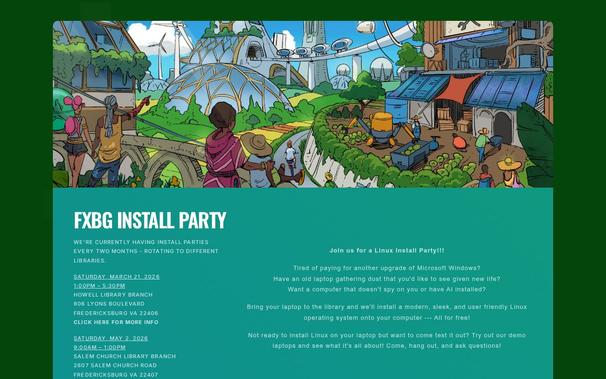
FXBG Install Party

We'll install Linux on your laptop for free! Join us at the FXBG Linux Install Party!

FXBG Install Party

Quick shout to @alxd and https://storyseedlibrary.org for the image used for https://fxbginstall.party 's header.

These images are artist created and are not AI generated. They're often on Creative Commons licenses, so use as you like according to each license.

You'll note artist attribution and license in the alt text for the image on the website as well as the "title" which shows up when you hover over the image with a cursor.

#solarPunk

Welcome to Story Seed Library!

A library of Solarpunk art and story seeds helping you imagine a better climate future!

Story Seed Library

@tinker My two distro recommendations for "you install it and then never need to touch the thing again" are Mint and Debian. I installed the latter for my father (who's technical knowledge only really extends as far as "knows or can figure out how to put in the wifi password on most devices") several years ago when he wanted to get away from windows, and the only real issue since was the laptop physically getting stepped on at one point and thus needing a replacement screen.

Yeah, debian stable doesn't come with the latest and greatest versions of everything, but for the vast majority of people it doesn't need the latest and greatest versions of software. It just needs to work...

@becomethewaifu Yeah I would do similar, for beginner introductions. I would lean toward LMDE (Linux Mint Debian Edition) to crossover beginner friendly, and stability. Perhaps MX Linux as a midweight, and only address advanced on an individual basis.
@becomethewaifu @tinker Last I checked, Mint also works as a live USB drive. Depending on time, that’s a great way to let people try it out to see how they like it on their system. And it lets you see ahead of time if there are any important drivers missing (e.g, you get to see if the network is horked *before* you wipe the box).

@bob_zim @becomethewaifu @tinker

This would certainly be one way to keep the panic level to a minimum when they hear there's no guarantee of not having bricked machines, too.

Nothing gets deleted before a live test run to confirm any possible hardware gotchas. Maybe take a bunch of different distros as live USBs so you can test again if one fails.

@becomethewaifu @tinker With kernel and maybe mesa from backports, and browser as flatpak, not much reason not to use stable.
@mirth @tinker Unless you're using the latest-and-greatest hardware, it's entirely unnecessary to use a backported mesa IMO. The whole point of this is "keeping otherwise e-waste machines MS no longer wants to support still functional", and those usually aren't so new that stable's mesa can't drive the GPU...
@becomethewaifu @tinker Mostly true, though I've found gaming on those older machines is quite serviceable. Steam is convenient to install as Flatpak, and e.g. hasvk and radv get ongoing updates for integrated graphics common in chips over a decade old. Valve is doing a lot of development on their runtime and subjectively it seems a bit more reliable to track Mesa along with Steam (this is not science but I have a herd of old machines here).
@becomethewaifu @tinker Another less general tweak which I'm going to roll out across my machines now that Gnome / Mutter color management is a little easier is to make color profiles for all the displays. For my old Macs (which have had color management for a long time) it's surprising how much it improves aging displays.
@mirth @becomethewaifu @tinker I wouldn't trust the security practices of flatpak compared to Debian's, and Firefox in Debian gets a number of malware features removed from it.

Does Flatpak do that? (I already know it doesn't and has a similar security model to Docker's, which makes it unacceptable compared to a proper distro package manager.)

@becomethewaifu @tinker

For mac user, I prefer to install gnome. For me Pop os is easier to install and configure than Debian. No extension needed for dock management, Flatpak available in the cosmic store and some nice basic customization.

@tinker wow, in todays instance of "how did I get so old" the last time I was involved in this was June 1998 for the Windows 98 release :(

I don't have the spoons to spend that much time with people to help them with tech problems these days but in those heady days we always believed each year would be the year of the linux desktop :)

@naturepunk @tinker I'll tell you one thing, there were lots and lots of hurdles that were never really fully cleared back in those days. Linux was definitely hard back then. Though Windows wasn't super easy either, people jumped at that difference.

But honestly? I think most of those hurdles are cleared. It's not perfect. Those who like to tweak and etc still have a lot more work on the Linux side to actually do all the little things that they can. But definitely gone are the days that a user can't use Linux without having to use the console all the time. I'd say systems like Linux Mint have finally done it. An ordinary person just wanting to check email or write stuff or whatever can enjoy an easy experience.

@tinker I like your approach to normal users very much. 👍

I always stayed with Windows only because the Linux nerds I met spoke a very different language and were too arrogant to answer my "idiot's" questions.

It took long and I had to search actively until I found very friendly people on Mastodon who were able to listen to what I need and who could explain Linux even for children. It was *these* people who gave me the courage to change!

@NatureMC @tinker this was my experience and reason I never went for it too. And then I met @dhampirdamsel and she was so patient with me and helped me out a ton!
@tinker This is such a good post, thanks for putting it all together.
@tinker
This is good idea. How many volunteers do you have and how many people turn up? Is it laptops or desktops?

@Moonlight_Crazy - The first one we held, we had two organizers and five other folks that showed up to volunteer. We didnt expect that many.

I'd say start with just one (yourself) and one other person (find a friend or ask for help) and invite others to show up to help but dont rely on any specific number. Volunteers grow in time as well.

So far as laptops or desktops, its whatever your neighbors bring in. Not many folks have desktops anymore though, so expect mostly laptops.

@tinker thank you, bookmarking this <3

@tinker > - If folks brought laptops for installation explain and have them sign their waivers, make sure they know all files will be deleted, ask if they've made backups, and then install!

Also ask where the backup is. People who don’t know better might make their backup to a file on the same drive. Asking the “dumb” questions early can save a lot of pain.

@tinker I personally like the idea of also bringing some SSDs to sell or give away, which mostly bypasses the backup problem. That can get really fiddly, though, as a lot of laptops don’t have easy access to the drive, and it’s hard to tell ahead of time.

If you’re going to bring SSDs, I’d go with a few sizes of a single model per interface type. Otherwise, people get bogged down choosing between the options.

@bob_zim

Also (past experience here!), ask if they have recently - or ever - tested that backup. Lots of people set up their backups, and never know that those are borked until they try a restore.

@tinker

@bob_zim @tinker further questions to ask non tech savvy people: do you know the passwords for all the websites you use regularly/have you backed up passwords saved in your browser? Because we installed Mint on my Dad's laptop, believed him when he said he hadn't saved any login details, and have now had months of "but this website didn't used to need a password, I'd just get straight into it"
@afewbugs @bob_zim - Oooh! That's a good one! Cheers for highlighting it!
@bob_zim @tinker about 20 years a friend, or more accurately the husband of my wife's friend, allowed his teen grandson to play on his Win PC until malware made it slow to a crawl. He asked for help and I decided the cleanest answer was to reinstall Windows then a decent AV. I asked several times if he was really sure there was nothing on the PC he needed. He was sure. Really sure. Halfway through the install he asked, 'does that mean all Barbara's photos...'
@tinker
Query, doesn't Windows 12 require/demand a NPU?
If that is the case, chances are the majority of people will probably not have that latest bit of technology, and probably can not afford a NPU in this RAM-scarcity economy.
Linux is going to see more of a surge of new users.
@softspeak - No idea on Win12 specifically when it does come out, but even Win11 wasn't supporting all hardware. So you're absolutely correct in that general assumption. Fully agree with Linux surge - and for most people to be able to enjoy that surge, they needs folks in the community to install it for them.

@tinker
I know a lot of game consoles companies, graphic card makers, and video game companies are rubbing their hands thinking they are about to bank on the rise of prices of games and systems.

It is going to be a rude awaking when gamers hold off buying new games and systems. Most will just explore back catalogs of older games, and they will hold off upgrading PCs or consoles. Steam's library will be shelter in the storm for most PC gamers.

@tinker It's possible (but probably not the best idea) to install Linux based operating systems without erasing files. Ubuntu actually has this built in to its installer, or it did last time I saw it. If you're able to shrink the computer's NTFS partition to make room for your new one, it can be mounted at a specific place on the file tree so sometime can still access their old files. If you use a distro that uses BTRFS for root or /home, NTFS filesystems can be converted into BTRFS & then you can use that. I have no idea how stable this is though.

@jackemled - Yeah, and folks will want Dual Boot, too... And while possible, it adds complexity and possibility of failure. So with that we usually just suggest a full and clean wipe and install and moving files and images back onto the new computer.

That said, if folks want us to try, and we have time and folks with skill to attempt it, why not. Worst case, we end up doing a full clean install anyways.

Big thing is to manage expectations. "Experimental" attempts and all that. The waiver states clearly and we state clearly, that while we will try our best, shit breaks sometimes.

Often these laptops weren't going to run anyways because Windows was killing support. So folks are willing to "risk" it (albeit a small risk) and most are chill.

@jackemled @tinker
An even more pro option would be to swap the drive out with a referbished or reclaimed drive. I agree the LCD would be to have them back up and install clean. These options are just about helping acceptance and helping out those that don't do this kind of stuff.
I'm inspired!
@jackel23gr @tinker I only mentioned that it's possible. I didn't say it should be done. It probably should not be done.

@tinker The Windows 12 stuff wasn't really all true but I commend the effort to make this post regardless, especially with concerns to preventing ewaste :)

I hope more people use Linux.

@tinker i would like help installing linux on my mini mac
@Mercurial @tinker is be happy to help! Where are you at in the process?
@tinker @betaphish i’m at the first stage ever it seems hard and complicated

@tinker

Ah least in Europe

https://endof10.org/

has a lot of events and structures in place. Maybe there's stuff you can copy/use as blueprint.

@tinker Even though the article turned out to be untrue, every single bit of this is still 100% applicable... Really really time to get rid of Microsoft and all the horrible things they're doing to every single one of their own customers willingly and knowingly...

Like, you know, the TormentNexus actually is optional. You can just, you know, say no.

@tinker my big concern with this is that while I'm reasonably sure that I can get Linux on a ThinkPad or Framework, my experience with more "consumer" brands has been pretty poor. I tried this recently with my father-in-law's old Yoga laptop and Debian couldn't recognise ½ his RAM.

I'd be worried that an event like this would go more harm than good.

@tinker Great tips. We already do a lot of this @linux020amsterdam #linux020 in Amsterdam. This saturday 7 March is our next monthly 'walk in' as we call it.
@tinker Thanks for posting. Tagging for #SolarPunkSunday
@tinker while tou are at it, install also some Lenin! ✊
@tinker
After a conversation at this past @NYC2600 meetup with @lambdacalculus I was thinking about bringing my ThinkPad and an unboxed flashing kit to try to flash Libreboot. This seems an even worthier goal.
@tinker This would also be a great cover if people want to plan other things like yarn bombing the local power poles or, hey, flock stuff.
@tinker windows 12 what? Oh god, not again…
@tinker I'm trying to find information about any local (NW FL) install parties, but my search-fu is failing me today. The site for nwflug.org is not loading, and my town apparently doesn't have a user's group. It also appears that my nearest AL group (2 hours away) "is in a period of transition", so it looks like there's no active groups near me. Any ideas?