 Tinker ☀️
In prep for the Windows 12 rollout, now is a good time to get your town's Linux Install Parties planned and advertised.
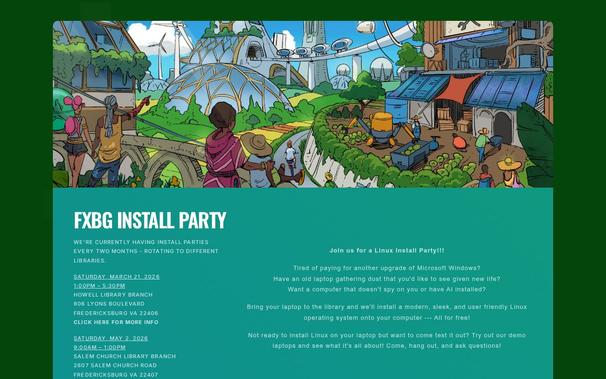
Here's my town's https://fxbginstall.party/
Here's a quick how-to guide to spinning one up in your town:
Goals:
- Install Linux on your neighbors' laptops. This preserves older laptops ( #permacomputing #ewaste prevention). This removes people from one part of the surveillance economy. And it saves people money.
- The party should be geared towards NON-TECHIES. This is NOT a Linux Users Group. This is not for enthusiasts. This for folks who just want their computer to work and let them do the basics. Bend the tech to the people, not the people to the tech.
Date and Time:
- Shoot for monthly parties. Try for a specific day of the week. Say the "First Saturday" or "Second Sunday" of every month.
- Easy for folks to remember and if they miss one month, they'll be there the next month
- Try for between two hours to four hours for the event.
- Be consistent. Show up for the full time even if no one shows up. Some times it takes two or three meetings before people start to come regularly.
Location:
- Shoot for a public community area
- The best bet is your local library if they have rooms or conference areas.
- City community centers are good, too
- Also look for religious institutions, civic orgs, or fraternal orgs if need be. It needs to be open to
the public, though, with no requirements to push other agendas on to visitors.
Linux Distro:
- Shoot for a single distro that caters to folks who are new. I usually go for Linux Mint, but go with what you like. Focus on ease of use and familiarity for folks who arent used to Linux or various Desktop Environments.
Waivers & Backups:
- Everyone should sign a waiver. You keep the signed waiver. They can have a copy of the waiver
- Explain that while you and other volunteers will make your best attempt to install Linux, you make no guarantees. You may brick their machine accidentally. And no files that were on the harddrive will remain. Everything will be deleted.
- They should make backups of their files before you start the install process (either online/cloud, or local on a USB)
- Some folks want you to try for a dual-boot, but thats up to you if you want to offer it. Still let them know that you might brick the machine even (especially?) if you try for a dual boot install.
- Example Waiver: https://tldp.org/HOWTO/Installfest-HOWTO/legalprotection.html
Advertisements:
- Create a simple brochure website and fliers with info and time and date
- Use words like "Update to a modern, private, and fast operating system. No monthly subscription. No cost. Volunteers will install for you." Appeal to folks whose laptops cant upgrade. "Can't install Windows 11 or 12? Don't throw your laptop away, install Linux. It's free, up to date, and secure" Etc etc.
- Use your town's local social media (eg Town Subreddit, Online/Offline Classifieds, Library Announcements, Town Events Page)
- Post fliers in various coffee shops, libraries, bars, restrooms, and community centers
- Tell other similar groups (hacker spaces, maker spaces, linux groups, etc) both to spread the word and get volunteers
- Word of Mouth: Just tell everyone you run into. And tell them to tell everyone they know.
What to bring:
- Multiple install media/USBs with your Distro on it to install on the laptops
- A couple "Demo Laptops" with your distro of choice installed for people to try out (install games, office suites, common programs for folks to try it out - aim for what people use so various browsers including Firefox and Chrome, Zoom / Teams, LibreOffice, MS Office on browser, browser games, desktop games, etc)
- Your own laptops to do internet lookups and specialized downloads (weird stuff happens - its good to be prepared)
- Extension cables and power strips
- Cheap USBs for last minute backups prior to installation that folks can take home with them
- Some screwdrivers or tools to open up laptops for light repair if you like
What to do:
- Greet folks as they come in and invite them to try out the demos
- Encourage questions and discussions (AVOID DISTRO FLAME WARS OR WHICH WINDOWS MANAGER BEATS WHAT DESKTOP ENVIRONMENT FOR FUCKS SAKE! THESE ARE NORMAL PEOPLE DONT SCARE THEM AWAY WITH YOUR NERD SHIT!!!!)
- If folks brought laptops for installation explain and have them sign their waivers, make sure they know all files will be deleted, ask if they've made backups, and then install!
- Help folks troubleshoot issues or install programs for those that already have Linux installed and need community support
That's it. Make it a regular occurrence and you'll get folks coming in for fresh installs monthly and to ask for help with previous installs. Also a really chill way to meet other folks and have a lovely afternoon.
If you have any questions, post up in this thread.
If you have any suggestions or tips and tricks that have worked at your own Linux Install Party, share with us as well!
Edit to add: The Windows 12... scare?... seems to be a hoax brought upon by AIslop. But there will be a Win12 at some point, and a 13, and so on. And the recent Win11 forced upgrade is what spurred my group to create a Linux Install Party in the first place. It's always best to have a place for folks to land, one that is already running and well established. So, honestly, still in prep for the Windows12 rollout, whenever it comes, get a Linux Install Party going now.
#ewaste #linuxinstallparty #installparty #solarpunk #windows12 #windows11 #linux
 Emelia/Emi
 Nu Modular
 Zimmie
 LumiWorx
 mirth
mirth LisPi
LisPi Seb
Seb