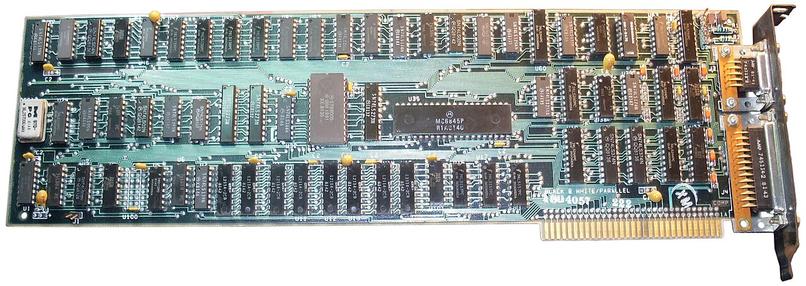
#UnpopularOpinion:

#CLI programs do not need to use color.

First of all, there's the sad assumption of a dark theme which I'm never going to be rocking, so just get over it. Cool computers always have/had a light background. This is where I live now. I ain't movin'.

Second of all, there's the dance of having to use -r with less if it uses color or use something like --no-color as a command line flag.

Thirdly, it's honestly just lazy. There's so much you can do to differentiate and grab attention without using color. There's always boldface and italics, but even without those, there's plenty of ways of differentiating things.

I will say though for #TUI applications that need maximum information density, color is very useful.

@rl_dane personally I want to aim with @OS1337 to make it work on a 80x25 #MDA screen (i.e. Terminal) and go from there.

  • If someone wants to make some ultra-low-power system running on an #eInk then they sgure can do a "Bright Theme". I just won't do a bright theme on my LCDs because it strains my eyes...

@kkarhan @OS1337

Do you mean actual #MDA display hardware, or just 80x25 (720x350, IIRC) monochrome?

I never quite understood why the PC standardized on 80x25, but classic terminals on 80x24.

IBM Monochrome Display Adapter - Wikipedia

@rl_dane @OS1337 well, MDA as in the standard that every PC graphics card since the #MDA still supports - not just VGA

  • For #Terminals the 25th (rarely "0th") line is used to display status information in lieu of "lock lights" or other indicators so unlike on a #PC it's not useable there...

Obviously one can set / customize the default Terminal Output Size in the #Kernel configs at build, but #80x25 (or at least #80x24) should be supported everywhere.

  • Actual MDA displays are expensive collectibles and in lieu of that I'd rather configure the 1st serial port ( tty0 aka. COM1) to spit out a 9600/8/N/1 #console when #VGA or similar video output doesn't exist.

But even the shittiest GPU will do MDA without drivers on #ix86 & #amd64 because that's some #BIOS routine command and part of the backwards compatibility of every single 2D/graphics chip I've heard of that isn's a mere 3D accelerator with 2D passhtrough

IBM Monochrome Display Adapter - Wikipedia

@rl_dane @OS1337 as of #eInk there are already some companies producing eInk #Monitors (at a hefty premium!) so if you (like @TechConnectify want to reduce Eye Strain to be as low as printed paper, then I guess it's worth the "low" 4-digit price for a 15"-24" #eInkMonitor

https://m.youtube.com/watch?v=7NfX0vlCa4k

E-Ink for Productivity: An Introduction

YouTube

@kkarhan @OS1337 @TechConnectify

I've seen his deep-dives into eInk! Very tempting, but crazy pricey. ;)

@rl_dane granted, as @TechConnectify points out this is propably due to the use of #eInk as a tech for monitors being nieche and big panels being more of an exception than norm.

  • I'm still mad #3M decided to pull #PixelQi off the market post-aquisition because it combines the advantages of #LCD & eInk with fewer drawbacks than either alone...

Alas one could in theory #DIY cheaper eInk Monitors if one accepts seconds-per-frame instead of frames per second as well as being willing to fiddle around with a @RaspberryPi / #Pi0 v1.3 and shove that #HDMI2CSI adapter on so it bssically displays a captured #HDMI signal in fullscreen.