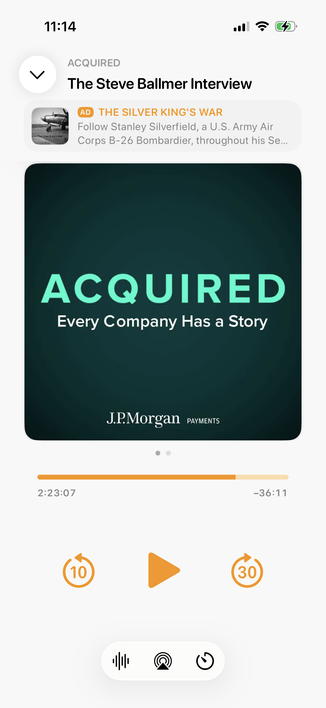
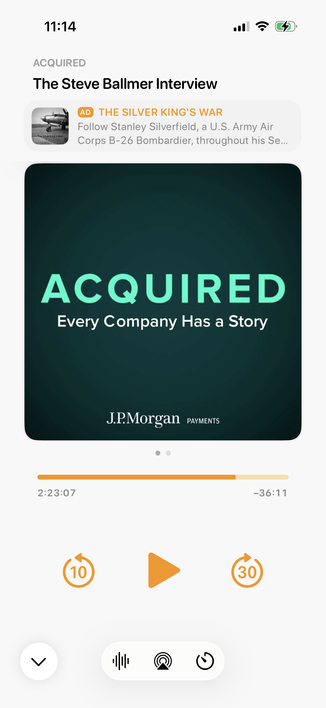
Integrating my now-playing controls with the new design language is hard. The biggest challenge: Where do I put the ad?

The system button-shadow style looks best at the screen edges, and can't stack (system-style toolbar buttons AND a capsule-style ad look bad next to each other).

Some options I'm playing with:
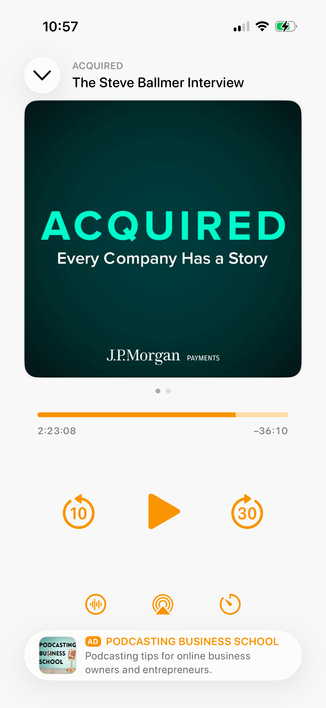
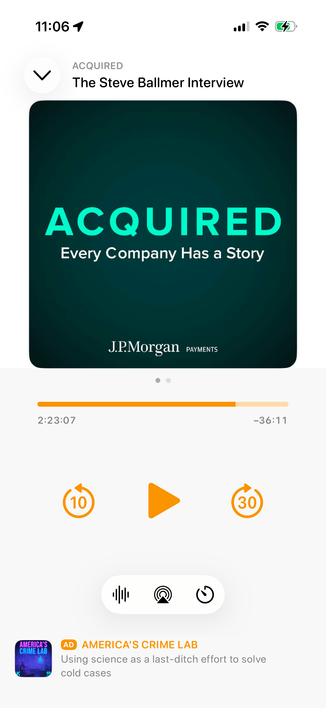
1 is the closest to the status quo.

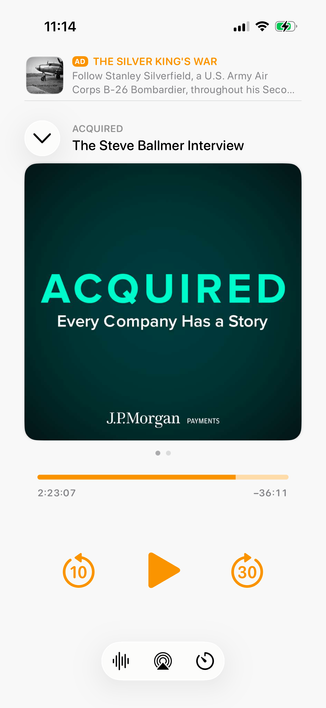
2 seems safe, but I don't love the toolbar-style buttons floating in the middle like that.

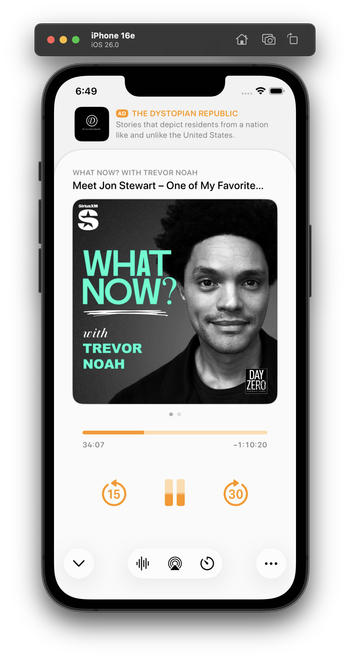
Leaning toward 3 myself, but it's pretty different from the status quo.

Do you have a clear preference?

1: Bottom capsule ad, orange bottom controls
23.2%
2: Bottom flat ad, toolbar-style bottom controls
20.3%
3: Top flat ad, toolbar-style bottom controls
56.5%
Poll ended at .

1. Thanks, everyone! Great feedback and suggestions. (Especially @BenRiceM!)

2. Lots of responses theorizing about better/worse ad-performance tradeoffs. Let me be clear:

When these factors are in tension, I prioritize good design over ad performance every time.

I try to make the best app, and I trust that the ad performance will mostly take care of itself if people keep wanting to use it. (And for the past ~8 years, it has.)

(Plus, I use the app with ads! I don't want it to suck!)

@marcoarment
Around 2017 when I started using the app, I went premium very quickly, but actually found the design without the ads a little less pleasant. Stayed with premium for the uploads though.
@marcoarment I think 3 would have fewest accidental clicks.
@marcoarment I think there's something strange about putting the ad between the title and the thumbnail. It breaks up two clearly and directly related content elements with something completely unrelated, which is confusing. Some ads might even appear to be part of the content about the particular podcast, which is even more confusing. Hence, strong preference for #3.
@marcoarment just curious, why do you use your own app with ads?
@potatoDOTzip @marcoarment probably because most of his users do and he wants to share their experience.
@marcoarment for what it’s worth, give yourself a lot of credit because the iOS 26 design implementation ideas you’ve shared publicly are great !!! I’m personally excitedly looking forward to the end result.
@marcoarment hell, I pay for it and leave the ads turned on, they don't bother me and occasionally make me curious about the show being advertised.
@marcoarment Why not implement chapter selection? Even more importantly, why can’t the user assign the FF/rewind (or skip) buttons to skip ahead one chapter / go back one chapter to make it easier (and safer) to change chapters in CarPlay? Surely I’m not the only one to have asked for this?
I played with this wild idea a bit for a top ad. I don't think I like it, but I'm glad I tried it.
@marcoarment I think having it at the top is a lot better
@marcoarment That’s far better than your earlier options. Clean, clear separation from content, but prominent.
@marcoarment I don’t know, that looks pretty amazing to me, but does it make conceptual sense? What’s underneath the now playing screen?
@stevenodb @marcoarment @marcoarment It might work better flipped, i.e. make the ad look like the top card.
@marcoarment I like three best but maybe place the add below the title/nav or even below the artwork?

@BenRiceM Below-artwork ends up looking really busy when there are chapters.

I'll play with below-title, though. Thanks.

@marcoarment I’d go with something like this, personally.

(and I’d be tempted to move the collapse button to the bottom)

@BenRiceM @marcoarment +1, that's pretty clean for an ad placement IMO
@BenRiceM @marcoarment alternatively what if the ad stays above the art, but the title moves below it?
@BenRiceM @marcoarment I like the look of the ad all the way at the top, but it does strike me that it might make it easier to tune out. Ben's approach makes it more visible, which might keep clickthrough at similar levels?
@BenRiceM @marcoarment I’m definitely not a designer but the UI would look more balanced with the collapse button on the top right. Having it on the left makes it look cluttered and leaves empty space on the right corner. 🤷🏻‍♂️
@BenRiceM Oh those are good…

@marcoarment @BenRiceM In my opinion, putting it below the title makes it harder to ignore. If it's always at the bottom or top, you can mentally tune it out more easily.

I know that is not your intention, but that location underneath the title could also be the most revenue-generating.

@marcoarment I don’t want to presume(*) and you probably have considered it before, but I’d love to see @BenRiceM‘s treatment of your app design sensibilities if y’all manage to find a professional arrangement 🙏🧡

(*paying Overcast customer since day 1 ;)

@BenRiceM @marcoarment yeah that would be great +1 for this suggestion of Ben
@BenRiceM @marcoarment I like the 2nd option the collapse should absolutely be at the bottom!
@BenRiceM @marcoarment I think it would behoove you to try the second suggestion with the ad under the title. It's clean, it's clear, and it might solve your notification problems.
@marcoarment 3 is the best of not great options.
@marcoarment the shadow makes it feel like you’re trying to draw attention to these secondary actions instead of the primary playback controls. It’s almost like liquid glass was not really fully thought through as a design system 🤔

@cbirdsong @marcoarment I think it’s just odd that some controls are liquid glass and others remain in the iOS7 style. If the playback controls were also be liquid glass (orange tinted would be sweet!) alongside the white/clear secondary controls, the hierarchy would make more sense.

Having the ad inside of a liquid glass bubble gives it the top-most layer of hierarchy which doesn’t seem user-centric, it’s ad-centric.

@marcoarment #1 looks good and is probably my favorite.

#2 looks unbalanced left-to-right but is clean.

#3 is worry would mess with muscle memory on navigation.

What about #3 but between navigation and artwork?

@marcoarment the business brain says to A/B top and bottom and see which one performs better.

As a user, I’d prefer top, because I’m more likely to want to reach controls easily than the ad.

@marcoarment my opinion is that:
3 gets the ad out of the way and out of the mind, good if you want the user to have a better experience, bad if you need the ads clicks.

2 feels the most standard of the designs, the instinct tells me that without the ad the toolbar-style buttons would lower down so it doesn't feel weird, also good for ads clicks

@marcoarment Option 3 is maybe more “expected” for an ad since it’s isolated and presents as a top banner. But with 2, you hit on something where the ad itself feels more integrated into the UI with the negative space flowing into it. It’s not offensive and pulls me eye to it — rather than simply ignoring it. Maybe this would earn it more attention and more clicks… and more ad revenue as a result? Seems kinda win-win.
@marcoarment Could you liquid-glassify just the play button for #2? Maybe that’s dumb. Food for thought as you explore your options. Maybe it’ll spark some other ideas.

@apmeyer @marcoarment This is the closest to what I was saying. But I was suggesting putting them all in a floating box. Maybe even making each control float?

Also note how Apple’s Music app does not have anything floating, almost like it’s a bad idea…

@marcoarment it took me a while to even see the ad on 3.

@marcoarment I didn’t like #3 at first because it makes the top feel much heavier, however it does push the controls closer to the bottom which is much friendlier for users.

It’s also likely to lead to fewer accidental clicks on the ads, which may or may not help your advertising metrics (should you have any). Less clicks overall, but more that are likely intentional (thus a better conversion rate).

@marcoarment Your instincts are right. The ad at the top is more noticeable, conceptually related to the playing artwork, and lets the control group have its own chrome/glass.
@chockenberry @marcoarment and, out of the way of my thumb/hand grip 👍
@chockenberry @marcoarment The control group having a shared glass container also lends nicely to the using the shared container transition for showing the next level of configuration within (e.g. the sleep timer configuration UI).
@marcoarment I think an option where the controls are on the bottom and the ad is above it without the container shape. So basically number 2 with the two bottom elements swapped.
@marcoarment Marco, after listening to all your grapples with Liquid Glass, I think most of us want an as stable-bug free app as possible, then any of the new design and API updates. I do think you should adopt it, but don’t worry if it takes a little time we have your back. (Personally the AirPlay bugs have been better, but that is still something for example that needs work)
@marcoarment I pay for Pro. I leave ads on. I think the ads are a decent discovery mechanism. I like #3 because it makes them more noticeable.
@marcoarment I like 3 because it means if/when someone goes ad-free, the muscle memory of controls where there thumb aims for has stayed the same or mostly the same.

@marcoarment I don’t know why three has such high support, it’s shocking.

Maybe just that you primed your poll. I wouldn’t use an app like 3 and I’ve been using overcast exclusively since launch

@marcoarment I voted 3, but I think a top ad with the orange controls would be better. The toolbar buttons draw too much attention away from (what I consider to be) the main controls (play/pause, skip forward/back)
@marcoarment 3 keeps the controls at the bottom of the screen and brings the others down a bit too, as a nice treat.

@marcoarment I dislike 3 as the ad is the first thing in lexical order. So you always have to “read over” the ad when looking at the page.

2 neatly de-emphasizes it while still displaying it at the same size – and marks the buttons as buttons according to platform conventions.

@marcoarment a lot of people voted #3 but while it looks the best, i think having a touch target so close to the area where you dismiss the now playing screen might maybe lead to many accidental inputs?
@marcoarment I voted option 1 purely because I don’t like the toolbar-style buttons. Option 1’s buttons respect my theme colour choice *and* have more appropriate spacing. I’m a sub so don’t care where the ad goes 😜
@marcoarment I don’t like having the ad in the prime visual real estate at the top of the screen, where it’s most offensive. But I think putting ads anywhere near actual buttons is a bad idea and bordering on a dark design pattern, given the potential for mistaps.
@marcoarment
Never ads at the top: totally destroys my Overcast user experience.
@marcoarment I feel that with today’s tall screens, you’re even usability-benefiting from 3’s moving the collapse button down a bit. Makes it more thumb-reachable.