Okay. Please help me as I ask COMPUTER BABBY QUESTIONS.

I have a Thinkpad T14 Gen 3 (AMD).
It has a 256 GB HD. That's too small. I want to buy a new, bigger one. I have a sense the good hard drives these days are "M.2".

Lenovo's specs page

https://www.lenovo.com/ca/en/p/laptops/thinkpad/thinkpadt/thinkpad-t14-gen-3-(14-inch-amd)/len101t0013

doesn't say anything about "M.2". It says the hd is "PCIe".

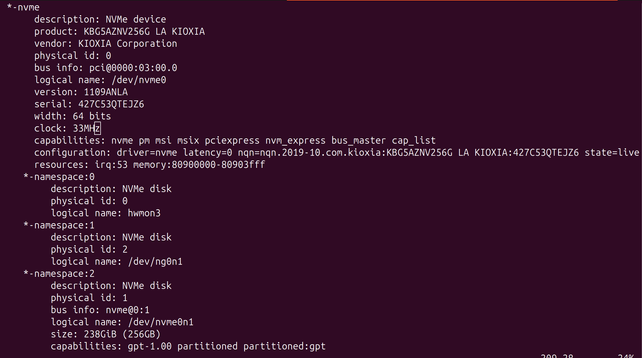
I run "lshw" to see what's on the computer. It says "NVMe".

How do I find out the bestest fastest aftermarket drive Canada Computers carries that my computer will support

I only understand computation as the MANIPULATION OF ABSTRACT PLATONIC FORMS. I do not understand this realm where computers are "physical objects" you manipulate with "screwdrivers". I would prefer to use Math to translate my thoughts directly into action, as if I am casting magic spells
Okay thank you all for explaining. I have one more question: Is there actually, like, a difference between drive vendors. Like if I pick WD vs Samsung vs Lexar (vs… "crucial"?!) will it ever make any difference

Okay. So I think I have my plans for the hard drive complete. Now here's the shedpainty question:

The old drive has Ubuntu 24.04 on it. I hate it.

Should I trade down to Debian?

Or should I trade up to Pop!_OS?

Will I regret either of these? Will either one, if I just go get a standard usb key installation, cause driver problems with my AMD chipset or secure boot or whatever other junk Lenovo has on board?

@mcc you can't go far wrong with #debian
@mcc trade up to debian imo. d-i ships with even non-free firmware by default now so it should be fine, and SB is SOP everywhere nowadays
@mcc I've been running Pop!_OS for a year now on a laptop, it's like having an old Ubuntu LTS release but someone already setup the nvidia gunk for me. Kindof annoying from a dev POV because it's using a lot of old packages, probably wouldn't rec over Ubuntu unless someone else handling nvidia gunk is attractive for you
@machinewitch i want cosmic but i'm not sure it actually works yet
@mcc you'll probably be fine with the big name brands, samsung, wd. You can get into differences around the controller and all stuff like that, but outside of the difference between slc/mlc/tlc/qlc it'll probably be the same.
@mcc to clarify, sorry, the difference between slc and qlc mainly being speed and longevity, with qlc beeing cheapest, most dense, quickest to die, slc being most expensive, least dense, longest laating
@violator @mcc It’s worth noting that SSD lifespan hasn’t really been a concern since 2005 or so. You can make drives fail in synthetic testing, but even there, they generally last >20x their rated endurance. Outside of synthetic testing, drives basically never fail due to wear.
@bob_zim @violator I do, um. A LOT of Rust clean builds

@mcc @violator That won’t be a problem on any M.2 SSD. The kind of synthetic testing I’m talking about is filling up the drive and erasing it as quickly as you can, continually, for a year or more.

I write around 150 GB per week to my VM host (rebuilding VMs, mostly) and its drives haven’t spared any pages since the first month I had them. It’s been years.

@violator @mcc It's a weird moment in naming hard drive standards--first "M.2 SATA" replaced old-style SATA (the kind with cables), and then "M.2 NVMe" replaced M.2 SATA. If your computer is from this decade you'll want M.2 NVMe. Then figure out the right form factor; they use four-digit codes. For brand, imo Samsung.

@mcc it does make a difference.

These days not so much on the performance front, most generations of SSDs are roughly comparable to each other under normal workloads; but reliability differs a lot, and thermal performance does a bit.

(Non-standard workloads are things like sustained max-throughput writes which exhaust DRAM caches, or heavy load when drives are near 100% usage and can't relocate storage blocks quickly enough to meet write load.)

https://mastodon.social/@gnomon/113720701898590025

@mcc on daily usage, from my experience, brand doesn’t matter that much
@mcc Backblaze publishes statistics for the drives they use, various manufacturers and sizes. Not most people's use case, but gives a fair idea of failure rates.
https://www.backblaze.com/blog/backblaze-drive-stats-for-q3-2024/
Backblaze Drive Stats for Q3 2024

Read the latest annualized failure rates for the Backblaze drive fleet.

Backblaze Blog | Cloud Storage & Cloud Backup

@mcc If you're looking for speed, choose WD SN850X (Samsung used to be good, too, but I've heard that their recent models have some problems). Otherwise just pick any drive that has 5-year warranty.

Note: if you're planning to do a lot of writing, avoid QLC drives – write speed on those drives falls below 30 MB/s once you fill the SLC cache.

@mcc individual models of drive from all the major brands will sometimes have problems. You probably won’t know for years. You can hedge your bets by buying a mix of brands. Backblaze publishes a report each year. https://www.backblaze.com/cloud-storage/resources/hard-drive-test-data
Backblaze Drive Stats: Download Hard Drive Reliability Stats, Reports, and Test Data

Understand hard drive reliability and explore the hard drive test data from the Backblaze data centers. Backblaze is affordable, easy-to-use cloud storage.

@edebill @mcc hard to install a mix of brands as the primary drive of a single laptop
@cibyr @mcc ah yes. I thought I saw a thread from a day or two ago about making a NAS and thought this was related. Mea culpa for not checking back up thread.
@edebill @cibyr Hm, you may have confused me with someone else.
@mcc @cibyr definitely. My apologies. Sorry for wrongly cluttering up your mentions.

@mcc Personally, I stick with drives manufactured by the companies which make their own flash: Intel (Solidigm), Kioxia (Toshiba), Micron (Crucial), Samsung, SK Hynix, and Western Digital (SanDisk).

There’s some difference between vendors, mostly in the controller firmware. This mostly matters in “enterprise” drives rather than consumer drives.

The much bigger difference is whether the drive has DRAM cache or not. In general, drives with DRAM have much higher random I/O performance than drives without it, and random performance equates to perceived “snappiness”.

@mcc Of these, Intel (Solidigm), Kioxia (Toshiba), and SK Hynix make mostly datacenter drives. SK Hynix does make some OEM 2280 drives for laptop manufacturers, but they’re generally low capacity.

I’d go with Crucial (Micron’s consumer brand), Samsung, or Western Digital. Samsung was the brand to beat for a long time, but they’ve fallen lately.

WD’s drives perform well and you pay for it. Their fast drives need a heatsink (which laptops don’t generally have space for) and a lot of airflow.

Crucial’s drives have solidly middle-of-the-pack performance, but they don’t really need extra cooling. They’re also significantly cheaper than WD’s most of the time.

@bob_zim Wait if I'm looking at a WD¹ how do I know if it's one of the ones that needs extra stuff like a heatsink

^ "Black SN770" (??) they also have a SN850x but it might be sold out.

@mcc Mostly look at the box. Looks like the SN850x is offered with or without a heatsink. The SN770 just has a heat spreader label (no extra thickness).

In general, PCIe 4 drives put out an impressive amount of heat. They throttle themselves down when overheating, so they should never be significantly slower than a PCIe 3 drive.

@mcc Looking a bit more into this, I wouldn’t bother with an SN850x in a laptop. That one seems like it’s more a desktop drive. Pretty much all the drives with available heatsinks (and most drives marketed towards gamers) are meant to be fast at the expense of power and heat.

I wish SSD reviews would include actual measured power draw at idle, power consumed to write 1 GB, 10 GB, 100 GB, power consumed to read 1 GB, 10 GB, 100 GB, and similar figures.

@mcc Their firmwares have different bugs (I.e. the secure erase function might not work). And of course 1000 vs 1024 for size. From the OS perspective they’re interchangeable. They might have different r/w speed, and MTTF/MTBF, and maybe a different percentage of spare flash cells. I usually add drives I’m interested in to the compare list on https://skinflint.co.uk/?cat=hdssd&xf=4836_7 for easy comparison.
Hard Drives & SSDs Solid State Drives (SSD) with Form factor: M.2 2280 Price Comparison Skinflint UK

compare prices and read user reviews for Hard Drives & SSDs Solid State Drives (SSD) with Form factor: M.2 2280

Skinflint.co.uk
@schrotthaufen wait wait who defines tb as 1000 and who defines it as 1024. is this documented somewhere
@mcc @schrotthaufen basically all storage and network gear is sold as powers of 10 (KB/MB/GB/TB), basically all RAM is sold as powers of 2 (KiB/MiB/GiB/TiB), and what gets displayed by software is a crapshoot
@mcc @schrotthaufen Windows always uses binary sizes (1 kB =1024 bytes, 1 MB = 1024 kB = 1048576 B, 1 GB = 1024 MB = 1073741824 B). Just about everybody else (including drive manufacturers) use decimal sizes ( 1 kB = 1000 B, 1 MB = 1000 kB = 1000000 B …), except for RAM sizes, which seem to be always in binary sizes (also, almost nobody uses Si binary prefixes – KiB, MiB, GiB …)
Binary prefix - Wikipedia

@null_aleph yeah but uhh if they say KB does that actually mean KB or does it mean "KiB but we wrote KB"
@mcc I mean if they put down KB, but meant KiB... That's on them?
@mcc suddenly reminded of the xkcd about competing standards. AaAaaaaaaa.
@null_aleph or on the store that created the product page :(

@mcc I am not super fond of Canada computers; I have had issues with them here in Ottawa. Also stock issues and hostile web user interface.
I think the last NVMe drive I bought from them was a Corsair? I'll take a look; contrast with their listed stock and go off of the model#

What kind of usage case are we talking about? Are you expecting a LOT of read-write events?

Sorry for the wall of text.

@null_aleph i dunno i just want like… a computer that is good

@mcc https://www.harddrivebenchmark.net/hdd.php?hdd=KBG50ZNV256G%20KIOXIA&id=31697
Benchmark (KIOXIA/TOSHIBA, 256GB, Type 2280)
https://www.harddrivebenchmark.net/hdd.php?hdd=Corsair%20Force%20MP600%202TB&id=23902
Last one I got. (Corsair MP600, 2TB, Type 2280 w/heatsink)

I've had no complaints on the performance of the drive. The super high-end ones may not fit inside of some laptops (chonky heatsink), so be wary of form factor variations.

@mcc storage brands these days virtually always label their (nonvolatile mass storage) products with powers of 10. they very commonly have a footnote that says "1 GB = 1000 MB = 1,000,000,000 bytes" or some such on the packaging

as for software, Windows uses "KB", "MB", etc. to label power-of-two sizes, technically incorrectly, because it's what people are used to, or something (pretty sure there's a Raymond Chen post to that effect). other systems vary... I think many Linux file browsers use binary prefixes ("MiB") correctly, but several CLI tools (notably, coreutils) use single letters ("M") for power-of-two sizes of bytes! it's usually clear in context though...

@mcc I think that’s in the specs on the vendors site. I know Intel uses 1000. On skinflint they list both TB, and TiB/GiB in the specs. The iB units are the ones that are not misleading.
@mcc of all the brands on the market, I trust Samsung the most. They have a good history of reliability and they actually make their own flash chips and controllers. All the others are randos buying chips and pcbs off the shelf and slapping 'em together and sticking their label on.

@mcc from low-volume personal experience ADATA SSDs are absolute garbage and the only ones to just randomly die on me.

WD, Samsung, Crucial are probably a safe bet. "Lexar" is now a "brand" so yeah probably not.

Edit: generally the cheapest branded option is probably fine. If you care about longevity you could look into SLC/TLC/QLC and stuff but meh. Everything that's not Adata seems to be doing fine.

(why yes I do have a grudge against garbage manufacturers)

@mcc as someone who worked in a family-owned computer store last summer, there's some differences. Samsung has definitely fallen off on quality control over the last 6 or so years. WD blue is usually what we stocked and sold, because it was usually the cheapest. We also sold crucial, because their reputation over the decades is a bit better. The speed and reliability differences are generally imperceptible between brands. The only thing I make sure people know is that once a drive starts to have trouble, you need to replace it as soon as possible, because you dont know whether it'll last 6 more months or completely fail and delete all your data later today. Drive failures were by far our biggest hardware issue amongst all categories of customers.

Tldr: dont buy samsung, otherwise it doesn't really matter, just check your drive health and replace as soon as there's any signs of potential failure.

@TommyTorty10 @mcc Agreed on the Samsung diss. We were a Samsung family for years, then my son's SSD failed and they refused to honor the warranty because we bought it on Amazon. They can get stuffed. Plan on using Crucial from now on.