Okay. Please help me as I ask COMPUTER BABBY QUESTIONS.

I have a Thinkpad T14 Gen 3 (AMD).
It has a 256 GB HD. That's too small. I want to buy a new, bigger one. I have a sense the good hard drives these days are "M.2".

Lenovo's specs page

https://www.lenovo.com/ca/en/p/laptops/thinkpad/thinkpadt/thinkpad-t14-gen-3-(14-inch-amd)/len101t0013

doesn't say anything about "M.2". It says the hd is "PCIe".

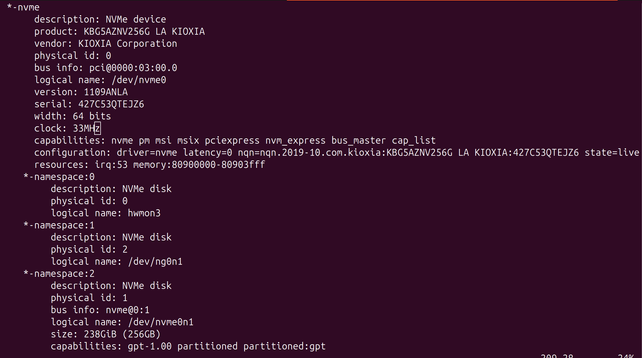
I run "lshw" to see what's on the computer. It says "NVMe".

How do I find out the bestest fastest aftermarket drive Canada Computers carries that my computer will support

I only understand computation as the MANIPULATION OF ABSTRACT PLATONIC FORMS. I do not understand this realm where computers are "physical objects" you manipulate with "screwdrivers". I would prefer to use Math to translate my thoughts directly into action, as if I am casting magic spells
Okay thank you all for explaining. I have one more question: Is there actually, like, a difference between drive vendors. Like if I pick WD vs Samsung vs Lexar (vs… "crucial"?!) will it ever make any difference
@mcc Their firmwares have different bugs (I.e. the secure erase function might not work). And of course 1000 vs 1024 for size. From the OS perspective they’re interchangeable. They might have different r/w speed, and MTTF/MTBF, and maybe a different percentage of spare flash cells. I usually add drives I’m interested in to the compare list on https://skinflint.co.uk/?cat=hdssd&xf=4836_7 for easy comparison.
Hard Drives & SSDs Solid State Drives (SSD) with Form factor: M.2 2280 Price Comparison Skinflint UK

compare prices and read user reviews for Hard Drives & SSDs Solid State Drives (SSD) with Form factor: M.2 2280

Skinflint.co.uk
@schrotthaufen wait wait who defines tb as 1000 and who defines it as 1024. is this documented somewhere
@mcc @schrotthaufen basically all storage and network gear is sold as powers of 10 (KB/MB/GB/TB), basically all RAM is sold as powers of 2 (KiB/MiB/GiB/TiB), and what gets displayed by software is a crapshoot