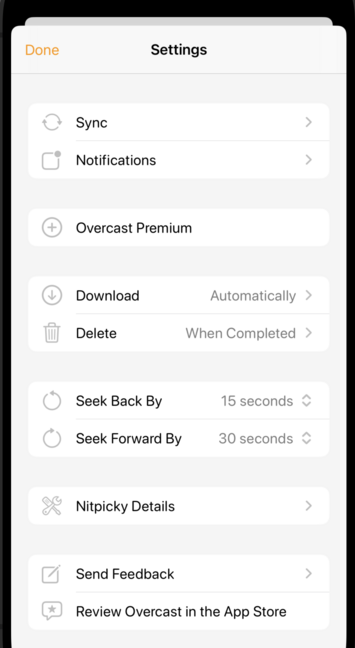
Lots of people (including Apple) put full-color icons on each top-level row in Settings these days.

I'm experimenting with using monochrome SF Symbols there. I may not ship it this way, but it's kinda fun, and it lets me use the same icons that are used for the corresponding features throughout the rest of the app.

Maybe that improves consistency and understanding, especially since I don't currently have localized strings.
@marcoarment looks interesting but also reads as everything is disabled
@marcoarment how does it look with the theme color? Too much?
@Bobbyp @marcoarment Or even theme color darkened + desaturated? Something to tie it together.
@marcoarment I really like the look of the consistent monochrome. It may lack enough contrast to easily see the sf symbols. Perhaps higher contrast for accessibility purposes?
@marcoarment the low contrast looks like a disabled state to me.
@marcoarment I think you're on to something here. It gives you more options if you need to highlight something specific.

@marcoarment I don't like monochrome ones (WhatsApp changed recently to those and it's incredibly dull)

I like color-coded ones, for different groups of settings for example. Or with some background (like in Settings app)

@marcoarment this looks really nice! but i’m not sure if it helps with usability.

i may be alone in this, but i rely on the icon colors in the macOS/iOS Settings app to narrow down to the section i’m looking for.

e.g i look for green when i want to turn my hotspot on, or red when i want to find notification settings.

Apple usually gives related sections similar colors, and that helps a lot in narrowing down sections of the settings app from 50 to 5.

@marcoarment Monochrome isn’t necessarily bad, but I feel like higher contrast would be nicer
@marcoarment Looks good. Comparing that to the current version, the icons really help. Feels easier to scan and more organized.
@marcoarment Designing in B&W is a good idea, even if you decide to color them later. This way you ensure that the icons work for color blind people.

@paulc @marcoarment

You might like trying my PlusNightMode package. There’s a ā€˜.monochromed()’ View function that makes that View and all child Views monochrome (you choose the color).

@marcoarment Finder switched to monochrome icons in the sidebar years ago and I still hate that decision. It’s visually better but usefully worse. It takes longer to find what I’m looking for.
@marcoarment I would suggest not using icons here that mean something else vis a vis app’s actual functionality (I am particularly hung up on the ā€œplusā€ that you used for ā€œpremiumā€ here, but indicates ā€œadd the episodeā€ in the actual app). When the meaning of the icon is the same (like download, skip forward, skip back, etc.), that works great, I think!

@marcoarment I kinda like this. It’s a ā€œfreshā€ look, not sure I’ll grow up on this though, it takes time to know.

It’s always a struggle to assign a color to every single setting icon.

@marcoarment Colour is an accessibility feature that everyone gets the advantages of!

It’s harder to parse the list when everything is the same colour.

@marcoarment I really like the icons! Do they work if they were coloured as well? I think that would help them stand out a bit more.
@marcoarment light gray on white is difficult for people with eye issues (spoken as a person with vision issues)
@marcoarment When icons are multicolored without any structure it’s overwhelming to me
So I prefer this style or colors organized by section (or just the symbols colored based on the current theme)
@marcoarment I like the consistency of having the same symbol, so a user doesn’t have to know/guess the name.

@marcoarment My feeling here is that this is better. As someone who needs reading glasses and who has a hard time distinguishing a lot of icons, having those be in color just makes them more distracting. I can’t tell what they mean but they're more attention-grabbing than the text I can actually use.

I don't know if there's any accessibility overlap/parallel there but that's my aging-eyes perspective.

@marcoarment I like it. I’d opt for monochrome black. Adds easy to grasp context, monochrome keeps it visually tidy, black doesn’t imply greyed out as much as grey does
@marcoarment Maybe tint them using the theme color?
@marcoarment No, please no. We don’t have displays with billions of colors just to have dull monochrome interfaces. I hated it when Apple went this way with the Finder and I still hate it.
@marcoarment Unsolicited feedback: You got 6 circular things near the top there that are all visually kind of same-looking. Maybe add more shape variety (or color as others have commented).
@marcoarment I think the color ones are usually categories.
@marcoarment I would suggest you either choose colors or have the theme influence them. Users need to ā€œgo to orangeā€ vs reading.
@marcoarment Don’t listen to others - this and custom colours for the icons!
@marcoarment Icons have too low contrast. It takes efforts from me to distinguish which is which.
@marcoarment i like it, it looks good and makes sense.
@marcoarment looks fine. Maybe add a little depth ?
@marcoarment I’m not the biggest fan. Looks a bit bland.
@marcoarment I don’t usually have trouble with low-contrast text but in this case I can barely distinguish the icons at a glance, there is way too little contrast there
@marcoarment Not directly related but this reminded me that I really wish ā€œStop After Each Episodeā€ were a top-level setting. I’m constantly switching that off and on. Hell, I would take it on the Now Playing screen even. Am I weird?
@marcoarment looks good. But make them colour tinted!
@marcoarment "it lets me use the same icons that are used for the corresponding features throughout the rest of the app." is a pretty compelling reason to have them I reckon.
@marcoarment I like it, this not a screen I want to be on, so I don't mind the monochrome. It will not localize, though. English is kind of in the middle in terms of lengthiness, so you'll get some traffic jams in the ones with text on the right.
@marcoarment FWIW, I really prefer the full-color icons
@marcoarment low contrast not great for accessibility nor understanding whether it is active or not