Oh noooooo! FB12122106 still exists in macOS 14.0 (23A344)

https://mastodon.social/@siracusa/110117776662224597

https://youtu.be/h0bKmcsMFvw

I wasn’t able to reproduce it in a clean install of Sonoma, so it's obviously something related to my specific configuration. But damned if I know what it is…

FB12122106 Demonstration

YouTube

Still trying to track down this bug https://mastodon.social/@siracusa/110255326994000695

To review:

1. It happens only when more than one user is logged in.

2. It does not happen on a clean install of Sonoma—but it does happen on my actual install of Sonoma.

3. It happens even when the only two users logged in are two newly created user accounts.

4. No non-Apple KEXTs are installed.

Given all of this, I've been looking in /Library for culprits. Is there some other place I should be looking?

Important update to https://mastodon.social/@siracusa/110255326994000695

The bug *is* reproducible on a clean install of macOS 14.0 (23A344).

It was not reproducible in an earlier Sonoma beta, but that changed some time between then and the release version.

At least I can stop tearing third-party software out of my system now…

…but now it’s time to try removing some hardware…

(Reminder for Apple folks: this is FB12122106.)

I've re-filed this bug against Sonoma specifically (because some Apple folks tell me this is a useful thing to do). Please see FB13211706 for a newly summarized report with new spindumps, samples, a sysdiagnose, and a new demonstration video.

I'm looking for someone with access to a 2019 Mac Pro (preferably with a Radeon Pro Vega II GPU) to try to reproduce FB13211706 as demonstrated in https://youtu.be/5Aq2GZpKkLU

Has Apple tried to reproduce it internally? I don't know. I've had no response in the Feedback app since I filed my original report six months ago. So I'm looking for a someone who is willing to actually communicate with me to tell me if it's just my Mac or what.

FB13211706: Window dragging is laggy and jumpy when more than one user is logged in

YouTube

Oh, FFS…it's my mouse! My stupid Microsoft Precision Mouse that has already been replaced under warranty once! When I use my wife's mouse, it no longer happens.

My mouse is connected via a USB cable, and the issue reproduces on a fresh install of macOS Sonoma with zero third-party software installed. So it has to be a hardware issue with the mouse—a hardware issue that only manifests when more than one user is logged in and window dragging happens with other visible windows, which is wild!

The same mouse works fine when connected via Bluetooth. It’s only when connected via USB that the bug happens.
@siracusa write something to peg one CPU, and see if it reproduces more easily on BT? 🤔 Try connecting to the machine over Screen Sharing and if it repros there via a VNC cursor
@siracusa (I don't actually think it's your mouse since I can repro in this VM, but maybe the fact that USB relies on the CPU for something. Try a different USB mouse?)
@stroughtonsmith @siracusa Using a magic trackpad, I thought for a moment that USB vs Bluetooth was the answer -- it was happening when on BT, but not when plugged in via lightning. But now it's happened when plugged in, too. (as I said, the bug seems less reliable on my system).
@stroughtonsmith One CPU pegged at 100% with an infinite loop and everything's fine.
@siracusa new thought: does the problem scale with the number of logged in users? I only have one extra account here… Maybe it's a session-based event routing issue
@stroughtonsmith I tried it with four users logged in, and it seems about the same as with two, but it’s hard to tell.

@siracusa ok, so I was able to reproduce on an M1 MacBook Air with just any old USB RF mouse. The screen resolution has to be above a certain threshold to show it easily (but 2560x1440 was enough).

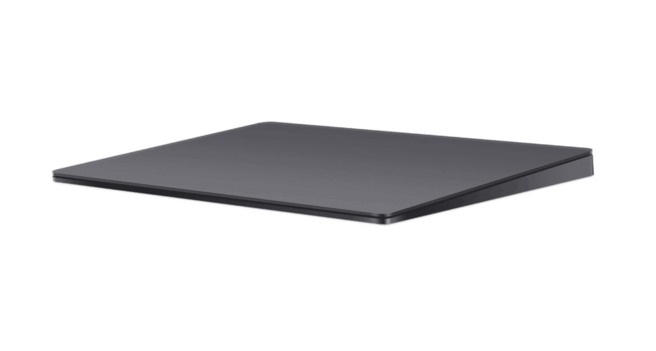
It did not reproduce with the Magic Trackpad over USB, so it must be something to do with mice specifically. This wasn't an expensive mouse with a high refresh rate, just a cheap mouse

TL;DR it's not you!

@stroughtonsmith What specific model of mouse are you using? My ancient USB Logitech MX300 doesn't reproduce it.
@siracusa hahaha I’m glad you asked, because it’s literally a no-brand mouse with generic internals 😂 Was the first mouse I could find on my shelf
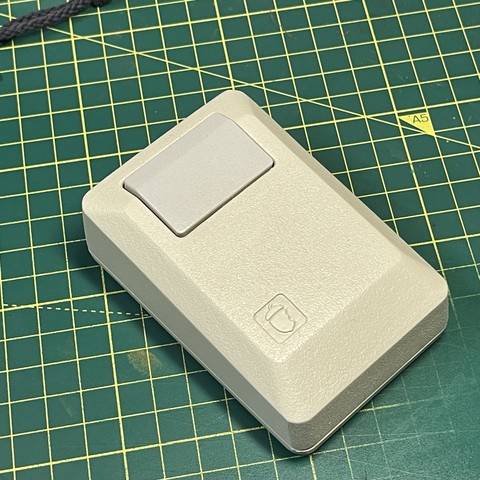
@stroughtonsmith An “Acorn" clone of the original Macintosh mouse!?
@siracusa no longer available but it was a gift from Kevin Noki who did that amazing Macintosh II case for the Raspberry Pi https://www.youtube.com/watch?v=miN8sADrsgA
Macintosh Mouse - 3D Printed

YouTube
@stroughtonsmith @siracusa damn, has he officially given up on making more of those? I have one of his rPi cases and _love_ it. Always hoped he’d do another run of the mice.
@siracusa @stroughtonsmith I saw he posted a new video today. https://youtu.be/7N9oz4Ylzm4 Impressive.
3D Printed Apple Macintosh - The Brewintosh

YouTube
@moonhouse @siracusa @stroughtonsmith If I felt the need to build another Hackintosh I’d probably use one of these! I could even modify it to fit a mini-itx board easier.
@siracusa and now you’ll get an answer from Apple saying they couldn’t reproduce it.
@siracusa A (mostly) happy ending, after all this time!
@siracusa Oh wow, I would maybe expect this from a wireless mouse, but a buggy *wired* mouse? Congrats on figuring it out!
@siracusa That is seriously bonkers. In this day and age, you'd think a mouse couldn't cause this stuff … then I remember what modern printers still do (or don't do as they see fit).
@siracusa oh my god I'm so happy and relieved for you. Our long national nightmare is finally over?
...maybe the mouse sends.... it's "data" differently that macOS chokes on?
@joshhunt @siracusa excuse me - INTERnational nightmare
@siracusa Have you tried unplugging and replugging in the same mouse? I am wondering if merely a change to the USB connection also solves it.
@jackwellborn Yeah, and I also tried plugging it into different USB ports.

@siracusa (Years ago, in a smoke filled room deep inside an undisclosed location somewhere in Redmond.)

“Thanks do the dominance of Windows and Office, which combined with the moderate success of Xbox, we've successfully driven a vast majority of people completely insane at least once in their life.

Gentlemen, ”most people” is not enough. We can do more.”

(Advances to a slide with your face and Microsoft peripherals.)

@siracusa could it be that it’s actually still a “software”issue somehow related to an attribute specific hardware?

Something like a poll rate out the mouse not being able to be handled correctly when other systems are “in process”?

Can’t think of anything that could possibly make it happen only if there are other visible windows if it was just a hardware bug.

(Caveat: I’m just a Python programmer- I have no idea what I’m talking about)

@jdbartee Maybe macOS communicates back to the mouse via USB when it's going to reposition the cursor, like it does when dragging one window near another in macOS?
@siracusa @siracusa I have one and a couple of video cards modules that I could test.
@siracusa 2019 Mac Pro, 12 core with pro vega II. I’ve created a second account which I’m logged in to and switched back to my main account. Absolute no issues with windowing, no lag. Do I need to have any windows open in the second account?
@stokes No windows need to be open on the account you're not using, but you need a bunch of visible windows on the account you're using, and they need to be close to each other. Try to reproduce the arrangement shown in the video. https://youtu.be/5Aq2GZpKkLU
FB13211706: Window dragging is laggy and jumpy when more than one user is logged in

YouTube
@stokes Also, what version of macOS are you using?
@siracusa Sonoma 14.0 standard build.
@siracusa I can't repro on M1 at aaaaall. I would be curious to hear if it can repro on any Intel machine, or with any AMD GPU. What kind of mouse/trackpad are you using, too? And what screen resolution?
@siracusa (can you repro on smaller screen resolutions, like sub 4K or lowdpi?)

@stroughtonsmith @siracusa I reproduced it! Intel Mac Mini. about 50 textedit windows with Lorem Ipsum, two stickies, and lots of jagged dragging.

Waitasec. Now it's not doing it. wtf? Dragged the ivory compose window to a different screen, dragged sticky note, was fine for a moment, then jumped all over the place, then settled down and is normal again.

Huh. Once the sticky note is left in the pile of Textedit windows, it seems to be okay, but when I move it outside the pile and wait a moment, after a few drag attempts it gets all wonky again.

Definiteliy comes and goes.

2018 Mac Mini, i5, 32 gig, 13.5.1.

@stroughtonsmith @siracusa Here's a hastily-converted video (it bounces a lot faster in the original .mov recording). (note also, I probably screwed up the aspect ratio in trying to find a format mastadon would accept….)
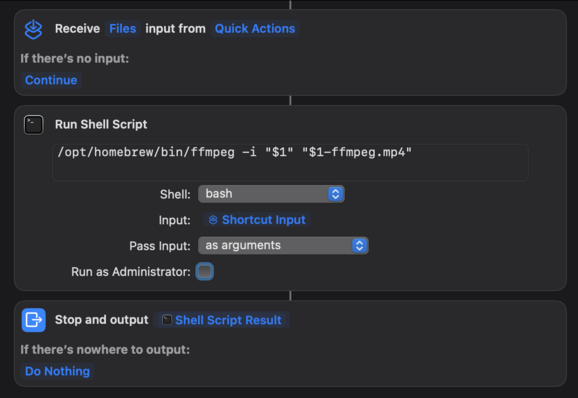
@darthnull @siracusa aside: my trick to upload to Mastodon is this ffmpeg Shortcuts action. Is good for anything around 720p or lower
@stroughtonsmith I tried it on an Intel MacBook Air and it doesn’t reproduce. I’m using the keyboard that came with the Mac Pro (connected via USB) and a Microsoft Precision Mouse (also connected by USB). I’ll try another mouse…
@siracusa I think I’m able to reproduce this in my ESXi Sonoma VM? The lag is probably Screen Sharing, but look what happens at the end. This is at lowdpi 2560x1600
@siracusa and a second take: is this the same issue? Does your YouTube video demonstrate two issues? …does your mouse have a CPU polling issue which triggers a different bug but may not be specific to your mouse?
@stroughtonsmith That sure looks similar, though not as severe. But I’m at a loss as to what in the world could require the specific set of circumstances on my Mac: USB connection to my Microsoft mouse, multiple logged-in users, and many visible windows near the window being moved.
@siracusa (my VM recording is with a second account logged in in the background fwiw. But it’s also on an Intel NUC which is CPU-starved and should more easily show CPU related performance issues)
@siracusa @stroughtonsmith recreated with usb connected mouse, absolutely no issues with Apple Bluetooth trackpad.
@stokes What mouse?
@siracusa Razer Deathadder, usb A connection.
@siracusa tried an ancient apple mouse (with the scroll ball on the top), that works fine. So it might be the higher speed mice which are the issue as @Gte suggests
@stokes @siracusa @stroughtonsmith is it possible it’s inefficiently searching for a snap target among all the windows, even when it’s not actually near any of them, and by the time that returns a result, you’ve already moved on, so it jumps, laggily? Don’t know why that would only happen on wired mice, but that’d be far from the weirdest input device type-specific handling I’ve seen.
@icodestuff Don't forget that it also requires more than one user to be logged in!
@siracusa oh right. What happens if the other user has many windows open instead of you? Or you both have many windows open? Does it get worse?
@icodestuff The only windows that matter are the ones visible on the current user's screen.
@siracusa I was just able to get something like this to happen with 146 TextEdit windows on one monitor (dragging occurring on either that monitor or the other) (using only 70 did nothing). Two users are on the machine, but only one is logged in. WindowManager is pegging one CPU core. The problem does not occur with other apps’ windows(!), ie dragging around Activity Monitor windows is fine with 146 TextEdit windows open, doesn’t even peg the core, let along lag. Not sure if it’s the same bug, but it kinda smells like it.
@icodestuff Log in the second user and then try it.
@stokes @siracusa @stroughtonsmith you are lucky, my magic trackpad crashes the windowserver if I use it to scroll for a period