Oh noooooo! FB12122106 still exists in macOS 14.0 (23A344)

https://mastodon.social/@siracusa/110117776662224597

https://youtu.be/h0bKmcsMFvw

I wasn’t able to reproduce it in a clean install of Sonoma, so it's obviously something related to my specific configuration. But damned if I know what it is…

FB12122106 Demonstration

YouTube

Still trying to track down this bug https://mastodon.social/@siracusa/110255326994000695

To review:

1. It happens only when more than one user is logged in.

2. It does not happen on a clean install of Sonoma—but it does happen on my actual install of Sonoma.

3. It happens even when the only two users logged in are two newly created user accounts.

4. No non-Apple KEXTs are installed.

Given all of this, I've been looking in /Library for culprits. Is there some other place I should be looking?

It can't be anything in /System because it doesn't happen on a clean install, and the sealed system volume means all /System dirs should be identical. And it can't be anything in ~/ because it happens even with newly created user accounts.
@siracusa I’d also dig into /private/var/db since that also has a lot of machine-level config state. (No clue what within that might be relevant, though, unfortunately.)
@siracusa doesn’t some stuff in ~/ come from /etc and the like when the user is created? Modified default profile?

@siracusa I assume you've already looked at any files in /Library that have changed since your install? (like with “find /Library -newer <watermark-file>”).

Maybe even log everyone out, log one person in, touch some file in /tmp, then log in the second user, verify bug is present, and do the find to see what's been altered by the second login?

@darthnull Sadly, the bug started happening after I updated to 13.3, so I don’t think it was a change to non-OS software that triggered it.
Stay tuned for @siracusa next software project: Reimagining Conflict Catcher for macOS!
Conflict Catcher - Wikipedia

Important update to https://mastodon.social/@siracusa/110255326994000695

The bug *is* reproducible on a clean install of macOS 14.0 (23A344).

It was not reproducible in an earlier Sonoma beta, but that changed some time between then and the release version.

At least I can stop tearing third-party software out of my system now…

…but now it’s time to try removing some hardware…

(Reminder for Apple folks: this is FB12122106.)

I've re-filed this bug against Sonoma specifically (because some Apple folks tell me this is a useful thing to do). Please see FB13211706 for a newly summarized report with new spindumps, samples, a sysdiagnose, and a new demonstration video.
Here’s my new demo video for FB13211706. (Please forgive the awful audio. I had a bunch of stuff on my desk that was in the way of setting up my podcast microphone.) https://youtu.be/5Aq2GZpKkLU
FB13211706: Window dragging is laggy and jumpy when more than one user is logged in

YouTube
@siracusa Great to see a video of this. Just some extra data here, I get similar delayed dragging with markups in Preview on PDFs. I only have one user on this machine, so I don't want to muddy the waters... maybe I should file a feedback if I catch the issue again. It doesn't happen all the time, but enough that it's a pain. If I do, maybe it's wise to at least mention your feedback for similar UX. Hope it gets resolved for you John (and everyone)!
@BG Me too. I’m hoping it’s fixed in Sonoma
@siracusa this never would have happened with Platinum.
@Eggfreckles @siracusa It can’t bug out if the whole system crashes first
@siracusa After seeing this, mine does this too. The molasses part but it is very rare. My windows don’t do that jumpy thing however 🤔
@jaytorres I think you have something different. This is 100% reproducible, not rare.
@siracusa is there any CPU/message/trace activity on the secondary user's processes while dragging a primary user window? It's as if drag or repaint events are being delivered synchronously to low priority processes owned by that other user?
@siracusa You forgot to ask people to like and subscribe.
@siracusa Wow, that looks infuriating.

@siracusa I had a thought, mostly based on the jumpiness near other windows. Does disabling window snapping make things better (option when dragging/resizing)?

That jumpiness has the look of lag+overaggressive snapping.

I'm looking for someone with access to a 2019 Mac Pro (preferably with a Radeon Pro Vega II GPU) to try to reproduce FB13211706 as demonstrated in https://youtu.be/5Aq2GZpKkLU

Has Apple tried to reproduce it internally? I don't know. I've had no response in the Feedback app since I filed my original report six months ago. So I'm looking for a someone who is willing to actually communicate with me to tell me if it's just my Mac or what.

FB13211706: Window dragging is laggy and jumpy when more than one user is logged in

YouTube
@siracusa @siracusa I have one and a couple of video cards modules that I could test.
@siracusa 2019 Mac Pro, 12 core with pro vega II. I’ve created a second account which I’m logged in to and switched back to my main account. Absolute no issues with windowing, no lag. Do I need to have any windows open in the second account?
@stokes No windows need to be open on the account you're not using, but you need a bunch of visible windows on the account you're using, and they need to be close to each other. Try to reproduce the arrangement shown in the video. https://youtu.be/5Aq2GZpKkLU
FB13211706: Window dragging is laggy and jumpy when more than one user is logged in

YouTube
@stokes Also, what version of macOS are you using?
@siracusa Sonoma 14.0 standard build.
@siracusa I can't repro on M1 at aaaaall. I would be curious to hear if it can repro on any Intel machine, or with any AMD GPU. What kind of mouse/trackpad are you using, too? And what screen resolution?
@siracusa (can you repro on smaller screen resolutions, like sub 4K or lowdpi?)

@stroughtonsmith @siracusa I reproduced it! Intel Mac Mini. about 50 textedit windows with Lorem Ipsum, two stickies, and lots of jagged dragging.

Waitasec. Now it's not doing it. wtf? Dragged the ivory compose window to a different screen, dragged sticky note, was fine for a moment, then jumped all over the place, then settled down and is normal again.

Huh. Once the sticky note is left in the pile of Textedit windows, it seems to be okay, but when I move it outside the pile and wait a moment, after a few drag attempts it gets all wonky again.

Definiteliy comes and goes.

2018 Mac Mini, i5, 32 gig, 13.5.1.

@stroughtonsmith @siracusa Here's a hastily-converted video (it bounces a lot faster in the original .mov recording). (note also, I probably screwed up the aspect ratio in trying to find a format mastadon would accept….)
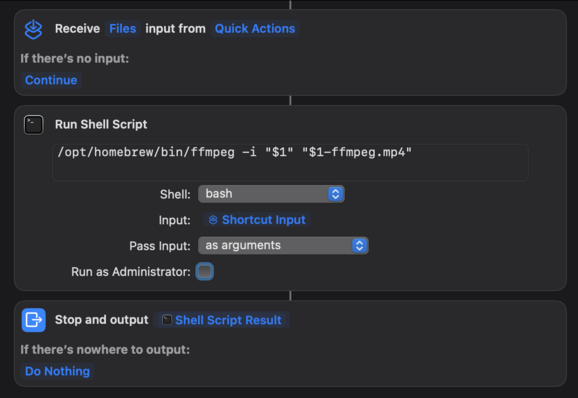
@darthnull @siracusa aside: my trick to upload to Mastodon is this ffmpeg Shortcuts action. Is good for anything around 720p or lower
@siracusa maybe it’s the mouse pad 😀

@siracusa any chance you’re accidentally holding down the shift key? 🤣 https://www.youtube.com/watch?v=QVPfHp6ixlQ

(I am joking, of course… and sad to see this feature got removed at some point.)

Awesome Animation Effect Mac OS X - Shift Key!

YouTube

@siracusa /Library/LaunchAgents and /Library/LaunchDaemons — with Daemons launching before user login and Agents after, but both are persistent. Same of course for ~/Library/LaunchAgents

My personal bet is on the /Library ones outside of a user folder because they would apply to new user accounts.

@siracusa could it possibly have something to do with Control Center using cpu even when it’s hidden? More users = more control centers always running.
@siracusa - Probably completely unrelated, but you’d hate working with Adobe Illustrator then…moving objects is often a leap of faith. Grab a road shield (just a group of basic shapes) and nothing happens/moves until you release the mouse, and then it moves into its new location. You have to hope it’s in the desired location. — Hasn’t been fixed in over 10+ years. The joys of paying $20+tax/month!!
@siracusa Just to further nail down #3: That is after a reboot? Or could something be lingering from a previous user login?
@jashapiro Yes, after a reboot.
@siracusa This may sound crazy, but does plugging in another keyboard cure it? I’ve seen weird behaviour on machines here where it turned out there was a stuck shift or option key.
@mrpommer It doesn’t happen on a clean install, so I don’t think it’s a hardware issue.
@siracusa I think fact one puts you so far out into the right hand side of the user distribution here that I am doubtful they’ll bother to fix this, sadly.

@siracusa John, when did this bug first appear for you? Like which version of macOS?

I wonder if that holds any clues, like if you have a configuration file or preference from that far back that the new system doesn’t like, or maybe there’s a naughty key or something in one of those retained files that doesn’t play well.

@nbomb It started around the time I updated to 13.3.
@siracusa what if you ran ‘sudo spindump windowserver -heavy’ while you are making the window stutter on the machine and see if that gives you any possible clues. Just guessing it could have something to do with two window server instances running (I'm assuming the other person is logged in and you are fast user switching between the two?)
@todd Yes, both users are logged in. The spindumps for the bug and normal case are both baffling to me.

@siracusa @todd Is the other user logged in but idle (i.e no one has a Remote Desktop session actually exercising things?)

Same display scaling for both users?

I might diff the filesystem under /Library on symptomatic and asymptomatic installs, but that's going to have a lot of noise.

@siracusa @todd Also, is there anything spitting to Console?
@djwtwo There’s always a ton in the Console, but nothing stands out so far.
@djwtwo Yes, idle. Same display settings. I’m already well into diffing /Library with a clean install. No luck yet.

@siracusa I just gave it a try on my multiuser 13.5.2 box (M1 Ultra Studio with 64GB), which is an increasingly-crufty installation (migrated from a 2012 Mac Pro.) Couldn't repro, even with >128 windows open. Fg user was admin, bg was normal; no idea if that would matter.

If nothing else, if you see something suspicious, I could double-check against that install to see if I have the suspicious item.

@siracusa they might be useful to someone inside Apple?

@siracusa
Does it only happen with several windows open, as shown in your demonstration video?

Regarding 3, do both users have apps/windows open? Or is it sufficient to have the other user logged in with nothing open?

Does it still happen if you start in safe mode?

Does it matter _how_ you move the windows? Like, circular motion triggers the problem, but linear motion doesn’t?