Oh noooooo! FB12122106 still exists in macOS 14.0 (23A344)

https://mastodon.social/@siracusa/110117776662224597

https://youtu.be/h0bKmcsMFvw

I wasn’t able to reproduce it in a clean install of Sonoma, so it's obviously something related to my specific configuration. But damned if I know what it is…

FB12122106 Demonstration

YouTube

Still trying to track down this bug https://mastodon.social/@siracusa/110255326994000695

To review:

1. It happens only when more than one user is logged in.

2. It does not happen on a clean install of Sonoma—but it does happen on my actual install of Sonoma.

3. It happens even when the only two users logged in are two newly created user accounts.

4. No non-Apple KEXTs are installed.

Given all of this, I've been looking in /Library for culprits. Is there some other place I should be looking?

Important update to https://mastodon.social/@siracusa/110255326994000695

The bug *is* reproducible on a clean install of macOS 14.0 (23A344).

It was not reproducible in an earlier Sonoma beta, but that changed some time between then and the release version.

At least I can stop tearing third-party software out of my system now…

…but now it’s time to try removing some hardware…

(Reminder for Apple folks: this is FB12122106.)

I've re-filed this bug against Sonoma specifically (because some Apple folks tell me this is a useful thing to do). Please see FB13211706 for a newly summarized report with new spindumps, samples, a sysdiagnose, and a new demonstration video.

I'm looking for someone with access to a 2019 Mac Pro (preferably with a Radeon Pro Vega II GPU) to try to reproduce FB13211706 as demonstrated in https://youtu.be/5Aq2GZpKkLU

Has Apple tried to reproduce it internally? I don't know. I've had no response in the Feedback app since I filed my original report six months ago. So I'm looking for a someone who is willing to actually communicate with me to tell me if it's just my Mac or what.

FB13211706: Window dragging is laggy and jumpy when more than one user is logged in

YouTube

Oh, FFS…it's my mouse! My stupid Microsoft Precision Mouse that has already been replaced under warranty once! When I use my wife's mouse, it no longer happens.

My mouse is connected via a USB cable, and the issue reproduces on a fresh install of macOS Sonoma with zero third-party software installed. So it has to be a hardware issue with the mouse—a hardware issue that only manifests when more than one user is logged in and window dragging happens with other visible windows, which is wild!

The same mouse works fine when connected via Bluetooth. It’s only when connected via USB that the bug happens.
@siracusa write something to peg one CPU, and see if it reproduces more easily on BT? 🤔 Try connecting to the machine over Screen Sharing and if it repros there via a VNC cursor
@stroughtonsmith One CPU pegged at 100% with an infinite loop and everything's fine.
@siracusa new thought: does the problem scale with the number of logged in users? I only have one extra account here… Maybe it's a session-based event routing issue
@stroughtonsmith I tried it with four users logged in, and it seems about the same as with two, but it’s hard to tell.

@siracusa ok, so I was able to reproduce on an M1 MacBook Air with just any old USB RF mouse. The screen resolution has to be above a certain threshold to show it easily (but 2560x1440 was enough).

It did not reproduce with the Magic Trackpad over USB, so it must be something to do with mice specifically. This wasn't an expensive mouse with a high refresh rate, just a cheap mouse

TL;DR it's not you!

@stroughtonsmith What specific model of mouse are you using? My ancient USB Logitech MX300 doesn't reproduce it.
@siracusa hahaha I’m glad you asked, because it’s literally a no-brand mouse with generic internals 😂 Was the first mouse I could find on my shelf
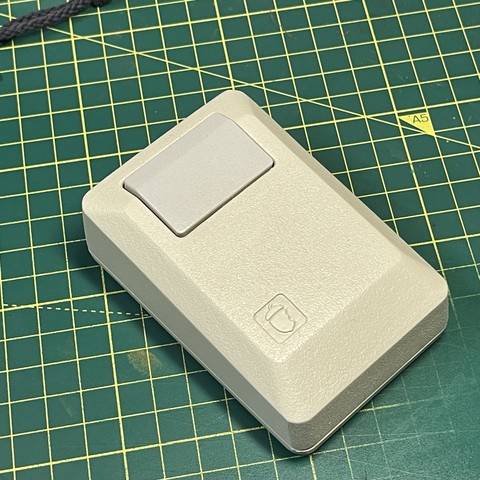
@stroughtonsmith An “Acorn" clone of the original Macintosh mouse!?
@siracusa no longer available but it was a gift from Kevin Noki who did that amazing Macintosh II case for the Raspberry Pi https://www.youtube.com/watch?v=miN8sADrsgA
Macintosh Mouse - 3D Printed

YouTube
@stroughtonsmith @siracusa damn, has he officially given up on making more of those? I have one of his rPi cases and _love_ it. Always hoped he’d do another run of the mice.
@siracusa @stroughtonsmith I saw he posted a new video today. https://youtu.be/7N9oz4Ylzm4 Impressive.
3D Printed Apple Macintosh - The Brewintosh

YouTube
@moonhouse @siracusa @stroughtonsmith If I felt the need to build another Hackintosh I’d probably use one of these! I could even modify it to fit a mini-itx board easier.
@stroughtonsmith @siracusa Wild theory based on a bit of experience working with USB HID input: Newer mice have something like a “high precision“ mode and a “low precision” mode for big and small movements and when the screen resolution is high enough, macOS gets confused between the two trying to map your big and small movements to screen pixels. Something like this is the only way I can explain the dramatic window jitter despite what appears to be a fairly smooth drag movement in the video…
@DavidAnson Don't forget about the requirement that multiple users be logged in at the same time!
@siracusa That’s just a macOS bug. :) If you want more wild speculation, they run a different version of the window manager when multiple users are logged in. Kind of like how Windows used to have a uni-processor and a multi-processor kernel and you’d boot into whatever the hardware needed.
@DavidAnson @siracusa well at least now there's more than enough evidence to help Apple reproduce and fix this thing, affecting multiple versions of macOS, and both Intel and Apple Silicon
@stroughtonsmith @siracusa Happy for John and all, but I kind of liked it when we all thought his machine was haunted.
@DavidAnson tbf I assumed he had some weird edge case of usage that was poorly tested, and I think “using multiuser features at all” actually satisfies that definition.
@stroughtonsmith @siracusa Love to see them break things that worked just fine all the way back in NeXTStep…

@stroughtonsmith @siracusa Wait a sec…USB RF, you say? I use a Logitech M720 Triathlon mouse with a Logitech Unifying Receiver nub plugged into USB, and I often get a behavior where I click at some screen location (Dell 4K display) and the last window I used jumps to that spot — it seems to act as if I’d been continuously dragging the window.

It hadn’t occurred to me to try switching the mouse from Unifying to Bluetooth, which it can do. I’ll give that a try and see if the problem disappears.

@stroughtonsmith I previously switched from Bluetooth to Unifying when @siracusa observed on @atpfm that Bluetooth can be flaky but the USB RF nubs are rock-solid. I wish I could remember when I started noticing the window weirdness.
@FormerlyStC I’ve also seen that behaviour with various mice and the Magic Trackpad over Bluetooth. I came to the conclusion it was something to do with me preferring a three finger drag in accessibility. I can’t cope with just a physical click and drag mode.

@sdjmchattie Wait, you can configure a three-finger drag? What?

(I use the three-finger swipe for Spaces, though.)

@FormerlyStC you have to dig around under pointer options in accessibility, but yes. My swipe between spaces is four fingers.

@stroughtonsmith @siracusa

Looking at this! I get similar intermittent behavior using a Wacom tablet over USB. I actually thought it was my phone interfering with the tablets sensing fields.